
Knowledge SuperBox
TV Box vs Smart TV and When to Add SuperBox S8





Already own a smart TV and wonder whether a TV box would be a useful upgrade? Start with what happens when you sit down to watch. If the apps you need open quickly, the remote feels comfortable, and the picture looks right, your television may already do everything you want.
A separate TV box becomes more interesting when the screen still looks good but you want a different interface, additional viewing tools, more storage, or an entertainment device you can replace independently. That is where the SuperBox S8 Series fits: it adds a dedicated media system to a compatible HDMI television without requiring a new screen.
This TV box vs smart TV comparison helps you decide whether to keep using built-in apps, add an external player, or choose an S8 for its particular features. The right purchase should solve something you actually notice in daily use.
Do you need a TV box if you already have a smart TV
You do not automatically need one. A smart TV is often enough for a household using a few supported streaming apps. Add a TV box when its interface, connections, storage, or viewing features offer something useful that your current setup lacks.
For SuperBox shoppers, the question is more specific: would supported Playback, manual recording, Picture-in-Picture, Multi-Viewing, or the S8 interface improve how your household watches? These are more meaningful reasons to buy than assuming every external box must outperform every television.
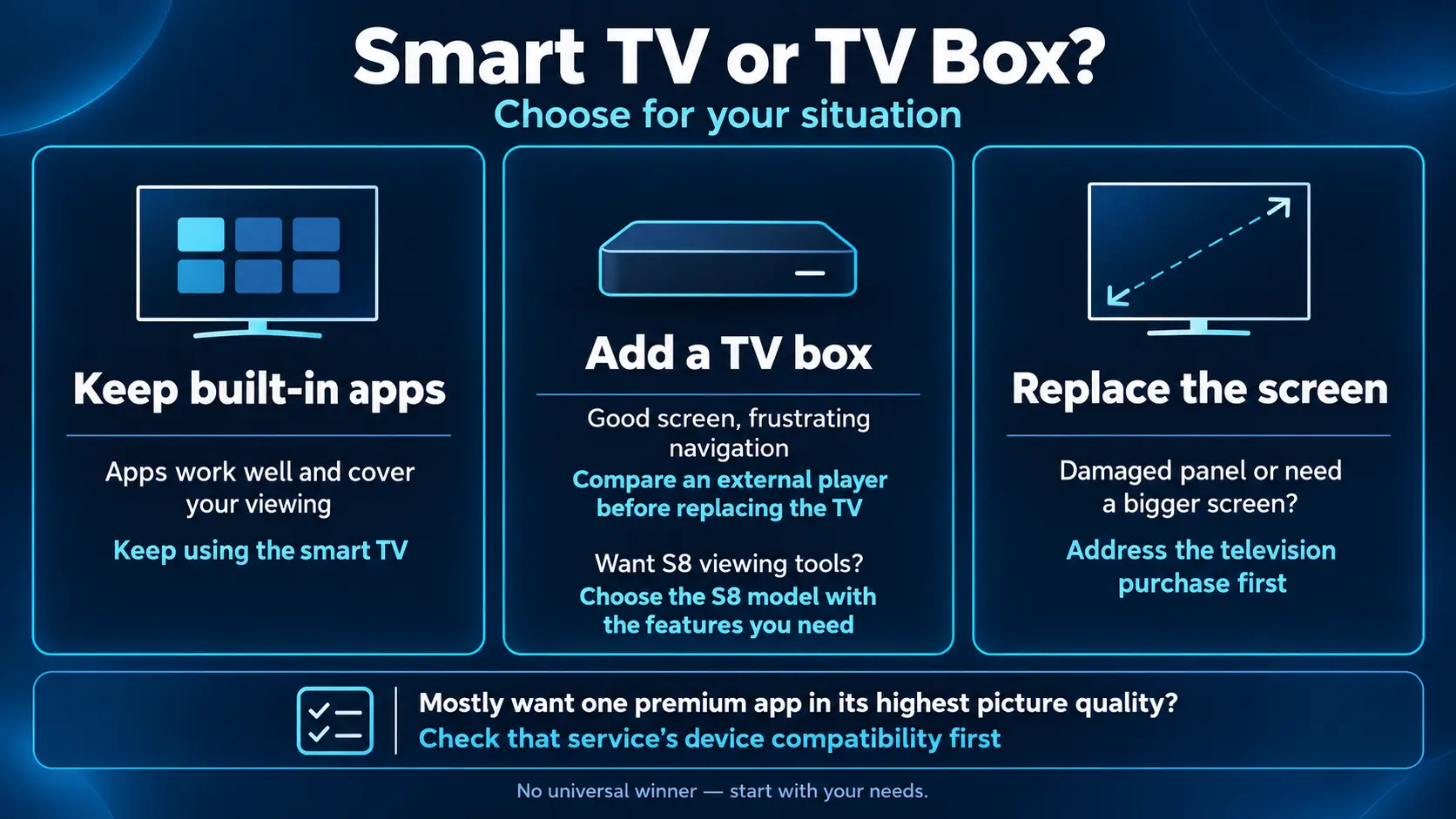
| Your situation | Sensible starting point |
|---|---|
| Built-in apps work well and cover your viewing | Keep using the smart TV |
| The screen looks good but navigation feels frustrating | Compare an external player before replacing the TV |
| You want S8 viewing tools | Choose the S8 model with the features you need |
| The panel is damaged or you need a bigger screen | Address the television purchase first |
| You mostly want one premium app in its highest picture quality | Check that service’s device compatibility first |
What is the difference between a TV box and a smart TV
A smart TV combines a display with an internet-connected platform. Its built-in apps run on the television’s own hardware and software. You usually launch them using the TV remote.
A TV box connects to an HDMI input and runs its own interface and apps. The television displays the picture coming from that input. You can still switch back to the TV’s built-in apps, a game console, or another source.
“TV box,” “streaming box,” and “streamer box” describe overlapping product categories. They do not identify one operating system or guarantee the same features. A device designed around a mainstream app ecosystem can serve a different purpose from a SuperBox media system.
If your bigger question is whether to buy a smart television at all, our smart TV vs non-smart TV guide covers that screen-buying decision separately.
TV box vs smart TV at a glance
| What matters | Smart TV alone | TV with an external box |
|---|---|---|
| Setup | Built-in platform; fewer devices | HDMI input, power, network and box setup |
| Interface | Determined by the TV platform | Determined by the selected player |
| Apps | Check the television’s exact app support | Check the box’s exact app support |
| Upgrade path | TV software updates or an added player | Replace the player while keeping the screen |
| Picture | Depends on panel, app, source and settings | Depends on those factors plus the HDMI path |
| Storage and ports | Model dependent | Model dependent; choose for your needs |
| Recording and replay | App or service dependent | App, service and device dependent |
| Ongoing costs | Internet and selected services | Internet and selected services, plus hardware |
A useful comparison starts with the specific television and box you are considering. Labels such as “Android,” “4K,” or “smart” are not enough to settle the purchase.
Seven differences that matter in everyday use
1. Keep a good screen and change the viewing system
The strongest reason to add a box is often the television you already own. A display can suit your room perfectly while its home menu no longer suits your habits.
An external player lets you change that part of the experience. You do not have to buy a larger screen, move a wall mount, or replace a panel that still looks good just to try another interface.
However, a TV box cannot repair a failing panel, increase the screen size, or give an older display the physical capabilities of a new one. If your complaint is poor brightness or a damaged screen, compare televisions before comparing media players.
2. Compare navigation speed separately from buffering
A slow menu and a video that keeps stopping are different problems. Menu responsiveness concerns navigation and app interaction. Buffering also involves the connection, the app and its content source.
The S8 Series offers a refreshed interface and upgraded streaming system, with 4GB RAM across the four models. That gives buyers a concrete configuration to compare, but it is not a promise that an S8 beats every premium smart TV in every task.
For a practical comparison, try the things your family repeats: launching a favorite app, returning Home, finding a program, and changing the volume. Consider whether the controls are easier, not just whether the specifications look larger.
If playback is the problem, work through our SuperBox buffering and freezing troubleshooting guide instead of treating a hardware purchase as an automatic network fix.
3. Check app support before buying
A television and an external box may offer different app catalogs. Neither “smart TV” nor “Android box” means that every service works, every mobile app is comfortable with a remote, or every premium service plays at its maximum quality.
Before purchasing, list your must-have apps and check compatibility with the exact device. Include the required account, region and picture-quality support. Netflix’s video-quality guidance explains that quality depends on the plan, device and other playback requirements.
SuperBox users should also distinguish installing an app from opening a Home shortcut. Our S8 app installation guide explains the SuperBox App Store workflow. For what the core apps actually do, use the Blue TV S8 guide and Blue VOD S8 guide.
4. Software support depends on the manufacturer and model
The claim that all smart TVs become unsupported after a fixed number of years is too broad for 2026. Manufacturers have different policies, and some now provide longer platform upgrade programs.
LG’s webOS Re announcement describes upgrades for specified older models over a five-year period. Samsung’s One UI Tizen information describes seven years of OS upgrades, with eligibility and regional conditions to check for the particular television.
An external box remains useful because it separates the screen purchase from the media-system purchase. That is an upgrade strategy, not a guarantee of unlimited updates. Check support for both products rather than assuming either category has a fixed lifespan.
5. Storage and connections can make the box more useful
Storage matters when you install compatible apps or keep local files. It is different from RAM, and neither number tells you how sharp your TV panel will be.
The S8 range offers 32GB, 64GB and 128GB storage choices. Usable space is lower after the system and apps are installed. The right capacity depends on what you plan to keep, particularly if you use supported recording.
Wi-Fi 6 and Gigabit Ethernet give SuperBox S8 owners wireless and wired options. Ethernet can be convenient when a cable reaches the router; wireless can fit a room where running a cable is impractical. The S8 Wi-Fi and Ethernet setup guide explains both.
USB support is another reason to compare models carefully. See our SuperBox USB storage guide before choosing a drive or formatting existing files.
6. Picture quality depends on the complete setup
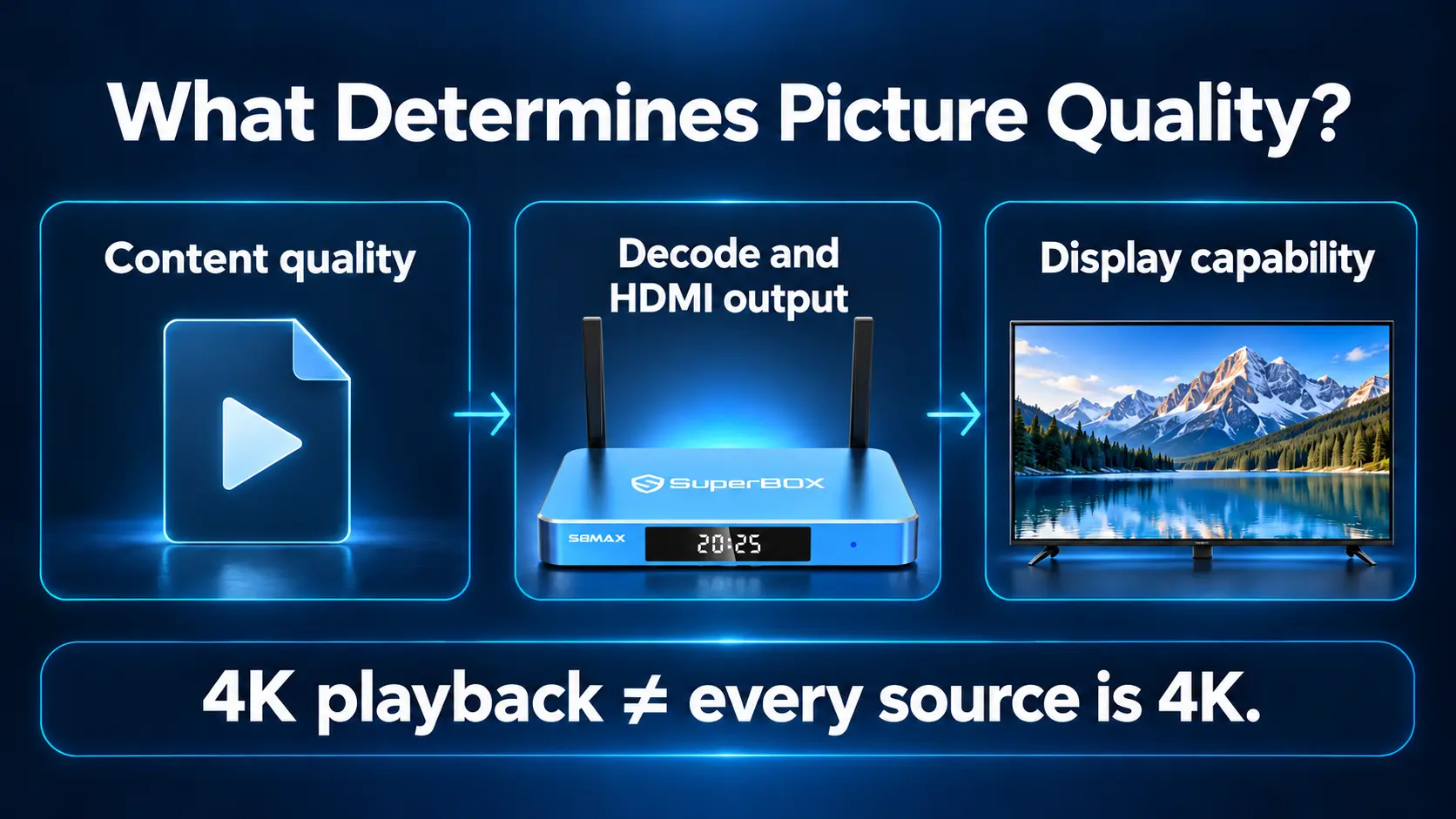
A TV box sends a picture to a television; it does not replace the panel. Source quality, app support, output settings and the display’s capabilities all matter.
SuperBox S8 supports 4K playback with compatible content and displays, while its specifications list H.265 decoding up to 6K at 60fps. Decoding capability is separate from HDMI output resolution. It does not make every channel 6K or turn a 1080p screen into a 4K display.
If picture settings are confusing, start with the best resolution for an Android TV box. Our SDR, HDR10 and Dolby Vision comparison explains another part of the picture-quality question. For buyers focused on the “6K” label, read whether a 6K TV box is worth it for a 4K TV.
7. Remotes and routines matter more than a long feature list
A viewing system should be comfortable for the person using it. Check button visibility, navigation and how easily someone can return to their favorite apps.
All S8 models include voice-command support; the S8 Ultra adds a backlit remote. The S8 Home interface also lets you organize shortcuts. Our S8 shortcuts and number-key setup guide helps turn those controls into a useful daily routine.
If the family has trouble navigating, configure the system together. Showing someone their two favorite apps can be more helpful than presenting every setting on the first evening.
Where SuperBox S8 adds value beyond built-in TV apps
An S8 makes the most sense when you want its specific viewing tools alongside a television you already like. A basic streaming stick may be enough for another household; choose according to the experience you need.
Watch supported programs in more than one view
Picture-in-Picture and Multi-Viewing are useful when two supported programs matter at the same time. Their availability is model and channel dependent: Pro and Plus offer Multi-Viewing for supported PPV and ESPN channels; Max and Ultra offer full supported-channel Multi-Viewing.
Check the S8 Picture-in-Picture and Multi-Screen guide for the controls and model scope. These tools are a stronger reason to compare S8 models than assuming that more storage alone makes a box faster.
Replay supported broadcasts and make manual recordings
Playback and recording serve different needs. The S8 Playback app can provide catch-up viewing within the available window, up to seven days on supported channels.
Built-in Recording lets you manually record supported programming. It is not a scheduled DVR: you start recording when needed and stop it to finish the file. Available recording time depends on storage and the recording itself.
Our S8 Recorder app guide covers the actual workflow. If automatic future-program recording is essential to you, verify that requirement before buying rather than assuming “recording” includes timers.
Keep the TV interface and S8 interface available
Adding S8 does not require abandoning the television’s native apps. You can use the TV platform for an app it handles well and switch to the S8 HDMI input for supported S8 features.
That flexibility is valuable when household members watch differently. One person can keep their familiar TV app while another uses the S8 interface, Playback or supported Multi-Viewing. Both use the same screen.
Which SuperBox S8 should you add to your TV
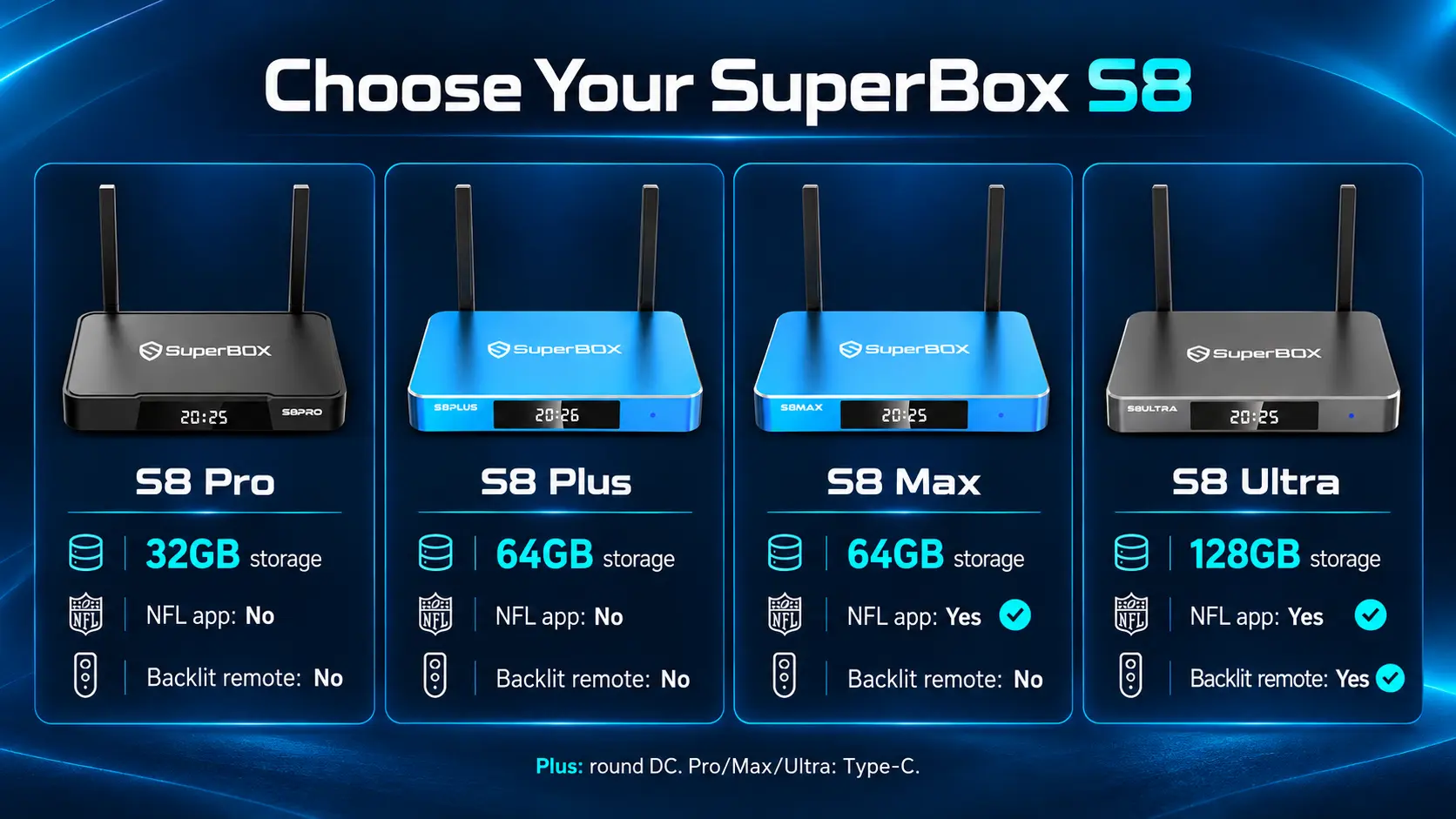
The best S8 is the one that includes the features you will actually use. All four have 4GB RAM; the main buying differences include storage, Multi-Viewing scope, NFL app availability, ports and remote backlighting.
| Model | Storage | Multi-Viewing | NFL app | Backlit remote |
|---|---|---|---|---|
| S8 Pro | 32GB | Supported PPV / ESPN | No | No |
| S8 Plus | 64GB | Supported PPV / ESPN | No | No |
| S8 Max | 64GB | Full supported channels | Yes | No |
| S8 Ultra | 128GB | Full supported channels | Yes | Yes |
Choose Pro for the entry S8 configuration. Plus gives you more storage while keeping the Pro/Plus viewing-feature scope. Max is our balanced recommendation for shoppers who want the NFL app and broader supported Multi-Viewing. Ultra adds the largest storage tier and illuminated buttons.
One connection detail is important: only S8 Plus uses a round DC power connector and USB 2.0 + USB 3.0. Pro, Max and Ultra use Type-C power and USB-C + USB 3.0. Use the supplied model-specific power supply.
The full S8 Pro vs Plus vs Max vs Ultra comparison explains the lineup in greater detail. App availability, supported channels and individual features can change with software, service conditions and region.
Compare the cost without assuming every subscription disappears
A box purchase and a television purchase are different expenses. If you already have a suitable screen, adding a player may be the more useful way to change your entertainment system. If you need a new display, the box is an additional purchase.
For ongoing costs, list what remains after the change: internet, the services you keep, and any equipment or installation costs. SuperBox hardware does not require a monthly equipment subscription from our store, but third-party paid apps still have their own terms and fees.
Savings come from expenses you can actually stop paying. If you keep your cable package and every existing streaming subscription, adding hardware does not automatically reduce the monthly bill.
Use our cord-cutting guide to build a viewing plan before canceling a package. Check important local channels, sports and household favorites rather than using someone else’s savings figure as your own.
How to add SuperBox S8 to a smart TV
- Connect HDMI. Connect the box to an available TV input and note its number.
- Connect the supplied power adapter. Plus uses round DC; Pro, Max and Ultra use Type-C.
- Select that HDMI input. Confirm that the SuperBox setup screen appears.
- Connect Wi-Fi or Ethernet. Follow the network wizard and confirm the connection.
- Pair the remote. Use the on-screen instructions or our S8 remote pairing guide.
- Install the supported apps you want. Check your viewing tools, then organize Home shortcuts.
- Test your normal routine. Open a favorite app, play supported content and check sound and picture before changing more settings.
For a model-specific walkthrough, use the S8 Max unboxing and setup guide or S8 Ultra setup guide.
Frequently asked questions
Can I use SuperBox with a Samsung, LG or other smart TV
Yes. A compatible HDMI input is the main connection requirement. Check the television’s supported output modes and any equipment between the box and TV.
Can I keep using my smart TV apps after connecting S8
Yes. Adding S8 through HDMI leaves the TV’s native platform available. Switch between the TV apps and the HDMI input according to what you want to watch.
Will a TV box make my television faster
It gives you a separate interface running on the box. It does not upgrade the television’s internal processor or speed up native TV apps. Whether you prefer the new interface depends on the specific devices and tasks.
Can SuperBox make a non-smart television smart
It can add an internet-connected media interface to a compatible HDMI display. The television still supplies the screen, and online viewing requires a suitable internet connection.
Does a 6K decoder mean I need a 6K TV
No. S8 supports 4K playback with compatible content and displays. Its listed 6K decoding capability describes processing support, not a requirement to buy a 6K television.
Is the NFL app included on every S8 model
No. It is listed on S8 Max and Ultra, not Pro or Plus. Choose according to the model feature table and confirm current availability before ordering.
Can I move one S8 between two televisions
You can reconnect it to another compatible HDMI television. You will need power and a suitable internet connection at that location. Moving one box is different from providing two independent viewing setups at the same time.
Should I buy a new smart TV or add S8 first
If you like your current screen and want S8 features, adding the box is the more targeted upgrade. If you need a larger screen or better panel performance, choose the television for those needs, then decide whether its built-in apps are sufficient.
Buy the S8 that fits your home from an authorized retailer
A good TV box purchase includes knowing where to get help after delivery. SuperBox TV Box Store is an authorized retailer serving customers in the United States and Canada. You can check our authorization code SP20250414002 at the SuperBox authorization website.
For most shoppers wanting the NFL app and broader supported Multi-Viewing, start by comparing Max with Ultra. Choose Ultra when the extra storage and backlit remote are useful to you; consider Pro or Plus when their feature scope covers your needs.
Order directly from superboxtvboxstore.com and keep your confirmation from customer@superboxtvboxstore.com. If you are unsure which seller handled an existing order, our guide to identifying your SuperBox seller explains what to check. Before purchasing, review the return conditions and contact our store with model-selection questions.
Choose the screen for the picture you want and the media system for the way you want to watch. When those needs point to S8, buy the model that meets them rather than paying for features you will not use.
The article was updated on:
