
Knowledge SuperBox
7 YouTube TV Alternatives in 2026: Lower Monthly Costs





What is the best alternative to YouTube TV?
The best YouTube TV alternative depends on what you want to change. Philo suits entertainment-focused viewers seeking a smaller monthly bill. Sling offers different channel combinations. Hulu + Live TV and DIRECTV provide other paid bundle options, while Fubo deserves a look when specific sports coverage matters. Free services suit casual viewing.
For households trying to reduce recurring television subscriptions, SuperBox S8 is a different route: buy the hardware once and access its supported viewing apps without a separate monthly subscription for those included apps. Its live-channel selection and on-demand entertainment make it worth comparing alongside subscription services.
Start with your favorite programs, the controls you use and your current bill. A cheaper plan is useful only when it covers the viewing you actually want.
First check what YouTube TV costs in October 2026
The main YouTube TV plan currently lists a regular price of $82.99 per month. That is $995.88 over 12 months at an unchanged rate, before applicable taxes and optional extras.
However, the main plan is no longer the only option. YouTube TV also offers smaller plans, including Sports at $64.99 and Sports + News at $71.99 per month. Check the current lineup before switching solely to reduce costs.
Its included cloud DVR, household accounts and supported multiview may matter to your decision. If you use those tools every day, compare their replacement carefully. Promotional prices are temporary; use the regular renewal price for a long-term budget.
Compare seven YouTube TV alternatives at a glance
| Alternative | Current cost approach | Main reason to consider it | Main check before choosing |
|---|---|---|---|
| SuperBox S8 | One-time hardware purchase; no separate monthly subscription for included viewing apps | Broad live and on-demand viewing with fewer recurring subscriptions | Your programs, internet connection and manual recording needs |
| Sling TV | Paid plans and optional extras; obtain a quote for your chosen lineup | Building a smaller channel package | Locals, simultaneous streams and add-on total |
| Philo | Essential $25/month; Bundle+ $33/month, direct billing | Entertainment channels at a lower monthly price | Whether its lineup covers your sports and local needs |
| Hulu + Live TV | Listed regular Hulu With Ads + Live TV price: $99.99/month | Live TV alongside Hulu and included Disney/ESPN content | Bundle value and regional availability |
| Fubo | Monthly subscription; quote depends on plan, location and extras | Checking coverage of specific teams and regional sports | Exact channels and final checkout total |
| DIRECTV streaming | Larger packages plus Genre Packs; MyEntertainment $42.99/month plus tax | Choosing a broad bundle or a narrower genre package | The selected package, locals and extras |
| Free apps plus an antenna | No subscription for the free services or received broadcasts; equipment may cost extra | Reducing spending when flexible viewing is enough | Ads, local reception and programming gaps |
Prices were checked on October 16, 2026. These are selected regular offers rather than a claim that every customer receives the same price. Taxes, billing platform, eligibility, market and extras can change the total. Internet is separate unless your provider explicitly includes it.
1 SuperBox S8 for broad viewing and lower recurring TV costs
SuperBox S8 connects to a compatible television and your internet connection. Instead of adding another large live-TV subscription, you purchase a dedicated box and use its supported entertainment apps.
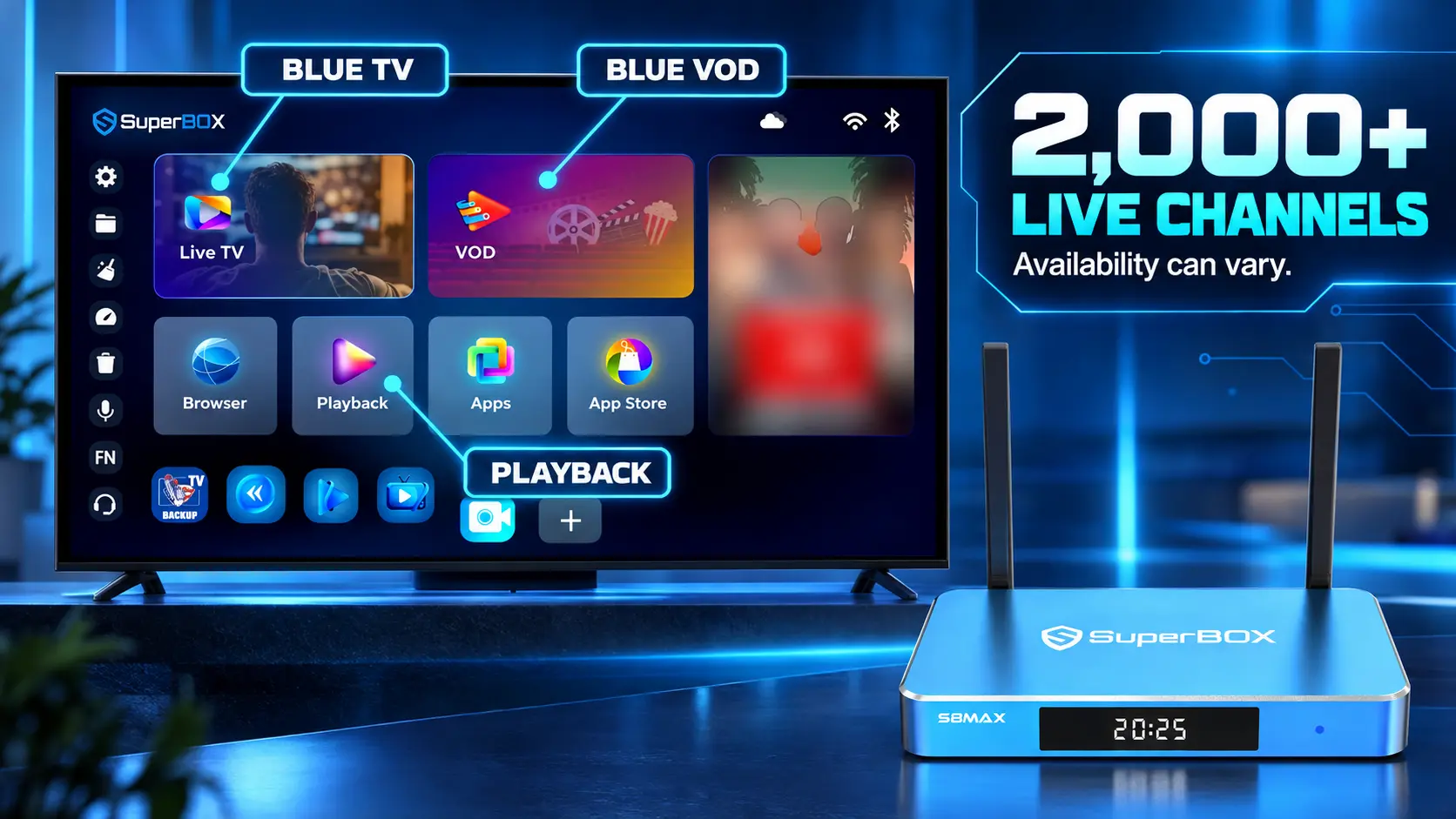
The S8 Max product page lists access to 2,000+ live TV channels through Blue TV, alongside a diverse on-demand selection through Blue VOD. News, sports, movies and TV shows give households a wide range of viewing choices from one device. Channel and content availability can change and vary by region.
That variety is the central money-saving benefit: when the available programming meets your needs, you may be able to cancel a recurring TV bundle and reduce other subscriptions you no longer use. There is no separate monthly subscription for the included viewing apps. You still pay for internet and any optional paid third-party services you retain.
If you are new to the brand, our explanation of how SuperBox works covers the device, television and internet connection.
Everyday convenience matters as much as channel count
The S8 interface supports Home app shortcuts and number-key assignments. You can keep a few favorite apps visible and assign them to remote numbers, then open them from Home. This helps someone who prefers familiar buttons to searching through a long app list.
Follow the S8 shortcuts and number-key guide for the exact setup. For live-channel navigation, use our Blue TV instructions; for movies and shows, see the Blue VOD guide.
The benefit is practical: choose your everyday apps once, learn a short routine and make those choices easy to reach again.
Compare recording before replacing YouTube TV
S8 adds built-in manual recording for supported content. It currently does not offer the same scheduled cloud DVR workflow as a subscription service that automatically records selected future broadcasts. Our S8 Recorder guide explains the controls and storage checks.
Playback is separate. It lets you revisit eligible previously available programs within the supported window, rather than creating a personal scheduled recording. See our S8 Playback guide if catching up after a broadcast is important to you.
For someone whose main goal is varied viewing and a lower recurring bill, S8 deserves a close look. Someone who depends on automatic recording should make that requirement part of the decision.
2 Sling TV for a smaller paid channel package
Sling offers several plan choices, including Orange, Blue, Essentials and Select. Begin with the channels you need, then compare the actual plan and extras offered at your address.
Orange does not include local channels. Blue and Orange & Blue offer certain local channels in selected areas. That makes a location check important before treating Sling as a direct replacement for your current lineup.
Sling lists 50 hours of included cloud DVR and an optional unlimited upgrade. Simultaneous viewing depends on the plan and channel. Check these details if several people watch at once.
Choose Sling when: a narrower lineup covers your habits and the checkout total is lower. Add up sports extras, premium channels and DVR upgrades before deciding; a small base package is not the whole budget.
3 Philo for entertainment at a lower monthly price
Philo’s current lineup includes Essential at $25 per month and Bundle+ at $33 per month for direct purchases. Essential includes live entertainment channels and unlimited DVR with one-year storage. Bundle+ adds AMC+, HBO Max Basic with Ads and discovery+ access.
This makes Philo worth considering if entertainment is your priority and you do not need a broad sports-and-local bundle. Compare its actual channel list with your must-haves before subscribing.
Choose Philo when: its entertainment lineup is enough on its own. If you must add several other services to fill gaps, compare that combined total rather than the $25 headline alone. Third-party billing prices can differ.
4 Hulu + Live TV for households using the bundle
Hulu + Live TV currently lists a regular $99.99 monthly price for the referenced Hulu With Ads + Live TV offer. Its live channels, Hulu library, included Disney+ content and additional ESPN content can make it useful for a household already paying for parts of that bundle.
It is not automatically cheaper than the main YouTube TV plan. Compare the subscriptions you would actually cancel after moving, and check access and activation requirements for the included services.
Choose Hulu + Live TV when: the overall bundle replaces enough of your existing spending to justify it. A discounted first month is different from the renewal price. Local channel availability and sports restrictions still require attention.
5 Fubo for checking specific sports coverage
Fubo’s current plan guide lists multiple packages with cloud DVR and sports options. Regional MLB, NHL and NBA coverage depends on location and plan.
Start with your team and the network showing its games, then check Fubo’s channel availability tool. A sports-focused brand name does not establish that every event you want is included.
Choose Fubo when: its current channels match your actual schedule. Obtain the full price for your location, including applicable regional sports charges and any add-ons. Fubo’s help documentation directs customers to the signup flow for current pricing; different offers and existing-customer plans may differ.
Do not rely on an old channel comparison for a future playoff or championship. Check the broadcaster and provider lineup close to the event.
6 DIRECTV for larger bundles or targeted Genre Packs
DIRECTV streaming offers larger packages, while its Genre Packs provide narrower choices. Current examples include MyEntertainment at $42.99 per month plus tax and MySports at a regular $64.99 per month.
The lowest advertised Genre Pack price is for a smaller category package, not the equivalent of a full live-TV lineup. Adding news, sports or regional team coverage changes the cost. Check the exact package instead of treating all DIRECTV offers as interchangeable.
Choose DIRECTV when: its channel combination fits better than competing bundles. For regional sports, enter your ZIP code and confirm the relevant network and package. Compare the regular total after any introductory promotion, including device or add-on costs you choose.
7 Free apps and an antenna for a smaller entertainment budget
Tubi, Pluto TV and Sling Freestream offer free, ad-supported viewing on compatible devices. They can be useful for casual movies, series, themed channels and browsing without another monthly subscription.
They do not all carry the same local stations, sports or new episodes as a paid live-TV package. A large number of themed streaming channels should not be treated as an identical lineup to cable networks.
An antenna can add receivable local over-the-air stations without a television subscription. Reception depends on the address, antenna and surroundings; test before canceling your existing access to local news.
Choose this route when: you are flexible about what to watch and want to keep spending low. Check app support on your television or streamer. You may already own suitable equipment, so try that before buying more.
Choose the right alternative for your household
Make a short checklist with the people who actually use the television. Separate programs you watch weekly from channels you would simply like to have.
| Your priority | Start by comparing | What to test |
|---|---|---|
| Fewer recurring TV subscriptions | SuperBox S8 and free viewing options | Actual programs, internet and everyday controls |
| Lower-cost entertainment bundle | Philo and suitable Sling plans | Favorite networks and the complete monthly total |
| Existing Disney/Hulu spending | Hulu + Live TV | Included subscriptions you can genuinely remove |
| Regional team coverage | Fubo and relevant DIRECTV packages | Team, network, ZIP code and schedule |
| Automatic future recording | Services with suitable cloud DVR | Scheduling, retention and device access |
| Local news | Local-inclusive plans or an antenna | Your specific station and reception |
Do not choose by channel count alone. One household may value a particular regional station more than hundreds of extra channels. Another may prefer the variety and ongoing cost structure of SuperBox.
For a broader transition away from cable, our cord-cutting guide explains how to plan internet, content and cancellation together.
Which SuperBox S8 should you choose?
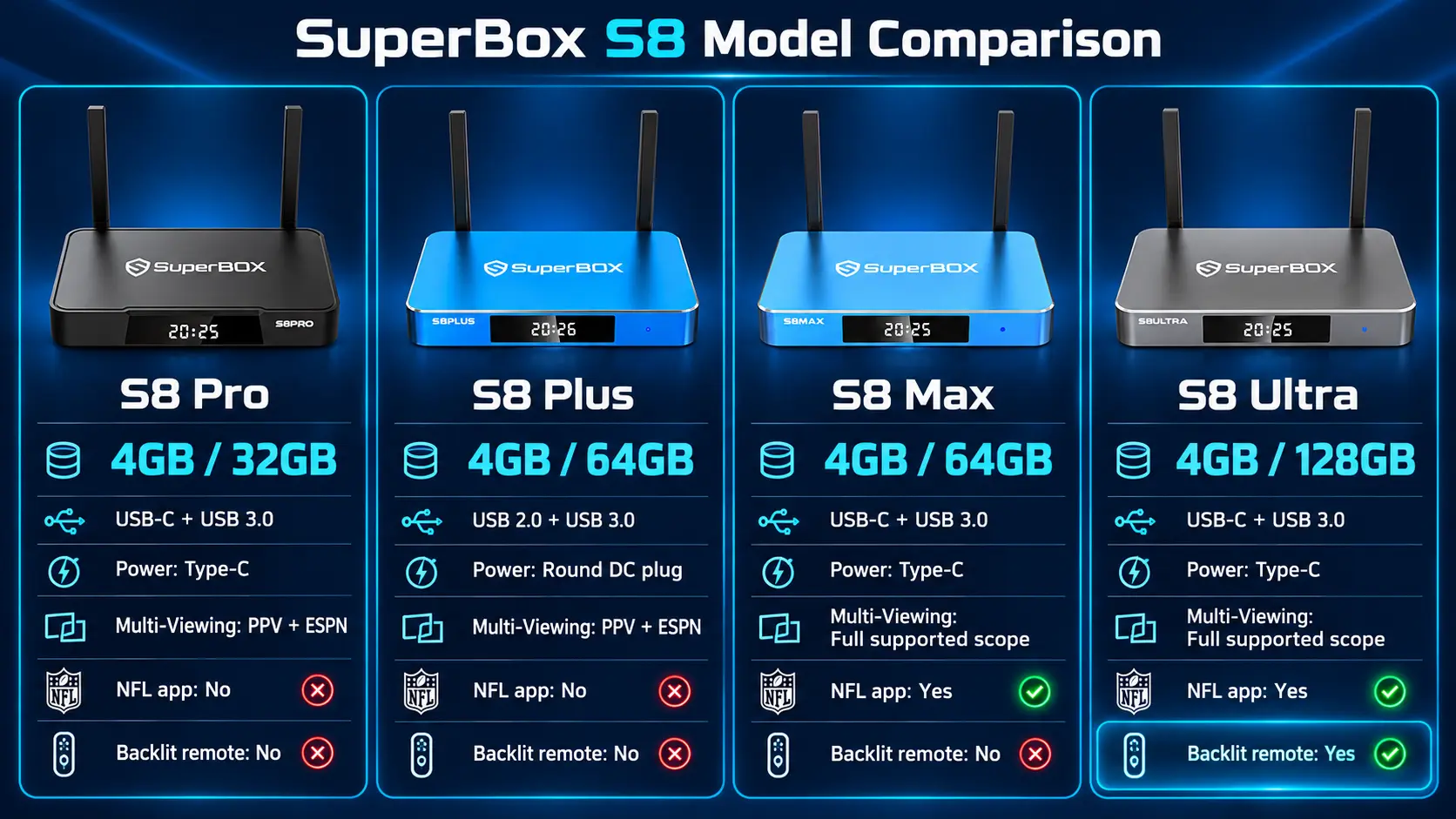
| Model | Storage | Multi-Viewing scope | NFL app | Included backlit remote |
|---|---|---|---|---|
| S8 Pro | 32GB | PPV + ESPN | No | No |
| S8 Plus | 64GB | PPV + ESPN | No | No |
| S8 Max | 64GB | Full supported channels | Yes | No |
| S8 Ultra | 128GB | Full supported channels | Yes | Yes |
All four models have 4GB RAM, voice command and built-in recording. App and sports availability remain subject to supported content and regional restrictions; the NFL app listing is not a promise of every game.
Pro suits lighter storage needs. Max adds broader Multi-Viewing and the NFL app without moving to the largest storage tier. Ultra adds 128GB and illuminated remote buttons. Plus provides 64GB with the Pro/Plus viewing scope. Compare the full S8 specifications for the remaining differences.
More storage gives you more space; it does not automatically increase internet speed. If several people or streams share the connection, plan the network as well as the device. Our S8 Wi-Fi and Ethernet guide covers the connection process.
Calculate what switching would actually save
The equipment price matters, but so does the bill you keep paying afterward. List the current service, any extras and all other subscriptions. Then write down what remains after the change.
Monthly saving = current recurring TV spending − replacement recurring TV spending.
If your internet price changes, include that difference too. Internet already used by the household is not a new saving just because a TV subscription ends.
For illustration, suppose your current TV spending is $82.99 per month. After switching, you keep internet unchanged and spend $20 per month on optional paid entertainment. The recurring difference would be $62.99 per month, or $755.88 over 12 months at those unchanged rates.
Using a $399 S8 Max hardware price, that example leaves $356.88 in first-year savings after the box purchase, before taxes, accessories or other changes. It would recover the equipment cost in roughly 6.3 months. This is a budget example, not a guarantee that the same programs or savings apply to every household.
The principle is useful even if you choose another option: compare the services you genuinely remove with everything you add. Keep only the subscriptions you use and review the total after the first month.
Test the new setup before canceling
Give yourself time to check the replacement while your existing service still works. Try the programs you watch regularly and the controls used by everyone in the household.
- Confirm television and device compatibility.
- Set up internet and install the supported viewing apps.
- Check favorite programs, local stations and sports requirements.
- Test recording or catch-up behavior if you depend on it.
- Compare the full renewal price and any subscriptions you will keep.
- Save account details, cancellation dates and purchase receipts.
For S8, begin with our app installation guide. Apps may need installation after initial setup; do not assume every Home tile already contains an installed app. If the remote needs pairing, follow the S8 remote setup instructions.
Practice selecting the TV’s HDMI input, returning Home and opening your favorite app. A short instruction card can make a new setup more comfortable for someone accustomed to a cable remote.
Why buy from SuperBox TV Box Store?
SuperBox TV Box Store is an authorized retailer serving customers in the US and Canada. Verify our authorization with code SP20250414002 at the SuperBox authorization website.
We provide model comparisons and detailed S8 setup guides, so you can understand the equipment before buying and follow clear instructions afterward. If you are comparing a YouTube TV subscription with an S8 purchase, contact our team with your television model and viewing priorities.
Review our return policy and keep the order confirmation from customer@superboxtvboxstore.com. SuperBox has multiple sellers; our seller identification guide explains how to confirm whether an order came directly from our store.
Frequently asked questions
What is a cheaper alternative to YouTube TV in 2026?
Philo’s $25 Essential plan is a lower-priced entertainment option. Sling and DIRECTV offer narrower packages, while SuperBox S8 provides another approach through a hardware purchase and included viewing apps without a separate monthly subscription. Compare the actual content and total cost.
Can SuperBox provide live channels and other content for free?
Yes. SuperBox offers 2,000+ live channels through Blue TV and varied on-demand entertainment through supported apps without a separate monthly subscription for those included apps.
Is SuperBox the same as a YouTube TV subscription?
No. SuperBox is hardware with its own supported app experience. YouTube TV is a subscription service. Compare channels, device support and recording behavior rather than assuming identical features.
Does SuperBox S8 record future shows automatically?
Its current recording workflow is manual. It should not be treated as a scheduled cloud DVR replacement. Playback is a separate catch-up function for eligible programs.
Which alternative is best for sports?
Start with your team, event and required network. Check Fubo, relevant DIRECTV and Sling plans, or SuperBox’s supported programming. For S8, the listed NFL app is on Max and Ultra; availability does not guarantee every game.
Can I get local channels without YouTube TV?
A local-inclusive subscription or a suitable antenna may work. Enter your ZIP code for subscription availability and test reception for an antenna. Confirm your specific station before canceling.
Are free apps a complete YouTube TV replacement?
They may be enough for flexible viewing, but their channels and catalogs differ from paid live-TV bundles. Check sports, local news and current episodes individually.
Do I need a new TV to use SuperBox S8?
A compatible HDMI television can use the box as an external streaming device. The box needs internet; the television does not have to run the apps itself. Check display and connection compatibility before ordering.
Should I switch or choose a smaller YouTube TV plan?
Compare both. A narrower plan may preserve familiar tools at a lower price, while another service or SuperBox may fit better if you want different content or fewer recurring subscriptions. Test the option against your own viewing list and budget.
The article was updated on:
