
Knowledge SuperBox
TV Box Buying Guide: Choose by Apps, Features and Budget





The right TV box should make it easier to watch what you enjoy, work with the television you already own, and fit the amount you want to spend. A longer specification sheet does not automatically make a device a better purchase.
Start with three questions: What will you watch? Which features will you use? What will the complete setup cost? Those answers make it much easier to compare a Google TV device, Apple TV, Roku, Fire TV, or SuperBox.
This TV box buying guide takes you through those decisions in a practical order. It covers internet streaming devices for homes in the US and Canada, including how SuperBox S8 fits into a shortlist and when a simpler setup may already meet your needs.
Start with your viewing habits
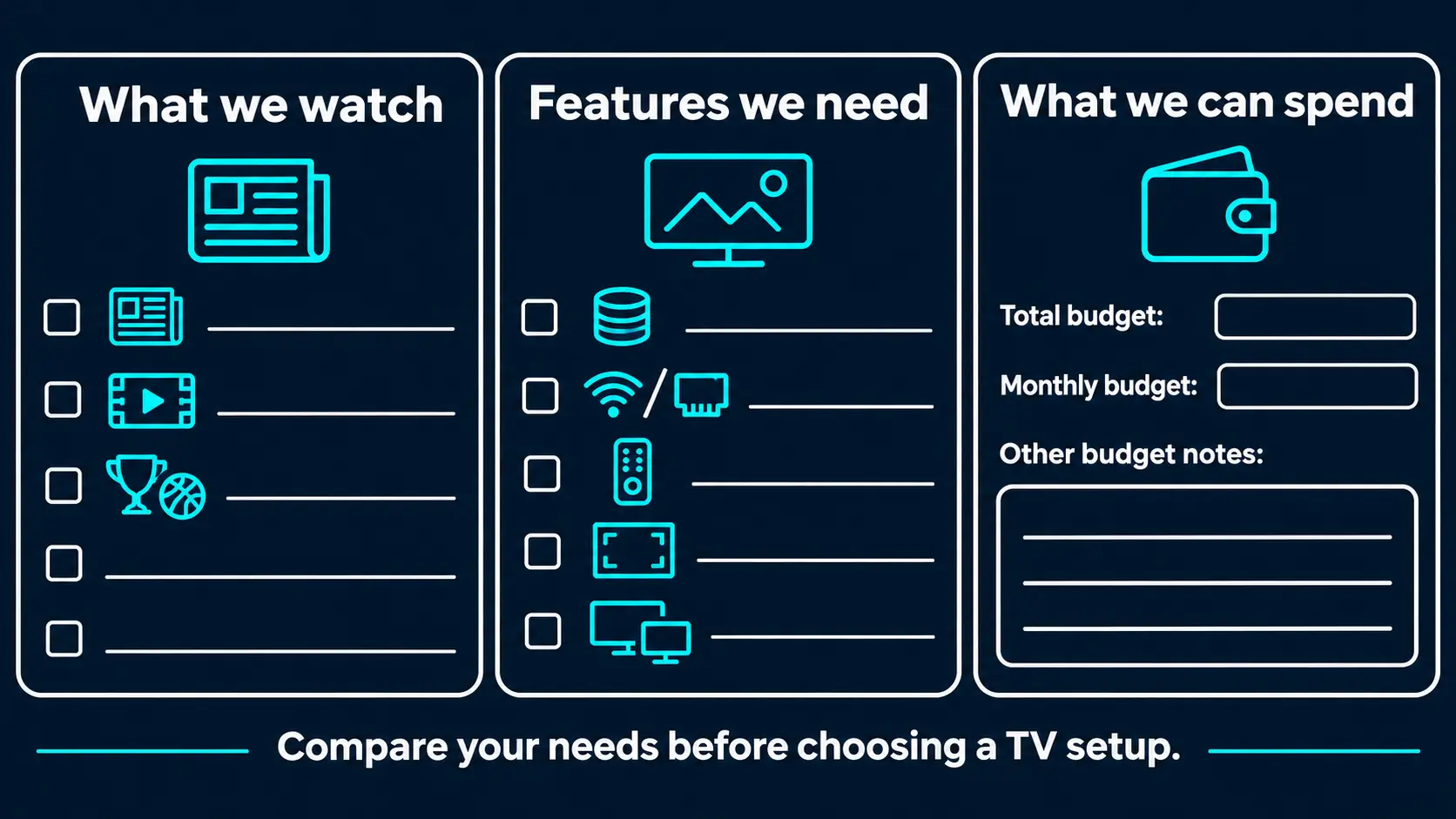
Before comparing products, write down the channels, apps, sports, and shows your household actually watches. Divide them into essentials and things that would be nice to have.
A household following a particular subscription service needs a device that supports that service properly. Someone replacing a cable-style routine may care more about channel browsing, catch-up viewing, and reaching familiar entertainment without moving between several menus.
For sports, identify the competitions and broadcasts you want in your country. Then check the viewing source and device compatibility. A sports-related app name alone does not tell you which games are available, whether local broadcasts are included, or whether multiple views are supported.
Think about the people using the television, too. A voice remote may be valuable for someone who finds typing difficult. Illuminated buttons may matter more than extra storage in a dark bedroom. A household watching one program at a time may have little use for advanced screen layouts.
Your list should describe a routine: “News in the morning, movies at night, and two supported sports broadcasts on weekends.” That gives you a reason to pay for particular features.
Decide whether your current TV needs another device
A smart TV already has its own software and apps. If it opens your essential services comfortably and everyone knows how to use it, you may be able to keep your current setup.
An external streaming box becomes useful when you want a different interface, additional connections, particular viewing tools, or a system you can replace independently of the screen. You can keep a television with a good picture while changing the device that runs your entertainment.
The important distinction is between the display and the viewing system. A box cannot repair a damaged panel or turn a Full HD screen into a native 4K television. It can provide a different set of apps and controls through an HDMI input.
If that is your main decision, compare the practical reasons to add a TV box to a smart TV before choosing a model.
Choose the platform before comparing specifications
“TV box” is a broad shopping term. Products with similar shapes can run different platforms, offer different apps, and organize entertainment differently.
| Platform or device family | A useful starting point when… | Check before buying |
|---|---|---|
| Google TV and Android TV devices | You want a TV-focused app platform and compatible streaming services | Exact model support, regional apps, remote and connections |
| Apple TV 4K | You use Apple services and want their TV experience alongside compatible apps | Required subscriptions, desired services and TV compatibility |
| Roku players | You want straightforward access to supported apps and free or paid viewing options | Local service availability and the features of the specific player |
| Fire TV devices | You prefer Amazon’s viewing environment and compatible entertainment apps | Your must-have services, model connections and regional availability |
| SuperBox S8 | You want the Blue app experience, channel browsing and supported S8 viewing tools | Model differences, current programming and the features your household will use |
Several platforms offer free entertainment alongside optional paid services. Buying the hardware and paying for a particular subscription are separate decisions. Roku, for example, does not require a platform subscription simply to use a purchased device.
Pay attention to precise platform names. An Android-based box is not automatically the same product as a Google TV or Android TV device. An operating-system version alone does not establish that every streaming service supports it or delivers its highest video quality.
For a must-have service, use the provider’s supported-device information. Netflix’s device guidance, for example, directs customers to requirements for specific device families. Apply that habit to whichever service matters most to you.
Check an essential app before committing
Take the exact device name to the service provider’s help pages and check three things: whether the app is supported, whether it works in your country, and whether your intended plan delivers the features you want on that model.
For example, “I want this app” is less specific than “I want this app on this player, in Canada, with the picture quality included in my plan.” The second question can reveal a mismatch before you spend money.
Treat casting from a phone as another feature to verify. If you want a device that everyone can use with its own remote, ask whether normal playback requires a phone or whether casting is simply an optional extra. Choose the routine your household will find comfortable.
Consider a box or a streaming stick
A small stick can be convenient behind a wall-mounted television. A separate box sits on a shelf or cabinet, where its connections may be easier to reach. Inspect the actual product rather than choosing by shape alone.
Check HDMI clearance, the location of a power outlet, and whether you will connect Ethernet or USB storage. Some setups need an additional adapter for a desired connection, so include that equipment in the purchase plan.
Leave the ventilation space recommended by the manufacturer and keep connected cables from pulling on the television’s port. A tidy installation should still let you reach the equipment when you need to reconnect a cable or ask for support.
Check the television and the room
Look at HDMI, picture and audio compatibility
Check that your television has an available HDMI input. Identify its model and whether it is Full HD or 4K. If you use a receiver, HDMI switch, or soundbar, include that equipment in the compatibility check.
Picture quality depends on the complete path: content, app, device, connection, and television. A 4K label does not make every program 4K. HDR and advanced audio formats also require support across the relevant equipment and service.
Read resolution claims carefully. Decoding describes processing a video format; output describes the signal sent to the TV. SuperBox S8 supports 4K playback and lists H.265 decoding up to 6K. Those are different capabilities, and the decoding specification is not a promise of native 6K display output.
Use the Android TV box resolution guide for picture-setting decisions. If your audio system sits between the player and television, check the soundbar and home theater connection options as well.
Plan the network connection where the box will sit
Consider the actual room, rather than only the speed printed on your internet bill. A router across the house and behind several walls presents a different situation from one beside the television.
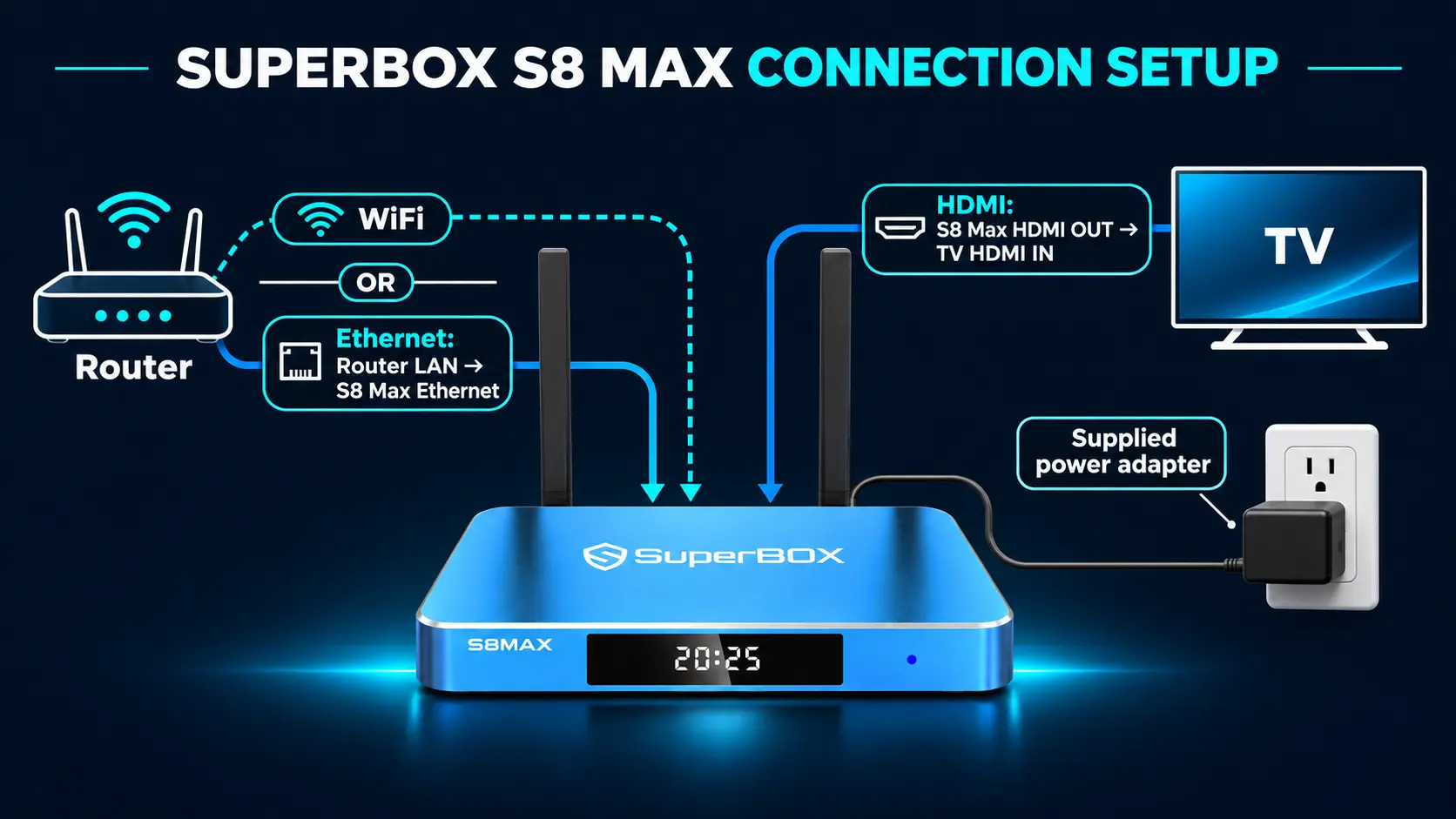
A built-in Ethernet port is useful when you can run a cable to the router. If that is impractical, assess WiFi coverage at the TV position and whether the chosen device supports your network.
WiFi 6 and Gigabit Ethernet describe connection capabilities. They do not create a faster internet plan or guarantee uninterrupted playback from every source. A responsive Home screen and a stable video stream are also different aspects of performance.
Address weak coverage before assuming a more expensive box will solve it. Our guide to improving WiFi for streaming can help you plan the room.
Read hardware specifications by what they help you do
Specifications become useful when you connect them to a real need.
| Specification | What to consider as a buyer |
|---|---|
| Processor and software | Responsiveness, supported apps and how the interface behaves in normal use |
| RAM | Working memory used while the device runs apps and its interface |
| Internal storage | Space for the system, installed apps, app data and compatible local files |
| Network connections | Whether your room is better served by WiFi or a wired connection |
| USB connections | The actual accessories or external storage you intend to connect |
| Remote | Button visibility, comfortable navigation, voice support and TV-control options |
Separate RAM, storage and recording capacity
RAM and storage serve different purposes. A 128GB storage model does not have 128GB of RAM, and doubling internal storage does not automatically double navigation speed or improve the picture.
Some advertised capacity is occupied by system software and installed apps. Estimate your needs from the apps and files you expect to keep, rather than looking for a universal number of apps a box can hold.
For SuperBox, the 32GB, 64GB and 128GB storage guide explains those choices. S8 recording has a separate requirement: recordings save to connected USB storage. Buying more internal capacity does not increase the space available on that external drive.
Pay attention to everyday controls
Picture how someone will reach the main app, change volume, return Home, and switch the TV input. Those actions happen far more often than opening a technical specification page.
Voice control can reduce typing for supported tasks. Backlighting helps locate buttons in low light. TV-control support may reduce remote switching, but check the exact remote, television and programming process.
When buying for another person, make the decision around their routine. The S8 guide for parents and seniors focuses on practical ease of use.
Ask how the device will be supported
The purchase includes a relationship with a manufacturer and a seller. Find out where official updates come from, how to get installation help, and who handles a hardware problem.
If a manufacturer publishes a support commitment for the exact model, read it. A familiar platform name or a recent operating-system number does not tell you how long that particular device will receive updates.
Look for understandable documentation as well as a list of features. Before ordering, try finding the instructions for a task you will use, such as connecting the network, pairing the remote, or making a supported recording. Clear instructions make it easier to judge whether you are comfortable with the setup.
Keep the retailer’s confirmation and model details together. If an app or interface changes later, those details help support identify the right product instead of starting from a description such as “the blue box.”
Choose viewing features you will actually use
Advanced features deserve a place in your budget when they solve a recognizable problem.
For sports: decide whether you watch one game, switch between channels, or want supported broadcasts visible together. Picture-in-Picture keeps a smaller view alongside the main picture; Multi-Viewing offers another way to follow supported sources. Availability depends on the product and app. The SuperBox sports model guide explains the buying decision without requiring you to learn every control first.
For missed programs: distinguish catch-up viewing from making your own recording. Catch-up depends on programming that the service makes available. Recording creates a saved file through a supported recording workflow.
For SuperBox S8 recording: plan compatible external USB storage and manual Start/Stop operation. Confirm support for the programming you want to save. The S8 Recorder instructions cover the process; internal storage should not be your reason for choosing a recording capacity.
For several rooms: work out whether people will watch independently at the same time. Two views on one television and independent viewing on two televisions are different requirements. Budget for the setup in each room before choosing the first box.
Where SuperBox S8 fits in your shortlist
SuperBox is worth considering when your priority is a dedicated live-TV and on-demand routine with additional viewing tools. Its appeal combines the Blue apps, supported replay and screen-layout features, and a one-time hardware purchase without a required monthly SuperBox equipment subscription.
Blue TV provides live channel browsing, and SuperBox TV Box Store advertises access to 2,000+ live channels. Blue VOD provides an extensive on-demand movie and series library. The core apps are free to use on compatible SuperBox hardware without separate monthly app subscriptions; internet service is still required, and programming availability can change.
Explore the store’s companion SuperBox channel guide when researching the live lineup, then confirm your essential programming before buying.
That combination can make SuperBox attractive to households reducing traditional cable expenses. It gives buyers a concrete entertainment setup to evaluate, rather than simply another place to install paid services. Separately chosen subscription apps retain their own charges.
The S8 range also offers voice control, the redesigned interface, supported Picture-in-Picture and Multi-Viewing, manual USB recording, and up to seven days of Playback for eligible programming.
Choose the S8 model around the differences
Prices below are the product-page amounts checked on November 6, 2026, in US dollars. Review the current listing and checkout total before ordering.
| Model | RAM / internal storage | Main reason to consider it |
|---|---|---|
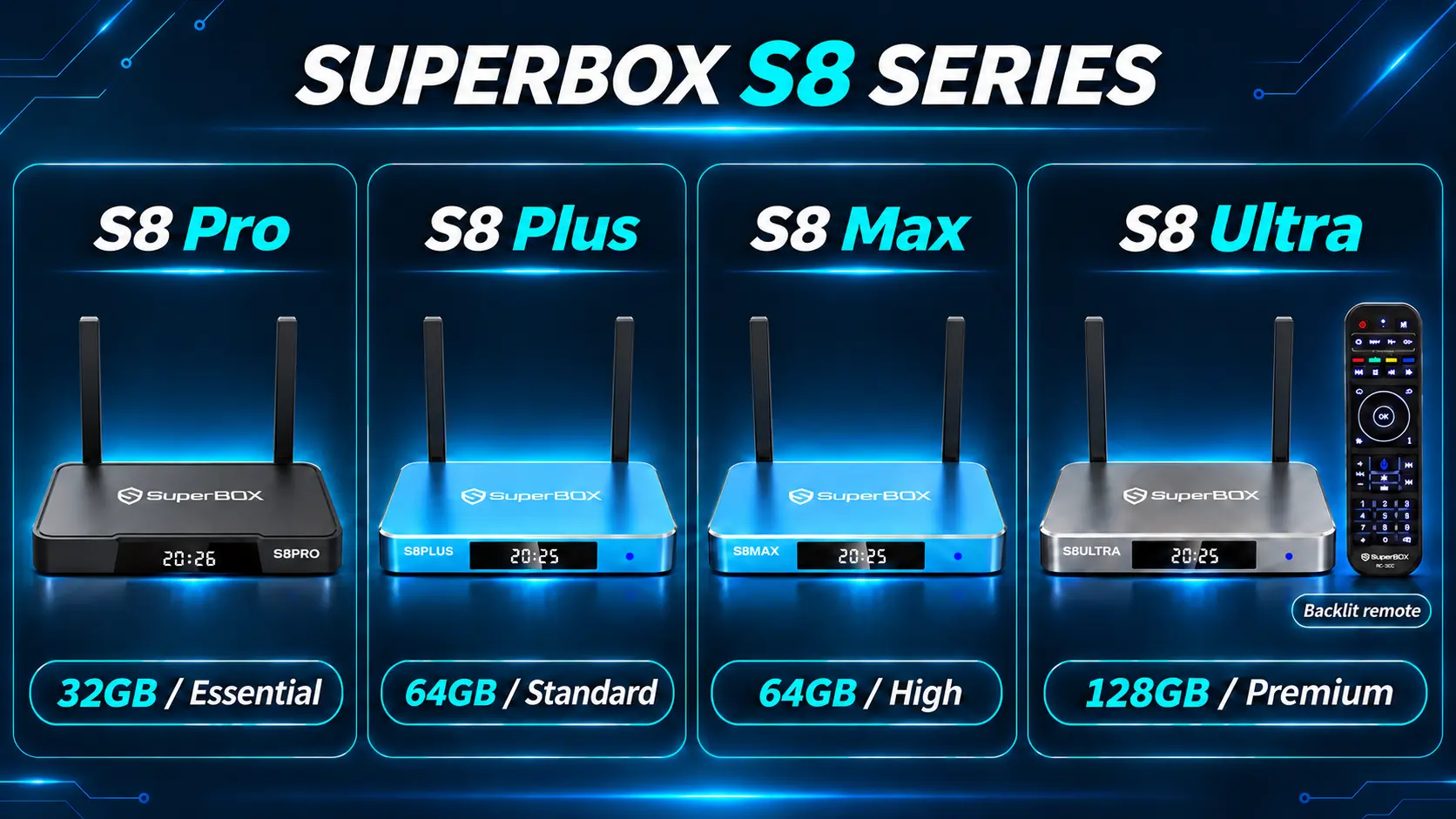
| S8 Pro — $359 | 4GB / 32GB | Essential performance tier and core S8 tools at the lowest S8 price |
| S8 Plus — $379 | 4GB / 64GB | Standard performance tier and more internal room than Pro |
| S8 Max — $399 | 4GB / 64GB | High performance tier, broader supported Multi-Viewing and the listed NFL app |
| S8 Ultra — $449 | 4GB / 128GB | Premium performance tier, largest internal capacity and an included backlit voice remote |
Pro and Plus support Multi-Viewing for supported PPV and ESPN channels. Max and Ultra offer the broader full-supported-channel tier, and both list the dedicated NFL app. Confirm the programming you need before making a sports purchase.
Only Plus uses round DC power and USB 2.0 plus USB 3.0. Pro, Max and Ultra use Type-C power and list USB-C plus USB 3.0. The Essential, Standard, High and Premium names describe the lineup’s advertised performance tiers; they are not measured loading-time comparisons.
Max is our main recommendation when you want the broader S8 viewing scope at a lower price than Ultra. Ultra makes sense when its additional internal room and illuminated remote are useful to your household. Pro and Plus remain sensible choices when their features meet your needs.
For the complete differences, continue to the four-model S8 comparison.
Match the shortlist to the way your household watches
Once the basic requirements are clear, picture an ordinary evening with each option. A device can meet your technical requirements and still be inconvenient for the person holding the remote. These examples show how to turn a feature list into a buying decision.
A living room built around familiar channels
Imagine a couple who usually turn on the news, browse live television, and choose a movie after dinner. Their priority is reaching familiar entertainment without remembering which service carries each program.
For this household, compare the route from the Home screen to live viewing, the way channels are organized, and the process for finding an on-demand title. Ask to see the interface rather than judging only the processor or storage number.
SuperBox belongs on this shortlist because Blue TV and Blue VOD serve those two viewing habits. The useful question is whether the available lineup and controls suit the couple’s routine. Extra screen layouts matter less if they normally watch one program together.
A household keeping its favorite subscription apps
Another household may already know exactly which paid services it wants. Its main complaint is that the television’s built-in interface has become inconvenient.
Start that purchase with the services’ exact-device requirements. Compare a compatible Roku, Fire TV, Google TV or Apple TV model around the apps the family will keep using. Paying for hardware with unrelated features will not improve that particular routine.
SuperBox may still appeal if the household also wants its Blue apps and S8 viewing tools. Treat that as an additional reason to buy, rather than assuming that an Android-based device duplicates every capability of another platform. You can also keep familiar subscription apps on the TV and use a separate HDMI device for a different viewing experience.
A sports household deciding where to spend more
Consider someone who follows one main game but checks another supported broadcast during breaks. Before paying for more advanced viewing, decide whether switching channels is enough or whether seeing both sources together would be useful.
If simultaneous supported viewing is important, compare the S8 model’s Multi-Viewing scope with the actual channels the household follows. Max and Ultra are the relevant step up when the broader supported-channel tier is the reason for the purchase.
Then make the Max-versus-Ultra decision separately: does the viewer want the additional internal storage and backlit remote? A sports requirement can justify a feature upgrade without automatically justifying every higher-priced model.
A bedroom or occasional-use television
For a second television, repeat the needs assessment instead of automatically buying the same model as the living room. An occasional viewer may need fewer features, while someone watching every night may care strongly about comfortable controls.
Check the screen from the actual viewing position and decide where the remote will normally sit. Button visibility, reaching the box’s connections, and switching between the TV and player can matter more in this room than a long list of advanced functions.
If choosing SuperBox, Pro or Plus may cover a simpler routine. Ultra deserves consideration when illuminated controls and its other upgrades will be used regularly. Match spending to the person and room, not simply to which television is largest.
Work out the complete cost
A low device price does not necessarily produce the lowest household bill. Compare the hardware purchase with the services and accessories you will use over the first year.
Include internet, any subscriptions you keep, external storage for recording, and equipment for additional televisions. If your current internet connection is already suitable, you may not need to change it. If cancelling cable changes a bundle discount, include the resulting internet price.
For SuperBox, the hardware purchase and free core-app access can help reduce recurring entertainment costs. The amount saved depends on charges you can actually remove. Our explanation of SuperBox monthly fees and remaining expenses separates those costs.
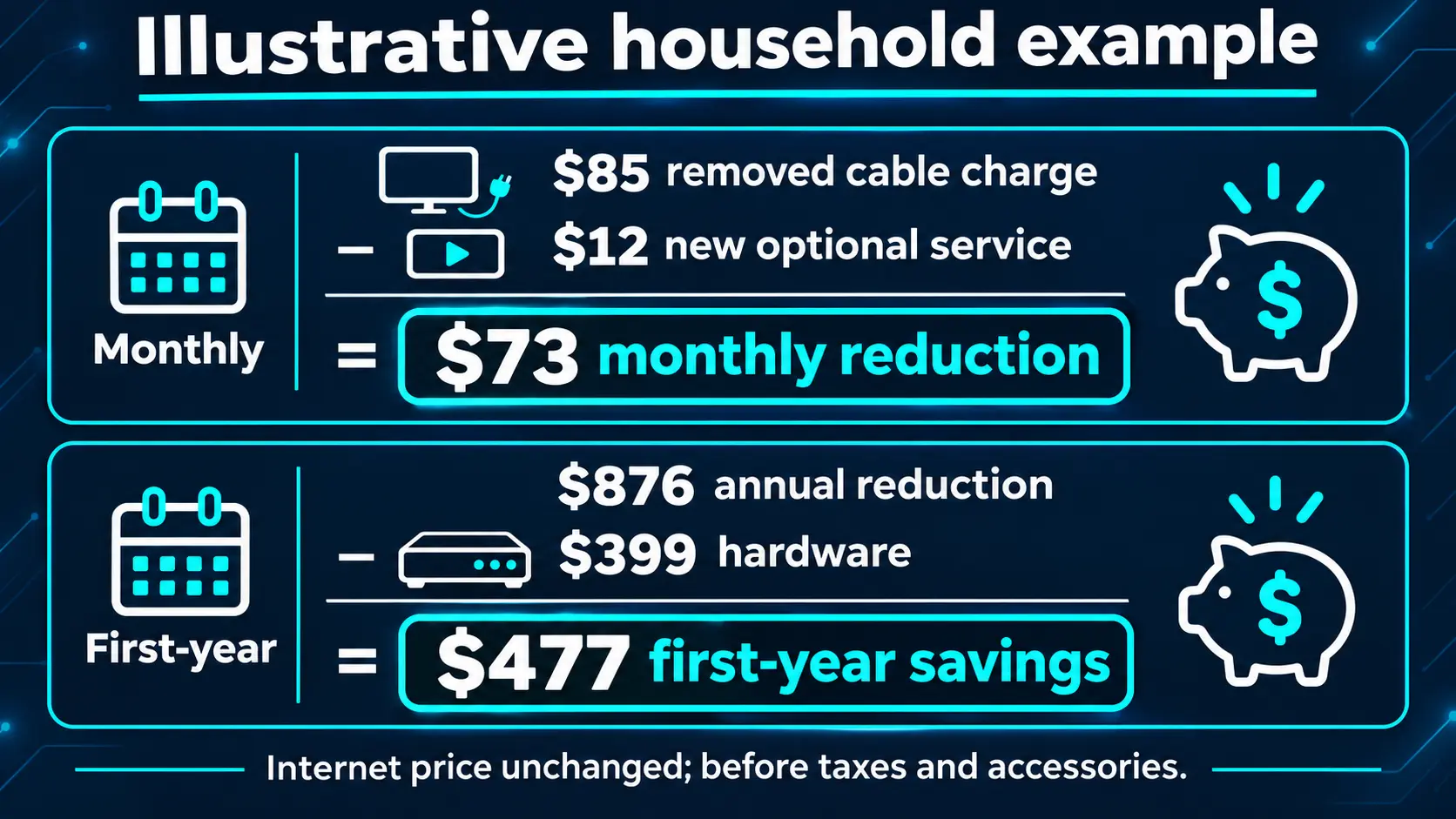
Consider this illustrative example: a household removes an $85 monthly cable-TV charge, keeps its existing internet plan at the same price, and adds one optional $12 monthly service. Its monthly reduction is $73, or $876 over twelve months. Subtracting a $399 device purchase leaves $477 in first-year savings before taxes, accessories or other changes.
Use your own bills to replace those numbers. The calculation becomes useful only after confirming that the new setup covers the entertainment your household wants. Follow a practical cable-cutting plan and test the replacement before cancelling the old service.
Compare the complete package at checkout
Compare what you receive with what you still need to buy. Check the exact model, included remote, supplied power equipment, delivery total, and any accessories selected for recording or networking. An accessory bundle has value when you will use its contents; count the cost of unnecessary extras as well.
If you are replacing an older device, identify which existing accessories are actually compatible before including their reuse in the budget. A matching connector alone is not a reason to substitute power equipment. Keep the supplied adapter with its intended device.
For a gift, include the recipient’s setup needs in the decision. A slightly different purchase can be more practical if it provides the controls they want and avoids another order for a needed accessory.
Choose a seller who can support the purchase
Before paying, check who operates the website, which business will appear on your confirmation, and how to contact that retailer. Read the return conditions and warranty coverage, particularly if you are buying for someone else.
SuperBox TV Box Store is an authorized retailer serving customers in the US and Canada. You can check authorization code SP20250414002 at the SuperBox authorization website. Our authenticity and seller-verification guide explains the different checks.
For a purchase made directly through superboxtvboxstore.com, email customer@superboxtvboxstore.com with technical or order questions. Include the exact model and order number when available so our team can help with the right purchase.
Read the return and refund conditions before ordering. A return window and a defect warranty address different situations; understanding them now makes the purchase easier to manage later.
Make your shortlist before checking out
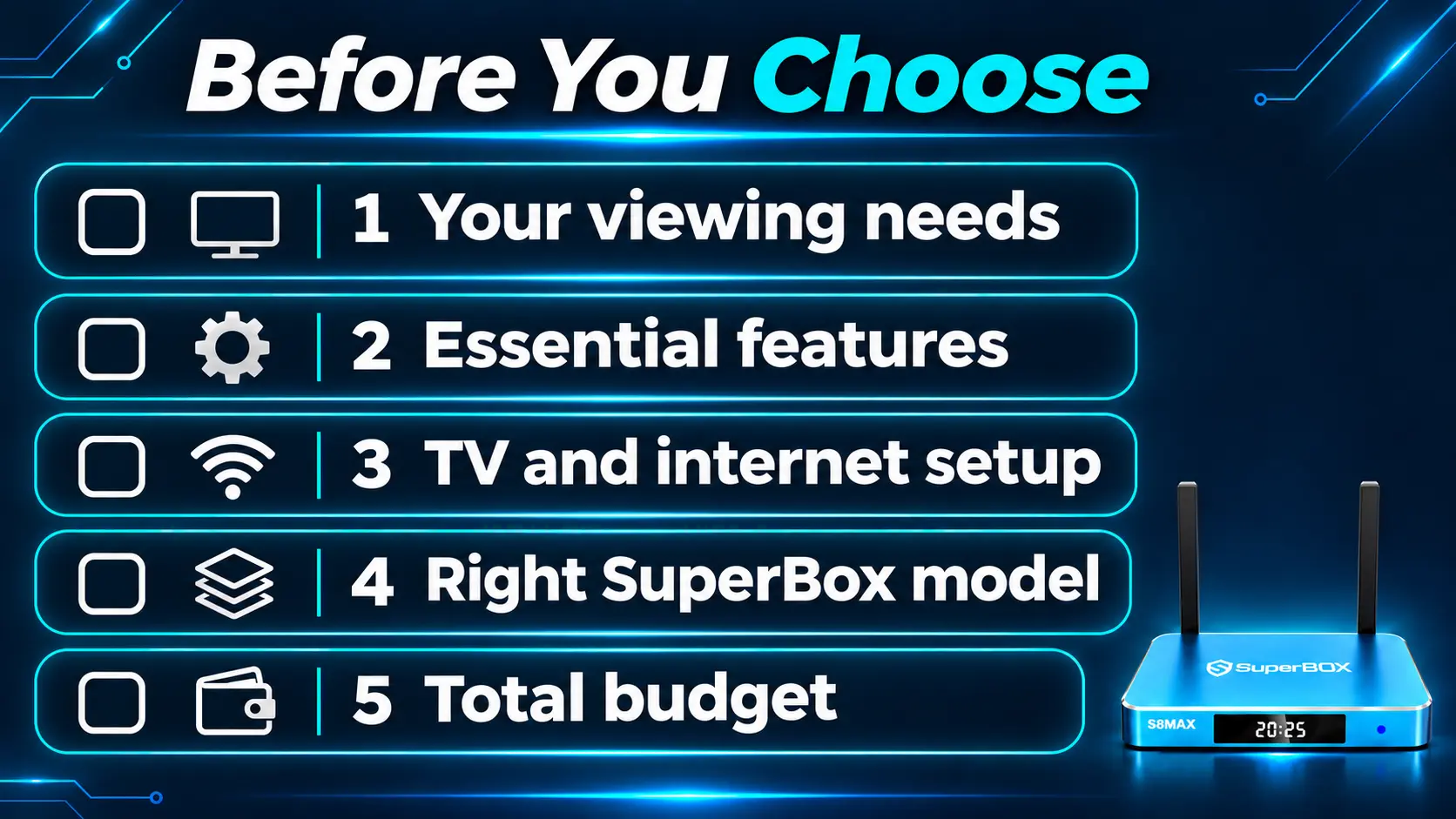
Reduce your notes to five decisions:
- Entertainment: the essential apps, channels or viewing sources are suitable for your country and device.
- Connections: the television, network and audio equipment work with the proposed setup.
- Daily use: the remote and interface are comfortable for the people using them.
- Useful upgrades: you can name a reason for extra storage, supported viewing layouts or recording.
- Total cost and support: the first-year budget, seller and purchase conditions are clear.
Ask the seller one concrete question if a decision remains unresolved: “We have one living-room TV, want supported sports viewing, and find small remote buttons difficult at night. Which model fits?” That produces more useful advice than asking for the most powerful box without explaining how you will use it.
For a shared household purchase, have the person who will use the box most often review the shortlist. Agree on which feature is essential and which is optional. Someone buying the device may value a large app collection, while the daily viewer mainly wants a clear route to familiar television. Resolving that difference before checkout helps you choose a setup that will actually be used.
TV box buying guide FAQs
Can I use a TV box without cable television?
Yes. An internet streaming box uses an internet connection for online viewing rather than requiring a traditional cable-TV package. Keep the distinction between internet service and television service clear, especially when both appear on one provider bill.
Can I keep using my smart TV’s own apps?
Yes. An external box normally uses an HDMI input. You can switch back to the television’s built-in platform to use its apps. Buying a box does not require replacing every part of a working TV routine.
How much internet speed should I budget for?
Check the services and number of simultaneous streams you expect. For example, Netflix recommends a stable connection of at least 15 Mbps for its 4K viewing. That is Netflix’s recommendation, not a universal SuperBox requirement or a guarantee for every stream. Leave capacity for other household use and check reception near the TV.
Can one SuperBox serve every television in the house?
For independent simultaneous viewing, plan a separate device for each TV. Moving one box between rooms is possible, but each location needs suitable connections and internet access. The multi-room SuperBox buying guide explains the options.
Will a streaming box work with a non-smart TV?
Usually, a television with a compatible HDMI input can display an external streaming device. Check the exact TV and box before buying. Older televisions without HDMI need additional consideration; start with the non-smart TV streaming guide.
Is a more expensive TV box always the better choice?
Only when its extra features solve a need you have. Compare the specific upgrade—connections, supported viewing tools, remote or storage – with your routine. A higher storage number alone does not establish better picture quality or faster streaming.
Should I replace every streaming device in my home at once?
You can start with the television used most often and assess the new routine before changing other rooms. That also helps you decide whether each room needs the same model. Include the full household plan in your budget, even if you purchase gradually.
What should I test after buying a SuperBox?
Confirm the TV input, internet connection, remote controls and apps you plan to use. Try your important viewing sources at normal viewing times, then test any feature that influenced the purchase. The S8 Max setup walkthrough provides a practical starting point for that model.
The article was updated on:
