
Knowledge SuperBox
Choosing a SuperBox S8 for Sports: Single-Screen, Multi-Viewing or PiP?





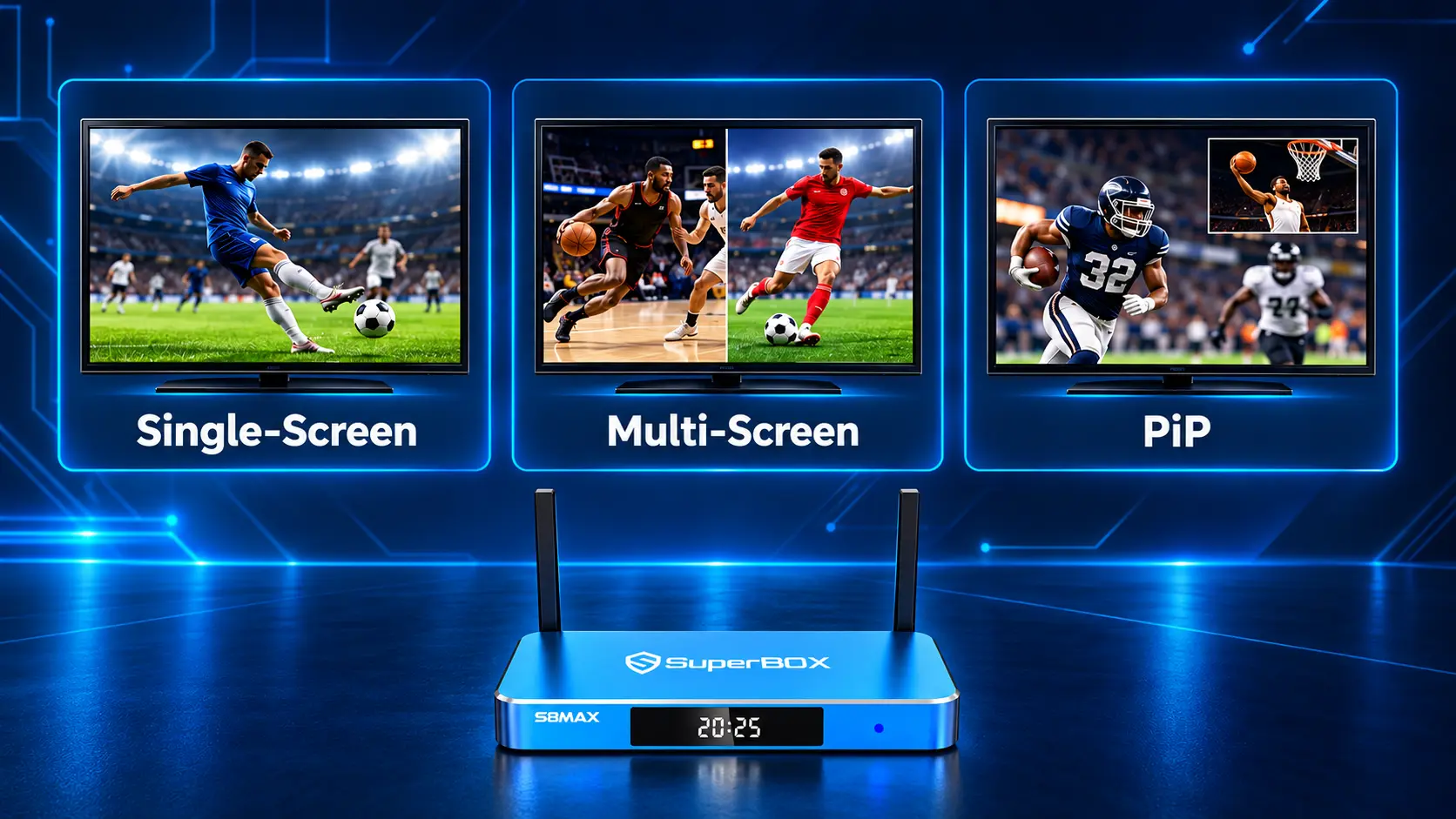
Choose Your Viewing Style Before Your S8 Model
The best SuperBox S8 for sports depends on what happens when two events overlap. Do you stay with your team’s game? Do you switch back and forth between equally important broadcasts? Or do you want one game to stay large while you keep an eye on another channel?
Those habits lead to different buying decisions. A viewer who mostly follows one event may be happy with a focused setup. Someone buying specifically for broader two-channel viewing has a stronger reason to consider S8 Max or Ultra.
Start with the layout, then check the channel scope. Single-Screen gives one broadcast the whole picture. Multi-Screen gives two supported channels equal visual space. Picture-in-Picture keeps one channel dominant with a smaller secondary window.
There is also a naming distinction: Multi-Viewing is the wider feature category, covering both PiP and Multi-Screen. PiP is not a separate premium hardware tier. Your model determines the supported channel scope; your preferred layout determines how those channels appear.
| How you watch sports | Layout to consider | Main buying question |
|---|---|---|
| One event has your full attention | Single-Screen | Does the model meet your everyday needs? |
| Two events matter about equally | Multi-Screen | Are your intended channels supported together? |
| One main event plus a secondary check | PiP | Is the second channel readable enough in a small window? |
If You Only Watch One Game at a Time
Single-screen viewing is a good choice when you want to settle into one broadcast. The action gets the full display, the score graphic is easier to read and there is no second picture competing for attention.
That can suit someone who follows one team, watches an entire match or prefers hearing the commentary without repeatedly deciding which event matters more. Checking another channel during a break does not automatically create a need for simultaneous viewing.
All four S8 models provide the core live-viewing experience. The PPV/ESPN limitation advertised for Pro and Plus concerns Multi-Viewing, not their entire ordinary single-screen channel selection. Check the current lineup for your programs separately from the simultaneous-viewing scope.
This makes S8 Pro a relevant starting point for a viewer with lighter app-storage needs. S8 Plus provides more internal storage while retaining the same focused Multi-Viewing scope.
You can also choose Max or Ultra and still watch most games full screen. Additional flexibility is useful when you need it; it does not have to dictate every evening. A busy sports day might begin with two channels visible and finish with one important game filling the screen.
Before moving up a model solely for Multi-Viewing, ask how often you genuinely want a second event playing. Buy for your regular viewing routine, with enough flexibility for the occasions that matter to you.
When You Want to Follow Two Supported Channels
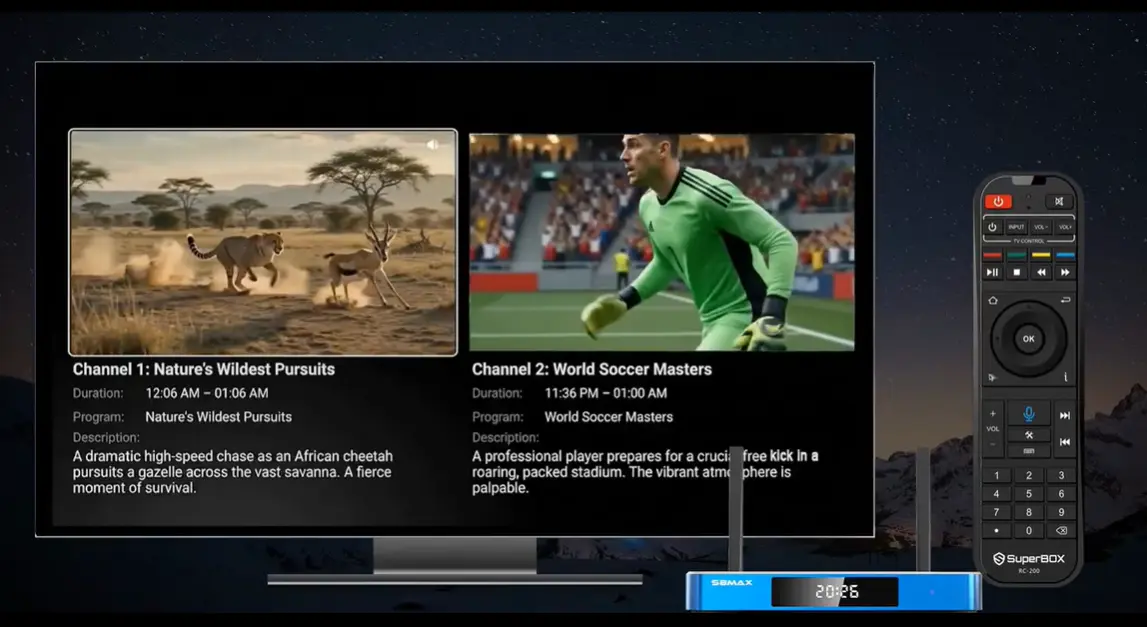
Multi-Screen makes sense when the second event is more than background. Both broadcasts interest you, and repeatedly switching channels risks missing something on either one.
The S8 Multi-Screen layout uses two equal side-by-side viewing panels. This is different from keeping one large channel with a small preview. Both pictures have a similar presence, making the layout useful when neither event is clearly secondary.
For example, two games might be approaching their final stages, or a main event might overlap another broadcast you follow closely. The feature lets you watch the available pictures together rather than relying on a quick channel change to discover what happened.
Check the channel pair before choosing the model
The important split is:
- S8 Pro and S8 Plus: Multi-Viewing for PPV/ESPN channels.
- S8 Max and S8 Ultra: Multi-Viewing across the full supported channel scope.
If your intended pair is covered by the Pro/Plus scope, those models may meet the requirement. If you want a wider mix of supported channels, Max and Ultra are the relevant choices.
“Full supported” does not mean every possible channel or every installed app. SuperBox’s app-scope FAQ identifies Multi-Viewing as a live-TV function, not a way to combine arbitrary VOD and other apps.
Think in channel names rather than just sports. Two people who both watch football may need different combinations, while viewers following different sports may have the same model requirement. The channel scope should match what you actually want on screen together.
Consider audio and readability
Multi-Screen lets you choose which channel’s audio to hear. It does not play two commentaries at the same time. You can keep both pictures visible while listening to the event currently receiving more attention.
Each picture is also smaller than a single full-screen broadcast. Consider whether scores and action are comfortable to follow from your seat. A layout that looks useful close to the television may be harder to read from the other side of the room.
This is where a larger television can help the viewing experience, but additional internal storage cannot. Storage capacity and the physical size of each viewing panel are separate things.
When Picture-in-Picture Makes More Sense
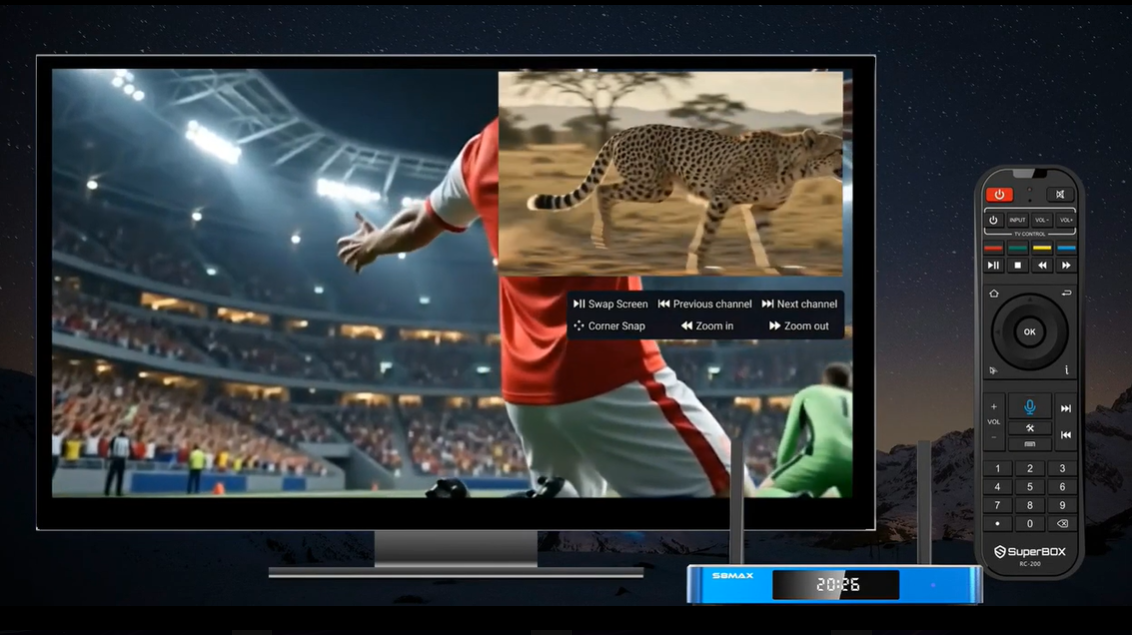
PiP fits the viewer who can clearly name a main event. You want that broadcast to stay large, but you also want a visual check on another channel without leaving it completely.
The main picture fills the screen while the second channel appears in a smaller overlay. That arrangement reflects the difference in priority: one program is the focus, and the other is something you are monitoring.
A typical sports use is keeping your team’s game dominant while watching for a change elsewhere. If the secondary action becomes important, the viewing priority can change. The S8 PiP controls include window adjustment and swapping the two views, so the layout is flexible rather than permanently tied to the original main channel.
Use the smaller window for monitoring
PiP is useful for noticing activity, but a small window may not be the best place to study a detailed score graphic or follow every play. If both events need continuous attention, equal-panel Multi-Screen may be a better fit.
PiP audio comes from the main full-screen channel; the secondary window is video-only. Keep the broadcast whose commentary matters most in the main view. SuperBox’s Multi-Viewing overview explains the audio distinction between the two layouts.
The overlay occupies part of the main picture, so its position matters. A corner that is clear during one broadcast may cover a score or graphic during another. Choose the arrangement that keeps the important action visible, and return to full-screen viewing when the secondary picture is no longer useful.
Choose the tier and layout separately
PiP uses the model’s supported Multi-Viewing scope too. Choosing a smaller window does not give Pro or Plus the broader Max/Ultra channel scope.
The decision is therefore two-part: which channels do you want together, and which one deserves more space? The channel combination helps identify the model. The attention split helps choose PiP or Multi-Screen.
For button-by-button setup, use the existing S8 PiP and Multi-Screen guide. It covers the controls separately so this article can stay focused on choosing the right viewing approach.
Compare S8 Models by Your Sports-Viewing Needs
Choose the supported channel scope first, then compare the internal storage and remote. The full S8 comparison covers the broader specifications; the table below focuses on this buying decision.
| Feature | S8 Pro | S8 Plus | S8 Max | S8 Ultra |
|---|---|---|---|---|
| RAM | 4GB | 4GB | 4GB | 4GB |
| Internal storage | 32GB | 64GB | 64GB | 128GB |
| Multi-Viewing scope | PPV/ESPN | PPV/ESPN | Full supported | Full supported |
| NFL app listed | No | No | Yes | Yes |
| Included backlit remote | No | No | No | Yes |
| Reason to shortlist | Focused viewing needs and lighter storage use | More internal space within the focused scope | Broader supported channel combinations | Max-level scope plus storage and remote upgrades |
Pro or Plus for a focused viewing routine
These models deserve consideration when single-screen viewing is your normal habit or the PPV/ESPN Multi-Viewing scope covers the channels you want together.
Pro provides 32GB internal storage; Plus provides 64GB. Choosing Plus gives more room for system and app use, but does not expand its Multi-Viewing scope to match Max. Make that distinction before deciding that the higher storage number answers every viewing requirement.
Max for broader supported Multi-Viewing
S8 Max is a practical starting point when broader two-channel viewing is the reason you are upgrading. Its advertised scope is full supported Multi-Viewing, with 64GB internal storage.
Plus and Max have the same storage capacity, so compare their viewing scope rather than treating them as equivalent. If the channel combinations are the feature you need, extra storage within the Pro/Plus tier does not substitute for that access.
Ultra for additional storage and an illuminated remote
S8 Ultra shares Max’s full supported Multi-Viewing scope. Its main additions here are 128GB internal storage and the included backlit remote.
Choose it if you want those extras for the way you use the box. Illuminated controls can be convenient in a dim room, while more internal space can suit a larger compatible app collection. You do not need Ultra simply to reach the broader Multi-Viewing tier: Max already provides it.
Check These Three Things Before Ordering
Your channel pair. Write down the two channels you most want to use together. Confirm current availability and the model’s supported Multi-Viewing scope. A general description such as “I watch sports” is less useful than a specific pair.
Your viewing distance. Decide whether you can comfortably follow two smaller pictures or whether one main game should stay large. That helps you choose a layout without confusing screen comfort with hardware capacity.
Your home connection. Two online channels share the available network with the rest of the household. Test normal live playback and check the connection where the box will sit. More internal storage does not increase internet speed.
Use our S8 Wi-Fi and Ethernet guide for connection help and the Blue TV guide for ordinary live viewing. A connection problem and an unsupported channel combination need different checks.
Frequently Asked Questions
Which SuperBox S8 is best for sports?
Choose by your viewing routine. Pro or Plus may suit single-screen use or focused PPV/ESPN Multi-Viewing needs. Max and Ultra are the models to compare for broader supported Multi-Viewing, with Ultra adding internal storage and a backlit remote.
Are PiP and Multi-Viewing different features?
Multi-Viewing is the wider category. PiP is one layout within it; Multi-Screen is the equal-panel alternative. PiP keeps one channel dominant, while Multi-Screen gives the two channels similar space.
Can Pro and Plus only show PPV and ESPN in normal viewing?
No. That distinction describes their advertised Multi-Viewing scope. Do not treat it as a statement that their entire single-screen channel selection consists only of those categories. Check the current lineup for individual programs.
Can I hear both sports channels at once?
No. PiP uses audio from the main channel. Multi-Screen lets you choose which channel to hear. Both layouts are for monitoring two pictures while listening to one audio feed.
Do Max and Ultra offer different Multi-Viewing scopes?
Both list full supported Multi-Viewing. Ultra’s larger internal storage and included backlit remote are separate reasons to upgrade; Max already provides the broader supported channel scope.
Does a larger storage capacity make two channels stream faster?
Extra internal storage provides more space for system and app use. It does not increase your internet speed or guarantee smoother playback. Your connection, available bandwidth and the sources still affect the experience.
Can I combine a live channel with any VOD app?
Do not assume that. The S8 Multi-Viewing feature discussed here is for supported live TV, not arbitrary app combinations. Check the relevant app and source before planning a particular setup.
Where are the instructions for enabling PiP or Multi-Screen?
Follow our complete S8 PiP and Multi-Screen guide for the actual controls. Use this article to choose the viewing style and model, then the tutorial to set it up.
Buy the S8 That Fits Your Normal Sports Routine
The decision comes back to attention and channel scope. Choose single-screen viewing for one event, Multi-Screen for two similar priorities and PiP for a main broadcast with a secondary preview. Then match your desired channels to Pro/Plus or Max/Ultra.
SuperBox TV Box Store is an authorized retailer serving customers in the US and Canada. Verify our authorization with SP20250414002 at the SuperBox authorization website.
Before buying, tell our team which channels you want to follow together and whether one is your main priority. We can help you compare the model specifications and identify what to check. Review our return policy and choose for the viewing routine you actually want to use.
The article was updated on:
