
Knowledge SuperBox
SuperBox Model Comparison: S6 vs S7 vs S8 – Which Should You Buy?





Choosing a SuperBox involves two decisions: which generation gives you the features you want, and which model within that generation fits your budget. A larger storage number answers only part of that question.
For most new buyers, S8 Max is our recommended balance of features and price. S8 Ultra adds the premium performance tier, 128GB of internal storage, and a backlit remote. S7 remains worth comparing when its lower purchase price or storage capacity suits your needs. For existing S6 owners, the important question is whether newer viewing tools would improve the way you already watch.
This SuperBox model comparison covers the S6, S7, and S8 Pro, Max, and Ultra models, plus S8 Plus. It separates meaningful generation changes from differences in storage, connections, and everyday convenience, so you can make a purchase with a clear reason behind it.
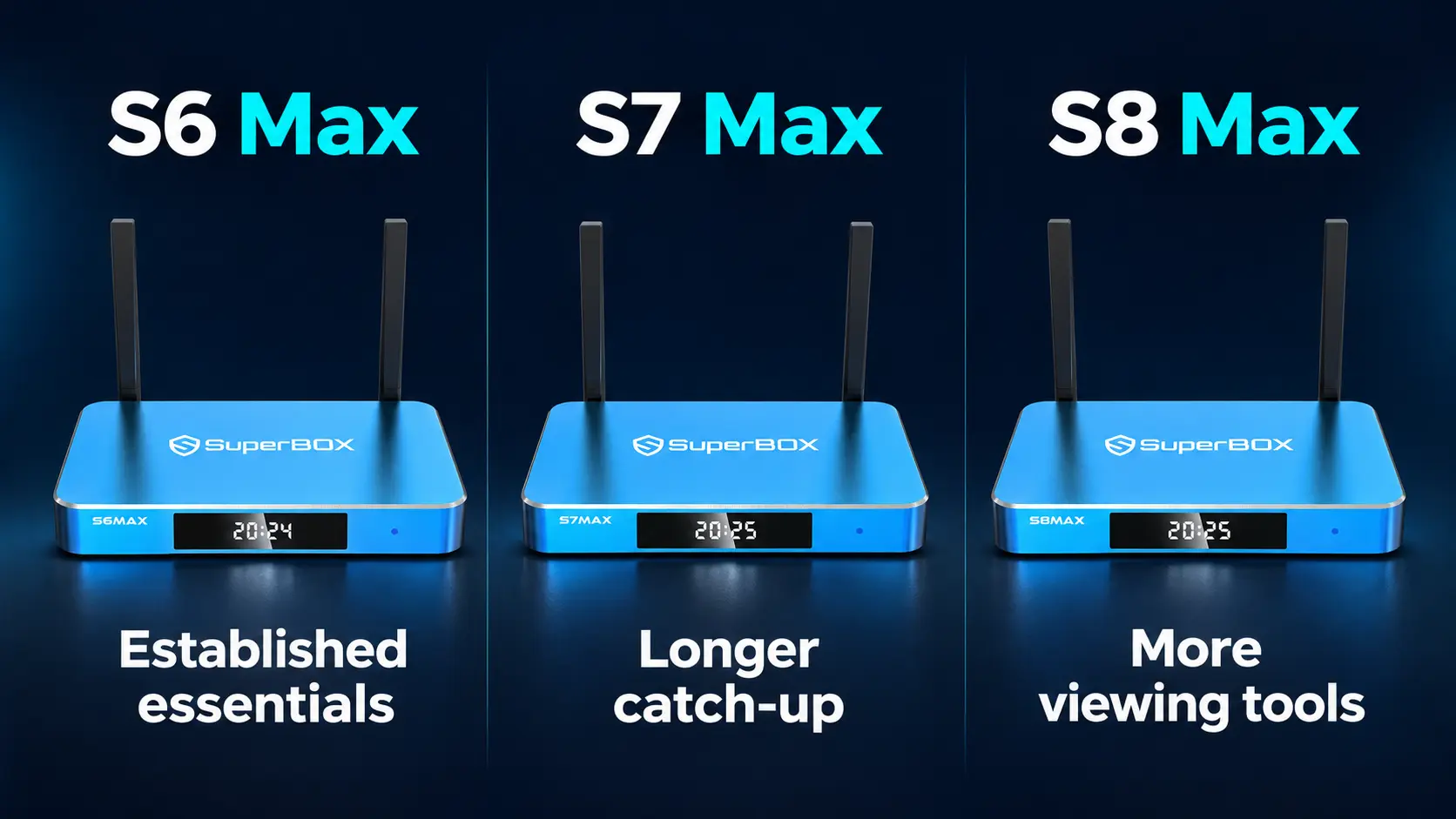
Understand the SuperBox names before comparing prices
In “SuperBox S8 Max,” S8 identifies the generation and Max identifies the model within that generation.
S6 and S7 each have Pro, Max, and Ultra options in this comparison. S8 expands the selection to Pro, Plus, Max, and Ultra. The generation affects the available interface and viewing features; the model affects storage and, especially within S8, additional capabilities and accessories.
An Ultra from an earlier generation is therefore not automatically a more suitable purchase than a newer Max. S7 Ultra gives you 128GB and an illuminated remote. S8 Max has 64GB but brings the S8 viewing tools and dedicated NFL app. Which advantage matters depends on how you use the television.
Start by choosing the functions you want. Then compare storage and the price difference between the remaining models.
S6 vs S7 vs S8 at a glance
The biggest practical changes are easier to understand when the generations sit together.
| Decision point | S6 Pro, Max and Ultra | S7 Pro, Max and Ultra | S8 Pro, Plus, Max and Ultra |
|---|---|---|---|
| Internal storage choices | 32GB, 64GB, 128GB | 32GB, 64GB, 128GB | 32GB, 64GB, 64GB, 128GB |
| RAM | 4GB | 4GB | 4GB |
| Operating system | Android 12 | Android 12 | Android 12 |
| Listed network connections | WiFi 6 and Gigabit Ethernet | WiFi 6 and Gigabit Ethernet | WiFi 6 and Gigabit Ethernet |
| Advertised Time Shift window | Up to eight hours on supported programming | Up to seven days on supported programming | Up to seven days on supported programming |
| Interface | Earlier generation layout | Redesigned interface and browsing | Updated S8 interface and viewing tools |
| S8 built-in Recorder | Not part of the S6 feature set | Not the S8 built-in Recorder | Included across S8; external USB storage required |
| S8 Multi-Viewing and PiP | Not the S8 feature set | Not the S8 feature set | Supported; viewing scope differs by model |
| Power connection | Round DC connector | Type-C | Type-C except S8 Plus, which uses round DC |
| Main reason to consider it | Continue using a box that meets your needs | Compare lower prices and larger-storage options | Buy newer viewing features and choose their scope |
WiFi 6 and Gigabit Ethernet are already listed for S6. Moving to S7 or S8 should be justified by the features you gain, rather than an assumption that every older model has slower network ports.
The Time Shift row describes the advertised rewind feature. It should not be read as a promise that every channel has an archive, or as a description of every separate Playback app function.
What stays familiar across the generations?
SuperBox connects to a television through HDMI and uses your internet connection for streaming. You can keep a suitable television and change the box that supplies the entertainment interface.
The main app roles are straightforward: Blue TV is for live television, while Blue VOD is for on-demand movies and series. Playback and Backup TV serve different viewing needs within the compatible app system.
SuperBox’s current offer includes 2,000+ live channels through Blue TV and a broad Blue VOD library, free to use after purchasing compatible hardware. Those core apps do not require separate monthly subscriptions. That makes SuperBox attractive for households replacing recurring cable television charges with an upfront device purchase.
You still need internet, and any optional paid services you keep have their own charges. Compare the television costs you can actually remove; our explanation of SuperBox’s monthly fees and ongoing costs helps separate those expenses.
Within the S8 lineup, buying a higher model changes features and convenience rather than purchasing a separate premium Blue TV channel package. Max and Ultra add the dedicated NFL app and broader supported Multi-Viewing. These are different from the ordinary single-channel lineup.
Check the names of your essential channels in the SuperBox channel list before choosing around an assumed package difference.
SuperBox model and price comparison
These are the prices displayed on SuperBox TV Box Store’s product pages when checked on November 11, 2026, in US dollars. The three S6 listings were marked out of stock. Treat their prices as reference listings, rather than currently available purchase offers; check each product page for availability before ordering.
| Model | RAM / internal storage | Listed price | Main comparison point |
|---|---|---|---|
| SuperBox S6 Pro | 4GB / 32GB | $299 | Earlier generation, smallest storage – Out of stock |
| SuperBox S6 Max | 4GB / 64GB | $299 | Earlier generation with 64GB – Out of stock |
| SuperBox S6 Ultra | 4GB / 128GB | $299 | Earlier generation with 128GB – Out of stock |
| SuperBox S7 Pro | 4GB / 32GB | $305 | Lower listed entry price than S8 |
| SuperBox S7 Max | 4GB / 64GB | $339 | Lower-cost 64GB alternative |
| SuperBox S7 Ultra | 4GB / 128GB | $381 | 128GB and a backlit remote |
| SuperBox S8 Pro | 4GB / 32GB | $359 | Essential tier and core S8 features |
| SuperBox S8 Plus | 4GB / 64GB | $379 | Standard tier with 64GB |
| SuperBox S8 Max | 4GB / 64GB | $399 | High tier, broader Multi-Viewing and NFL app |
| SuperBox S8 Ultra | 4GB / 128GB | $449 | Premium tier, 128GB and backlit remote |
Notice that the generations overlap in price. S7 Ultra is only $18 below S8 Max in this snapshot, although it has twice the internal storage. That makes the real decision extra storage and an illuminated remote versus the newer S8 functions.
Compare the extra purchase cost with the feature gained
The price gap can be more helpful than the standalone price. At these listed amounts, moving from S7 Max to S8 Max costs $60. Moving from S7 Pro to S8 Pro costs $54. These are one-time hardware differences, so ask whether the newer functions are worth that amount to your household.
A buyer comparing S7 Ultra and S8 Max faces a different trade: paying $18 more moves into S8 while reducing internal storage from 128GB to 64GB. Someone who wants recording and broader simultaneous viewing may prefer that exchange. Someone who needs the larger internal app space and illuminated remote may value the S7 package more.
Include any accessory you actually need. For manual recording, add a compatible USB drive if you do not already own one. For a wired network connection, allow for an Ethernet cable if necessary. Compare the complete setup rather than treating the box price as the whole project.
SuperBox TV Box Store is an authorized retailer serving customers in the US and Canada. If you are comparing two close options, use the website live chat to explain your current model, main viewing habits, and budget. That gives our team something useful to recommend around. You can also read who we are and verify our authorization.
What does each generation add to daily viewing?
S6: keep it when the essentials still work for you
S6 established the combination of live television, on-demand viewing, voice control, parental controls, and an advertised eight-hour Time Shift feature. Pro has 32GB, Max has 64GB, and Ultra has 128GB.
For someone already using an S6 successfully, its age alone is not a reason to replace it. If you mostly watch one program at a time and have no need to create recordings or follow simultaneous supported views, your present routine may still be satisfactory.
The more useful upgrade trigger is a specific frustration: you regularly miss the catch-up window, want an easier interface, or would use a viewing function that belongs to S8.
For new buyers, an unavailable S6 listing is mainly a reference point. Compare the newer models you can order rather than building a purchase decision around an old price that cannot currently be checked out.
S7: longer catch-up and an updated everyday interface
S7’s advertised seven-day Time Shift window is a meaningful step beyond S6’s eight-hour feature for supported programming. It can matter if work, family plans, or different schedules make watching live difficult.
The interface was also redesigned, with updated browsing and presentation. Its Type-C power connection and USB-C plus USB 3.0 arrangement are practical changes from the S6 layout.
S7 Ultra adds 128GB and an included backlit voice remote. If those conveniences are your priorities, compare its price with S8 Max instead of assuming the newer generation wins every individual specification.
S7 is a value choice when it provides the routine you want for less money. The trade-off is that you are not buying the full S8 feature set described below.
S8: more control over how you watch
S8 adds an updated interface, built-in manual recording, and supported Multi-Viewing and Picture-in-Picture. These features change what you can do during a viewing session.
For example, a sports viewer can consider supported simultaneous broadcasts rather than repeatedly switching between them. Someone who wants to create a saved recording can use the S8 Recorder with external USB storage. A household moving from an older layout can set up a new daily routine around the S8 interface.
Pro and Plus provide an entry into the generation. Max and Ultra expand the supported Multi-Viewing scope and include the dedicated NFL app. This is where choosing the exact S8 model becomes important.
The S8 differences that matter most
All four S8 models include the generation’s core features, but their viewing scope and physical connections differ.
| Feature | S8 Pro | S8 Plus | S8 Max | S8 Ultra |
|---|---|---|---|---|
| Internal storage | 32GB | 64GB | 64GB | 128GB |
| Performance tier | Essential | Standard | High | Premium |
| Multi-Viewing | Supported PPV and ESPN | Supported PPV and ESPN | Full supported channels | Full supported channels |
| Dedicated NFL app | No | No | Yes | Yes |
| Manual Recorder | Yes | Yes | Yes | Yes |
| USB connections | USB-C + USB 3.0 | USB 2.0 + USB 3.0 | USB-C + USB 3.0 | USB-C + USB 3.0 |
| Power | Type-C | Round DC | Type-C | Type-C |
| Included backlit remote | No | No | No | Yes |
The performance labels identify the lineup’s tiers. They are not measured loading-time percentages or a claim that Premium runs a certain number of times faster than Essential.
S8 Plus is the connection exception: it uses round DC power and USB 2.0 plus USB 3.0. S8 Pro, Max, and Ultra use Type-C power. Use the equipment supplied for the exact model.
The complete four-model S8 comparison goes deeper into these differences if you have already chosen S8 and only need to settle on a version.
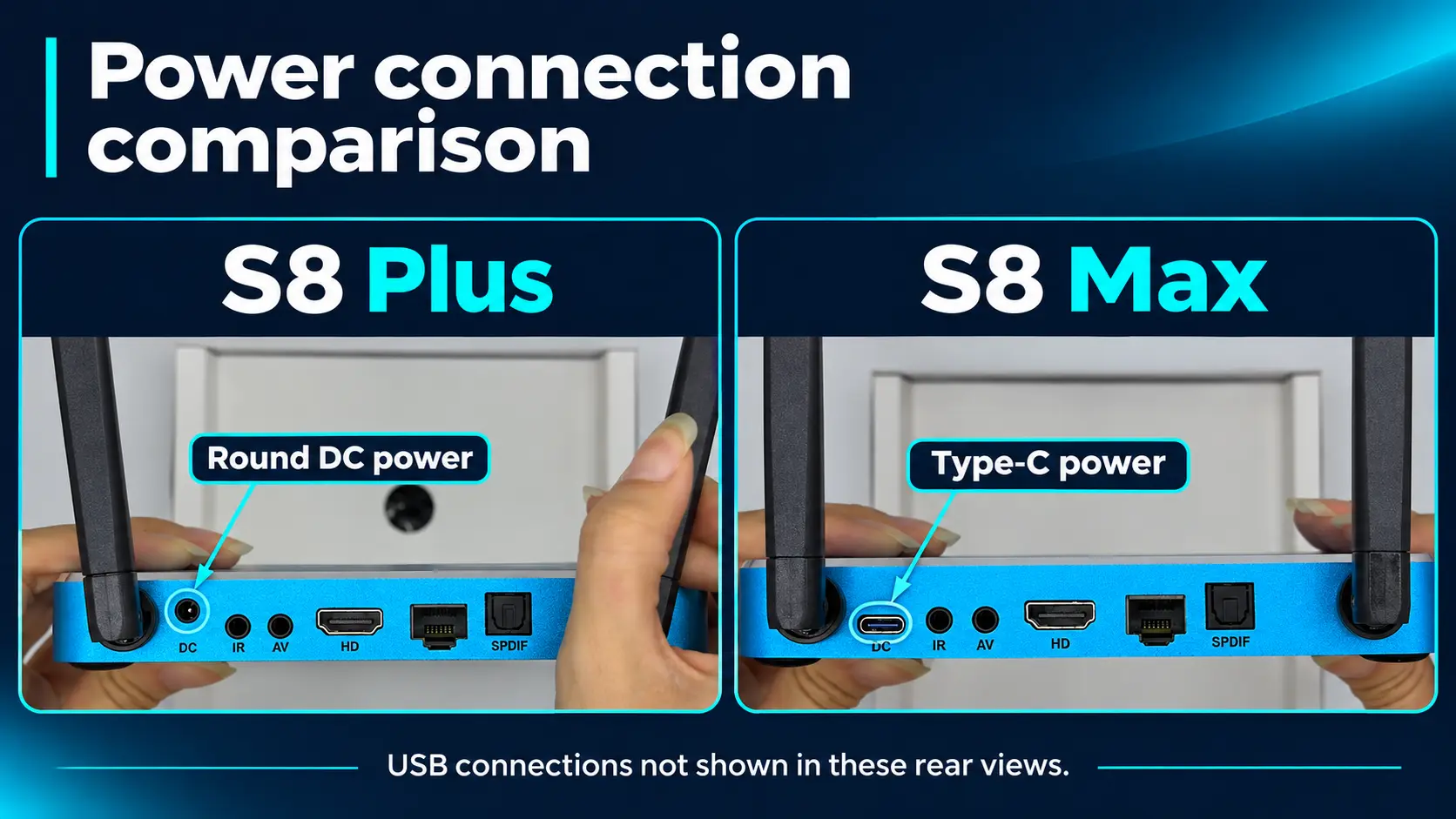
Why the same 64GB does not make Plus and Max equivalent
At the checked prices, S8 Max costs $20 more than Plus. Both have 64GB, but Max adds the High performance tier, broader supported Multi-Viewing, the dedicated NFL app, and the Type-C connection layout.
For a household interested in those viewing features, the extra purchase cost has a clear purpose. If your budget stops at Plus and its supported viewing scope meets your needs, its 64GB still offers more internal room than Pro.
Why Ultra costs more than Max
S8 Ultra costs $50 more than Max in this snapshot. It retains Max’s listed viewing advantages while adding the Premium tier, 128GB, and the included illuminated remote.
Those benefits are easy to connect to everyday use: more room for compatible apps and files, and buttons you can see during evening viewing. Ultra is a strong premium choice for a frequently used main television. Max remains our recommendation when its 64GB and standard voice remote suit the household.
Compare features by what you want to do
Watch more than one supported broadcast
Multi-Viewing and PiP are reasons to move toward S8 when you want simultaneous supported views on one television. PiP uses a smaller inset picture; other supported layouts arrange views differently.
Choose around the actual broadcasts you follow. Pro and Plus have the designated PPV/ESPN Multi-Viewing scope. Max and Ultra expand to full supported channels. That limitation describes simultaneous viewing, not a smaller ordinary Blue TV channel package on Pro and Plus.
The dedicated NFL app is another listed Max/Ultra difference. It should be considered separately from the live channel list; it is not an included subscription to NFL+ or Sunday Ticket.
Create a recording you can play later
All four S8 models list built-in recording. External USB storage is required, and recordings are saved there. Moving from 64GB Max to 128GB Ultra does not increase the capacity of that external drive.
The established Recorder workflow uses manual Start and Stop. If scheduled recording is essential to your purchase, ask about its current availability before ordering rather than assuming it works like a cable DVR.
Our S8 Recorder instructions explain how to create a recording and check that the saved file plays. Recording support depends on the program and application.
Catch up without creating your own recording
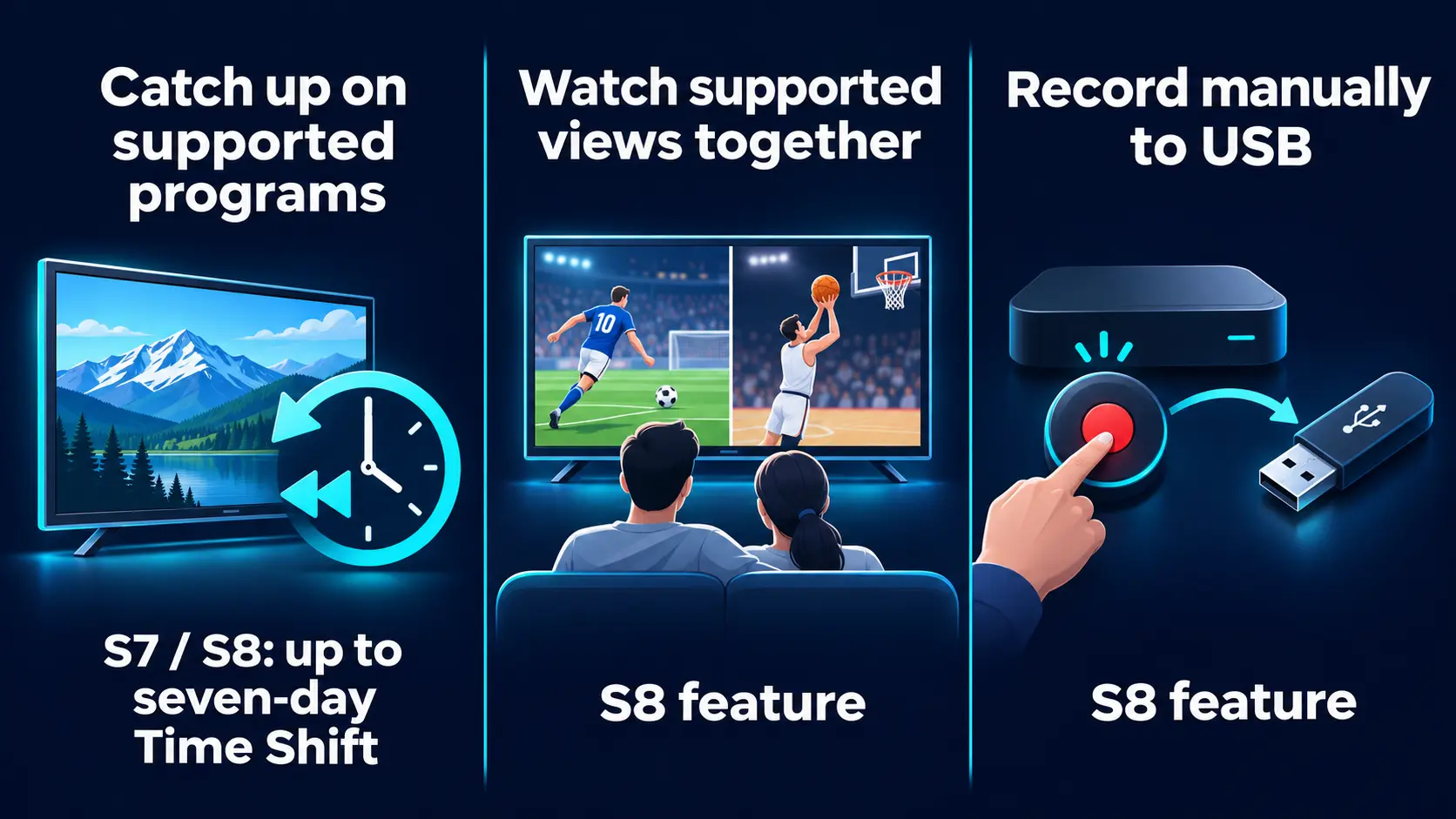
Time Shift and Playback access eligible earlier programming. They serve a different purpose from starting a recording yourself.
If you mainly want to revisit something you missed, first check whether the program supports catch-up. S7’s longer advertised Time Shift window may already answer that need. S8 is more compelling when you also want its manual Recorder or simultaneous-view tools.
How much storage should influence your choice?
Storage is space inside the box for compatible apps, their data, and local files. RAM is working memory used while the system and apps operate. The models compared here list 4GB RAM, even though storage varies.
32GB can suit a focused setup using the main entertainment apps. 64GB provides more internal room for a broader app collection. 128GB is useful when you know you want more space and prefer managing it less often.
Some advertised capacity is used by the system, so the available amount will be lower than the headline figure.
Choose around what will be installed or saved. Watching more channels through the same live-TV app does not require a higher-capacity model just because the lineup is large. Likewise, an on-demand library does not mean every movie is stored inside your box.
For example, S7 Ultra can make sense if internal space is your priority, whereas S8 Max can be the better fit if you want simultaneous supported viewing and manual USB recording. Neither storage figure answers the entire comparison.
Check the room before paying for an upgrade
All three generations list WiFi 6 and Gigabit Ethernet. Where the box sits can still affect the connection: a television tucked behind thick walls may benefit from a suitable wired connection even when the box already supports a modern wireless standard.
If your current device works well beside the router but struggles in the bedroom, investigate that difference before buying a replacement for the same spot. A generation upgrade and a network improvement solve different problems.
The television matters, too. A good existing HDMI screen can remain part of the setup. Compare the viewing features you want from the box, and assess picture quality through the actual display and program you watch. Spending more on internal storage will not change the panel resolution of that television.
Is it worth upgrading your current SuperBox?
If you already own an S6
Write down the tasks your current box cannot do in the way you want. “I would like to follow two supported broadcasts” is a stronger reason to consider S8 than “my model number looks old.”
If the main issue is the limited advertised Time Shift window, compare the newer catch-up experience. If you want to create your own recordings, concentrate on S8 and include external storage in the budget.
For a working S6 used on a guest-room television, replacing it may be less urgent than upgrading the main living-room setup.
If you already own an S7
S8 is most persuasive when you will use its new functions. An owner who enjoys S7’s current viewing routine and seven-day supported Time Shift may have less to gain from a change made only for the generation number.
A regular sports viewer who wants broader simultaneous viewing has a more specific reason to compare S8 Max and Ultra. Someone wanting to save supported programming manually has a reason to consider any S8 model.
Before replacing a box because a stream buffers, check the network and whether the problem affects one program or several apps. A new device cannot repair every internet or source issue.
If you are moving from cable for the first time
Begin with your essential channels and normal evening routine. Then choose the model that makes that routine comfortable.
At $399, S8 Max provides a useful middle ground for a first main-TV purchase. Ultra is worth considering when its illuminated remote and extra internal space are benefits you will use regularly. Pro and Plus keep the initial cost lower while retaining the core S8 functions.
Test the new setup with the people who use the television before changing your existing TV service.
FAQs about comparing SuperBox models
Is S8 the newest generation in this comparison?
Yes. S8 is the newest of S6, S7, and S8, launching on September 13, 2026. This comparison covers the four S8 options: Pro, Plus, Max, and Ultra.
Does 6K decoding mean I need a 6K television?
No. Decoding capability and television resolution are different. S8 supports 4K playback with suitable content and a compatible display; its H.265 decoding specification reaches 6K at 60fps. That does not turn a 4K screen into a native 6K display.
Will buying a second box change the model I need?
Choose each box for the television and person using it. A main-room Ultra and a simpler secondary-room model can be sensible. Multi-Viewing on one screen does not create independent viewing on another television; a separate box is the straightforward choice for each independent SuperBox setup.
Can I reuse the power adapter from my older box?
Use the supplied power equipment for your exact model. S6, S7, and S8 do not all use the same connector, and a plug fitting is not enough to establish compatibility.
Is an older Ultra always better than a newer Pro?
No. The older Ultra may offer more internal storage or an illuminated remote, while a newer Pro provides generation-specific functions. Compare the job you want it to do rather than treating the word Ultra as a universal ranking across generations.
Does the newer box require more expensive internet?
The generation name alone does not determine your internet bill. Consider connection quality where the box sits, other household usage, and the content you watch. If the current plan works well, a new SuperBox does not automatically require a faster paid tier.
Where do Supreme and S7 Prime fit?
They are separate models outside this ten-model comparison. Supreme is discontinued, while S7 Prime is a distinct S7 option. If comparing an older listing or bundle, use its exact model and package information rather than applying an Ultra or Max specification to it.
Make the final choice with one viewing routine
Before ordering, describe a normal evening in one sentence: “I work late, catch up on supported broadcasts over the weekend, and want to make occasional manual recordings.” Then check which shortlisted model handles that routine with the conveniences you want.
For a new main-room purchase with room to explore the broader viewing tools, S8 Max is our starting recommendation. Choose Ultra when the Premium tier, 128GB, and backlit remote justify the additional $50. Compare S7 when lower upfront cost or its 128GB option serves you better, and keep a working S6 when it still meets the job.
If you buy directly from SuperBox TV Box Store, contact customer@superboxtvboxstore.com for order questions or technical help. Include the exact model and what you want to achieve, so we can help with the decision or setup that matters to you.
The article was updated on:
