
Knowledge SuperBox
Best Android TV Boxes for Live Sports in 2026





A close game is a poor time to discover that your new TV box lacks the app you need, struggles with the room’s WiFi, or cannot show the two channels you wanted together.
If you are comparing top-rated Android TV boxes for live sports, start with how you watch. A single-game viewer using a particular subscription service needs a different setup from someone who wants channel browsing, catch-up viewing, and two supported broadcasts on one television.
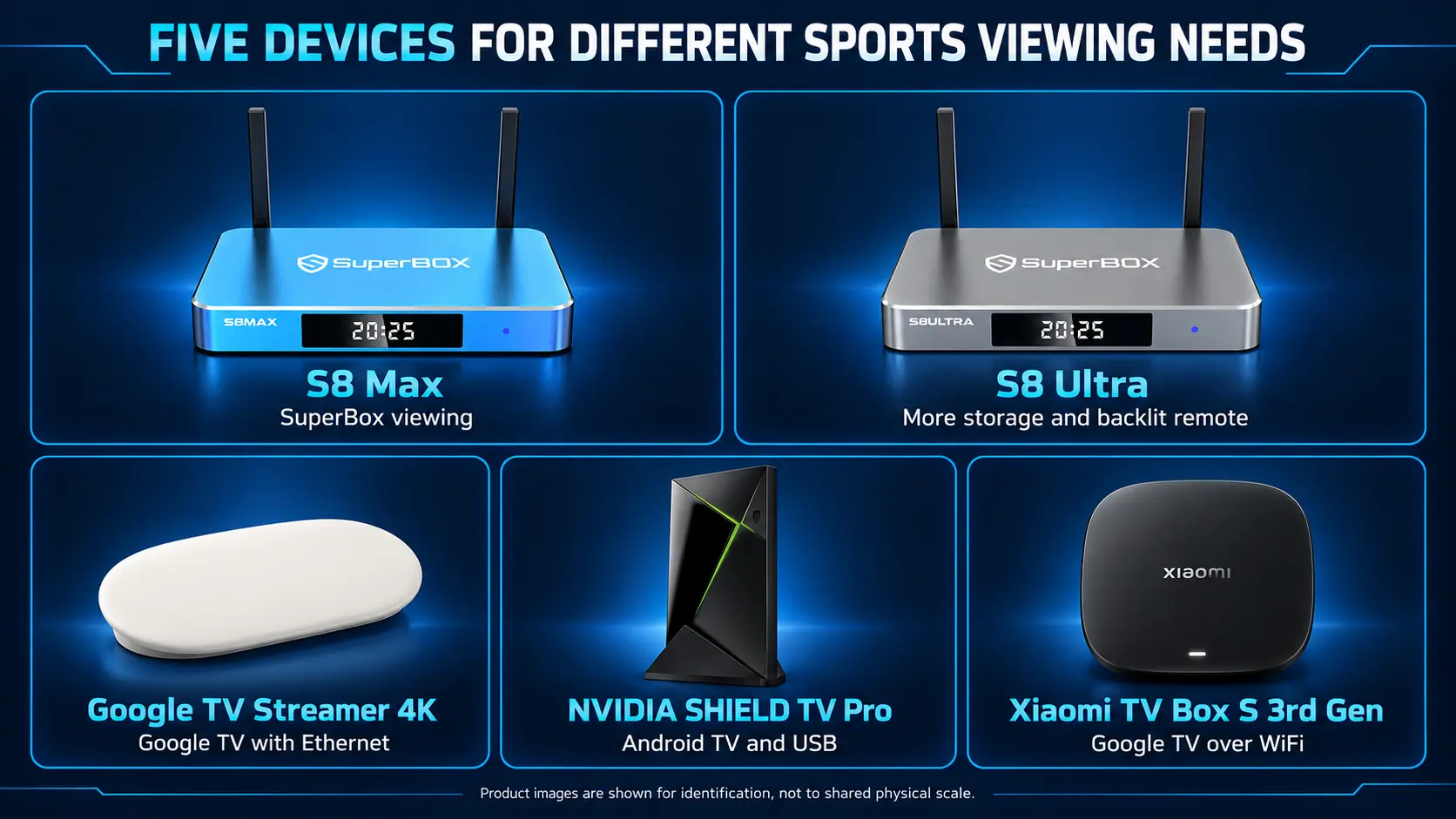
Our shortlist includes SuperBox S8 Max, SuperBox S8 Ultra, Google TV Streamer 4K, NVIDIA SHIELD TV Pro, and Xiaomi TV Box S 3rd Gen. S8 Max is our preferred SuperBox balance of features and cost; Ultra adds storage and an illuminated remote. The other choices serve different app and connection needs.
These are editorial recommendations based on published capabilities and viewing needs, rather than a ranking of customer star scores. Below, you can compare the differences that matter before buying.
Start with the sport and service you want to watch
Write down the competitions you follow, the country where you watch, and the channels or services carrying them. Then check the exact device against the provider’s current requirements.
This matters because “Android TV box” is often used loosely. Google TV Streamer and Xiaomi use Google TV, while SHIELD uses Android TV. SuperBox uses its own Android-based entertainment environment. An Android version number alone does not establish support for every sports app.
For example, Fubo’s device requirements specify certified Android TV devices and a minimum operating-system version. That is a more useful compatibility check than assuming any Android box will work.
Also check whether your chosen plan includes the competition, local broadcasts, and features you want. US and Canadian availability can differ. Confirming those details first helps prevent buying good hardware for the wrong service.
Once the viewing source is settled, compare the connection, remote, and screen layout. Those are the differences you will encounter during every game.
Compare five Android and Google TV boxes for sports
| Device | Published memory and storage | Built-in Ethernet | Main reason to shortlist it |
|---|---|---|---|
| SuperBox S8 Max | 4GB / 64GB | Gigabit | SuperBox apps and broader supported Multi-Viewing |
| SuperBox S8 Ultra | 4GB / 128GB | Gigabit | Max-level viewing scope with extra storage and a backlit remote |
| Google TV Streamer 4K | 4GB / 32GB | Gigabit | Google TV setup for compatible sports subscriptions |
| NVIDIA SHIELD TV Pro | 3GB / 16GB | Gigabit | Android TV with USB connections and home-media flexibility |
| Xiaomi TV Box S 3rd Gen | 2GB / 32GB | No RJ45 port | Compact Google TV option for a room with reliable WiFi |
Memory and storage figures are manufacturer-listed capacities; some internal storage is used by the system. They do not establish a speed ranking between different processors and software platforms.
For sports, use this table to identify a suitable starting point. A built-in Ethernet port is useful if you can run a cable to the router. Extra storage matters when you install more compatible apps or keep local files. Neither specification decides which games your service carries.
SuperBox prices mentioned below were checked on November 2, 2026, in US dollars. Confirm current pricing and availability on the linked product pages.
SuperBox S8 Max for a flexible sports and live TV routine
The SuperBox S8 Max is our main recommendation for buyers who want the SuperBox experience without moving to the highest-priced S8. Its current product listing shows $399 USD, with 4GB RAM, 64GB storage, WiFi 6, and Gigabit Ethernet.
Its particular appeal is broader supported Multi-Viewing, including Picture-in-Picture and Multi-Screen layouts. When two supported channels overlap, you can keep an eye on both instead of repeatedly changing channels.
The dedicated NFL app is another listed feature. Choose around the programming you actually want, rather than treating an app name as confirmation of every fixture.
Max also makes sense when sports share the television with news, movies, and family viewing. Its voice remote and S8 home interface give the household a common starting point.
Choose S8 Max when: supported two-channel viewing and everyday SuperBox entertainment matter more than having the largest internal storage capacity.
SuperBox S8 Ultra for a main room used every evening
The SuperBox S8 Ultra is listed at $449 USD. It combines 4GB RAM and 128GB storage with WiFi 6, Gigabit Ethernet, the dedicated NFL app, and the same broader supported Multi-Viewing scope as Max.
Its clearest everyday upgrades are the larger internal storage and included backlit voice remote. Illuminated buttons can be convenient when the room is dim and you want to find a control without turning on a lamp.
Ultra is the Premium performance tier within the S8 lineup; Max is High. Those labels do not establish a measured percentage advantage or a guarantee against buffering.
You do not need Ultra solely to reach the broader Multi-Viewing tier. Max already offers that scope.
Choose S8 Ultra when: you want the premium S8 configuration for regular living-room use and will value its remote and storage advantages. The current $50 step up is easier to justify when those conveniences serve your routine.
Google TV Streamer 4K for a subscription-based sports setup
Google TV Streamer’s specifications list 4GB memory, 32GB storage, Gigabit Ethernet, and up to 4K HDR at 60 frames per second. Its wired connection is a useful feature for a television near the router.
Consider it when you already know which compatible sports services you want and prefer to organize them through Google TV. Check each provider’s device support and plan before purchasing.
Its hardware is separate from the subscriptions you choose. A box purchase does not pay for a live TV package.
Choose Google TV Streamer when: your decision starts with supported subscription apps and you want Google’s streaming device with built-in Ethernet. It is a different entertainment approach from buying a SuperBox for its dedicated viewing apps.
NVIDIA SHIELD TV Pro for sports alongside a home media collection
NVIDIA SHIELD TV Pro lists a Tegra X1+ processor, 3GB RAM, 16GB internal storage, Gigabit Ethernet, and two USB 3.0 ports. Its remote includes motion-activated backlit buttons.
It is worth considering if the same television handles compatible streaming apps and a larger home-media setup. The USB connections are useful when external storage is part of that arrangement.
NVIDIA also lists AI-enhanced upscaling. That feature does not turn the original broadcast into native 4K or change a provider’s game coverage.
The main trade-off here is internal capacity: system software uses part of the listed 16GB. Plan around the apps you need rather than treating the processor name as the whole purchase decision.
Choose SHIELD TV Pro when: wired networking, Android TV, and external-media flexibility belong in the same setup.
Xiaomi TV Box S 3rd Gen for a room with good WiFi
Xiaomi TV Box S 3rd Gen lists Google TV, 2GB RAM, 32GB storage, and video decoding up to 4K at 60 frames per second. Xiaomi’s official FAQ confirms WiFi 6 and no built-in RJ45 Ethernet port.
That makes it a candidate when your compatible sports apps are available and the television already has a dependable wireless connection.
Check local availability, warranty coverage, and the regional product version before ordering. A price from another country may not reflect what you will pay in the US or Canada.
Choose Xiaomi when: a compact Google TV box fits the room and WiFi works well where the box will sit. If you specifically want a built-in wired connection, compare the other four options first.
Compare multiview within the app you will use
Multi-viewing features are especially useful when kickoffs overlap, but the word “multiview” does not mean the same thing on every platform.
On SuperBox S8, Picture-in-Picture keeps one supported channel large with a smaller secondary window. Multi-Screen gives two supported channels similar space. These layouts suit different habits: following your own team closely, or monitoring two events of equal interest.
For the controls, use the S8 Picture-in-Picture and Multi-Screen guide. If you are still choosing a model, the sports viewing comparison focuses on that decision.
Other services have their own implementations. YouTube TV’s current multiview help describes up to four eligible channels on one screen and a builder on supported TVs and streaming devices. Its content choices and subscription conditions belong to YouTube TV.
That is why a useful comparison asks which channel combinations work in your chosen app. Do not assume that a layout available inside one service will combine arbitrary streams from other apps.
Also consider readability. From across the room, a score graphic that looks clear at full size may become difficult to read in a smaller panel. Test your preferred layout at your normal viewing distance.
What makes SuperBox different for sports fans
SuperBox combines dedicated live TV viewing with other entertainment in the same device family. Blue TV is advertised with 2,000+ live TV channels, while Blue VOD provides movies and series for times when the game is over.
The core supported apps are free to use after purchasing compatible hardware. There is no separate monthly SuperBox equipment subscription. That can make the setup attractive for cord-cutters who want to reduce recurring television expenses.
Your savings depend on the cable charges and subscriptions you can actually remove. Internet remains necessary, and paid third-party services keep their own terms. The ongoing-cost breakdown separates those expenses.
For specific channels, consult our companion channel guide and confirm current availability. Channel names alone do not establish the rights or availability of every event.
Are S8 Pro or Plus enough?
They can be, particularly for viewers who mostly watch one channel. Pro has 32GB and the Essential performance tier; Plus has 64GB and the Standard tier.
Their advertised Multi-Viewing scope covers supported PPV and ESPN channels. Max and Ultra expand that to full supported channels and add the dedicated NFL app. This distinction concerns Multi-Viewing access, not the entire single-screen lineup.
Use the four-model S8 comparison if you want the lower-priced options alongside Max and Ultra.
SuperBox TV Box Store is an authorized retailer serving the US and Canada. Before ordering, tell us the sports, channel pair, and room setup you have in mind. For purchases made directly from our store, email our team for order or technical assistance.
Look beyond 4K when judging live sports picture quality
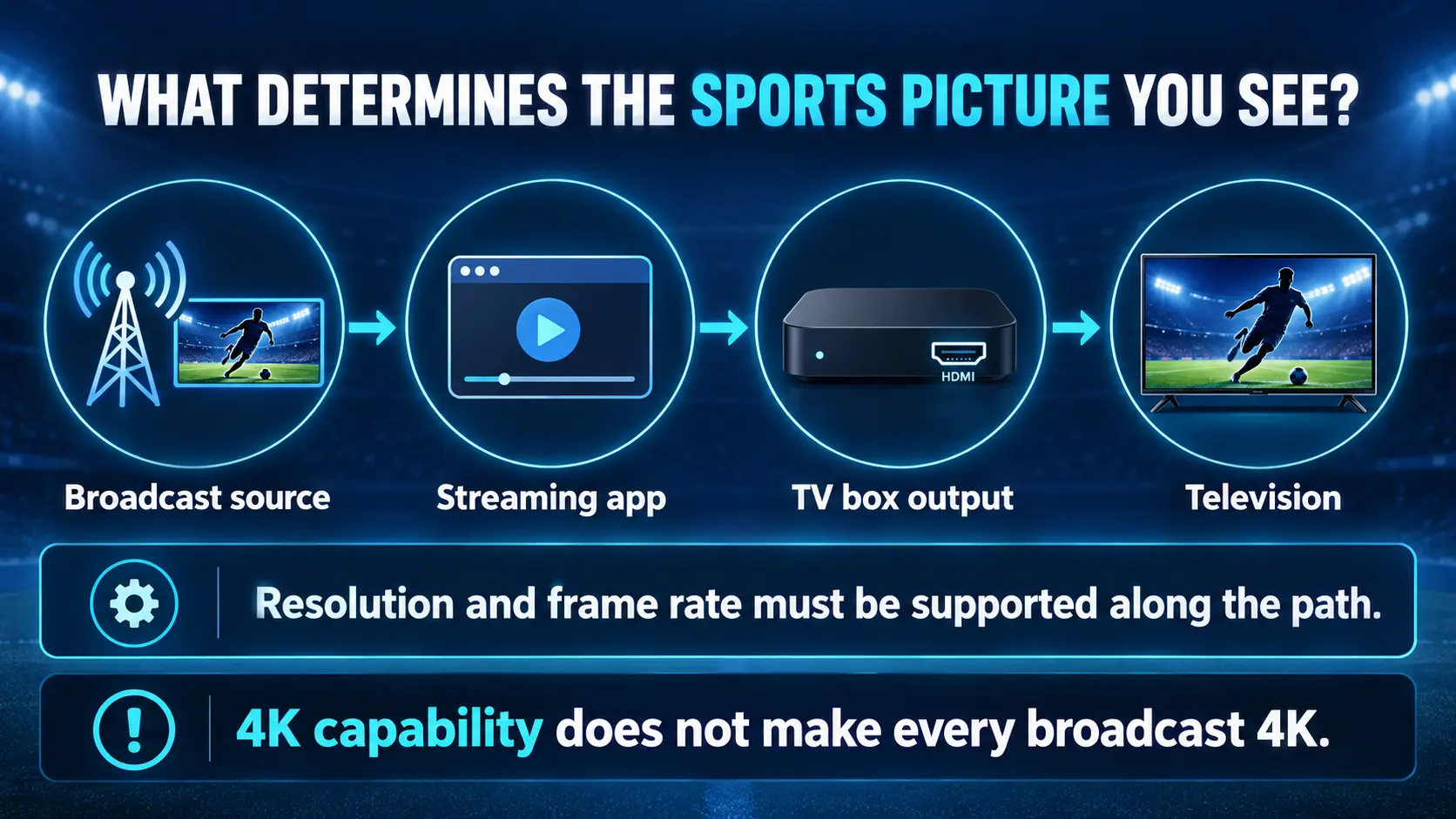
A higher resolution can make fine details easier to see, but motion and consistency matter during a match. A clear scoreboard is less useful if the picture keeps stopping.
For compatible broadcasts, 50 or 60 frames per second can represent fast motion more smoothly than a lower-frame-rate source. The source, app, device, and television must support the relevant format. A 60Hz output setting alone does not make a 30fps feed into native 60fps sports.
Likewise, 4K support means the box can handle suitable content; it does not mean every channel broadcasts in 4K. A good HD feed can be a perfectly sensible way to follow a game.
SuperBox S8 supports 4K playback and H.265 decoding up to 6K. Those describe different capabilities. The decoding specification is not a promise of native 6K sports output.
Our resolution guide for TV boxes explains the display choices. When evaluating a setup, watch camera pans, players moving across the field, the scoreboard, and lip sync during studio coverage. Judge the actual program you use, rather than the largest resolution printed on a box.
Give the box a connection suited to live viewing
If the router is nearby, Ethernet is worth trying. It removes the wireless link between the box and router from the connection path, though it cannot fix a provider outage or an unavailable stream.
For WiFi, check the room itself. A speed result near the router does not describe reception behind a television at the other end of the house. Avoid enclosing the box in a crowded cabinet, and consider what else shares the network when a game is on.
The relevant test is a normal viewing session at the television, including any second view you intend to use. Two supported streams can place different demands on the connection from one.
For S8, start with the WiFi and Ethernet connection instructions. If reception varies across the house, use the separate WiFi improvement guide.
You do not need to buy the largest advertised broadband plan simply because a box has Gigabit Ethernet. The port describes the local connection capability, not a mandatory internet subscription speed.
Check how you will catch up on missed action
Live viewing, catch-up, and recording serve different needs. If you often arrive home after kickoff, consider how your chosen app handles the program after it airs.
SuperBox offers Playback for eligible programming, with up to seven days on supported channels. That can be useful when a relevant broadcast is available after its original time.
S8 also offers manual recording to connected external USB storage. You start and stop it yourself; the recording does not use the advertised 64GB or 128GB internal capacity. Treat it as a manual Start and Stop workflow.
Use the S8 recording instructions before buying storage for that purpose. If scheduled recording while you are away is essential, check the exact service’s current DVR capabilities.
Do not choose Ultra’s larger internal storage solely to keep more USB recordings. Buy that upgrade for the internal apps, files, and remote conveniences you will use.
Frequently asked questions
Which Android TV box should I buy for live sports?
Start with the service or channel you want. S8 Max is our preferred SuperBox balance for broader supported Multi-Viewing. Google TV Streamer, SHIELD TV Pro, and Xiaomi are alternatives for compatible app-based setups, with different connections and storage.
Is S8 Ultra better than S8 Max for watching two games?
They share the same broader supported Multi-Viewing scope. Ultra adds 128GB internal storage and a backlit remote; Max has 64GB. Choose Ultra for those conveniences rather than assuming you need it to unlock the wider viewing tier.
Does an Android TV box include every sports subscription?
No. Hardware and service access are separate. SuperBox’s core supported apps are free after compatible hardware purchase, while outside paid subscriptions retain their own charges and requirements.
Can an Android TV box guarantee no buffering?
No device can guarantee that. The home connection, app, and streaming source all affect playback. Wired networking can help with a weak wireless link, but it does not solve every cause of an interruption.
Will more storage make a live game stream faster?
More internal storage gives you room for apps and files. It does not increase your broadband speed or the frame rate of the broadcast. Compare supported viewing features and connection quality alongside capacity.
Should I replace an existing box that already shows my games well?
You may not need to. Upgrade when a specific limitation matters, such as missing app support, no convenient wired connection, or a viewing layout you want. Identify that limitation before spending money.
Make the final choice before game day
Choose the box that supports the way you actually follow sport. A viewer with a settled subscription app may be best served by a compatible Google TV or Android TV device. A household wanting SuperBox’s dedicated apps and broader supported two-channel viewing should start by comparing S8 Max and Ultra.
Then run a full rehearsal: open the right channel, check the picture and sound, try the second view if needed, and confirm that everyone knows the basic remote controls.
The best purchase is the one that makes the next match easier to watch.
The article was updated on:
