
Knowledge SuperBox
How to Watch the Super Bowl Free on a Smart TV in 2027





You can watch the Super Bowl free on a Smart TV without returning to a cable contract. For U.S. viewers preparing for Super Bowl LXI on Sunday, February 14, 2027, the clearest confirmed subscription-free broadcast route is ABC through an antenna, where your home receives the local station.
SuperBox gives existing owners another route to check: the available live TV feed carrying the game. Its supported core viewing apps do not add a monthly subscription, and S8 Max and S8 Ultra also offer a dedicated NFL app as part of the SuperBox viewing experience.
“Free” describes the viewing charge after the necessary equipment is in place. An antenna or SuperBox may involve an upfront purchase, and internet streaming still requires internet service.
Start with the correct broadcaster, then prepare the connection and app you intend to use.
Which channel has the Super Bowl in 2027
Super Bowl LXI will air on ABC and ESPN. Disney+ has also announced a livestream for its U.S. subscribers.
ESPN’s Super Bowl announcement confirms the February 14 date and ABC/ESPN coverage. Its Disney+ announcement adds that streaming option.
For a free over-the-air picture, look for your local ABC broadcast station. For SuperBox, look for an available ABC or ESPN feed carrying the event and confirm its program listing.
ABC News and ABC News Live are news services. Their names should not be treated as confirmation that you have found the ABC game broadcast.
This guide focuses on U.S. viewing options. Broadcast rights, regional availability, and app access differ outside the U.S.
Choose your Smart TV viewing route
| Route | What you need | Viewing cost | What to check |
|---|---|---|---|
| ABC over the air | Compatible TV tuner and suitable antenna | No monthly broadcast subscription | Local ABC reception |
| Supported SuperBox live TV | Compatible SuperBox, HDMI connection, and internet | Core app viewing free after device purchase | Current channel and game listing |
| S8 Max or Ultra NFL app | Applicable S8 model and supported app availability | No separate monthly SuperBox app fee | Available event listing |
| Disney+ | Supported device and subscription | Paid service; useful if already subscribed | U.S. account and event access |
| Eligible live TV service | Plan carrying the relevant broadcast | Subscription or eligible trial terms | Local lineup, renewal cost, and device support |
For a single evening, an antenna may already provide what you need. For live television, movies, series, and sports throughout the year, SuperBox offers a broader entertainment setup.
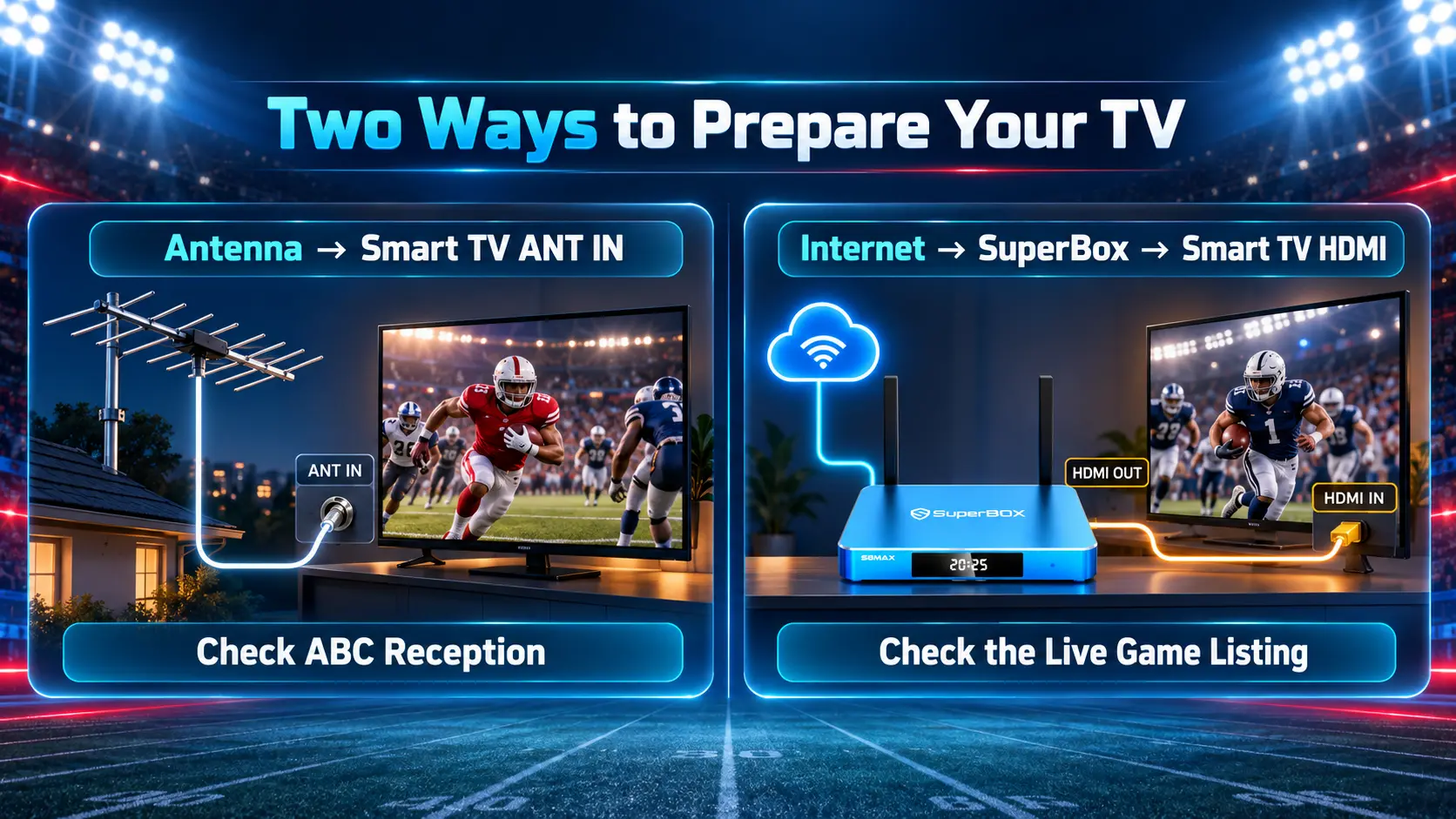
How to watch the ABC broadcast free with an antenna
A suitable antenna can receive local broadcast television without a monthly cable or streaming subscription.
First, check the ABC station serving your address. Reception depends on the transmitter, terrain, building, antenna, and placement. AntennaWeb helps you assess antenna options.
Then prepare the TV:
- Connect the antenna’s coaxial cable to the television’s antenna input.
- Select the TV’s broadcast source, rather than an HDMI input.
- Open channel setup and run the antenna or over-the-air scan.
- Locate the local ABC station.
- Watch long enough to check picture and sound stability.
On supported Samsung TVs, the relevant controls include Broadcasting → Auto Program → Air. Follow your model’s manual; menu names vary. Samsung’s channel-scan instructions explain its process.
Once reception works, the over-the-air broadcast itself does not require internet. Test it before game day so you have time to address a weak signal.
How to find the Super Bowl broadcast on SuperBox
SuperBox runs its apps on the external box and sends the picture to your Smart TV through HDMI. Your television can remain on that input while you use the SuperBox remote.
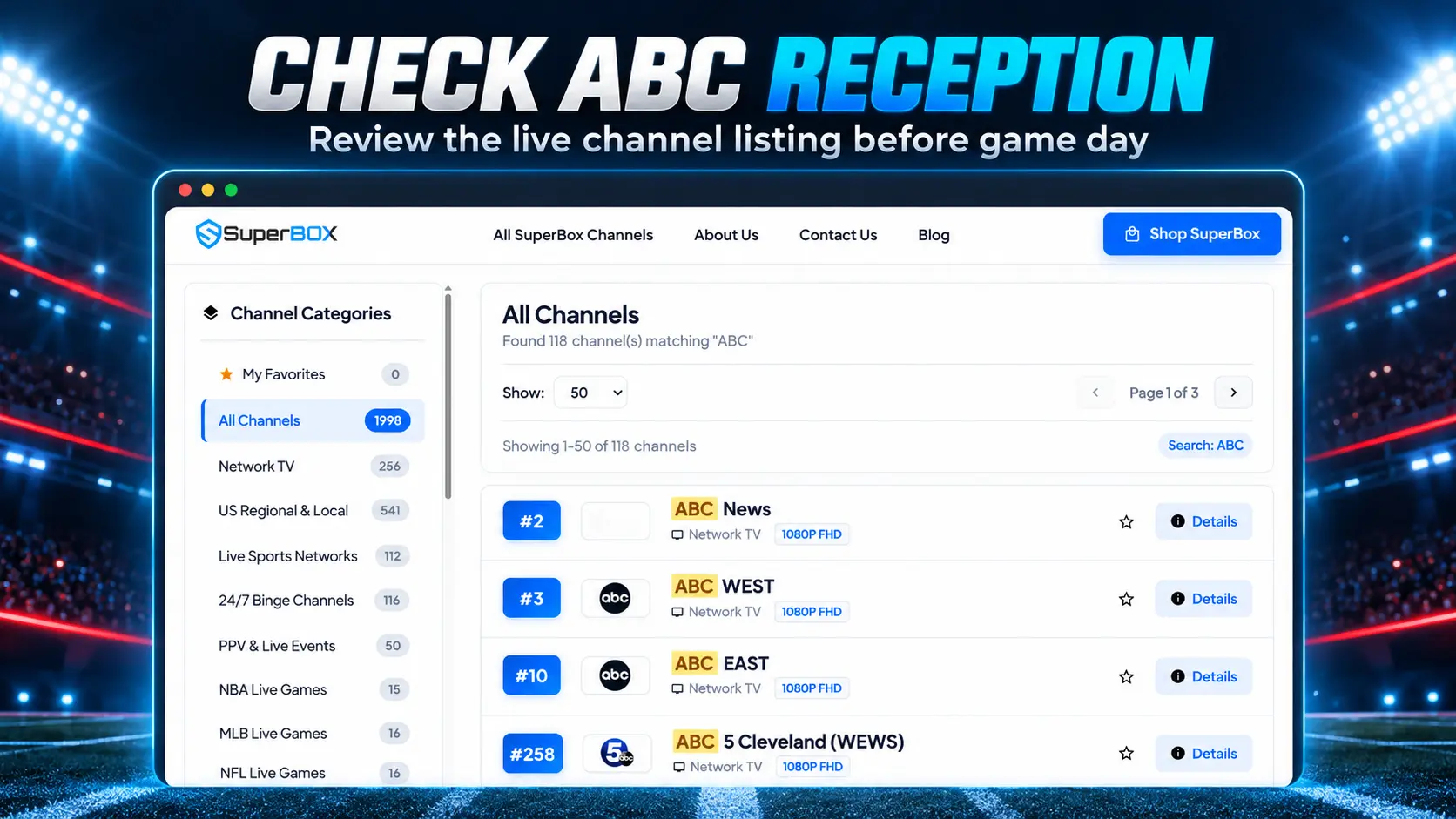
For the 2027 game, ABC and ESPN are the relevant broadcaster names to check. Our companion SuperBox Channel List lists ABC East, ABC West, sports channels, and event categories, with search tools to help locate a feed.
Use that guide as a starting reference, then confirm the current program on your actual device. Channel names, numbers, and event availability can change.
Prepare Blue TV and confirm the game
- Connect SuperBox to a compatible HDMI input and select it on the TV.
- Connect the box to working WiFi or Ethernet.
- Install the supported viewing apps from the device’s internal App Store.
- Open Blue TV and search for the broadcaster carrying the game.
- Check the electronic program guide for the Super Bowl event.
- Test the channel’s picture and sound, then save it in Favorites if useful.
- Return before the broadcast starts and confirm that the selected feed is showing the event.
This is the subscription-free core-app route for SuperBox owners: when the game is available on a supported live feed, watching that feed does not add a separate monthly viewing fee.
Our Blue TV guide explains channel search, Favorites, and the program guide. Use the app installation guide if an app or shortcut is missing.
Keep the TV input and viewing app clear
The television’s own home screen and the SuperBox home screen are separate.
If you press the TV remote’s Home button, you may return to the television’s native apps. Select the SuperBox HDMI input again to continue using the box.
For households adding a box to a working Smart TV, our TV box and Smart TV guide explains that arrangement.
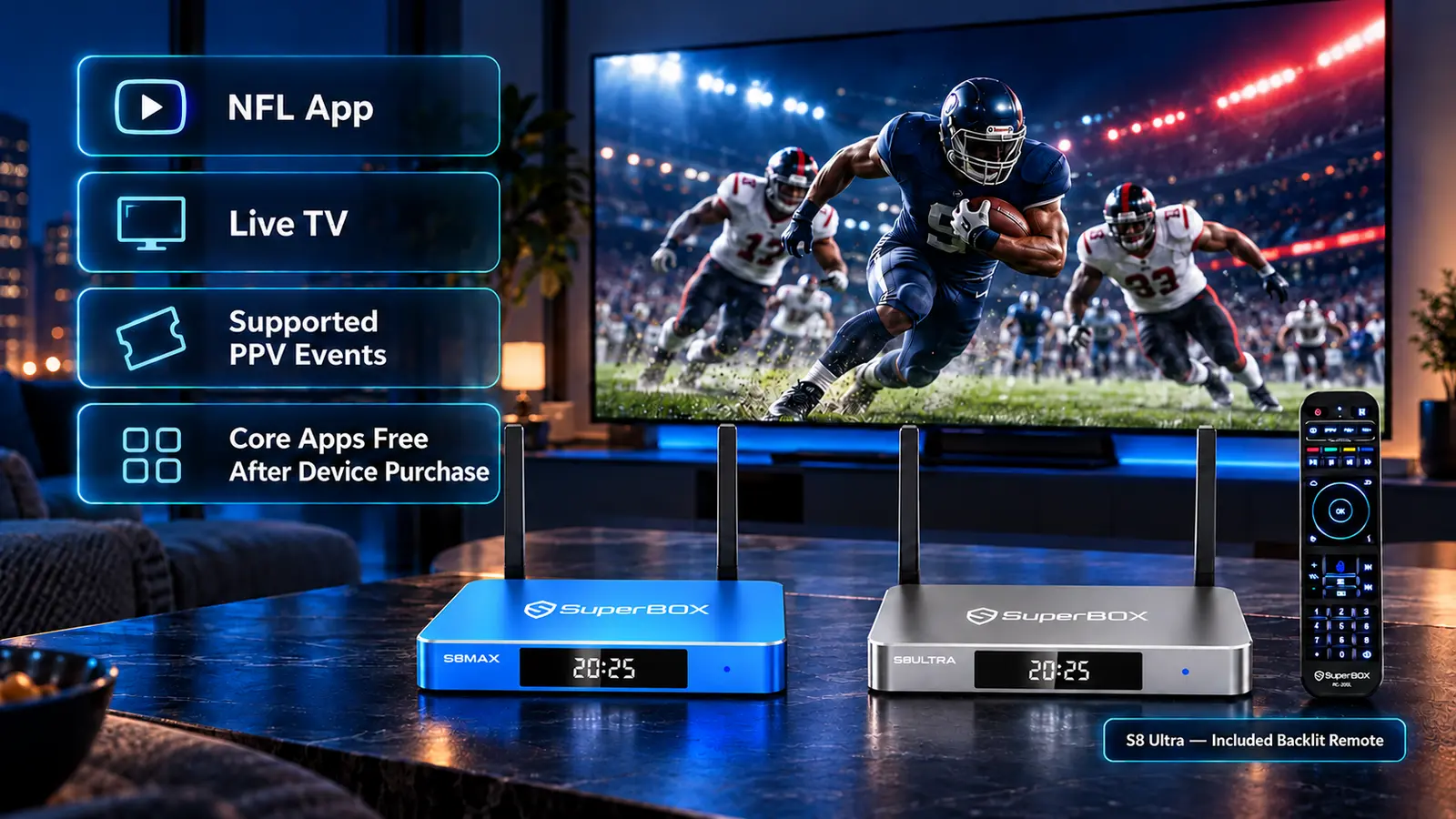
S8 Max and S8 Ultra include a free NFL app option
If you are buying a SuperBox with football in mind, S8 Max and S8 Ultra are the S8 models that include the dedicated NFL app. The app is offered within SuperBox’s subscription-free viewing experience, without a separate monthly app fee.
That gives football fans an additional place to check supported programming alongside Blue TV’s live channels. Open the NFL app and review its current event selection before relying on a particular game.
This app feature is separate from the paid NFL+ subscription service, which has its own device and content rules. The NFL says live local and primetime regular-season and postseason games through NFL+ are limited to phones and tablets and cannot be cast to a TV. Its device guidance explains those limits.
For Smart TV viewing, prepare the route that actually provides the game on your television.
Compare S8 Max and Ultra for everyday sports viewing
| Feature | S8 Max | S8 Ultra |
|---|---|---|
| Current price in USD | $399 | $449 |
| Internal storage | 64GB | 128GB |
| Performance speed | High | Premium |
| Dedicated NFL app | Yes | Yes |
| Multi-Viewing scope | Full supported channels | Full supported channels |
| Included backlit remote | No | Yes |
Prices checked October 27, 2026.
S8 Max gives you the NFL app and broader supported Multi-Viewing at a lower purchase price.
S8 Ultra adds more internal space, the Premium performance tier, and a backlit remote that can be convenient for evening viewing.
Both can suit a household that wants sports and general entertainment beyond Super Bowl Sunday. Our S8 sports buying guide covers choosing by viewing style.
More sports and supported PPV events without extra viewing charges
SuperBox’s appeal extends beyond one football game. Its advertised lineup also includes PPV event feeds, which can provide supported events without a separate event-purchase charge through the SuperBox offering.
Check the PPV Events and Sports sections in our channel guide for the event you want, then verify the listing on your box. A category name does not guarantee every boxing card, fight night, or other premium event.
The Super Bowl itself is a broadcast event rather than a PPV purchase. The PPV selection matters for other sports occasions throughout the year.
SuperBox also provides a broad everyday entertainment choice: Blue TV offers 2000+ live channels, while Blue VOD provides a large library of movies and series. The core apps are free after a compatible device purchase; internet and optional paid memberships remain separate costs.
If that selection replaces cable services or equipment rentals you no longer need, it can help reduce recurring TV spending. Compare your actual programs and bills before canceling anything. Our cord-cutting guide helps with that decision.
Do not confuse a free download with free game access
A streaming app can be free to install while requiring a paid account to watch its live sports.
Disney+ has announced the 2027 Super Bowl for U.S. subscribers. If you already subscribe, check the app on your supported TV. It is a subscription route rather than a free-to-everyone broadcast.
Similarly, verify any live TV trial’s eligibility, channels, billing date, and renewal price before signing up. An offer available today may differ by game day.
Older app instructions can also be misleading. ABC discontinued its standalone mobile and connected-TV app in September 2024, as its app notice explains. Use current supported viewing options rather than searching for an obsolete download.
Test your Smart TV setup before kickoff
Spend a little time checking the complete viewing route:
- Picture: Confirm that menus and score graphics fit the screen.
- Sound: Test the TV or soundbar from the seats guests will use.
- Network: Play a stream where the box will sit, with normal household activity.
- Controls: Practice opening the intended channel and returning to it.
- Backup: Keep another appropriate viewing route available if practical.
Follow our WiFi optimization guide and S8 network setup instructions if needed.
If playback fails, test another channel or title to identify whether the problem affects one item or the wider connection. The buffering guide helps with further checks.
A 4K-capable Smart TV and box do not make every feed native 4K. Choose supported settings and assess the actual picture. Our resolution guide explains the display choices.
Frequently asked questions
Can I watch the Super Bowl free on a Smart TV in 2027?
Yes, the ABC broadcast can be received without a monthly subscription through a suitable antenna where reception is available. Existing SuperBox owners can also check supported live TV feeds without an additional core-app viewing fee.
What channel should I look for?
ABC and ESPN are the announced U.S. broadcasters for Super Bowl LXI on February 14, 2027. Find the actual game feed; ABC News Live is a different service.
Can SuperBox show the game without a monthly subscription?
Yes. Supported live feeds in the core SuperBox offering do not require a separate monthly app subscription. Confirm that the current ABC or ESPN event listing on your box provides the game.
Do S8 Max and Ultra have an NFL app for free viewing?
Yes. Both offer the dedicated NFL app within the SuperBox viewing experience without a separate monthly app charge. Check its current supported events. NFL+ subscriptions have separate terms.
Can I watch other PPV events free on SuperBox?
Yes. The SuperBox lineup includes supported PPV event feeds without a separate event-purchase charge. Check the specific event in the current channel guide and on your device.
Do I need an antenna when using SuperBox?
No. SuperBox’s online viewing uses an internet connection and HDMI to the TV. An antenna is a separate option for receiving local ABC over the air.
Can I install Blue TV directly on my Samsung or LG TV?
Yes. In the SuperBox setup described here, the app runs on the SuperBox device. Connect the box by HDMI and select that TV input to use its apps.
Does free viewing include the halftime show?
The full live game broadcast is the route to check for the game’s halftime coverage. A highlights channel or a later replay may offer different content, so confirm you are watching the live presentation.
Choose SuperBox for game day and the rest of the year
Super Bowl Sunday may start the search, but the right entertainment setup should remain useful afterward.
SuperBox combines live television, movies, series, and supported sports events with core apps that do not add monthly subscriptions. Max and Ultra add the NFL app and broader supported Multi-Viewing for households that follow sports regularly.
SuperBox TV Box Store is an authorized retailer serving the U.S. and Canada. Verify code SP20250414002 at the SuperBox authorization website.
Explore S8 Max, S8 Ultra, or all SuperBox models. Use our companion channel guide to review the listed programming.
We value your experience before and after delivery. For any technical or order issue with a purchase made directly from superboxtvboxstore.com, email customer@superboxtvboxstore.com.
The article was updated on:
