
Knowledge SuperBox
SuperBox S8 Pro vs S8 Plus: Is the Extra Storage Worth It?





Start With What the Extra Storage Will Do for You
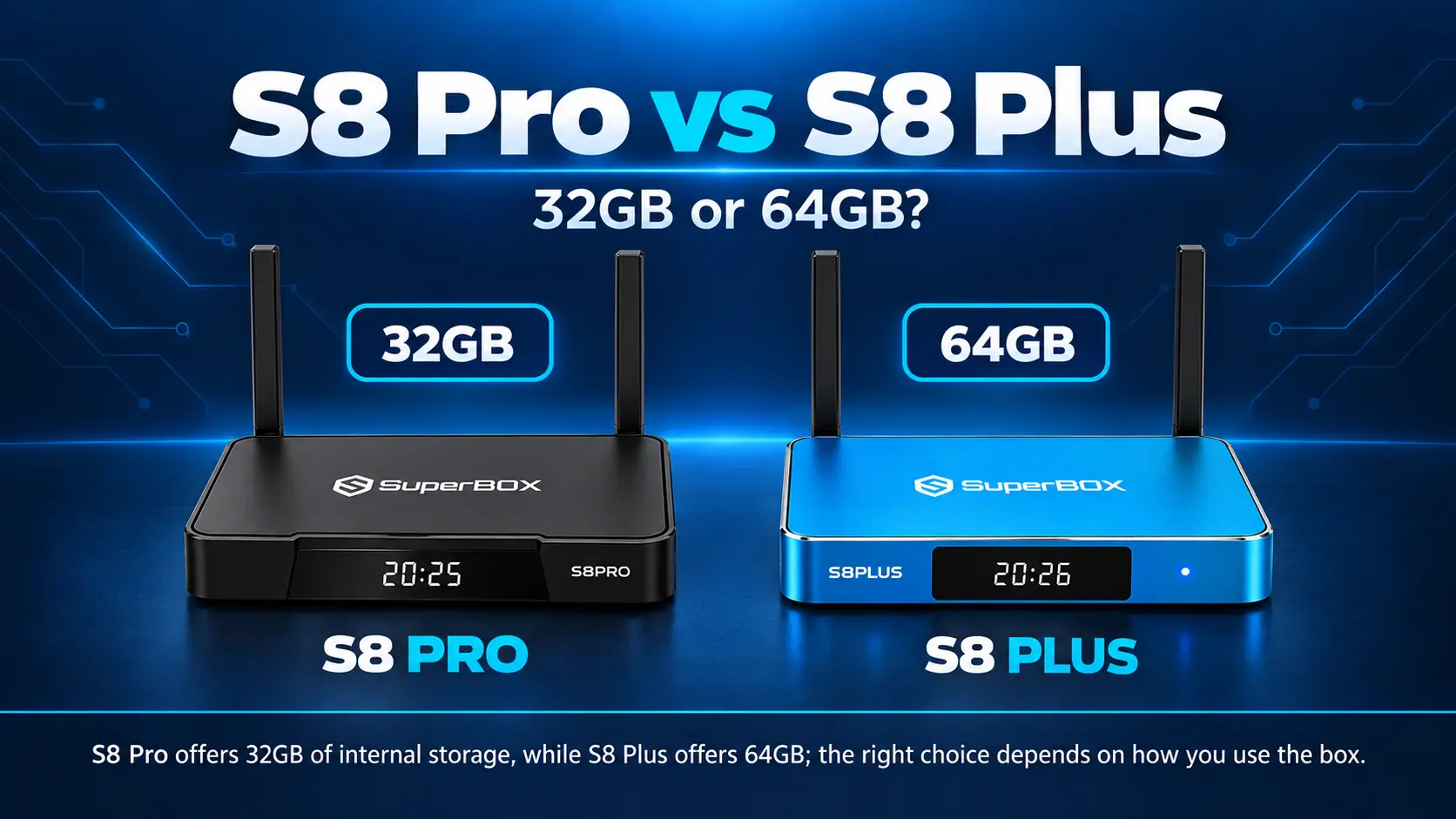
The SuperBox S8 Pro and S8 Plus make a natural comparison. Pro is the entry point into the S8 lineup, while Plus offers double the advertised internal storage without moving to the Max or Ultra viewing tier.
At SuperBox TV Box Store, the listings checked for this article show S8 Pro at $359 and S8 Plus at $379. That is a $20 difference between 32GB and 64GB.
Plus is worth considering if you want more room for compatible apps and their data. Pro remains a sensible choice for a focused streaming routine with a small app collection. Neither choice should be based on the expectation that internal storage holds your S8 recordings: recording requires USB storage on both.
There is another detail to check before buying. Pro and Plus use different USB and power connections, so Plus is not simply the same box with a larger capacity number. Here is how to choose around your home, your apps, and your budget.
SuperBox S8 Pro vs S8 Plus at a Glance
| Feature | SuperBox S8 Pro | SuperBox S8 Plus |
|---|---|---|
| Listed store price | $359 | $379 |
| RAM | 4GB | 4GB |
| Performance Speed | Essential | Standard |
| Advertised internal storage | 32GB | 64GB |
| USB connections | USB-C + USB 3.0 | USB 2.0 + USB 3.0 |
| Power connector | Type-C | Round DC plug |
| Multi-Viewing channel scope | Supported PPV and ESPN | Supported PPV and ESPN |
| NFL app listed for model | No | No |
| Voice-command remote | Yes | Yes |
| Included backlit remote | No | No |
| Core Blue TV, Blue VOD, Playback, Backup TV apps | Supported | Supported |
| Built-in recording | Manual recording to connected USB | Manual recording to connected USB |
| Network options | Wi-Fi 6 and Gigabit Ethernet | Wi-Fi 6 and Gigabit Ethernet |
| 4K playback | With compatible sources and equipment | With compatible sources and equipment |
Prices were checked on October 21, 2026. Confirm the current S8 Pro listing and S8 Plus listing before ordering.
The main trade-off is straightforward: Plus adds internal capacity, while Pro has the Type-C power and USB-C arrangement. Their listed core viewing access remains similar.
What Is the Difference Between 32GB Storage and 4GB RAM?
The numbers on a product page describe different things.
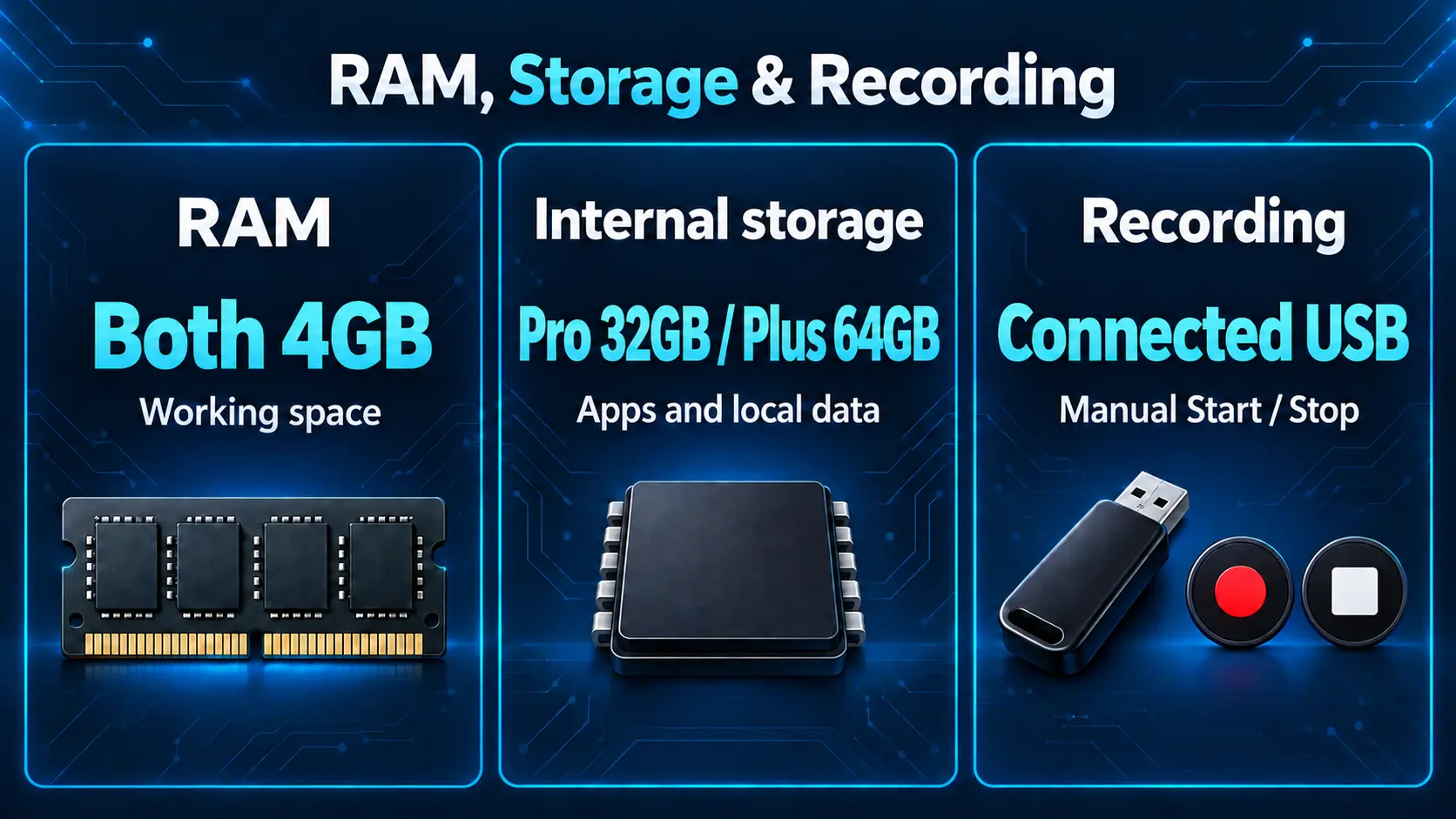
Internal storage keeps installed apps, app data, system files, and other files stored on the device. RAM provides working space for apps and the system while they run. Both models list 4GB RAM; choosing Plus doubles the advertised internal storage, not the RAM.
Think about a cupboard and a kitchen counter. The cupboard holds things you keep; the counter is where you work with them. A bigger cupboard can be useful without doubling the counter space.
Performance Speed is rated Essential on S8 Pro and Standard on S8 Plus. These are separate performance tiers from the storage specification. The 32GB and 64GB capacity figures describe how much the devices can store, rather than a fixed difference in loading speed.
Advertised Capacity Is Different From Available Space
The system and installed software occupy part of the storage. You will not receive the entire advertised 32GB or 64GB as empty space for your own files.
Plus offers an additional 32GB of advertised capacity, but you should not assume exactly 32GB more free space on every configured device. The installed software and its data affect what remains available.
For an existing box, the useful number is available space in its storage information, together with which apps or files use it. For a new purchase, your intended app collection is a better guide than an unsupported promise about a fixed number of apps.
When the Extra 32GB Is Useful
More capacity matters when you expect to keep more software or local data on the box. It is less significant when your habits remain focused on a few familiar viewing apps.
You Want a Broader Collection of Compatible Apps
A household may want several viewing services, a media player, and other compatible utilities. Each app has its own installation size and data needs, so there is no reliable universal app count for either model.
Plus gives you more capacity to accommodate that collection. The advantage is flexibility: you have less reason to choose between keeping two useful apps purely because of space.
Compatibility still matters. Extra storage does not make an unsupported app compatible with the device. List the apps you actually want before treating a larger installation library as a benefit.
Several People Use the Same Television
Different viewers often bring different preferences. One person uses a familiar live app, another follows a series, and someone else wants a separate compatible media tool.
If that describes your home, Plus is worth considering even when no single viewer needs a large app collection. You are choosing room for the household’s combined use.
Ask everyone which apps they would genuinely use. That simple conversation can reveal whether the extra capacity solves a real need or only sounds reassuring on the product page.
You Prefer More Room as Your Setup Develops
A first-time buyer may not know their final app collection yet. At the checked $20 difference, Plus can be a reasonable way to leave more internal space available as preferences develop.
That does not remove the need to manage storage. Keep useful apps, review files you no longer need, and avoid filling the box with downloads simply because capacity is available. The benefit is more flexibility, rather than unlimited space.
When S8 Pro Is Already Enough
Pro is a reasonable starting point when you mostly stream through a small group of apps and do not plan to keep many files internally.
Watching more hours does not necessarily mean you need more permanent storage. A person who streams the same familiar app every evening may have a simpler storage requirement than someone who regularly installs additional software.
The question is what stays on the box, not just how often the television is on. A longer series watched through an online app does not automatically mean storing the entire series internally.
A Dedicated Box for One Main Routine
For a bedroom, a second television, or a viewer who wants a small set of familiar choices, Pro may cover the job without paying for unused capacity.
You can still organize installed apps on the newer S8 Home interface. Our S8 shortcuts guide explains how to make regular choices easier to reach. A simpler daily routine comes from that setup, rather than capacity alone.
A Buyer Who Knows Their Priorities
Choosing Pro makes sense when you have checked your required apps and connections and know its capacity suits your plans. Keeping the initial cost lower is a valid reason to buy it.
Avoid buying either model based only on a label such as “entry-level” or “upgrade.” A well-matched Pro is a better purchase than paying for storage you never use. Equally, a buyer already planning a broader app collection has a clear reason to consider Plus.
Recording Is a Separate Storage Decision
Both Pro and Plus require a connected USB storage device for built-in recording. You start and stop the recording manually, and the file saves to USB. It does not use the box’s internal 32GB or 64GB capacity as its recording destination.
Therefore, choosing Plus does not by itself give you twice the recording time. For this function, the relevant storage is the available space on the connected USB device. Scheduled recording of future programs is not currently supported.
If recording is your main reason for comparing the two models, plan the USB storage separately and choose the box based on its other differences. Our S8 Recorder guide explains the manual workflow.
Playback is different again. It provides access to eligible previously aired programs rather than creating a personal USB recording. See our Playback app guide if that is the feature you intend to use.
Check the Ports Before Choosing Plus
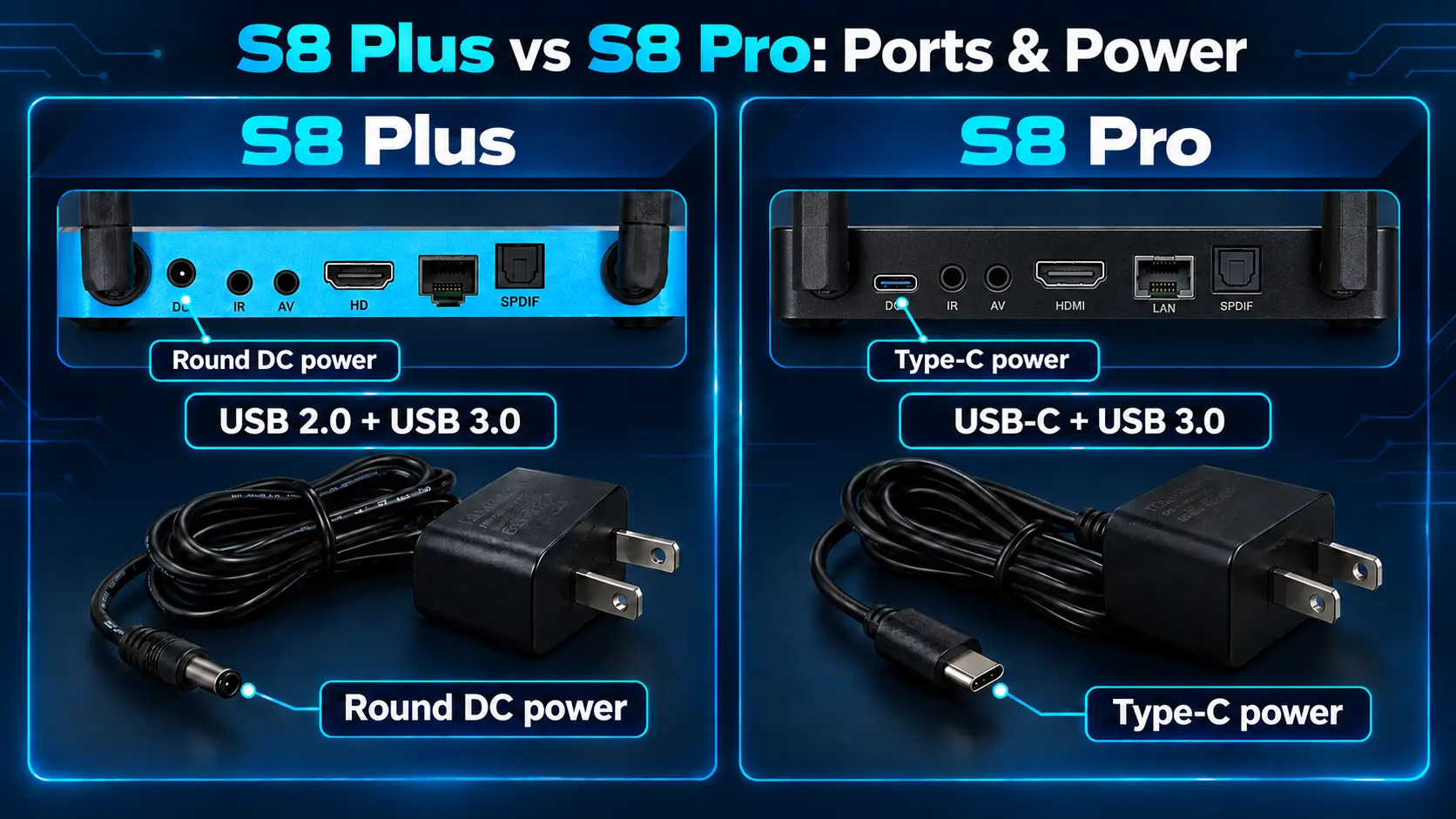
Storage is only part of this comparison. Pro has USB-C + USB 3.0 connections and Type-C power. Plus has USB 2.0 + USB 3.0 connections and a round DC power plug.
If you own accessories you want to use, check their connection requirements. Both models list USB 3.0, but their other USB connection differs. Do not assume that moving up in price preserves the exact same ports.
For power, keep each device with the adapter supplied for that model. This is particularly useful in a home with boxes in several rooms. A small label can prevent someone from mixing up the Plus adapter with the Pro equipment.
A connector shape alone is not enough to establish replacement-adapter compatibility. Use the correct supplied equipment or confirm the requirements before substituting another adapter.
The S8 Pro setup guide and S8 Plus setup guide cover their respective connections. Either can be straightforward to set up once you identify the correct model and cable.
What the Storage Upgrade Does Not Change
Pro and Plus share access to the core Blue TV and Blue VOD experience, plus Playback and Backup TV. SuperBox promotes 2,000+ live channels and varied media through its viewing apps, with selection subject to current availability. Plus should not be chosen on the assumption that its larger capacity automatically unlocks a different film catalog.
For everyday movie browsing, our Blue VOD guide explains the app. For live viewing, use the Blue TV guide.
Both models list Multi-Viewing for supported PPV and ESPN channels. Both omit the model-specific NFL app and the included backlit remote. Buying Plus for storage does not change those distinctions.
Both also offer Wi-Fi 6, Gigabit Ethernet, and 4K playback with suitable sources and equipment. A larger internal capacity is not a substitute for a reliable connection or suitable picture settings. Use the S8 internet setup guide if network setup is the issue you want to solve.
A Simple Way to Decide Whether Plus Is Worth It
Start with the apps and files you expect to keep, then check the connections you need.
| Your main requirement | A sensible direction |
|---|---|
| A small set of familiar streaming apps | Pro is worth considering. |
| A broader compatible app collection | Plus offers more internal capacity. |
| More room for a shared household’s app choices | Plus is the more flexible storage option. |
| More recording space | Plan USB storage separately; internal capacity is not the recording destination. |
| Type-C power and the listed USB-C connection | Pro has that arrangement; Plus uses different connections. |
| Broader Multi-Viewing or the NFL app | Compare Max rather than treating Plus storage as that upgrade. |
At the checked $20 difference, Plus is an appealing choice for a new buyer who expects to use the additional space. Pro remains sensible when 32GB suits the intended setup and its connections fit better.
If you already own a working Pro, replacing it is a different calculation. You would be buying another device, not simply paying the difference between two new models. Check your actual available space and needs before deciding whether replacement is justified.
When to Look at S8 Max Instead
If your reason for upgrading is broader supported Multi-Viewing or the NFL app, compare S8 Max. Its listing was $399 when checked: another $20 above Plus, with the same advertised 64GB capacity but a different viewing tier.
Keep that question separate from storage. Our complete S8 comparison explains the wider lineup if your priorities extend beyond Pro and Plus.
Frequently Asked Questions
Is SuperBox S8 Plus Worth It Over S8 Pro?
It can be worth the checked $20 difference if you want more internal room for compatible apps and local data. Pro offers 32GB and Plus offers 64GB. Check their different power and USB connections before choosing.
Does S8 Plus Have More RAM?
No. Both list 4GB RAM. Plus doubles advertised internal storage from 32GB to 64GB; it does not double working memory.
How Do Pro and Plus Compare on Performance Speed?
S8 Pro has an Essential Performance Speed rating, while S8 Plus has a Standard rating. Plus therefore moves up a performance tier as well as increasing internal capacity. The 32GB-to-64GB storage change should not be read as a fixed speed multiplier.
How Many Apps Fit on Each Model?
There is no single reliable count. Apps differ in size, their data can grow, and system files use part of the advertised capacity. Compare your intended apps and available space instead of relying on a fixed app-number promise.
Does Plus Store More Recordings Internally?
No. S8 built-in recording requires connected USB storage, manual Start/Stop, and saves files to USB. Neither the Pro’s 32GB nor the Plus’s 64GB is the recording destination.
Do Pro and Plus Have the Same Power Connector?
No. Pro uses Type-C power; Plus uses a round DC plug. Keep the correct supplied adapter with each device.
Does Plus Add the NFL App or Full Supported Multi-Viewing?
No. Both Pro and Plus list PPV/ESPN Multi-Viewing and omit the NFL app. Compare Max or Ultra if those additional viewing features are important.
Can I Use a USB Drive Instead of Buying Plus?
USB recording and compatible file storage are separate from built-in app storage. Do not assume that connecting a USB drive increases internal capacity or lets every app install there. Confirm the specific app and storage function before relying on USB as an alternative.
Choose the Capacity You Will Actually Use
The strongest reason to buy S8 Plus is straightforward: you want more internal space and are comfortable with its connection arrangement. For a small, focused app collection, S8 Pro offers the core experience at a lower upfront price.
Neither choice needs to be complicated. List your regular apps, check your accessories, and separate internal capacity from USB recording. That gives you a practical reason for the model you choose.
SuperBox TV Box Store is an authorized retailer serving customers in the US and Canada. Verify our status using SP20250414002 at the SuperBox authorization website.
If you want help choosing between Pro and Plus, contact our team with your television details and intended use. We can help you compare the relevant specifications before ordering, so you buy the storage and features that fit your home.
The article was updated on:
