
Knowledge SuperBox
How to Lower Your Cable Bill as a Senior: 9 Practical Ways to Save in 2026






Start with a smaller bill and a familiar way to watch
To lower a cable bill as a senior, review the latest statement, ask for a lower total price, remove services you do not use and check income-based internet assistance. If cable still costs too much, test an antenna or a streaming setup before canceling.
You do not have to make every change at once. A household that wants familiar controls might begin with a smaller cable package. Someone already comfortable using apps may be ready to switch. Both approaches can work if the final bill is lower and the programs you care about remain available.
The goal is a television setup you can afford and use comfortably. Here are nine practical steps, including a call script, a savings worksheet and a clear explanation of where SuperBox S8 can fit.
1 Read the whole bill before asking for a discount
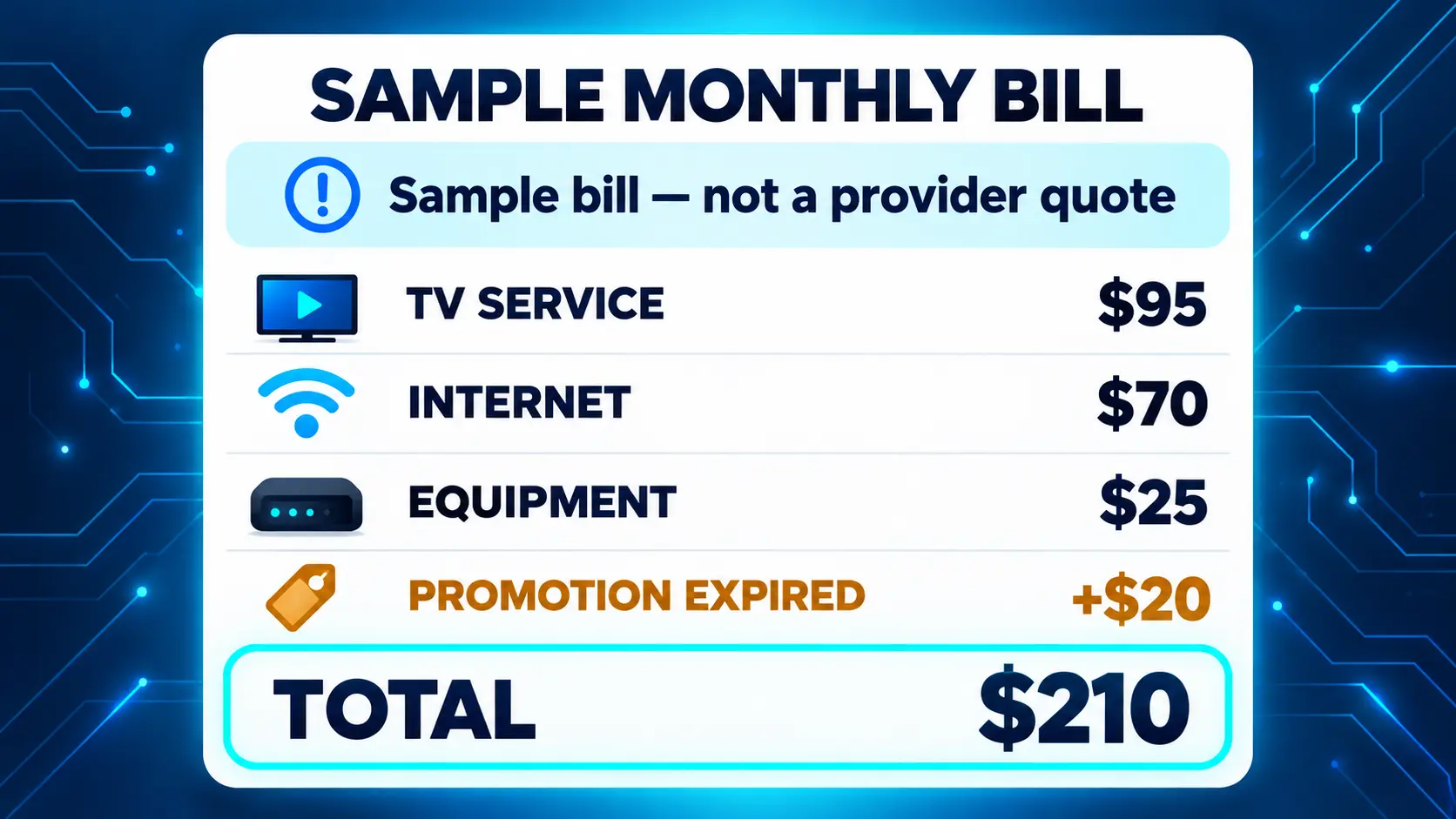
Have your newest statement and an earlier statement nearby. Compare the recurring total, then look for an expired promotion, an added service or a charge you do not recognize.
If TV, internet and a home phone appear together, separate those costs before deciding how much you could save. Canceling television does not automatically remove the entire bundle bill.
| Item on the statement | Question to ask |
|---|---|
| TV package | Is there a smaller package with my important channels? |
| Premium channels or add-ons | Which ones am I paying for separately? |
| Extra TV boxes | Are all these boxes still in use? |
| DVR service | Do I use the recording service enough to keep it? |
| Internet | What would internet alone cost at my address? |
| Home phone | Is it needed for calls, an alarm or a medical device? |
| Promotion or discount | When does it end, and what happens afterward? |
Some providers include certain charges in their advertised total; others itemize them. Use the actual amount due rather than adding a fee twice because an online article says it should be there.
Write down the current recurring total on paper. Keep one-time purchases and late charges separate so they do not distort the monthly comparison.
2 Call with a clear request and a written budget
Use the customer-service number on your statement or the provider’s official website. Have the account holder present if someone is helping you.
Ask for a review of your current plan. If the first representative cannot discuss better offers, ask whether a loyalty or retention team can help. You do not need to authorize cancellation to request a price comparison.
A simple cable bill negotiation script
“I am reviewing my household expenses and need a lower monthly bill. My current total is ____. I would like to keep these channels: ____. Please compare a lower-priced package, any offers for existing customers and the price of internet alone. What would my full monthly total be, and how long would that price last?”
Before agreeing, ask:
- Does that total include equipment and required charges?
- Which channels or services would change?
- Is there a contract or an early cancellation charge?
- When does the promotion end?
- Does the price require automatic payment, and which payment method?
- Will changing the bundle affect the internet or phone price?
Ask for written confirmation and save the order or reference number. Put the promotion’s end date on your calendar, then compare the next statement with the quote.
There is no need to depend on a special day of the month or promise of a particular discount. Available offers vary. A useful result is a written price you understand, with the services you want.
3 Remove extras without disrupting essential services
Start with an unused premium channel, an extra receiver in a spare room or a recording add-on you rarely open. Ask how much the total would fall after removal; a bundle adjustment can change the result.
Do not remove a home phone simply because you make most calls on a mobile. First check whether an alarm, emergency alert device or another household service depends on that connection. Confirm the requirements with the company operating that equipment.
For a smaller TV package, check your actual channel list rather than choosing by the package name. Write down the local news station, favorite evening programs and any sports you regularly watch. Ask whether each is included in the replacement package at your address.
If you spend part of the year elsewhere, ask about a seasonal hold. Get its duration, charges and effect on your promotion in writing. Do not assume it is free or that every provider offers the same arrangement.
4 Check equipment charges before buying replacements
An unused rented TV box is worth reviewing. Ask how to remove it from the account and where to return it. Keep a receipt that identifies the returned equipment, then check the following bill.
Buying a modem or router can make sense only when the provider permits it and removing the rental creates a real saving. Some plans include equipment. Other plans have compatibility requirements, especially when phone service uses the same unit.
Use this simple calculation:
Equipment purchase price ÷ monthly rental charge actually removed = approximate months to recover the purchase cost.
For example, a hypothetical $120 purchase that removes a genuine $10 monthly charge takes about 12 months to recover its cost. If the equipment was already included, buying your own does not produce that saving.
A SuperBox is a television streaming device. It does not replace your internet modem or router. Our guide to how SuperBox works explains that connection before you buy equipment you may not need.
5 Check current assistance programs rather than assuming age qualifies you
Being retired or receiving Social Security retirement benefits does not automatically qualify a household for every low-income program. Eligibility depends on the program’s rules.
The options below concern phone or internet costs, not a general government discount on cable television. Lower internet costs can still help if you move to streaming.
Lifeline
Lifeline offers eligible households a monthly benefit of up to $9.25 for qualifying phone, internet or bundled service. Enhanced assistance applies on qualifying Tribal lands.
Under the current eligibility rules, households can qualify through certain programs, including Medicaid, SNAP and Supplemental Security Income, or through income at or below 135% of the applicable federal poverty guideline.
SSI and Social Security retirement are different benefits. Receiving a retirement check alone does not establish Lifeline eligibility. Use the official eligibility page and a participating provider to check your circumstances. If you already use Lifeline for phone service, ask how the household rules affect an internet application rather than assuming you can claim a second benefit.
Xfinity Internet Essentials
Xfinity Internet Essentials currently lists qualifying plans starting at $14.95 per month. It has assistance-program, service-area and other enrollment conditions. Its published rules also address recent Xfinity Internet service and certain outstanding balances.
An existing customer should ask about eligibility and alternatives before changing service. Do not disconnect first on the assumption that enrollment is automatic.
Spectrum Internet Assist
Spectrum Internet Assist specifically lists seniors age 65 and older who receive SSI among eligible customers. Its current page describes a $25 monthly option and a further $15 rate for qualifying assistance-program participants, subject to the applicable criteria.
Ask for the total including any Wi-Fi service you need. Spectrum lists Advanced WiFi as an additional charge on Internet Assist. The lowest advertised internet price is not necessarily your final household total.
ACP has ended
The Affordable Connectivity Program ended on June 1, 2024. The FCC warns about websites still advertising ACP enrollment. Do not submit personal details to a page promising a new ACP benefit.
Check program pages directly when you apply, because prices and enrollment requirements can change.
6 Compare three ways to spend less on television
| Option | Why it may suit you | What to check |
|---|---|---|
| Keep cable with a smaller package | Familiar menus and an existing remote | Important channels, full price and promotion end date |
| Use an antenna for local broadcasts | No monthly subscription for received over-the-air channels | Reception, tuner compatibility and available stations |
| Switch to streaming | More choice over equipment and services | Internet cost, programs, subscriptions and everyday controls |
An antenna can be useful for local broadcasts, but reception depends on your location, antenna and surroundings. It does not replace every cable channel. The FCC’s antenna guide explains the basics of receiving free over-the-air television.
Streaming requires internet for online viewing. You can use a compatible Smart TV or connect a separate streaming device to a suitable television. An existing screen may be enough; our Smart TV versus streaming box comparison explains the difference.
Avoid replacing one large bundle with several subscriptions you rarely use. Make a short list of programs first, then identify the services needed to watch them. Check the exact channel, local station or sports event rather than assuming a broad entertainment description covers it.
7 Decide whether SuperBox S8 fits the way you watch
SuperBox S8 is a separate streaming box that connects to a compatible television and your internet connection. Its role in a savings plan is to provide another way to watch while you reassess the cable TV package.
SuperBox provides access to 2,000+ live TV channels and a diverse selection of movies, TV shows and other media content through its supported apps, without a separate monthly subscription for those included viewing apps. For seniors looking to cut the cord, that range of entertainment can help reduce reliance on a costly cable package. Internet and any paid third-party subscriptions you choose remain separate.
For everyday use, the useful questions are simple: Can you find your programs? Can you read the menus? Can you return to the Home screen easily?
Set up a few familiar choices
On S8, installed apps can appear in the Home shortcut row. You can also assign an app to a remote number through FN → Quick Access, then press that number from Home to open it. These are app shortcuts, distinct from entering channel numbers inside a viewing app.
Start with two or three choices rather than filling every slot. Our S8 shortcuts and number-key guide shows the exact setup. Use the Blue TV guide to learn the viewing controls separately.
Choose a model for features you will use
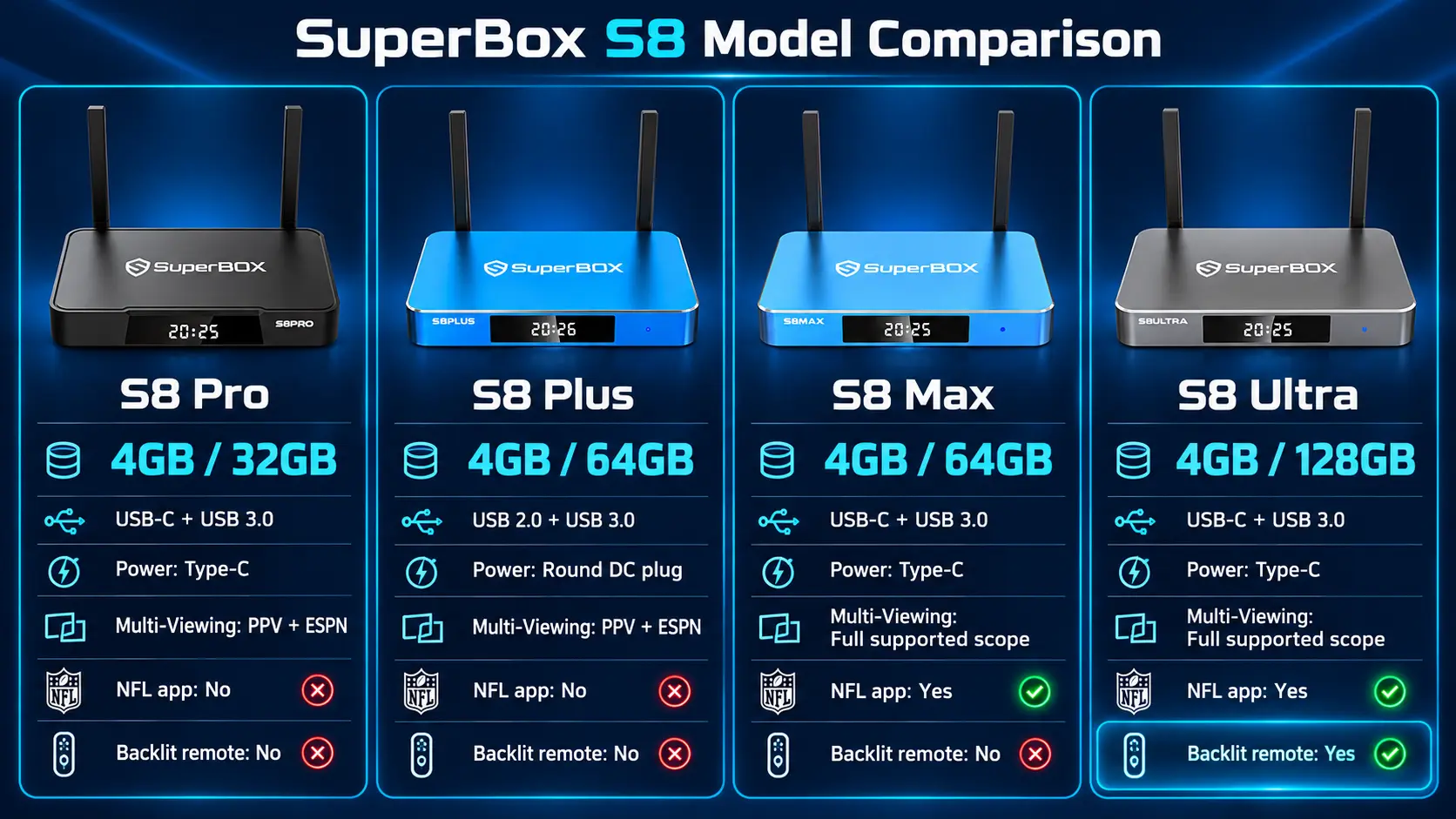
| Model | Storage | Practical reason to consider it |
|---|---|---|
| S8 Pro | 32GB | Core S8 functions with lighter storage needs |
| S8 Plus | 64GB | More storage with Pro/Plus Multi-Viewing scope |
| S8 Max | 64GB | Broader supported Multi-Viewing and the listed NFL app |
| S8 Ultra | 128GB | More storage and an included backlit remote |
All four list voice command. Ultra alone includes remote backlighting in the current comparison. Pro and Plus list PPV/ESPN Multi-Viewing; Max and Ultra list full supported channels. See the complete S8 model comparison before choosing.
For replacing DVR use, check the workflow carefully: S8 recording is currently manual, rather than scheduled recording while you are away. The S8 Recorder guide explains its use. Playback is a separate function for supported previously available programming; see the Playback guide.
8 Calculate savings using the full household total
Use the internet-only quote from your provider, then add any subscriptions you plan to keep. Include the device, accessories and any cancellation charges separately.
Monthly saving = current recurring total − new recurring total.
Here is a hypothetical example, not a provider quote or a promised result:
| Monthly cost | Before | After |
|---|---|---|
| TV and internet bundle | $170 | — |
| Internet-only plan | — | $70 |
| Paid streaming services retained | — | $20 |
| Total recurring cost | $170 | $90 |
| Monthly difference | $80 less |
In this example, recurring savings would be $960 over 12 months. If the new equipment cost $400, first-year savings after that purchase would be $560, before taxes, accessories or cancellation charges. Recovering that equipment cost would take about five months at an $80 monthly saving.
Your result may be smaller or larger. If the new total is close to your current bill, negotiate again or choose a simpler setup before buying equipment. The cord-cutting guide can help you plan that transition.
9 Test the replacement before canceling cable
Try the new setup while the old service is still available. A little overlap gives you time to learn the controls and check programs without rushing.
- Connect the device and internet. For S8, follow the Wi-Fi and Ethernet setup guide.
- Install the supported apps using the S8 app installation instructions.
- Test the programs you actually watch, including local news and sports where relevant.
- Practice changing the TV input, opening an app and returning Home.
- Write a short instruction card with the HDMI input and your chosen shortcuts.
- Confirm the final internet price, cancellation date and equipment-return instructions.
If someone is helping a parent or grandparent, let the daily viewer operate the remote during the test. A setup that works only when a family member is visiting needs more practice or simplification.
Keep return receipts and compare the final cable statement with the confirmed cancellation terms. Review the following internet bill too, especially if removing TV changed a bundle discount.
Buy SuperBox from a retailer you can identify
SuperBox TV Box Store is an authorized retailer serving customers in the US and Canada. You can verify our authorization using code SP20250414002 at the SuperBox authorization website.
Before ordering, contact our team with your television model, viewing needs and questions about the S8 lineup. We provide model comparisons and step-by-step setup guides so you can choose with a clearer understanding of the equipment.
Read our return policy and keep the order confirmation from customer@superboxtvboxstore.com. SuperBox is a brand sold by multiple retailers; our seller identification guide helps confirm whether an order was placed directly with our store.
Frequently asked questions
What is the easiest first step to lower a cable bill?
Review the latest statement and call for a lower total price. Have your must-have channels and an internet-only quote ready before accepting a change.
Can SuperBox help seniors watch free contents?
Yes. SuperBox offers access to 2,000+ live TV channels, plus a diverse range of movies, TV shows and other media, without a separate monthly subscription for its included viewing apps. That can help seniors reduce cable TV spending.
Does everyone over 65 get a cable discount?
No. Ask your provider about available offers, but do not assume age guarantees a discount. Low-income internet programs have their own eligibility requirements and are separate from cable TV pricing.
Does Social Security qualify me for Lifeline?
Social Security retirement benefits alone do not establish eligibility. SSI is a qualifying program; income or other qualifying benefits may provide another route. Check the official Lifeline rules.
Can I still sign up for ACP in 2026?
No. ACP ended on June 1, 2024. Look at current provider programs and Lifeline instead, and avoid websites promising new ACP enrollment.
Can I watch television without paying for internet?
An antenna may receive available local over-the-air broadcasts without internet. Online streaming, including SuperBox viewing, needs an internet connection.
Will SuperBox eliminate every monthly entertainment expense?
No. The hardware has no mandatory monthly device fee, but internet and any paid services you retain still cost money. Compare your complete before-and-after budget.
Which S8 model has the backlit remote?
S8 Ultra includes the backlit remote in the current model comparison. Choose it if illuminated buttons and extra storage are useful enough to justify the purchase for your household.
Should I cancel cable before setting up a streaming box?
Test first. Check your programs, connection and everyday controls, then confirm the cancellation terms and equipment returns. That gives you a clearer transition and fewer surprises.
The article was updated on:
