
Knowledge SuperBox
How to Watch Friends Free on SuperBox: All 10 Seasons





Yes, you can watch Friends free on a compatible SuperBox through Blue VOD, without a separate monthly Blue VOD subscription. All 10 seasons have been confirmed in the app for this guide’s November 2026 availability check. You still need the SuperBox hardware and an internet connection.
To begin, open Blue VOD, search for Friends, choose the original 1994 TV series, and select your season and episode. If you are watching for the first time, start with Season 1, Episode 1.
The main thing is finding the right listing. The original sitcom, a reunion special, and unrelated titles containing “friends” are different results. Here is how to get to the series you want and make it easy to return to.
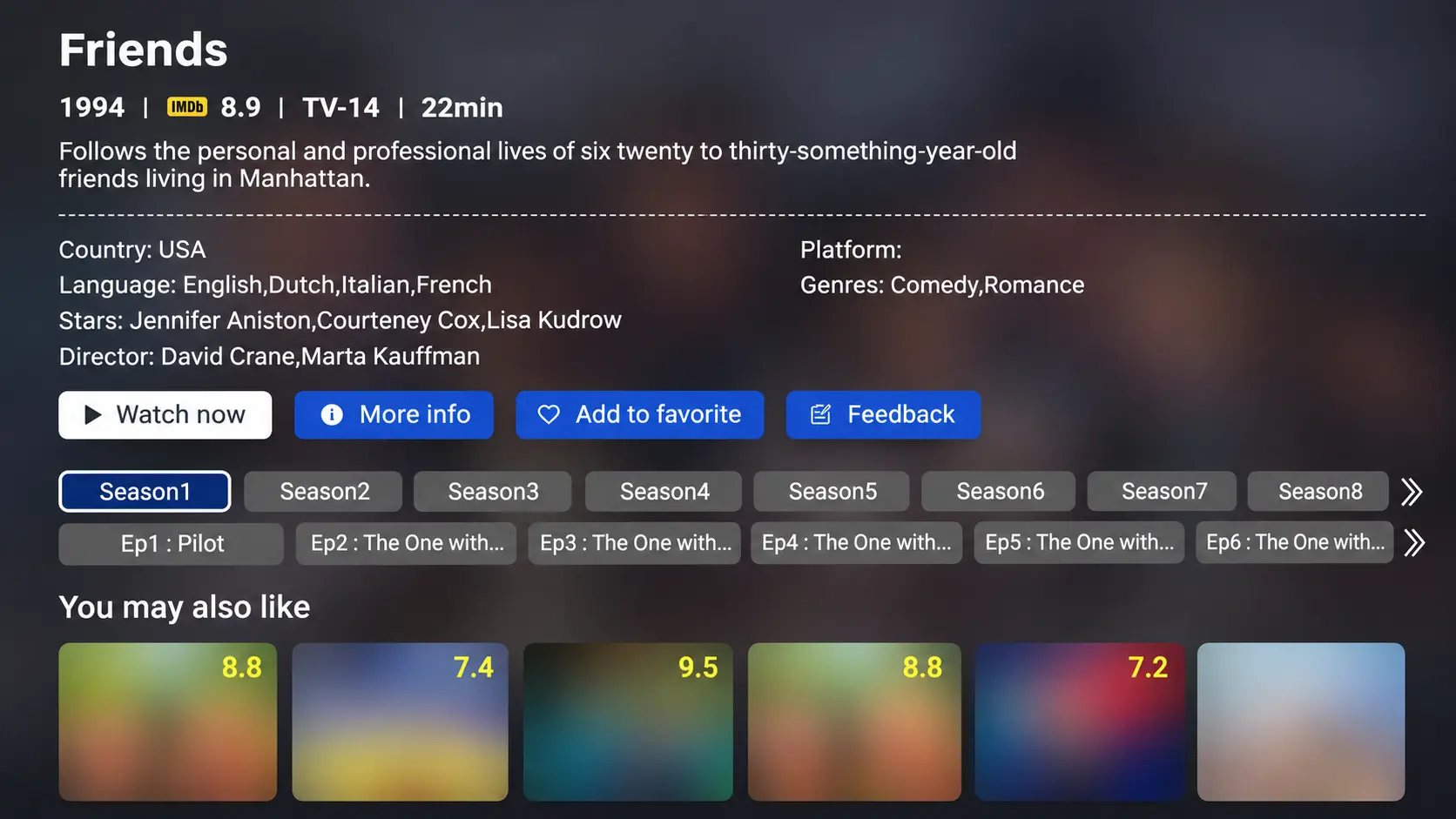
Find the original Friends, not the reunion
The Friends series you are looking for began in 1994. It follows Rachel, Monica, Phoebe, Joey, Chandler and Ross through friendships, work and relationships in New York City. The six principal cast members are Jennifer Aniston, Courteney Cox, Lisa Kudrow, Matt LeBlanc, Matthew Perry and David Schwimmer.
Those details help when several search results have similar names. Look for the original series and a season-and-episode selection, rather than choosing the first poster containing the word “Friends.”
Friends: The Reunion is a separate special. It is not Season 11 and does not replace the original episodes. The confirmation in this article concerns the sitcom’s 10 seasons; it does not establish whether the reunion is currently in Blue VOD.
Friends is also an episodic TV series, not a single movie. If you are searching in a movies-only view, change the media type before assuming that the show is missing.
Open Blue VOD on the right TV screen
If the television is still showing its own Home menu, select the HDMI input connected to SuperBox before looking for Blue VOD. Then use the SuperBox remote to navigate the box. A title search on the TV’s built-in platform is a different search from one inside Blue VOD.
For example, a television may show a paid-service result for Friends while the SuperBox is connected to another input. That does not tell you what is listed in Blue VOD. Switch to the box, open the correct app, and search there.
If you have a Samsung television and need help reaching that screen, follow the SuperBox-to-Samsung connection steps. Once the SuperBox Home screen appears, return to the instructions below.
Search Blue VOD and choose an episode
Use the SuperBox remote for these steps. On the S8 interface:
- Open VOD or the installed Blue VOD shortcut.
- Select Search and enter Friends.
- If filters are displayed, select TV Series and Name.
- Open the original 1994 series.
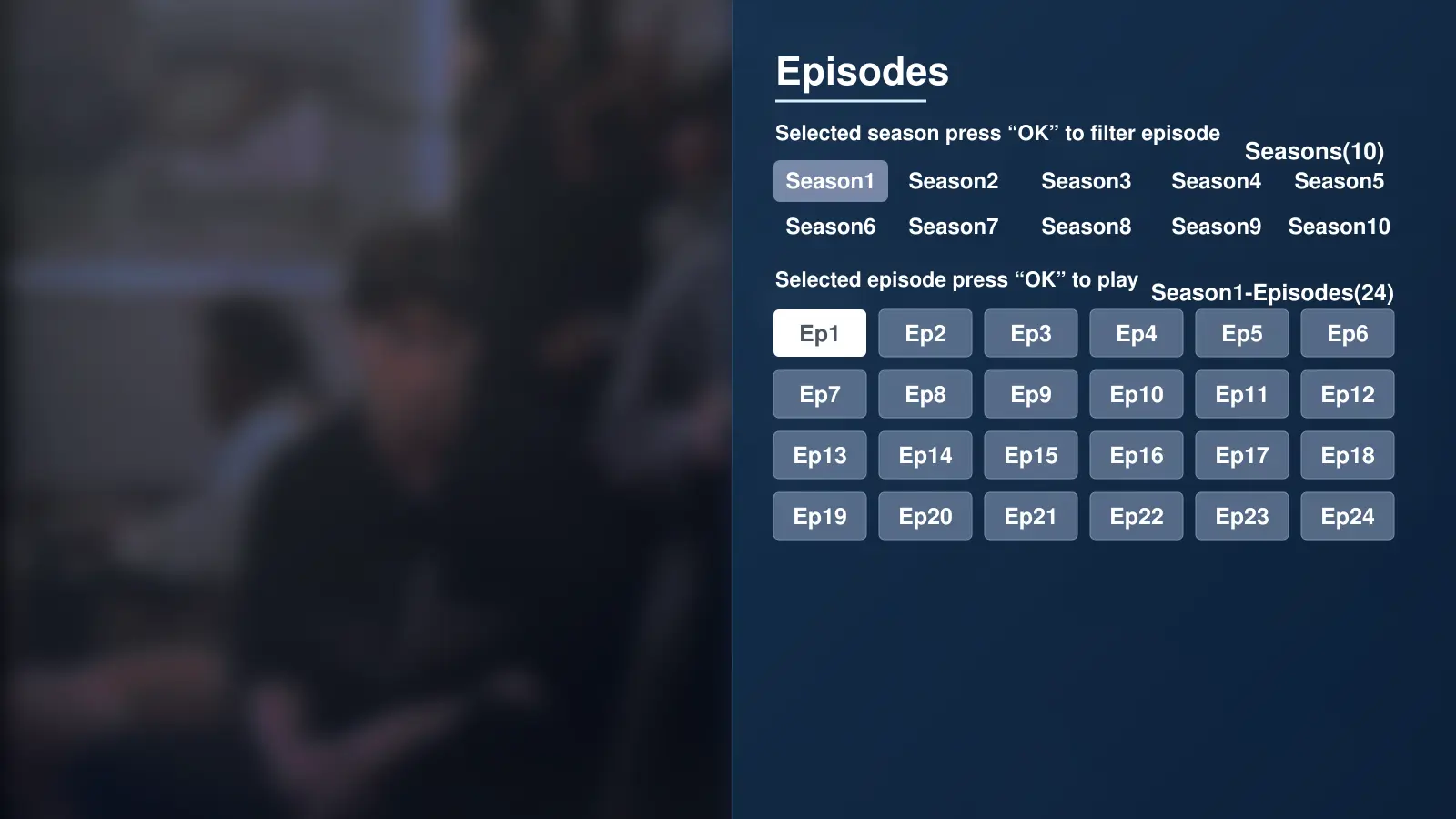
- Choose the season, then the episode you want to play.
If Blue VOD is absent, install the app or add its S8 Home shortcut first. Menu labels can vary with the installed app version.
Use the show’s name as the search term
Enter Friends, rather than a longer phrase such as “watch Friends free all seasons.” The app is searching its title catalog; it does not need the words you might type into a web search.
Because “friends” is a common word, read the result details before selecting a poster. Check the 1994 series identity and the familiar cast. A compilation, interview or similarly named production is not the same listing.
If the results look wrong, check one filter at a time. A title belongs under a name search; a cast search is for a person’s name. Correcting the filter can be more useful than repeatedly entering the same word.
When a season does not appear immediately, inspect the available season controls before leaving the listing. The first screenful may not show every choice at once. Use the navigation shown by your app and confirm the selected season before opening an episode.
Before pressing play, check the season number as well as the episode number. “Episode 9” identifies a different part of the story in each season. Writing the position as S1E9 means Season 1, Episode 9 and avoids that confusion.
For a new viewing, the first episode introduces the group and Rachel’s arrival in Monica’s life. For a rewatch, go straight to the season you remember. You do not need to restart the entire show simply to revisit a favorite episode.
If the opening scene is unfamiliar, pause and return to the episode selection. Confirm the intended entry before skipping ahead through a different episode.
Pick a starting point for your Friends rewatch
A complete run and an evening of familiar favorites are different plans. Choose the kind of viewing you want before browsing through later-season descriptions.
First time watching: begin with the pilot
Start at Season 1, Episode 1 and follow the episodes in order. Friends has ongoing relationships and storylines alongside individual episode plots. Beginning at the start gives those developments their context.
The pilot may be labeled “The One Where Monica Gets a Roommate.” Match the season and episode as well as the title, because wording can differ between listings.
If another person in the room has seen the series already, agree not to explain future storylines. A familiar show can still be a first viewing for someone else.
Returning viewer: choose an episode you remember
For a short rewatch, use an episode’s title and position to locate it. Searching the main series title gets you into the show; the season and episode controls take you to the particular installment.
Here are three reference points to help you choose:
| What you want to watch | Season and episode | Episode title to look for |
|---|---|---|
| The beginning of the original series | S1E1 | The One Where Monica Gets a Roommate |
| An early Thanksgiving episode | S1E9 | The One Where Underdog Gets Away |
| A later-season favorite for returning viewers | S5E14 | The One Where Everybody Finds Out |
The later-season choice can reveal relationship developments. Save it for a rewatch if you want to experience the story in order.
Find an episode when you remember a scene
You may remember a Thanksgiving dinner or a conversation without remembering its episode number. Find the episode title and season position first, then use those details in the series listing.
For example, “The One Where Everybody Finds Out” is S5E14. Open Friends, choose Season 5, and locate Episode 14. Do not assume that typing an individual episode title into the app’s main search will produce the same result as searching the series itself.
If the displayed title uses slightly different wording, compare the season, episode number and description. For a first-time viewer, avoid reading several later descriptions while searching; they can reveal more of the story than you intended.
Thanksgiving viewing: choose the episode before guests arrive
Friends can fit a relaxed holiday evening when you want a sitcom episode rather than a full-length movie. Season 1, Episode 9 is one starting point for a Thanksgiving-themed selection.
Open the intended episode before everyone sits down, then pause at the beginning. That gives you time to confirm the listing and sound without scrolling through several seasons in front of guests.
Decide whether the evening is a single-episode break or a longer rewatch. Having a choice ready is more useful than starting the app with no plan and spending the time browsing.
Set up comfortable picture, dialogue and subtitles
Friends is a conversation-led sitcom, so make sure you can follow the dialogue before settling into a longer session. Start with a familiar volume level and play a short section. If someone else controls the soundbar or receiver, agree which remote adjusts the volume.
Bring up the Blue VOD player controls when you need to pause or move through the video. Use the displayed progress bar to check where you are, and confirm that playback is paused before leaving the room. The SuperBox Home menu and the controls over the episode are different screens.
Check captions on the current episode
In the S8 Blue VOD player, open the gear icon, then Subtitle Tracks, and select an available track. Read a few lines to check that the selected language is useful.
If your preferred language is absent, a different remote command will not create it. Check the current episode’s options rather than assuming that every season has identical tracks. The same applies when moving from one series to another.
Keep ordinary viewing settings simple
Leave playback speed at 1x / Normal for an ordinary rewatch. If the dialogue suddenly sounds unusually fast or slow, check that setting before adjusting your entire audio setup.
If the picture already looks natural, keep its current shape. Stretching the image to fill a screen can make people and objects look distorted. Check the player’s aspect-ratio option only when you have a visible problem to address.
There is no need to change decoding or network-related app settings just to start another Friends episode. Get the basic picture, sound and captions comfortable, then return your attention to the show.
Understand what “watch Friends free” means here
For compatible SuperBox owners, Blue VOD provides on-demand viewing without its own separate monthly subscription. Watching Friends through that app does not require starting a Blue VOD monthly plan or paying a separate per-episode Blue VOD charge.
The box itself is a purchase, and your internet service remains a household expense. If you also subscribe to another streaming service, that service keeps its own billing terms. Blue VOD is a separate app; it is not an included HBO Max account or a way to sign into another company’s paid service for free.
For someone who enjoys returning to familiar series, the benefit is a viewing routine that does not add another monthly Blue VOD payment each time a new month begins. You can watch at your own pace instead of planning the whole rewatch around a short trial.
When assessing savings, use the services you actually pay for. A SuperBox can help reduce entertainment spending if it replaces something you would otherwise keep buying. It does not create savings from a subscription you never had. The SuperBox cost breakdown separates the hardware, internet and optional subscriptions.
The dated check confirms the 10-season listing. Catalog availability can change, so check the current app if this particular show is essential to your purchase.
Keep Friends easy to find next time
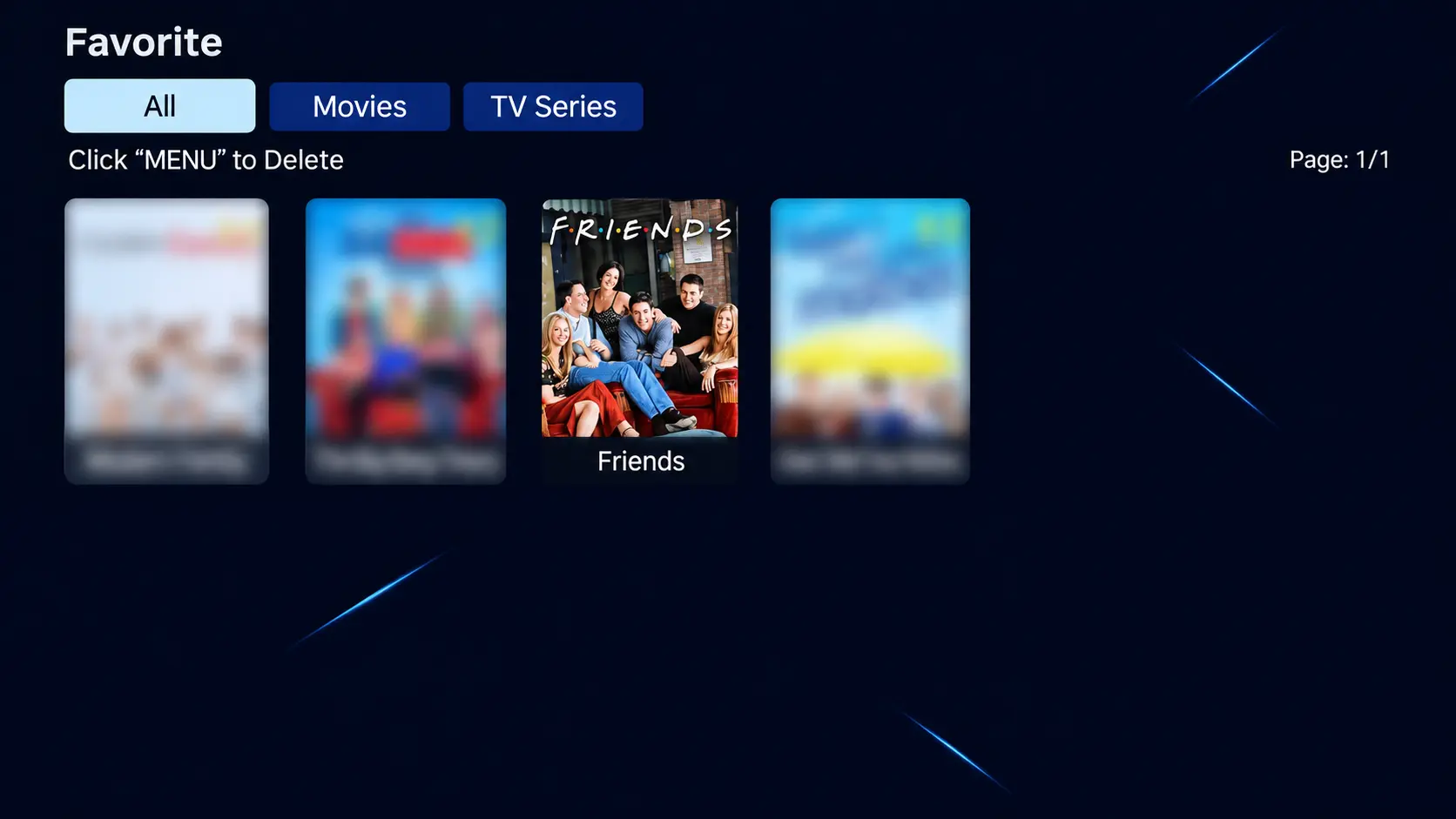
Save the series with Favorite on its detail page and return through the app’s Favorite menu. History offers a route to recent activity. The Blue VOD controls guide covers these tools and playback settings.
For a shared television, agree on where your joint rewatch will continue. Someone else may open a later episode on the same device. A short note such as “Friends — S2E4, finished” gives everyone a clear starting point.
If you stop mid-episode, include an approximate time. That is a practical fallback if the next session opens at a different position from the one you expected.
Buying a SuperBox for classic shows and everyday TV
If you already have a compatible SuperBox, start with that device. A 10-season series is not a reason on its own to buy a new box or the model with the most internal storage. Blue VOD viewing uses streaming rather than requiring you to save the entire series locally.
For a new household setup, the SuperBox S8 Max is a useful option for regular series viewing alongside live TV. It combines 4GB RAM, 64GB internal storage, WiFi 6 and Gigabit Ethernet.
The S8 Ultra adds 128GB internal storage and an included backlit voice remote. Illuminated buttons may be particularly useful for someone who likes watching with the lights low. Choose those upgrades for their everyday benefit, rather than expecting them to add more Friends seasons.
SuperBox TV Box Store is an authorized retailer serving US and Canadian customers. Our website’s live chat can help you choose around your television, viewing routine and budget before ordering. The purchase should fit more than one title: consider the shows, films and live viewing your household will use regularly.
If Friends is missing or an episode will not play
When the search result or season list looks incomplete
If Friends does not appear, check the search term and filters first. If the series opens but you cannot see a particular season, confirm that you chose the original show and inspect the season navigation.
Describe what is actually visible. “The series opens, but I can only see these season choices” is more useful than “The show has disappeared.” A screenshot can show whether the issue concerns the search results, season list or selected episode.
Do not confuse reaching the end of a visible row with reaching the end of the entire catalog. Check the navigation available on that screen. If the season still cannot be found, report the missing selection rather than assuming it must be somewhere else.
When one episode fails or shows unexpected content
Note the season and episode, then try a nearby episode and a different series. If those play, report the first entry specifically. If the picture starts but seems to belong to another installment, note what the label says and what you see at the beginning.
For example: “Friends S3E6 opens, but playback stops after about one minute. S3E7 and another series play.” This is a sample message; replace every detail with your own results.
Keep the checks focused. A missing listing, a wrong episode and a video that will not load are separate observations. Giving support the exact symptom helps them continue without asking you to repeat the whole process.
If online apps generally fail to load, check the S8’s internet connection. If only one episode fails, report that specific result rather than assuming the entire box needs to be replaced.
For purchases made directly through superboxtvboxstore.com, email customer@superboxtvboxstore.com with the model, season and episode, exact on-screen message, and whether another title works. Send order details privately. Our team can help coordinate technical assistance and order questions for your store purchase.
Friends on SuperBox FAQs
Are all 10 seasons of Friends in Blue VOD?
Yes. All 10 seasons were confirmed in the app for this guide’s November 2026 check. Open the original series to select the season you want.
Should I open Blue TV or Blue VOD?
Open Blue VOD to choose Friends on demand by season and episode. Blue TV is the separate live-channel app; it is not the episode-selection route described here.
Is Friends: The Reunion an eleventh season?
No. It is a separate reunion special. Choose the original 1994 series for the sitcom’s 10-season run.
Do I need an HBO Max subscription for these steps?
No. These instructions use Blue VOD on compatible SuperBox hardware. An HBO Max subscription is a separate service and is not included with a SuperBox purchase.
Will Friends play in 4K with my preferred subtitles?
A catalog listing does not confirm a particular resolution or language track. Check the current episode’s available picture and subtitle options. The box’s video capabilities do not establish the format of every stream.
Can I use an older SuperBox to watch Friends?
If your existing SuperBox supports the current Blue VOD app, check the listing there first. The step-by-step interface descriptions in this guide use S8. Owning an older model does not, by itself, mean you must upgrade to watch this series.
Do I need to record Friends before watching?
No recording step is needed for the on-demand viewing described here. Open Blue VOD and select the available episode. Choosing a season from the catalog is different from recording a live broadcast.
What can I watch after Friends?
If you want another friendship-centered sitcom, consider How I Met Your Mother on SuperBox. Its separate guide covers the confirmed nine-season series and how to find it in Blue VOD.
For tonight, choose the kind of viewing you want: the pilot for a fresh start, a familiar episode for a rewatch, or a Thanksgiving selection for a relaxed evening together.
The article was updated on:
