Guide to the New Blue VOD Interface on SuperBox S8

Summarize this article with:
ChatGPTClaudeGoogle GeminiGrokPerplexity
New-Blue-VOD-Interface-on-SuperBox-S8

Are you curious about the new Blue VOD interface on your SuperBox S8? You’re in the right place! This comprehensive guide from SuperBox TV Box Store will demystify what makes this interface new, how to leverage its powerful features for an unparalleled streaming experience, and provide solutions to common queries.

We’re here to ensure you get the most out of your SuperBox S8, the ultimate digital entertainment system.

Understanding the New Blue VOD Interface on SuperBox S8

What is Blue VOD on SuperBox S8?

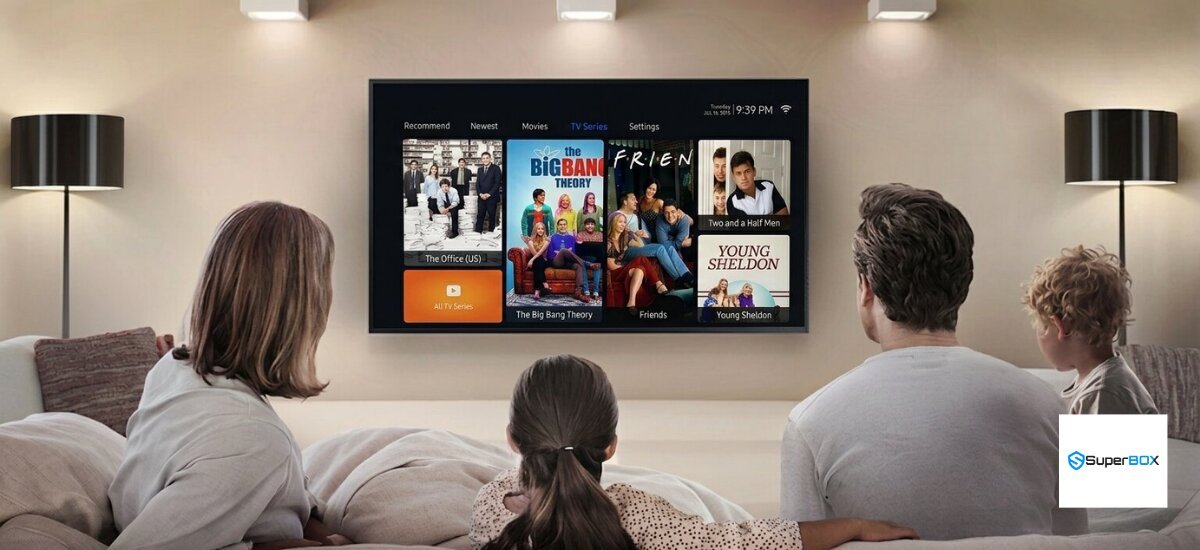
Blue VOD on SuperBox S8 is the pre-loaded Video-On-Demand application, serving as a central hub for an extensive library of movies and TV shows. This dedicated platform is a core component of the SuperBox S8’s digital entertainment ecosystem, providing immediate access to a vast array of VOD content without any subscription fees.

Its primary value lies in offering a diverse and constantly updated selection of on-demand content, transforming your SuperBox into a comprehensive streaming media player.

What-is-Blue-VOD-on-SuperBox-S8

The application is specifically optimized for SuperBox devices, ensuring seamless integration and performance. It allows users to browse, select, and watch thousands of titles at their convenience, making it a cornerstone of the SuperBox S8 user experience. This feature distinguishes the SuperBox S8 as a robust smart TV box designed for modern viewing habits.

The New Aspect: Continuous Evolution and Enhanced User Experience (UX)

The “new” aspect of the Blue VOD interface on SuperBox S8 refers to SuperBox’s ongoing commitment to refining its user interface (UI) and user experience (UX) design. SuperBox continuously updates the Blue VOD app and the underlying Android 12 OS, ensuring a modern and responsive platform.

These incremental enhancements, rather than a single major overhaul, lead to a consistently improved and fresh interface for users.

For those upgrading from older SuperBox models or new to the SuperBox S8, the current interface feels significantly new due to these continuous refinements. The SuperBox S8 new UI/UX design overview showcases a more intuitive layout, faster navigation, and enhanced visual appeal.

This evolution ensures that the SuperBox S8 Android TV box interface remains at the forefront of digital entertainment, providing a superior streaming experience.

Key Benefits of the Blue VOD Interface on SuperBox S8

The Blue VOD interface on SuperBox S8 offers several key benefits, significantly enhancing the overall user experience. Firstly, users enjoy improved UX and intuitive navigation, making content discovery effortless.

The streamlined design allows for quick access to desired movies and TV series, contributing to a positive SuperBox S8 user experience review.

Secondly, the interface provides access to an extensive and updated VOD content library, ensuring there is always fresh content to explore. This seamless streaming media player functionality allows for smooth playback and high-quality viewing.

Ultimately, these benefits combine to deliver an enhanced home theater experience, positioning the SuperBox S8 as a premier digital entertainment system.

Dive Deep into Blue VOD Features and Functionality

Extensive Content Library: 15,000+ Movies and TV Shows

Blue VOD offers an extensive content library, boasting over 15,000 movies and TV shows available on-demand. This vast selection is continuously updated daily, ensuring a fresh and diverse array of on-demand content for every viewer.

The SuperBox S8 VOD content library includes a wide range of genres, catering to all tastes and preferences.

15000-Movies-and-TV-Shows

Users can easily browse through diverse categories such as action, comedy, drama, animation, documentary, and more. This organized structure simplifies content discovery, allowing you to quickly find exactly what you want to watch.

The daily updates mean you will always have access to the latest releases and timeless classics, making your SuperBox S8 a comprehensive on-demand content platform.

Seamless Navigation and Powerful Search Capabilities

The Blue VOD interface on SuperBox S8 features a user-friendly interface design, ensuring seamless navigation and easy content discovery. The layout is intuitive, allowing users to effortlessly browse through categories and explore the extensive library.

This design significantly improves how to navigate the new Blue VOD interface on SuperBox S8, making it accessible for all users.

Furthermore, Blue VOD incorporates efficient search functionality for movies and TV series. You can quickly find specific titles by typing in keywords. For added convenience, the app integrates with the SuperBox S8 voice control remote, enabling hands-free searching.

Simply speak the title or genre, and the system will locate relevant content, enhancing your overall SuperBox S8 streaming experience.

Personalized Viewing: Favorites and Recent History

Blue VOD on SuperBox S8 allows for a personalized viewing experience through its Favorites and Recent History features. You can easily save content to a Favorites list, ensuring quick access to your most cherished movies and TV shows. This feature is perfect for building a personal collection of must-watch titles.

Additionally, the app provides quick access to your recent viewing history, allowing for seamless continuity. If you pause a movie or TV series, you can easily pick up exactly where you left off.

These features are among the best practices for using SuperBox S8 Blue VOD, ensuring a convenient and tailored entertainment journey.

Family-Friendly Features: Parental Control

The Blue VOD interface on SuperBox S8 includes robust parental control features, designed to provide a safe viewing environment for families. This functionality allows users to manage and restrict access to specific content categories with PIN protection.

Parents can set up a secure PIN to prevent children from accessing mature or inappropriate material.

This feature ensures peace of mind, allowing families to enjoy a wide range of content while maintaining control over what younger viewers can watch. The parental control option is easy to configure within the app’s settings, making the SuperBox S8 a truly family-friendly digital entertainment system.

Effortless Access: Automatic Activation

One of the most convenient aspects of the Blue VOD app on SuperBox S8 is its effortless access through automatic activation. Unlike many streaming services, Blue VOD does not require a separate subscription or manual activation process.

Once your SuperBox S8 is set up, the Blue VOD app is ready to use, providing immediate access to its vast content library.

This no-subscription model eliminates recurring costs, offering a truly cost-effective way to enjoy premium on-demand content. The automatic activation ensures a hassle-free setup, allowing users to dive straight into their home theater experience without any delays or complicated procedures.

Optimizing Your Experience: Accessing, Updating, and Troubleshooting Blue VOD

How to Access Blue VOD on Your SuperBox S8

Accessing Blue VOD on your SuperBox S8 is straightforward. The app is typically pre-installed and can be easily located within the SuperBox’s App Store or on the main home screen. Look for the distinctive Blue VOD icon to launch the application.

For even quicker access, the SuperBox S8 voice control remote offers a convenient method. Simply hold down the microphone button and say “Blue VOD” to open the app hands-free. This integration streamlines how to use new Blue VOD interface SuperBox S8, making content access fast and efficient.

Keeping Your Blue VOD App and SuperBox S8 System Updated

Maintaining updated software is essential for optimal performance and access to the latest features. Regularly updating both the Blue VOD app and your SuperBox S8 system ensures a seamless streaming experience.

Step-by-Step Blue VOD App Update Guide

To ensure you have the latest SuperBox S8 Blue VOD app features, regularly check for updates within the SuperBox’s App Store. Navigate to the App Store, find Blue VOD, and select the update option if available.

Keeping the app updated helps resolve bugs and introduces new functionalities, enhancing your SuperBox S8 Blue VOD features. This process is vital to update Blue VOD app on SuperBox S8 and ensure the best performance.

Ensuring Optimal System Performance with Android 12 OS Updates

Beyond app updates, ensuring optimal system performance requires keeping your SuperBox S8 Android TV box interface updated. Navigate to the device’s main settings, select “Device Preferences,” and then “System Updates.” Here, you can check for and install any available Android 12 OS updates.

These system updates improve overall stability, security, and compatibility, directly contributing to a smoother Blue VOD experience.

Common Troubleshooting Tips for Blue VOD Issues

Even with a robust system, occasional issues can arise. Knowing common troubleshooting tips for Blue VOD buffering on SuperBox S8 can quickly resolve most problems, allowing you to fix SuperBox Blue VOD not working scenarios.

Addressing Buffering and Playback Problems

Buffering and playback problems are often frustrating, but usually have simple solutions. If you encounter issues like troubleshooting Blue VOD buffering on SuperBox S8, first ensure your internet connection is stable. Sometimes, a temporary network glitch can cause interruptions.

Restarting your SuperBox S8 can also resolve minor software conflicts affecting playback.

Checking Your Internet Connection

A stable and fast internet connection is crucial for smooth VOD streaming. The recommended minimum internet speed for VOD streaming is at least 8Mbps, with higher speeds advised for 4K or 6K content. Test your internet speed to ensure it meets these requirements.

A weak or inconsistent signal can lead to frequent buffering and poor playback quality.

Clearing Cache and Data

Over time, accumulated cache and data can cause performance issues within apps. Clearing cache and data for the Blue VOD app can resolve many playback issues. Go to your SuperBox S8 settings, find “Apps,” select Blue VOD, and choose the options to clear cache and clear data.

This action refreshes the app, often fixing minor glitches without affecting your saved content.

Rebooting Your SuperBox S8

A simple reboot can often fix temporary glitches that affect app performance. To reboot your SuperBox S8, simply unplug the power adapter from the device, wait for about 30 seconds, and then plug it back in. This power cycle can clear temporary memory issues and restore normal functionality to your Blue VOD app.

When to Consider a Factory Reset

A factory reset should be considered a last resort for persistent issues that other troubleshooting steps cannot resolve. Understanding the implications is important, as a factory reset will erase all installed apps, settings, and personal data, returning your SuperBox S8 to its original factory state.

When-to-Consider-a-Factory-Reset

Only proceed with a factory reset if you have exhausted all other options and are prepared to reconfigure your device.

SuperBox S8 Series: Powering Your Blue VOD Experience

Compatibility Across SuperBox S8 Pro, S8 Max, and S8 Ultra

The Blue VOD application offers consistent functionality across all SuperBox S8 models, including the S8 Pro, S8 Max, and S8 Ultra. Users can expect the same extensive content library, intuitive navigation, and core features regardless of their specific S8 device. This ensures a unified and high-quality streaming experience across the entire S8 series.

Instructions on how to update Blue VOD app on SuperBox S8 Pro, S8 Max, and S8 Ultra remain identical, ensuring ease of maintenance for all users. The consistent performance of Blue VOD across these models underscores the robust design and optimization of the SuperBox platform.

How Android 12 OS Enhances the Blue VOD Interface

The SuperBox S8 series runs on the modern and responsive Android 12 OS, which significantly enhances the Blue VOD interface. Android 12 provides a stable and efficient operating system for seamless streaming, contributing to the overall SuperBox S8 new UI/UX design overview.

Its optimized performance ensures faster app loading, smoother transitions, and a more responsive user experience within Blue VOD.

How-Android-12-OS-Enhances-the-Blue-VOD-Interface

The underlying Android 12 OS also brings improved security features and better resource management, allowing the Blue VOD app to run more efficiently. This advanced operating system is a key factor in the superior performance and user-friendly nature of the SuperBox S8 Android TV box interface.

Hardware Specifications for a Superior Streaming Experience

The robust hardware specifications of the SuperBox S8 models are fundamental to a superior Blue VOD streaming experience. All S8 models (Pro, Max, and Ultra) feature a powerful Quad-core ARM Cortex-A53 processor and 4GB DDR RAM, ensuring lightning-fast performance and smooth multitasking.

Dual-band WiFi 6 connectivity provides ultra-fast and stable internet access, crucial for high-quality VOD streaming.

Furthermore, the ability to handle H.265 6K at 60fps video decoding means that Blue VOD content is delivered with stunning clarity and detail.

The varying storage options (32GB eMMC for S8 Pro, 64GB eMMC for S8 Max, and 128GB eMMC for S8 Ultra) provide ample space for system files and app data, all contributing to the seamless and immersive home theater experience offered by the SuperBox S8 series.

Frequently Asked Questions (FAQs)

Does the new Blue VOD interface require a subscription?

No, the Blue VOD app on SuperBox S8 does not require any subscription fees. It comes pre-loaded and automatically activated, providing free access to its extensive content library.

Can I watch live TV channels through Blue VOD?

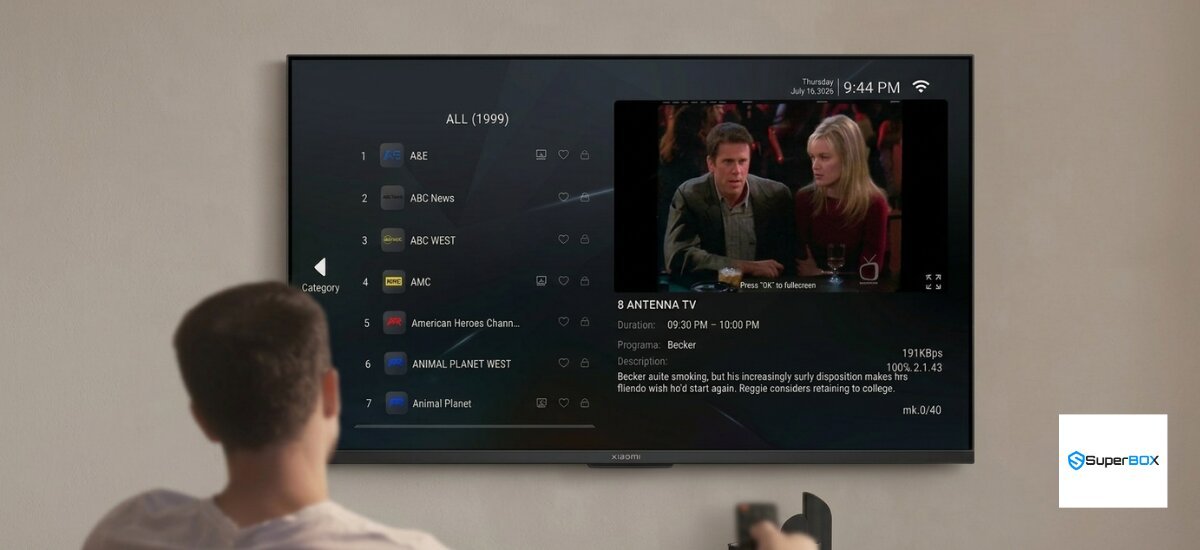
Blue VOD is primarily for on-demand movies and TV shows. For live TV channels, SuperBox devices typically feature a separate application like Blue TV, which offers over 2,000 live channels.

How often is the Blue VOD content library updated?

The Blue VOD content library is updated daily, ensuring a fresh selection of movies and TV shows for users. This continuous update cycle keeps the on-demand content platform current and engaging.

A minimum internet speed of 8Mbps is recommended for smooth VOD streaming. For higher quality content like 4K or 6K, a faster connection is advisable to prevent buffering.

Is Blue VOD available on older SuperBox models?

Blue VOD is a standard feature across SuperBox devices. While the interface and performance may vary slightly based on the model and its Android OS version, the core Blue VOD functionality is available on most SuperBox models, including the S6, S7, and S8 series.

Rate this post

Content Disclaimer: Product information and setup guides provided on this website are for informational purposes only. SuperBox TV Box Store is not responsible for the content, stability, or copyright compliance of any third-party applications installed on the device. We strongly recommend contacting our support team to verify compatibility before making a purchase. Please read our full Terms of Service & Content Policy here.

Information about SuperBox TV Box Store:

SuperBox TV Box Store is an authorized retailer of authentic SuperBox TV Box S6, S7, and S8 series products for customers in the US and Canada.

As an officially authorized SuperBox distributor (Authorization Code: SP20250414002), our business generates revenue through the sale of genuine SuperBox products, including the S6, S7, and S8 models, serving customers throughout the United States and Canada.

  • Brand Name: SuperBox TV Box Store
  • Authorization Code: SP20250414002
  • Slogan: Your Entertainment Partner
  • US Address: 201 E Center St, Anaheim, CA 92805, USA
  • Canada Address: 100 Sunrise Ave #135, North York, ON M4A 1B3, Canada
  • Contact Phone/WhatsApp: +1(604) 239-6845
  • Technical Support WhatsApp: +60 11-1175 0101
  • Email: customer@superboxtvboxstore.com
  • Website: https://superboxtvboxstore.com/
  • Working Hours: Monday to Saturday, 8 AM – 7 PM

Shopping Cart
Scroll to Top