
Knowledge SuperBox
SuperBox S7 Streaming Reliability in the USA for Everyday TV





SuperBox S7 streaming reliability in the USA depends on how well the box, your home connection, and the viewing app work together. The S7 family offers a useful foundation for everyday television: WiFi 6, Gigabit Ethernet, 4GB RAM, and apps for live channels, movies, series, and supported catch-up viewing.
For a household considering a move away from cable, the practical question is whether that combination fits the way you watch. Can you settle into the evening news, finish a movie, and find an alternative if one channel has trouble?
The SuperBox S7 is worth considering for regular single-screen viewing when your connection is suitable and its available content matches your needs. Its free-to-use core apps make the value attractive. Consistent playback still depends on the connection reaching your TV and the stream you select.
Here is how to judge that fit before buying or changing your current television service.

What the S7 brings to a dependable TV setup
The strongest reason to consider the S7 is the combination of viewing flexibility and modern connection options.
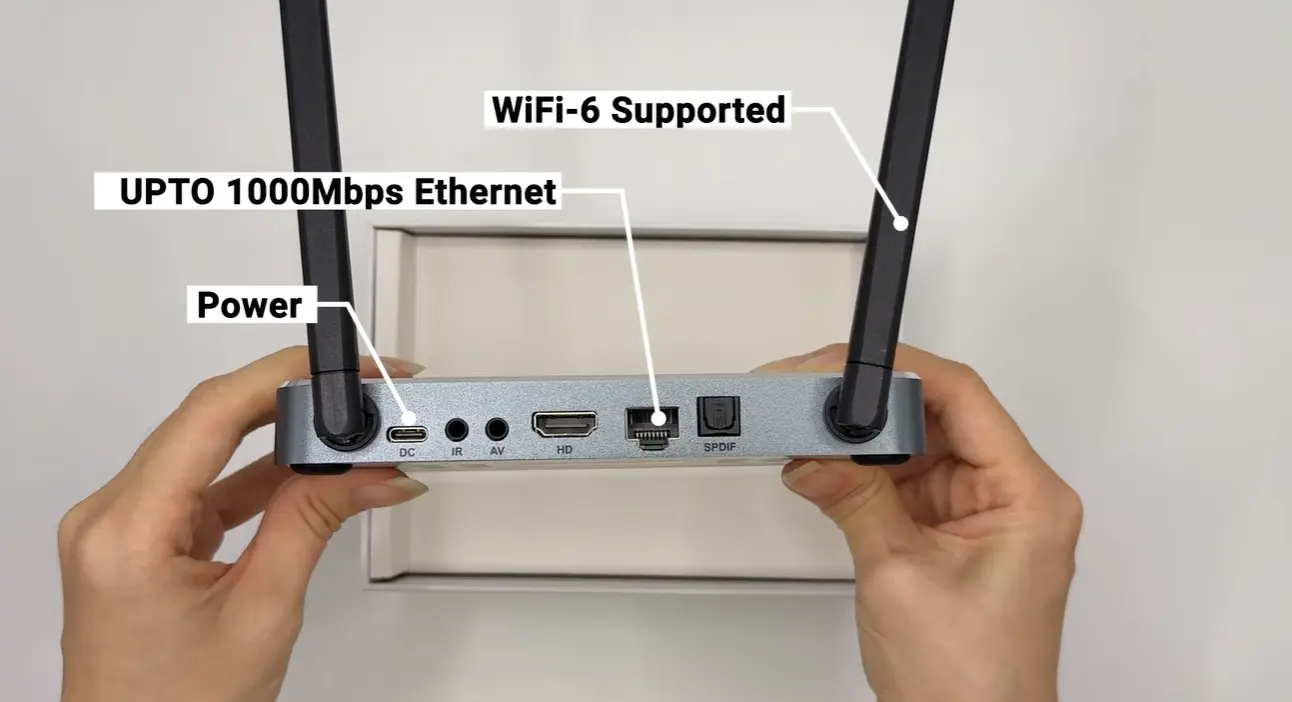
Gigabit Ethernet gives you a direct wired route to the router. That is useful when the television sits far from a wireless access point or when you want to compare a troublesome WiFi connection with a cable.
WiFi 6 provides a current wireless option for compatible home networks. Its usefulness still depends on router placement, distance, and the conditions in your room. A wireless feature on the box cannot remove a wall or relocate a router.
The S7 Pro, Max, and Ultra each have 4GB RAM. Their internal storage differs, giving you choices for installed apps and data. Ultra adds the convenience of a backlit remote.
Together, these features give you flexibility in how you connect and use the box. The most useful outcome is a system that performs your regular viewing tasks comfortably.
For owners who want to measure their setup, the separate S7 Ultra speed and stability test provides a detailed home-testing method. For the buying decision, start with the room and viewing routine the box needs to serve.
Judge the connection at the television
A US internet package may advertise an impressive download speed, but your SuperBox uses the connection delivered to its location. The number on the bill and the connection beside the TV answer different questions.
A router in an upstairs office may serve a downstairs television differently from a nearby laptop. Other people streaming, downloading games, or backing up files also share the household connection.
Google’s home-network troubleshooting guidance identifies distance, physical barriers, and competing activity as factors that can affect wireless performance. Check these before assuming the box needs replacing.
Use the manufacturer’s network recommendation
SuperBox’s current S7 internet recommendation specifies 160Mbps measured directly on the box. Use that guidance when planning the installation, rather than relying only on your provider’s advertised plan.
Mbps describes the rate at which data transfers. It does not measure the processor’s speed or establish how quickly every channel will open.
Different services publish their own requirements. For example, Netflix recommends a stable 15Mbps for its 4K streams. That is Netflix-specific guidance, not the requirement for Blue TV or a substitute for SuperBox’s recommendation.
The buying decision should consider both network capacity and actual playback. A high number is useful; a consistent evening’s viewing is the result you want.
Leave room for normal household activity
Imagine a household running two Netflix 4K streams. Using Netflix’s published recommendation as a planning reference, two times 15Mbps equals 30Mbps before other activity.
This is a simple bandwidth illustration, not a prediction of SuperBox usage. It explains why counting only one television can underestimate the demands of a busy home.
Evaluate the S7 during the hours you normally watch, with the household using the internet normally. A quiet weekday morning cannot tell you everything about Friday evening.
Check the data allowance when replacing cable
More streaming can change how much internet data your household uses each month. This deserves attention if your US home plan, travel connection, or hotspot has a data allowance.
Internet speed and data allowance are different. Speed describes how quickly data arrives; the allowance describes how much you can use within the billing period.
For scale, Netflix lists up to 3GB per hour for HD and 7GB per hour for 4K. Using its upper 4K figure in an illustrative calculation, two hours per day for 30 days would be 420GB: 7 × 2 × 30.
That is a Netflix-based planning example, not a measured Blue TV or Blue VOD consumption rate. Video quality and the actual service affect usage.
Check your provider’s account page for your household total, the plan’s terms, and what happens at any limit. Do not assume that choosing WiFi instead of Ethernet changes the internet allowance; both can use the same home service.
For a cable-replacement decision, consider everyone in the household, including other televisions and downloads. Your provider’s own usage meter is more relevant to the bill than a generic estimate from another home.
Three hypothetical US household examples
The following figures are illustrative assumptions, not measured S7 results or customer case studies. They show how the same product can face different conditions.
| Hypothetical household | Assumed connection at the box | Useful interpretation |
|---|---|---|
| Living-room TV connected by Ethernet | Around 200Mbps during the evening | Meets the manufacturer’s stated speed recommendation; actual app playback remains the next check. |
| Bedroom TV several rooms from the router | WiFi varies from 190Mbps to 25Mbps | A fast peak conceals an inconsistent wireless route worth improving. |
| Household with a stable connection but one failing channel | Around 200Mbps while other selections play | Start by investigating that channel or app route, rather than buying a faster internet plan immediately. |
The second example matters because an average can hide the experience that frustrates viewers. A large result followed by a sharp slowdown is different from a connection that stays consistent.
The third shows why “my internet is fast” and “this channel is having trouble” can both be true. A network test and a live broadcast do not measure the same thing.
Treat the table as a way to choose the next question. Your own room, connection, and viewing selections determine the answer.
Choose an S7 model for how you use it
Storage and convenience help distinguish the main S7 choices. They should not be turned into invented guarantees about fewer interruptions.
| S7 model | RAM and internal storage | Practical reason to consider it |
|---|---|---|
| SuperBox S7 Pro | 4GB / 32GB | A straightforward choice when you need fewer installed extras. |
| SuperBox S7 Max | 4GB / 64GB | More internal room for compatible apps and their data. |
| SuperBox S7 Ultra | 4GB / 128GB | The largest capacity of these three, plus a backlit remote for dim-room use. |
For a main television, Ultra is appealing when you value storage flexibility and comfortable evening controls. For a simpler installation, Pro or Max may cover your needs.
A larger drive is different from a better internet connection. Buying 128GB does not repair a weak wireless path or guarantee that an affected channel becomes available.
If you already own an S7 that handles your usual apps well, investigate a connection or app issue before assuming a more expensive box is necessary.
Know your viewing options before an interruption
Reliability feels better when everyone understands where to find what they want.
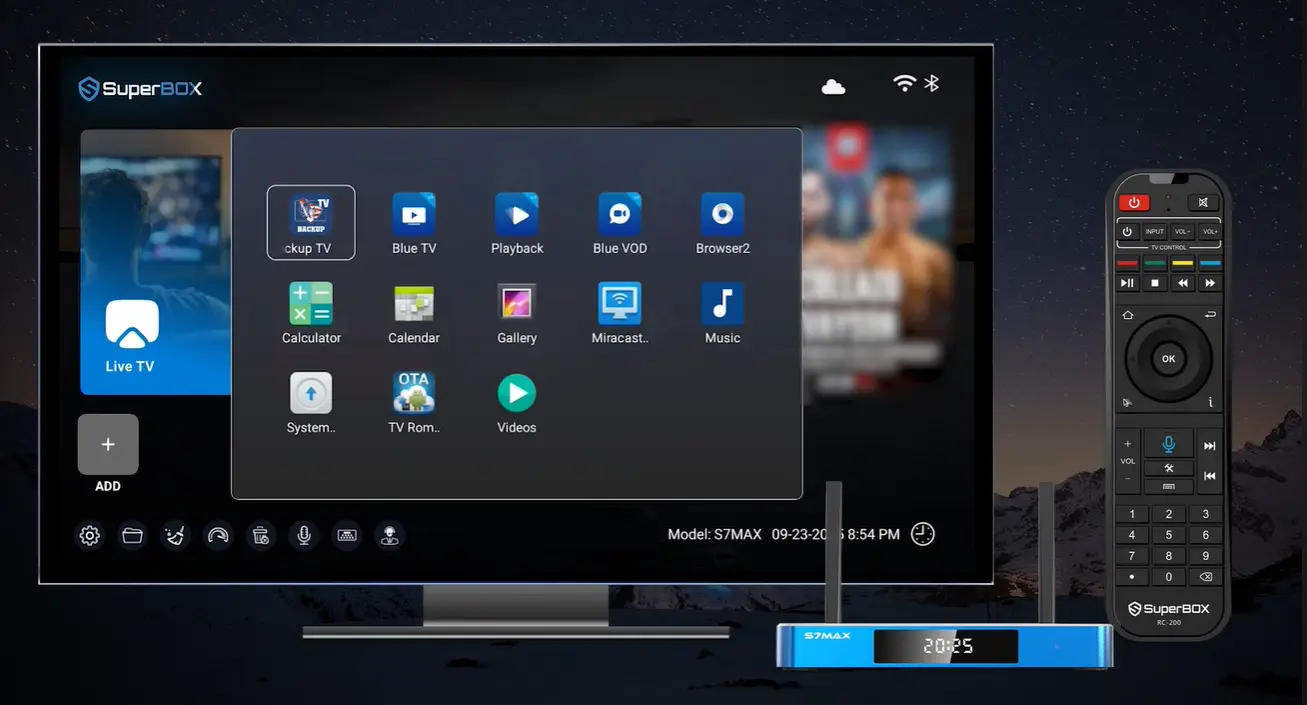
Blue TV is the main live-channel route. The store advertises access to 2,000+ live channels, while Blue VOD provides on-demand movies and series. These core viewing apps are free to use after purchasing compatible SuperBox hardware.
That makes S7 attractive for viewers trying to reduce recurring TV expenses: the device is a one-time purchase, with no separate monthly SuperBox subscription for those core apps. You still need internet, and optional paid services keep their own charges.
The ownership-cost explanation helps separate those expenses before you decide what cable charges you can remove.
Keep Backup TV available
Backup TV combines live TV and on-demand content in one app. It is useful as another viewing option when Blue TV or Blue VOD has a temporary problem.
If one selection fails in your usual app, check whether it is available in Backup TV. Its catalog may differ, and it still needs working internet.
Install it while setting up your regular apps, rather than first looking for it when everyone is waiting to watch something. The Backup TV guide explains that separate viewing route.
Playback serves a different purpose: supported catch-up programming. It is useful for finding an eligible earlier broadcast, rather than treating every app as interchangeable.
Check US channels that matter to your household
A large catalog is valuable, but your personal shortlist matters more than a total channel count.
Write down the stations and programs you would genuinely miss: local news, a favorite entertainment channel, regional sports coverage, or a regular evening show.
Use the store’s SuperBox channel list as a starting point, then check the current app listings. A national network name alone does not establish that your particular local affiliate or regional broadcast is available.
This is especially useful for US viewers because local television expectations often depend on the city and market. Ask about the specific station, rather than only asking whether the box has “local channels.”
For time-sensitive viewing, check the actual channel and upcoming program beforehand. Neither a channel count nor an app name guarantees every sports event.
A dependable replacement for your household is one that serves your priorities. Finding thousands of options is helpful; finding the programs you regularly choose makes the change worthwhile.
Set up for ordinary evenings
You do not need to change every setting. Start with the physical installation and the way the household uses it.
Give Ethernet a fair chance
When a cable route is practical, connect the box directly to a router LAN port and confirm the active connection. This removes the wireless hop between that router and the box.
If a long cable would be awkward, work on router placement and coverage first. Google’s wireless-interference guidance explains how dense materials and metal objects can weaken signals.
Keep the box out of a closed cabinet and leave its ventilation openings clear. Use the supplied power equipment and position the remote where normal operation is comfortable.
Make the familiar choices easy to find
Create a short Favorites list in the apps that support it. Show other viewers where to find their usual channel and how to return Home.
Practice the alternative app route once. A household member who can independently switch from a troublesome selection to another option will need less help.
For the detailed controls, use the S7 Ultra daily-use walkthrough. Keep the reliability decision focused on your routine instead of learning every feature at once.
Keep maintenance targeted
Let active installations and approved updates finish before judging app behavior. Avoid changing several settings during the same troubleshooting attempt.
If a viewing session is working well, there is no need to clear data or factory-reset the device as a nightly habit. Those actions can remove preferences and create extra setup work.
Understand a problem before replacing equipment
The first useful distinction is how widely the problem appears.
| What you notice | A sensible next action |
|---|---|
| One live channel pauses while others play | Record its name, time, and message; try another selection. |
| Blue TV has trouble but Blue VOD works | Investigate the affected app or live route and try Backup TV where suitable. |
| Several online apps lose access together | Check the box’s connection and the wider home network. |
| The Home highlight does not respond normally | Check remote control and navigation separately from video buffering. |
| A particular movie fails repeatedly | Record the exact title and version, then compare another available title. |
These observations give support a starting point. They do not require you to diagnose a failed component.
For an existing buffering problem, the buffering and freezing guide covers the next troubleshooting steps. Avoid erasing the whole device simply because one selection failed.
If you bought directly from SuperBox TV Box Store, contact customer@superboxtvboxstore.com for technical or order questions. Include your model, order number, affected app, exact message, and whether other selections work.
We value the experience after delivery as much as the purchase. Clear information helps us review the issue and coordinate the appropriate next step. Different retailers maintain separate order records, so keep your purchase confirmation available.
Decide whether S7 fits before canceling cable
S7 makes the most sense when you want everyday live TV and on-demand entertainment without adding another monthly SuperBox app subscription.
Its connection options give you flexibility, its core apps cover different viewing tasks, and the S7 Ultra adds storage and backlit controls for a comfortable main-TV setup.
Before removing an existing service, spend several normal evenings using your intended replacement. Choose familiar programs, use the household connection normally, and let other viewers try the controls.
Keep the internet service needed by the box. If internet and TV are bundled, ask what internet alone will cost before estimating savings.
Buy through an authorized retailer that clearly identifies itself and provides an after-sales contact. SuperBox TV Box Store is an authorized retailer serving US and Canadian customers. The linked S7 product pages above let you compare current purchase details without relying on an old promotional price.
Frequently asked questions
Is SuperBox S7 reliable enough for everyday viewing in the USA
It is a reasonable option for everyday single-screen viewing when its available content suits your household and your connection is suitable. Judge your regular apps and programs during normal evening use, rather than expecting one specification to predict the entire experience.
Does SuperBox S7 work without cable television
Yes. It streams over your internet connection and connects to the TV through HDMI. You can remove a cable-TV service while retaining internet, but check your provider’s revised internet-only charge and your replacement viewing options first.
Does S7 Ultra have better streaming reliability because it has 128GB
The larger internal capacity gives you more room for apps and data. Ultra also includes a backlit remote. Storage alone does not establish better streaming uptime or fix interruptions caused by the network or a particular feed.
Should I use WiFi or Ethernet
Use the connection that works consistently at your television. Ethernet is a useful choice when the cable route is practical, especially if wireless coverage is inconsistent. WiFi remains convenient when the router placement and connection support your normal viewing.
Does Backup TV fix every Blue TV problem
It provides an alternative live-TV and VOD route worth checking when the usual app has trouble. It does not automatically switch streams, guarantee identical content, or repair a lost internet connection.
Does Gigabit Ethernet mean I need a gigabit internet plan
No. Gigabit describes the port, not the plan you must buy. Consider the manufacturer’s S7 network recommendation, other household use, and the connection reaching your television. A faster plan will not resolve every app or channel issue.
Make the decision around your actual evening
The best reason to choose an S7 is that its viewing options, connection choices, controls, and ongoing costs fit your home.
Start with the room where it will be used. Confirm your important channels, keep an alternative app available, and make the everyday routine easy for everyone who watches.
When the setup serves those ordinary evenings well, the S7’s value becomes clear: flexible television and movie viewing with free core apps and a practical path away from recurring cable-TV charges.
The article was updated on:
