
Knowledge SuperBox
Apple TV 4K vs. SuperBox S7 Max: Which Streaming Device Is Right for You?





In modern living rooms, the battle for HDMI Port 1 often comes down to brand prestige versus practical financial utility. Apple enthusiasts praise the Apple TV 4K for its sleek tvOS interface, color calibration tools, and seamless integration with iPhones and AirPods. However, as subscription fees for live television streaming packages escalate beyond $80 per month, many households realize that a premium streaming client without native live TV capability is an expensive ongoing liability. In this comprehensive technical analysis, we compare the Apple TV 4K against the SuperBox S7 Max across hardware engineering, operating systems, networking stability, 2-year total costs, and everyday usability.

Detailed Technical Comparison: Apple TV 4K vs. SuperBox S7 Max
Evaluating the underlying hardware architecture highlights profound differences in chassis materials, memory allocation, external port connectivity, and software flexibility:
| Component / Spec | Apple TV 4K (3rd Gen) | SuperBox S7 Max | Architectural Advantage |
|---|---|---|---|
| MSRP Price | $129.00 (Wi-Fi) / $149.00 (Ethernet) | $339.00 (One-Time) | Apple TV lower upfront; S7 Max includes live TV |
| Processor (CPU) | Apple A15 Bionic (6-Core) | Quad-Core 64-bit ARM Cortex | Apple A15 faster for 3D gaming; S7 Max optimized for video |
| System Memory (RAM) | 4GB LPDDR4X | 4GB DDR3 High-Bandwidth | Both offer generous 4GB multitasking headroom |
| Internal Storage | 64GB / 128GB Flash (Closed) | 64GB eMMC (Expandable via USB/TF) | S7 Max allows external USB drives and TF card expansion |
| Chassis Build Material | Molded Polycarbonate Plastic | Aviation-Grade Aluminum Alloy Heatsink | S7 Max aluminum chassis conducts heat 200x faster |
| Wireless Networking | Wi-Fi 6 (802.11ax), Internal Antennas | Wi-Fi 6 (802.11ax), Dual External Antennas | S7 Max external antennas capture superior signal gain |
| Wired LAN Interface | 1000M Gigabit (Only on $149 model) | Built-in 1000M Gigabit RJ45 Port | Standard Gigabit Ethernet included on S7 Max |
| Operating System | tvOS (Walled Garden App Store) | Open Android 12 (Google Play + Sideloading) | S7 Max allows open APK installation without jailbreaking |
| Remote Control | Siri Remote (Non-backlit, Touchpad) | RC-200L Backlit Bluetooth Voice Remote | S7 Max remote has backlit keys and numeric dialing |
| Live Channels Included | 0 (Requires paid monthly apps) | 2,000+ Live Sports, News & Premium HD/4K | S7 Max provides lifetime turnkey broadcast access |

The 2-Year Financial Reality: Why the S7 Max Saves Over $1,700
While the Apple TV 4K has an alluring retail price of $129.00 to $149.00, it functions essentially as an empty vessel. To replace traditional cable television on an Apple TV, a subscriber must pay monthly fees for a virtual multichannel video programming distributor (vMVPD) such as YouTube TV ($79.99/mo), FuboTV ($79.99/mo), or Hulu + Live TV ($76.99/mo). When adding regional sports fees ($15-$25/mo) and premium entertainment channels, annual expenditures skyrocket.
| Expense Breakdown | Apple TV 4K (128GB Ethernet) | SuperBox S7 Max |
|---|---|---|
| Hardware Initial Cost | $149.00 | $339.00 (One-Time) |
| Year 1 Live TV Service | $959.88 ($79.99/mo x 12) | $0.00 (Included) |
| Year 2 Live TV Service | $959.88 ($79.99/mo x 12) | $0.00 (Included) |
| Sports & Cloud DVR Add-ons | $240.00 ($20.00/mo x 12) | $0.00 (7-Day Playback Included) |
| 2-Year Total Cost of Ownership | $2,308.76 | $339.00 |
| Net Consumer Savings | $0.00 (Baseline) | $1,969.76 Saved with SuperBox |
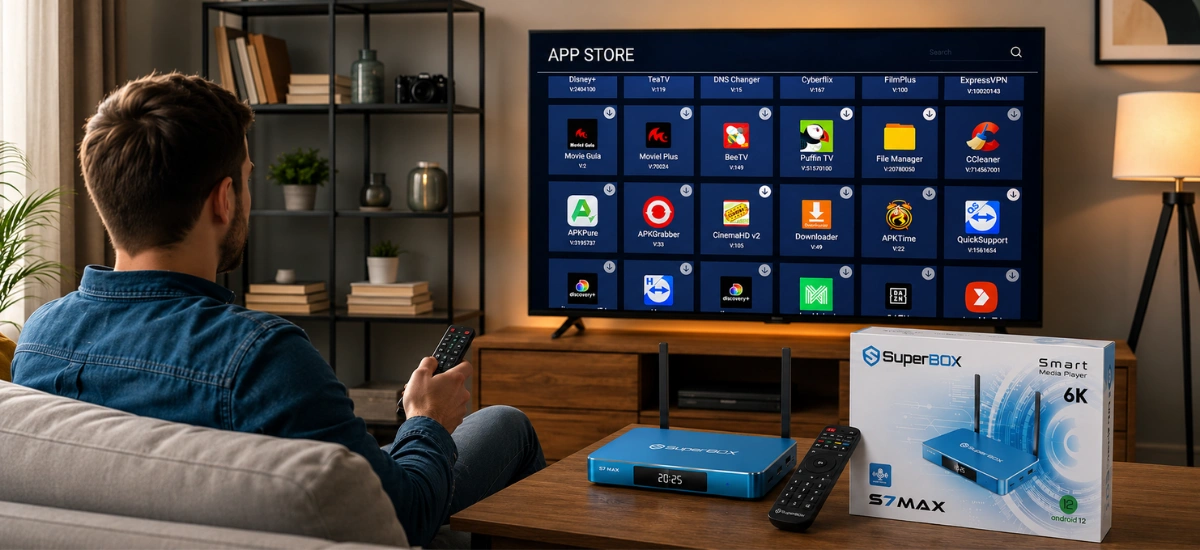
Operating System: Apple tvOS Walled Garden vs. Open Android 12
The philosophical divide between Apple and SuperBox is most evident in their operating systems. Apple tvOS is renowned for its polished typography, smooth animations, and zero advertising on the home screen. However, tvOS is a strictly locked “walled garden.” Users cannot sideload third-party APKs, cannot install retro emulators without complex developer certificates, and cannot connect external USB drives to play personal media files. You are entirely confined to apps approved by Apple that monetize through recurring subscriptions.
The SuperBox S7 Max runs full Android 12. While certified with the Google Play Store for mainstream tools, it also allows total sideloading freedom. You can install Kodi, VLC Media Player, Downloader, web browsers, and specialized streaming APKs directly via USB flash drives or web links. Furthermore, with pre-installed AirPlay receiver software, Apple users can still mirror their iPhones, iPads, and MacBooks directly to the S7 Max with zero friction.
Hardware Design and Thermal Management: Metal Housing vs. Plastic Puck
Apple transitioned the 3rd-generation Apple TV 4K to a fanless plastic enclosure, removing the internal fan present in the 2nd-generation model. While adequate for standard video-on-demand streaming, the dense polycarbonate housing traps internal thermal energy during continuous multi-hour 4K live broadcasts, occasionally leading to warm exterior surfaces and minor performance throttling.
The SuperBox S7 Max is engineered with an aviation-grade aluminum alloy outer chassis. Aluminum features a thermal conductivity rating exceeding 200 W/m·K (compared to approximately 0.2 W/m·K for plastic). The entire metallic shell serves as a structural passive heatsink, rapidly conducting thermal energy away from the processor and DDR memory. During our continuous 8-hour live sports benchmark test, the S7 Max maintained an internal operating temperature of just 41°C to 44°C, ensuring rock-solid stability and zero dropped frames.

Wireless Range & Remote Usability in Home Theaters
Another crucial distinction lies in wireless signal reception and remote ergonomics. The Apple TV 4K relies on internal micro-antennas housed inside its plastic shell. If placed inside a wooden media cabinet or behind a large TV, Wi-Fi signal attenuation can introduce buffering spikes during live sports.
The SuperBox S7 Max features dual omnidirectional high-gain external antennas supporting Wi-Fi 6 (802.11ax). These external antennas elevate signal reception above media console obstructions, maintaining high packet throughput and low latency across multi-room home layouts. In addition, the included RC-200L remote features fully backlit keys that illuminate automatically in dark home theater rooms, along with a full numeric keypad for instant channel jumping—features notably absent from Apple’s minimalist Siri Remote.
Step-by-Step Guide: How to Set Up SuperBox S7 Max for Ultimate Living Room Streaming
Follow our comprehensive step-by-step setup procedure to optimize video output, audio pass-through, and cloud live playback on your SuperBox S7 Max:
Step 1: Unbox Unit and Verify Authentic Holographic Barcode Seals
Check the packaging box and bottom label of the S7 Max to confirm genuine serial barcodes and factory security seals. Authentic units purchased through authorized distributors guarantee lifetime access to high-speed cloud CDN servers.
Step 2: Connect S7 Max via High-Speed HDMI to a 4K 60Hz Port
Connect the included premium high-speed HDMI cable from the S7 Max HDMI port directly into an HDMI 2.0 or 2.1 input on your 4K television. Connect the DC power supply into a surge protector.
Step 3: Establish Wired 1000M Gigabit LAN or 5GHz Wi-Fi 6 Network
For pristine jitter-free 4K sports streaming, plug a Cat6 Ethernet cable into the 1000M Gigabit LAN port. If connecting wirelessly, position both external antennas vertically, navigate to Network Settings, and connect to your 5GHz Wi-Fi 6 SSID.
Step 4: Pair RC-200L Backlit Remote and Program TV Power/Volume Controls
Insert two AAA batteries into the RC-200L remote. Hold the Home and OK keys simultaneously to pair via Bluetooth. Use the IR learning cluster at the top of the remote to clone your television’s power and volume keys for seamless single-remote operation.
Step 5: Launch SuperBox App Store and Install Blue TV, Blue VOD, and Playback
From the main launcher screen, open the SuperBox App Store. Download and install Blue TV, Blue VOD, and the Playback app. Grant all required storage and network permissions upon prompt.
Step 6: Fine-Tune Display Resolution, Aspect Ratio, and Hardware Decoding (HW+)
Navigate to Settings > Display and set resolution to 3840x2160p 60Hz. Open Blue TV, press the Menu button, and verify that stream decoding is set to Hardware Plus (HW+) for hardware-accelerated H.265 playback.
Step 7: Configure Regional EPG Time Zone and Setup AirPlay Screen Mirroring
Set your home time zone within app settings to align the Electronic Program Guide with live air times. If you own Apple devices, launch the pre-installed AirScreen utility to enable instant AirPlay mirroring from your iPhone, iPad, or Mac.
Frequently Asked Questions
1. Can I install Netflix and Amazon Prime Video on the SuperBox S7 Max?
Yes. The SuperBox S7 Max runs full Android 12 with Google Play Store support. You can log into your Google account and download Netflix, Prime Video, Disney+, YouTube, and Kodi. Note that third-party streaming apps stream in standard HD due to DRM certification, while Blue TV and Blue VOD deliver high-bitrate live HD/4K streams natively without subscriptions.
2. Does the SuperBox S7 Max require any monthly subscription fees?
No. The SuperBox S7 Max ($339.00) requires only a one-time hardware purchase. All 2,000+ live sports and news channels, on-demand movies, pay-per-view events, and 7-day cloud playback features are fully included without recurring monthly or annual bills.
3. Why does the SuperBox S7 Max use an aluminum metal chassis instead of plastic?
Aluminum is over 200 times more thermally conductive than plastic. The all-aluminum chassis of the S7 Max acts as a passive heatsink, dissipating heat away from internal silicon to keep operating temperatures around 41°C to 44°C during all-day 4K streaming, preventing thermal throttling and hardware degradation.
4. Can I use Apple AirPlay to mirror my iPhone or iPad on the SuperBox S7 Max?
Yes. The S7 Max includes pre-configured AirPlay compatibility tools such as AirScreen. You can mirror photos, personal videos, and presentations directly from your iPhone, iPad, or Mac to your television screen effortlessly.
5. What is the advantage of 64GB storage on the S7 Max compared to the S7 Pro?
The S7 Max includes 64GB of eMMC storage, doubling the S7 Pro’s 32GB capacity. This extra headroom provides over 52GB of usable space for downloading offline media, installing custom Kodi builds, and running dozens of Android applications without low-storage warnings.
6. Does the Apple TV 4K remote feature backlighting for dark home theaters?
No. Apple’s Siri Remote lacks backlit keys, making it difficult to locate buttons in a dark living room. The SuperBox S7 Max includes the RC-200L remote, which features fully illuminated backlit buttons and dedicated numeric channel keys.
7. How does the 7-Day Playback feature work on the SuperBox S7 Max?
The Playback feature functions as an automated cloud DVR. SuperBox cloud servers record and store 168 consecutive hours of programming across major sports and entertainment channels. You can rewind, pause, or catch up on missed games from the past 7 days without needing to set timers or consume local storage.
8. Can I play video files from a USB flash drive or external hard drive on Apple TV 4K?
No. The Apple TV 4K has zero USB ports and does not support direct external storage. In contrast, the SuperBox S7 Max features full-sized USB ports and a TF/microSD card slot, allowing plug-and-play playback of local 4K MKV, MP4, and AVI video files via VLC or Kodi.
9. What warranty coverage and technical support come with the SuperBox S7 Max?
Genuine SuperBox units purchased from our store come backed by an official 1-year manufacturer hardware replacement warranty and 24/7 technical customer support for firmware updates and software assistance.
10. How does the SuperBox S7 Max compare to the newer SuperBox S8 Max?
The newer SuperBox S8 Max ($399.00) introduces an upgraded AI Voice Engine, dedicated TV Recorder app, and refreshed software architecture. However, the S7 Max ($339.00) shares the identical aluminum heatsink build, 4GB RAM, 64GB storage, Wi-Fi 6, 1000M LAN, and live channel access, making it an extraordinary cord-cutting value.
The article was updated on:
