
Knowledge SuperBox
Where to Watch Modern Family: Free and Paid Options





You can stream Modern Family on Hulu or Peacock in the United States and Disney+ in Canada. Digital purchase options are another route if you prefer buying episodes or seasons instead of adding a streaming subscription.
Compatible SuperBox owners can also watch Modern Family free through Blue VOD without a separate monthly Blue VOD subscription. All 11 seasons have been confirmed in the app for this guide’s November 2026 availability check. The device is a purchase, and an internet connection is required.
Whether you are meeting the Dunphys for the first time or returning to a familiar Christmas episode, start by choosing your viewing route. Then find the original 2009 series and the season you want.
Where is Modern Family streaming in the US and Canada?
The available service depends on your country. The following options were reviewed on November 7, 2026; check the current offer before subscribing or purchasing.
| Where you watch | Viewing option | Access to check |
|---|---|---|
| United States | Hulu | Subscription streaming; all 11 seasons are listed |
| United States | Peacock | Subscription streaming; the service lists the 11-season series |
| Canada | Disney+ | Subscription streaming; the Canadian page lists 11 seasons |
| United States | Amazon Video or Fandango at Home | Digital purchase listings; check the season or collection you are buying |
| Canada | Apple TV Store | Digital purchase listings; check your Canadian storefront and selected season |
Hulu and Peacock for US viewers
Hulu’s Modern Family guide confirms the entire series is available to its subscribers. ABC’s own show page also directs viewers to Hulu for all seasons.
Peacock’s series page lists Modern Family with 11 seasons. Both services provide a way to choose episodes on demand rather than waiting for a particular broadcast.
If you already use one of these services, check the account you have before paying for another. A household may value the rest of a service’s catalog as much as this one sitcom, so compare the entertainment you will actually keep watching.
For a new subscription, review the current plan, advertising conditions and supported devices. A service being available does not mean every household needs to add it. Start with what your existing account covers and what you want beyond Modern Family.
Disney+ for Canadian viewers
The Disney+ Canada listing includes Modern Family and its 11 seasons. That makes it a relevant subscription option for readers watching from Canada.
Use the Canadian catalog and your own account when checking access. A US streaming recommendation should not automatically be treated as the same offer in Canada, even when both pages show a familiar poster.
If a search sends you to another country’s page, return to the service’s local catalog before making a purchase decision. This is particularly useful when a search result mentions Hulu while the offer available to you is presented through Disney+ Canada.
Buying seasons instead of subscribing
Current availability listings identify Amazon Video and Fandango at Home purchase options in the United States, and Apple TV Store purchases in Canada.
Check what the price covers: an individual episode, one season or a collection. A purchase listing is different from a show being included with a subscription you already pay for.
Buying may suit someone who wants a particular season. If your plan is to revisit the show from beginning to end, compare the complete purchase with your other viewing options first. Do not assume that the first price displayed covers all 11 seasons.
Check the offer against how your household watches
Before paying, consider three practical details: who will watch, where they will watch, and which languages they need. A service can carry the right show while a particular account or plan still needs closer inspection.
If someone prefers French or Spanish, check the actual audio and caption options for the series on that service. A translated website menu is not confirmation of a dubbed episode, and captions are different from spoken audio.
Also check the advertising conditions and the devices you intend to use. These details matter more during a regular family rewatch than a small difference between headline offers. Use the provider’s current plan information rather than assuming every plan has identical features.
For a shared account, confirm the applicable household and simultaneous-viewing terms. Keep those checks with the service you choose; a feature offered by one provider should not be assumed for the others.
Can you watch Modern Family free on SuperBox?
Yes. Modern Family’s 11 seasons have been confirmed in Blue VOD on compatible SuperBox hardware. Blue VOD does not require its own separate monthly subscription or a separate episode-rental payment for this viewing route.
The practical benefit is having an on-demand sitcom to return to without adding another monthly Blue VOD charge. You can watch a few episodes, leave the series for a while, and return to the available catalog at your own pace.
Blue VOD is separate from Hulu, Peacock and Disney+. You are using a different app on the SuperBox; you are not receiving paid accounts for those services. The hardware and home internet remain part of the overall cost.
Consider the household’s wider entertainment routine
For an existing SuperBox owner, checking Blue VOD is the straightforward next step. For someone considering a purchase, evaluate more than one show: the films, series and live viewing you would use regularly, alongside the services you would keep.
That is where SuperBox can help a household reduce recurring entertainment spending. Its free core-app access may replace a service you would otherwise continue paying for. The savings depend on the charges you can actually remove; internet and any retained subscriptions still belong in your budget.
Our breakdown of SuperBox’s ongoing expenses separates those costs before you make a decision.
If you want help choosing a device, SuperBox Official Store is an authorized retailer serving customers in the US and Canada. The S8 Max is a model to consider for everyday series and live-TV use. The S8 Ultra includes a backlit voice remote, which may be useful if your usual viewing room is dim. Ask through the website’s live chat about the features your household will use, rather than choosing a model solely for one series.
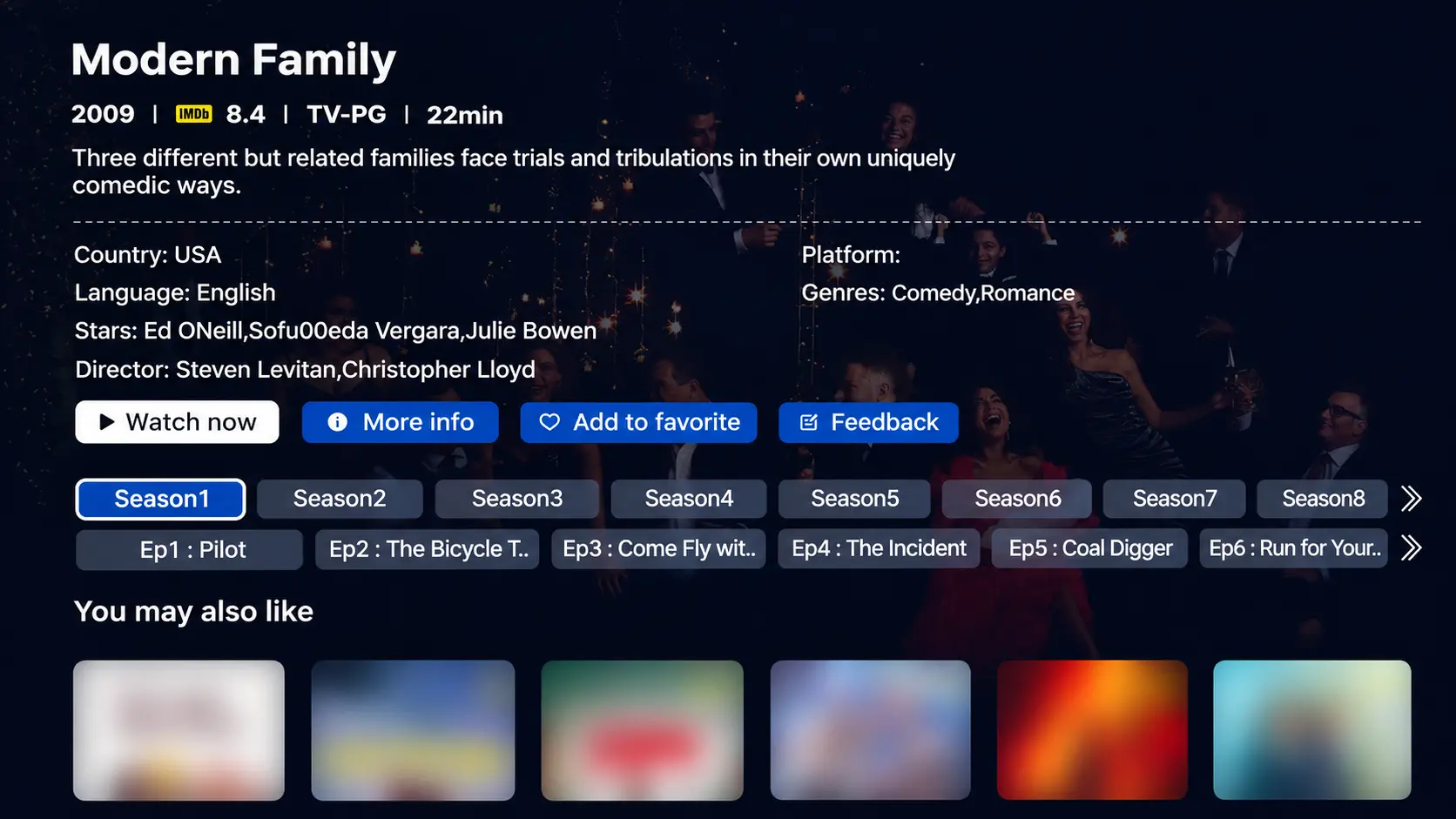
How to find Modern Family in Blue VOD
Open the SuperBox interface on your television, then use the box’s remote. These are the basic steps on the S8 Blue VOD interface:
- Open VOD or the installed Blue VOD shortcut.
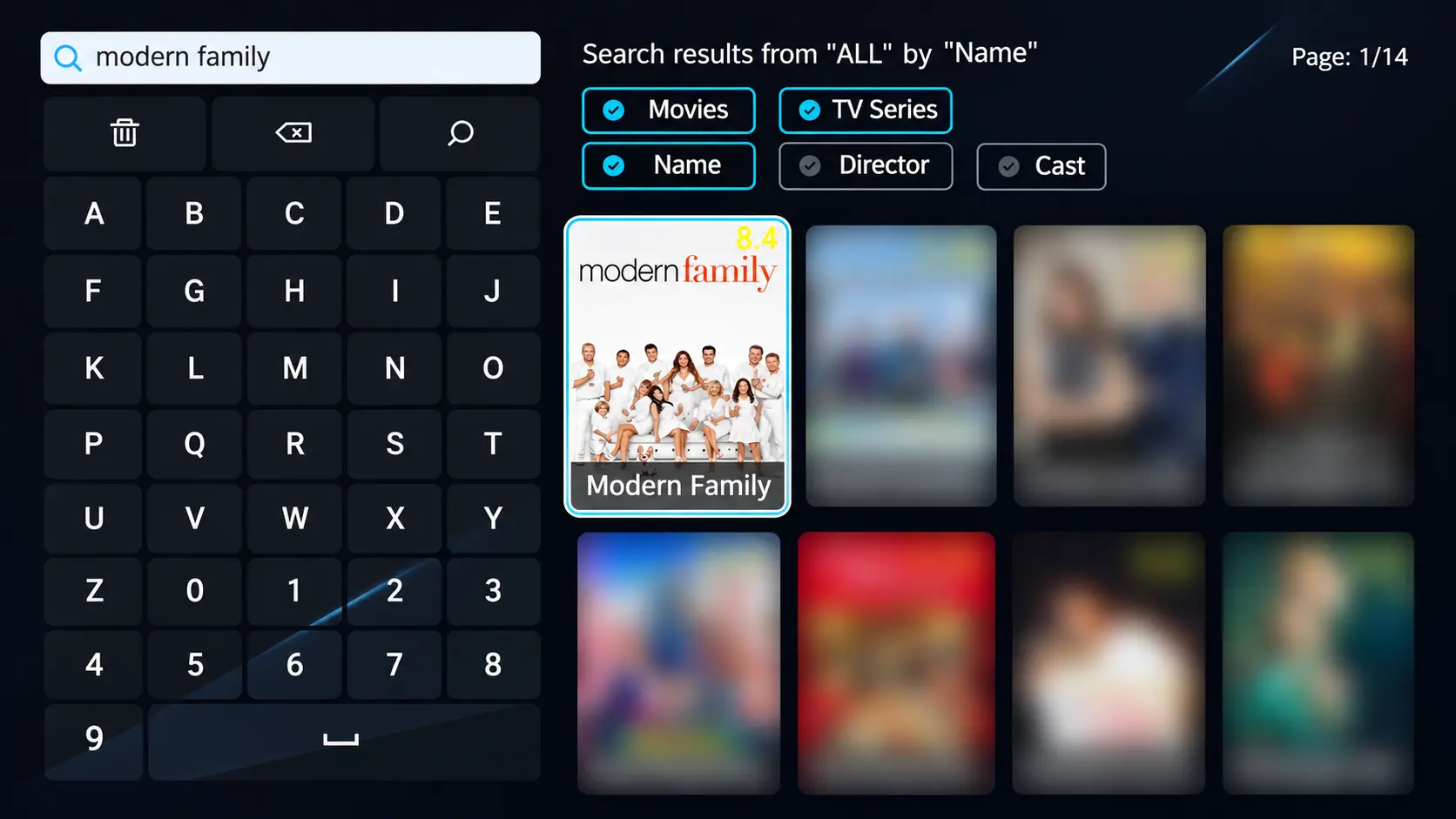
- Select Search and enter Modern Family.
- Where filters appear, choose TV Series and Name.
- Open the original 2009 series.
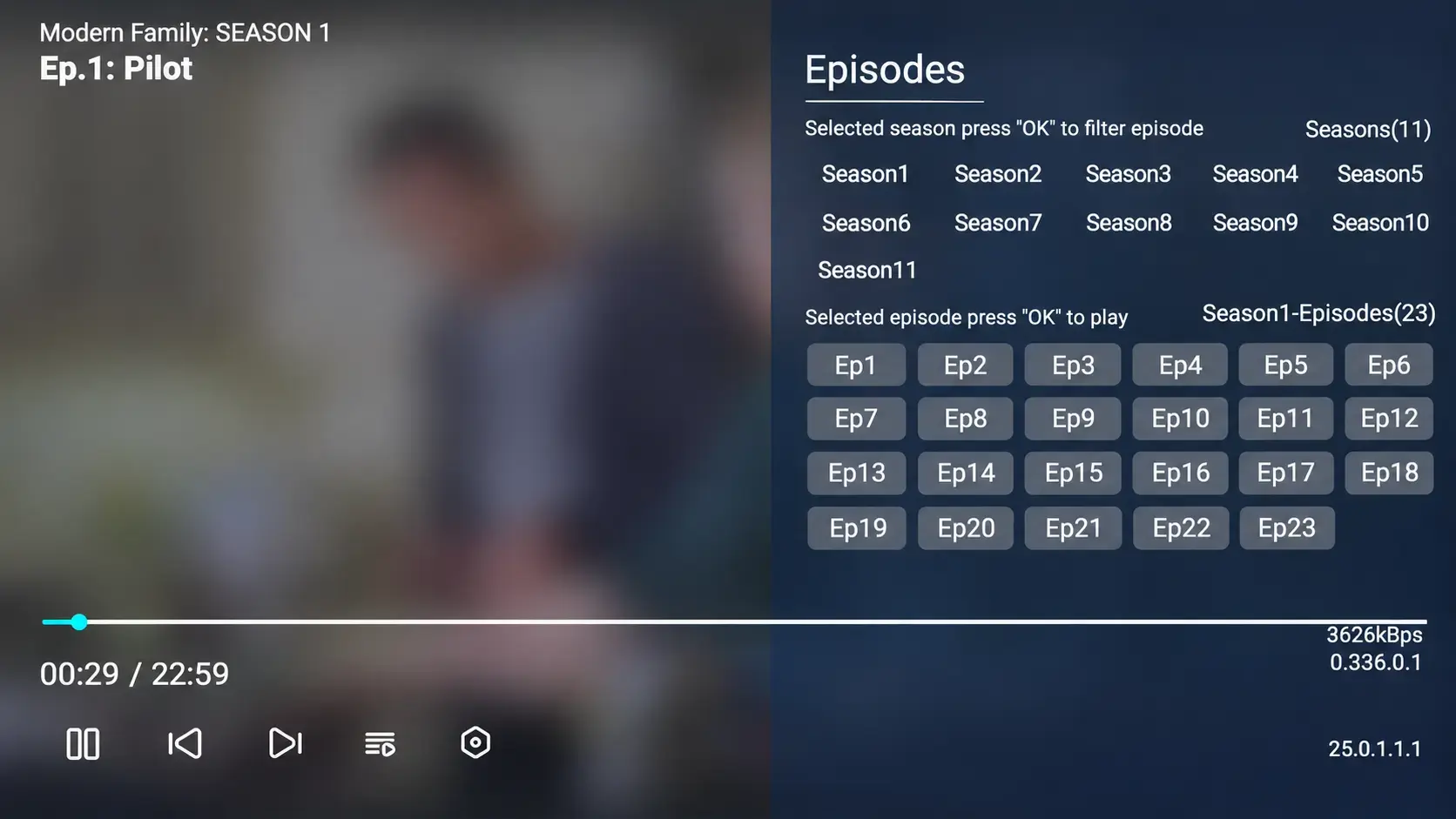
- Select a season, then the episode you want to watch.
Enter the show’s name rather than a web-search phrase such as “where to watch Modern Family free.” If results look unrelated, check the media type and title-search filter before trying again.
For the first viewing, choose Season 1, Episode 1 — Pilot. For a rewatch, open your chosen season directly. Confirm both numbers before playback: S3E10 means Season 3, Episode 10, not the tenth episode in whichever season was already selected.
Older compatible models and app builds may arrange the controls differently. The S7 Blue VOD walkthrough covers the demonstrated S7 interface; the S8 Blue VOD guide explains that generation’s search and playback controls. Use the guide matching the screen you see if you need more than the basic title-selection steps.
Meet the three families before starting
Modern Family follows an extended family through three connected households. Understanding the connection makes the first episodes easier to follow without needing a detailed plot summary.
Jay Pritchett is the father of Claire Dunphy and Mitchell Pritchett. Their households, along with Jay’s, form the core of the show. Here is the starting setup, without later-season developments:
| Household at the beginning | People to recognize | Connection to the wider family |
|---|---|---|
| Jay and Gloria | Jay, Gloria and her son Manny | Jay is Claire and Mitchell’s father |
| Claire and Phil | Claire, Phil, Haley, Alex and Luke | Claire is Jay’s daughter and Mitchell’s sister |
| Mitchell and Cameron | Mitchell, Cameron and their daughter Lily | Mitchell is Jay’s son and Claire’s brother |
The comedy often comes from how the households approach the same event differently. A celebration or family plan can look manageable in one home and become complicated when everyone joins in.
This structure also explains why a clip featuring only Phil does not tell you everything about the series. The show moves between the families, bringing their stories together rather than following one person exclusively.
What the mockumentary style means
Modern Family presents its fictional characters through a documentary-style format. Characters speak toward the camera, and the episode moves between scenes and interview-like moments.
Those moments are part of the storytelling. A cut away from an argument to a character explaining themselves is not a separate behind-the-scenes feature. Keep watching and let the episode’s different viewpoints come together.
If you are used to more conventional sitcoms, give the format an episode or two. The contrast between what someone says about the family and what happens in the next scene is part of the viewing experience.
Does the title mean it is suitable for every age?
“Family” describes the people and relationships at the center of the show. It does not automatically make every episode a children’s program.
Check the displayed rating and description on the service or episode you choose. The series includes adult relationships and situations as well as parenting and family life. For a mixed-age group, preview the intended episode and decide whether its humor suits everyone watching.
You do not need to turn the evening into a detailed screening process. A quick look at the episode’s information is more useful than assuming every sitcom with children in the cast has the same audience.
Choose a starting point for your kind of viewing
The series has 11 seasons, and its original run spans 2009–2020. A full first watch and an evening of familiar episodes are different ways to enjoy it.
Start with the pilot if you have only seen clips
Short clips can make a character familiar before you have watched an entire episode. Start with S1E1 — Pilot to meet the original households and understand how their stories connect.
Then continue in order if you want to follow the family over time. The children grow up, and later episodes build on changing relationships and circumstances. Starting late can reveal developments you would otherwise experience as part of the story.
You do not need to know every character’s name before pressing play. Use the household map above as a reference if two of the family connections are unclear, then return to the episode.
Choose “Connection Lost” for a distinctive rewatch
Season 6, Episode 16 — Connection Lost uses Claire’s computer screen as the episode’s storytelling space while she tries to reach Haley. ABC’s own episode coverage identifies this unusual presentation.
For a returning viewer, it is a specific choice when you want an episode that feels different from the usual household scenes. For a first-time viewer, it is better approached after meeting the characters and learning how they relate to one another.
Because the presentation includes computer windows and calls, treat those elements as part of the episode rather than controls for the Blue VOD app. If you want to pause or leave playback, bring up the player controls using your remote.
Pick “Express Christmas” for a holiday session
Season 3, Episode 10 — Express Christmas follows the family putting together a quick celebration when they realize they will not be together on Christmas. It is a useful holiday starting point for someone revisiting the show.
For another Christmas choice, Season 7, Episode 9 — White Christmas centers on a planned family celebration in a mountain cabin. These are episode recommendations, not a requirement to watch the whole series out of order.
Choose the season and episode before guests arrive. That gives you time to confirm the listing and start the right entry, rather than searching a long series while everyone waits.
Save the Season 11 finale for the end of a first watch
If you want the story to unfold in order, leave the final season until you reach it naturally. The humor includes changes in the family’s lives, and jumping to the ending can reveal where several relationships and circumstances lead.
Peacock’s Season 11 listing presents the ending as Episode 17 — Finale Part 1 and Episode 18 — Finale Part 2. When returning specifically for the finale, check for both parts in the listing you use so you do not accidentally begin halfway through the ending.
For an ongoing first watch, continue from the episode you last completed. If a list looks shorter than expected, inspect its entries and navigation before assuming the ending is absent. The label on your current app screen is the practical reference when selecting the episode.
Make a long series manageable without turning it into homework
All 11 seasons give you a choice of pace. You can follow the story a little at a time or return to a favorite episode when that suits the evening.
If two people are watching the series together, agree on which episode comes next. A simple note such as “Modern Family — S2E5 finished” is enough to keep a shared viewing position clear if someone else uses the television.
For viewers at different points, select the season deliberately rather than assuming the most recent activity belongs to you. A saved show helps locate the series; the season and episode identify the part of the story you want.
For detailed Favorite, History or subtitle controls, use the S7 or S8 guide linked above. You do not need to learn every app setting just to begin watching a sitcom.
If a season is missing or an episode will not start
Describe the actual screen before deciding what has gone wrong. An empty search, a season you cannot locate and an episode that will not play are different observations.
- No search result: Check Modern Family, the TV Series selection and the title-name filter.
- Only some seasons are visible: Inspect the available season navigation and confirm that you opened the original series. Take a photo of the visible choices if the season still cannot be found.
- One episode fails: Try a neighboring episode and a different series, noting what happens in each case.
- The label and opening do not match: Record the selected season, episode number and title, then explain what appears when playback starts.
For an order placed directly through superboxtvboxstore.com, email customer@superboxtvboxstore.com with your model, the exact entry involved, any error message and the comparison results. A screenshot or short recording can make the issue clearer. Our team can coordinate technical help and order assistance for your store purchase; send purchase information privately.
The 11-season listing was confirmed for this guide’s November 2026 check. Availability can change, so verify the current app if this particular series is essential to your buying decision.
Modern Family viewing FAQs
Where can I watch Modern Family in the United States?
Hulu and Peacock list the series for subscription streaming. Current US availability listings also identify digital purchase options through Amazon Video and Fandango at Home. Check the offer and selected season before paying.
Where can I watch Modern Family in Canada?
Disney+ Canada lists all 11 seasons. Apple TV Store is also identified as a Canadian digital purchase option. Use your own country’s storefront rather than assuming US offers apply.
Can I watch all 11 seasons free on SuperBox?
Yes. All 11 seasons were confirmed in Blue VOD for this guide’s November 2026 check. Blue VOD access on compatible SuperBox hardware has no separate monthly app subscription; the device and internet are separate costs.
Do I need Hulu, Peacock or Disney+ to use Blue VOD?
No. Blue VOD is a separate app on compatible SuperBox hardware. Using it does not provide or require paid accounts for those three services.
Should I open Blue TV or Blue VOD for Modern Family?
Open Blue VOD to select the series, season and episode on demand. You do not need to wait for a live-channel rerun or record the episode first.
Does Modern Family have a two-part finale?
Peacock lists Finale Part 1 as Season 11, Episode 17 and Finale Part 2 as Episode 18. When choosing the ending in your current app, check its entries for both parts and start with Part 1.
Can I expect the same subtitles on every episode?
Check the current episode’s available tracks. A language on one entry does not confirm the same track throughout the series, and an app listing does not establish a particular video resolution.
What should I try after Modern Family?
For another ensemble comedy, explore Friends on SuperBox. Its separate guide covers the original series and how to distinguish it from the reunion. Choose your next show around the humor you enjoy, rather than feeling you need another long marathon immediately.
If you prefer a group of friends with a scientific setting, compare the viewing options for The Big Bang Theory. That guide also helps distinguish the original sitcom from its related productions.
For tonight, choose one clear starting point: the pilot to meet the households, a familiar season to revisit, or a holiday episode for a shared evening.
The article was updated on:
