
Knowledge SuperBox
Best Latino Cable Packages in 2026 and Cheaper Alternatives





The best Latino cable package is the one that carries your family’s Spanish-language channels without making you pay for a larger bundle you rarely use.
For an existing Xfinity Internet customer, NOW TV Latino is worth checking first. Spectrum offers Spanish-focused and bilingual plans, while DishLATINO suits households considering a traditional satellite setup. DIRECTV MiEspañol and Sling Latino provide streaming alternatives with different channel selections and pricing.
If your main goal is to move away from recurring cable costs, SuperBox S8 offers another approach: buy the hardware and use its dedicated live TV and on-demand apps without a monthly SuperBox equipment subscription.
This guide compares US television options. Prices and availability depend on the offer, address and eligibility; US subscriptions should not be assumed to work in Canada or other countries.

Best Latino TV options at a glance
The table separates traditional TV, internet-delivered subscriptions and hardware you purchase. They are different ways to build a home TV setup.
| Option | Strong starting point for | Advertised price or purchase structure | Main condition to check |
|---|---|---|---|
| Xfinity NOW TV Latino | Eligible internet customers seeking a small Spanish TV bill | $15 per month plus tax | Requires eligible Xfinity internet service; internet is extra |
| Spectrum TV Latino or Stream TV Latino Más | Spanish-focused or bilingual households in Spectrum’s service area | Get the current offer for your address | Confirm plan name, internet requirements and the complete quote |
| DishLATINO Plus | Families considering satellite TV and a traditional receiver | $71.99 per month advertised for two years | Qualifying offer has a 24-month commitment; advertised main-package pricing excludes local channels |
| DIRECTV MiEspañol | Spanish TV viewers wanting a standalone streaming subscription | $24.99 per month for the first two months; current subsequent rate $37.99 | Auto-renews unless canceled; taxes and current offer terms apply |
| Sling Latino | Viewers satisfied with a smaller Spanish channel selection | $10 per month advertised | Match the exact lineup before adding regional packs |
| SuperBox S8 | Households prioritizing an upfront purchase and lower recurring TV costs | One-time hardware purchase; internet remains extra | Check required channels in the current app and budget for any optional paid services |
Prices checked October 29, 2026. Promotional prices are not permanent rates. The provider pages linked below control the current offers, eligibility and local availability.
Channel totals also need context. A mixed English-and-Spanish package is not the same thing as that many Spanish-language channels, and free streaming channels may be counted differently from traditional networks.
Choose your channels before choosing a provider
Start with a short household list rather than a headline channel count.
Write down the specific networks, programs and sports you need. That could mean Univision or Telemundo entertainment, a local Spanish newscast, a particular soccer competition, children’s programming or television from a family member’s home country.
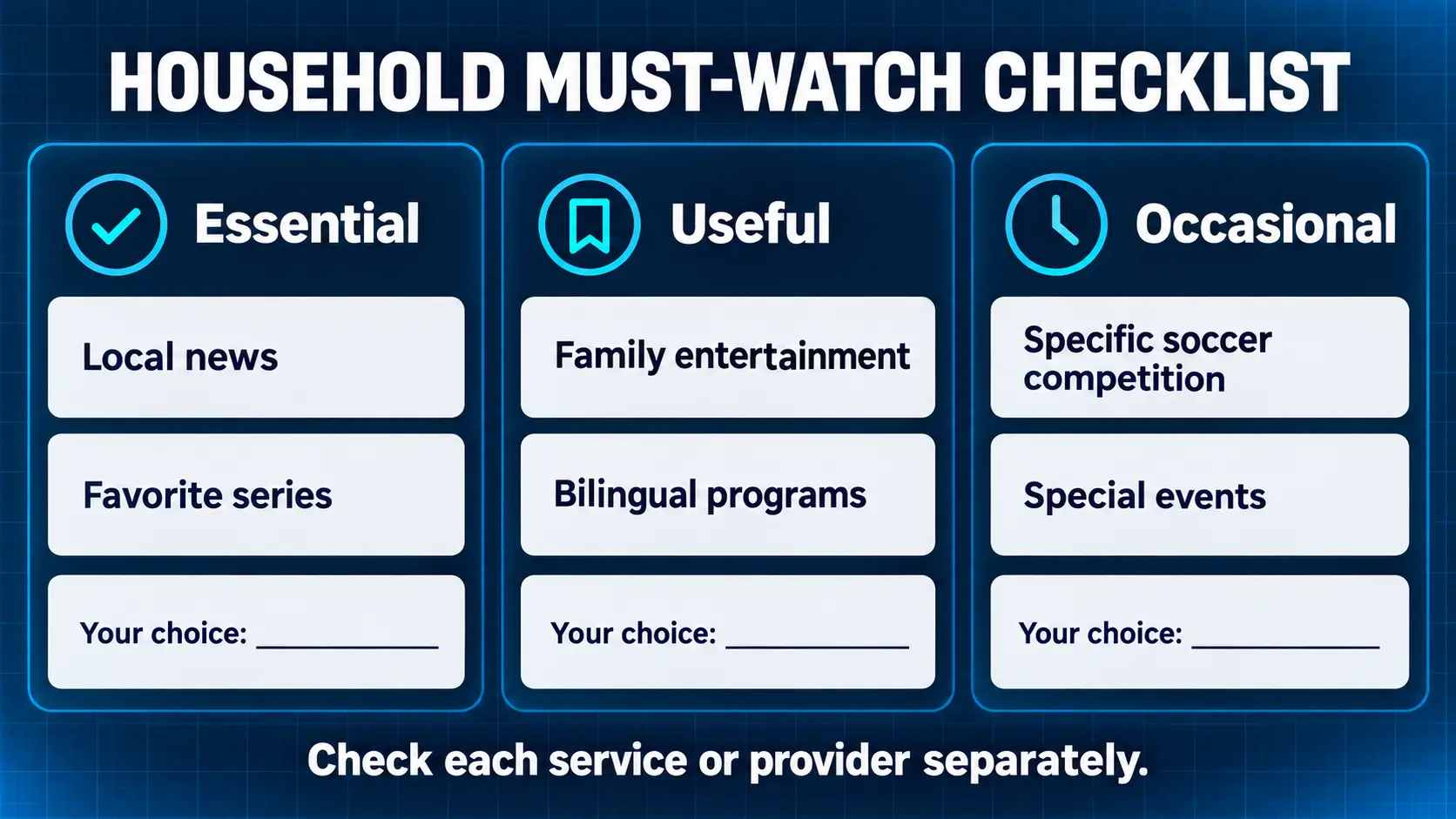
Then divide the list into three groups:
- Essential: the shows and channels you would miss immediately.
- Useful: things you watch regularly but could replace.
- Occasional: programs that do not justify a large year-round package.
This helps you distinguish a real saving from a cheaper package that requires several add-ons. It also prevents the opposite mistake: buying the biggest bilingual bundle because a smaller plan sounds incomplete.
If different people speak different languages at home, compare their actual viewing together. A Spanish-first household and a household split evenly between English and Spanish may need different packages, even with the same budget.
Xfinity NOW TV Latino for eligible internet customers
Xfinity lists NOW TV Latino at $15 per month, plus tax, without an annual contract. Eligible Xfinity internet service is required.
Its current overview lists Spanish networks including Univision, UniMás, Galavisión and TUDN, alongside Peacock Premium and ViX Premium with ads. Local broadcast channels are not included; Telemundo programming through Peacock should not be confused with receiving your local Telemundo station.
That makes it a useful first comparison if you already have qualifying internet and want to reduce a larger TV bill.
Check before switching: NOW TV Latino is different from the traditional Xfinity TV Latino add-on. Ask which product you are being quoted, what happens to your existing lineup and whether any equipment must be returned.
Do not count the $15 TV charge as the entire household bill. Keep the internet price visible, especially if changing a bundle also changes your broadband rate.
Spectrum for a Spanish focused or bilingual household
Spectrum’s current Latino plan page distinguishes TV Latino, with 45+ Spanish channels, from Stream TV Latino Más, with 170+ English and Spanish channels. The larger plan includes ViX Premium with ads and Paramount+ Essential.
Older offers may use names such as Mi Plan Latino or TV Stream Latino. Compare the current product on your quote rather than assuming an old article describes the offer available today.
Spectrum’s current TV terms state that TV Latino requires Spectrum Internet. Equipment, activation, taxes and promotional conditions should be checked for the selected plan and address.
Choose around language balance. If most viewing is Spanish, investigate the smaller plan first. If the family also relies on English-language entertainment, compare the larger package against the cost of building that mix separately.
Ask for the full introductory bill and the rate after the promotion. A package that includes apps you already pay for may be useful, but only count a saving after you activate the benefit and stop duplicate billing.
DishLATINO Plus for a traditional satellite TV setup
DishLATINO Plus advertises $71.99 per month for two years, a mixed lineup of 190+ Spanish and English channels and a Hopper Duo DVR. The qualifying offer requires credit approval, automatic payment, paperless billing and a 24-month agreement with an early termination charge.
DISH’s main Latino offer page states that advertised main-package pricing excludes local channels. Check their cost before treating the headline price as your complete bill.
This option deserves consideration if your family values a familiar receiver-based TV routine and wants a broad bilingual lineup.
The practical trade-off is commitment. Compare the contract length, installation arrangements, receiver costs and local-channel options with your plans for the next two years.
A price guarantee can make budgeting easier, but it is different from the freedom to cancel whenever your viewing needs change. Ask what is guaranteed and which charges sit outside that guarantee.
DIRECTV MiEspañol for a standalone Spanish streaming plan
DIRECTV MiEspañol offers 60+ channels, including Spanish sports and entertainment networks, plus ViX Premium with ads. No base package or contract is required.
At the date checked, its advertised promotion is $24.99 per month for the first two months, followed by the then-current rate, presently $37.99 per month, unless canceled.
Its appeal is a Spanish-focused lineup without having to start with a larger English-language package. Compare it if the exact networks you watch are included and you want an internet-delivered service.
Price the ongoing plan, not just the opening offer. Check local-channel availability for your market and confirm the supported equipment you intend to use.
DIRECTV also sells satellite and other TV packages. MiEspañol’s terms should not be applied to every DIRECTV product simply because the provider name is the same.
Sling Latino for a smaller package or regional interests
Sling Latino advertises a $10 monthly plan with 19 channels. The same page lists regional selections such as México, Caribe, Sudamérica, Centroamérica and España.
This makes it worth investigating when the channels connected to a particular country or region matter more than a broad bilingual bundle.
Start with the actual lineup. A low monthly price is useful when its smaller selection is enough; it becomes a different proposition when you add several packs to recreate a larger service.
Do not assume that a Spanish package includes your local Univision or Telemundo feed. Check those stations explicitly, along with any sport you consider essential.
For a household that mainly wants a few novelas, entertainment networks or regional channels, a focused selection may be more sensible than paying for hundreds of unrelated options.
SuperBox S8 as an alternative to recurring cable packages
A cable comparison should also ask whether you still need a recurring TV package at all.
SuperBox gives households a different spending pattern. Instead of renting a provider’s receiver and maintaining a large television bundle, you purchase the device and use compatible entertainment apps over your home internet.
Its dedicated apps cover different viewing habits:
- Blue TV is for live channel browsing; the store advertises access to 2,000+ live channels overall.
- Blue VOD provides a broad selection of on-demand movies and series.
- Playback offers catch-up for eligible programming on supported channels.
These core apps do not require separate monthly app subscriptions on compatible SuperBox hardware. Home internet and optional paid third-party services remain separate expenses. The explanation of what SuperBox owners still need to budget for helps you compare the total with your existing TV bill.
Check the Spanish lineup against your own list
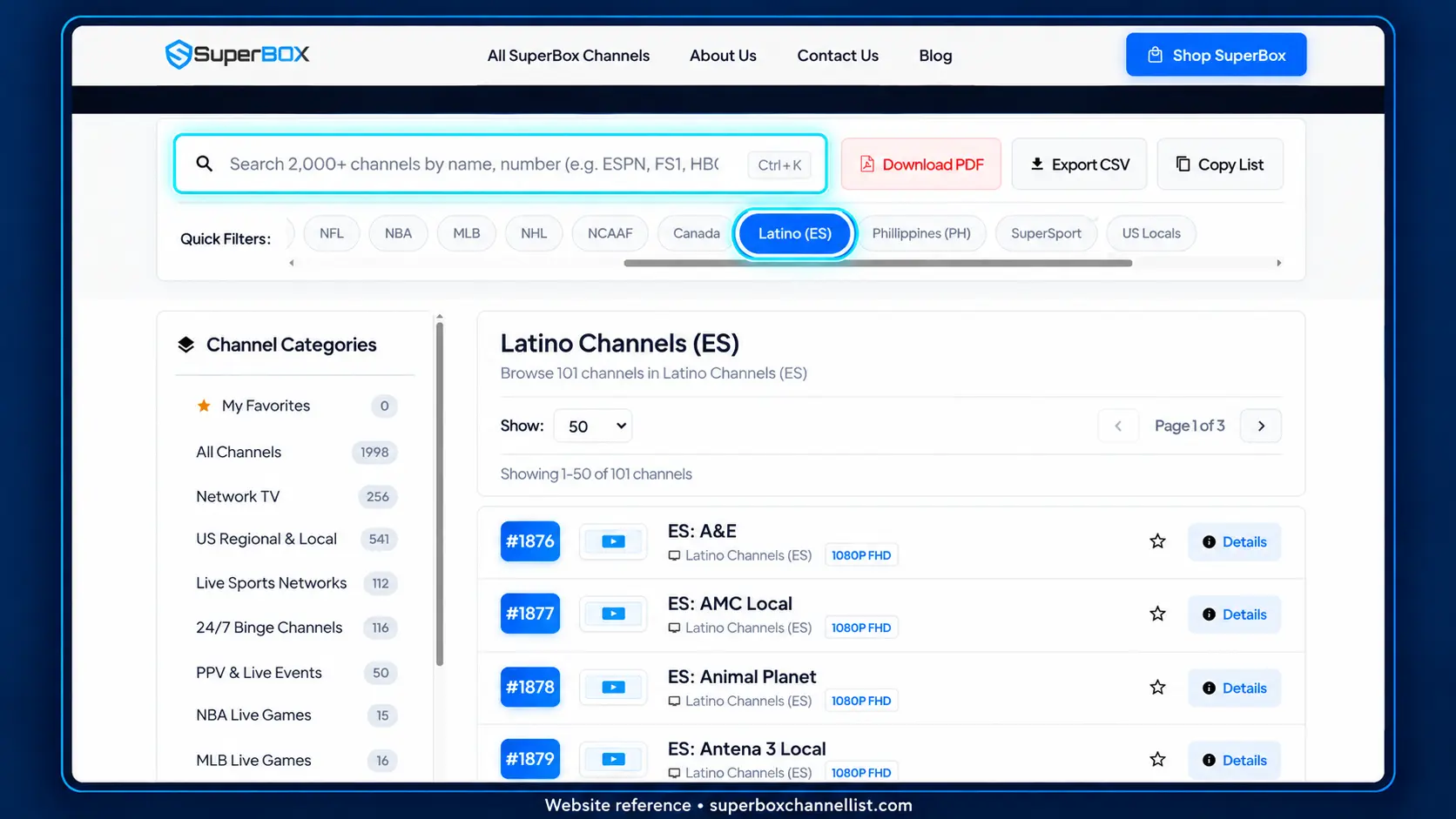
Use our companion channel guide and its Latino (ES) filter as a starting point. Its listings include Spanish entertainment entries, while networks such as Telemundo, Univision and TUDN can also appear elsewhere in the directory.
Search by channel name, confirm the feed and spoken language, and check the programs you actually watch. Published listings are a reference; availability inside the app can change. The instructions for finding and organizing channels in Blue TV can help you build a manageable family shortlist.
The financial benefit comes from charges you can genuinely remove. If SuperBox covers your everyday viewing, eliminating an unused cable package or equipment rental can reduce ongoing costs substantially. If you retain several paid services, include those when comparing.
SuperBox does not supply a subscription to every outside service. A paid provider account remains a separate purchase on equipment that the provider supports.
Choose SuperBox S8 around the way your family watches
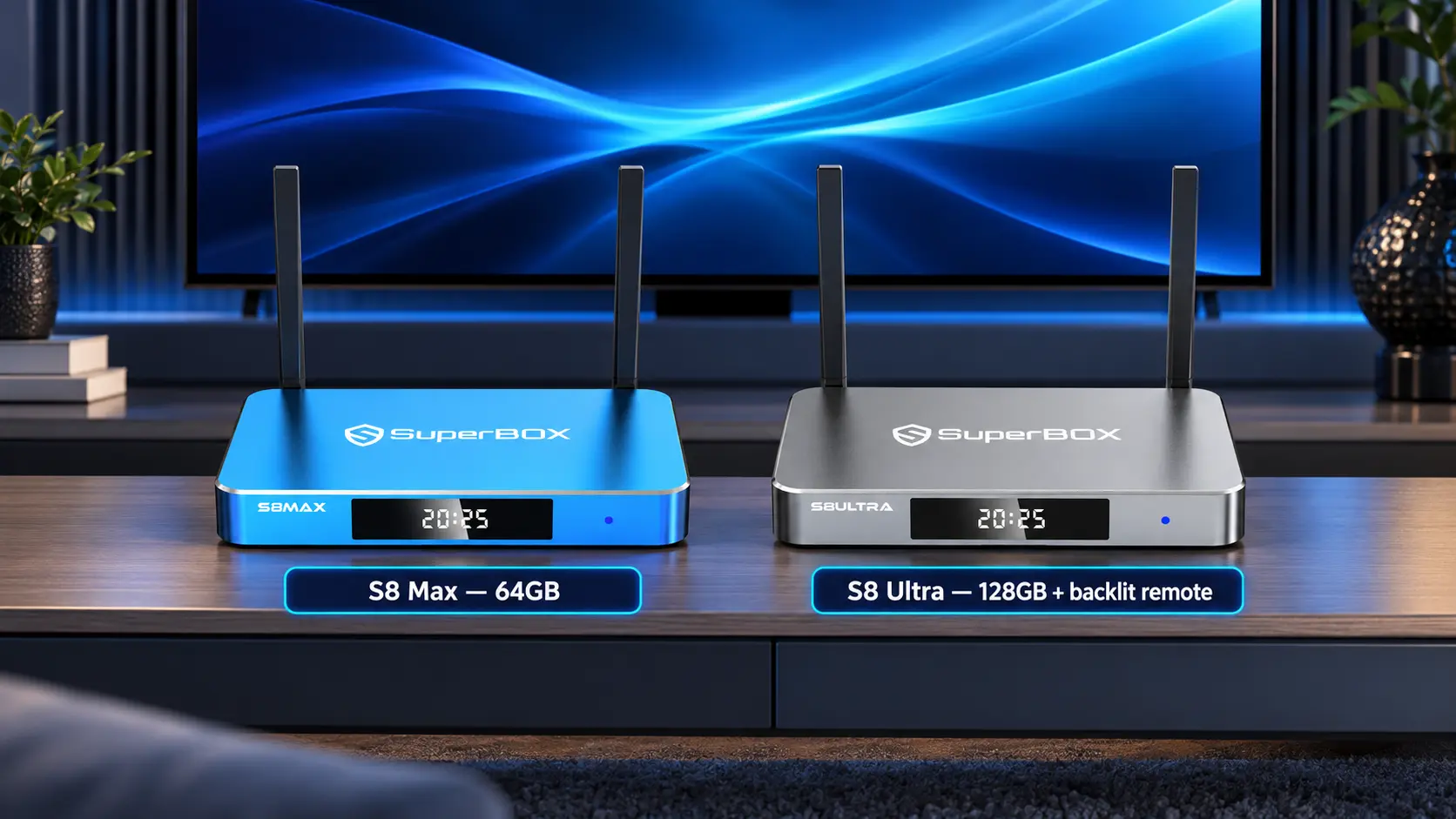
The S8 Max is listed at $399 and offers 4GB RAM, 64GB internal storage, WiFi 6, Gigabit Ethernet and a AI voice-command remote. It is a practical option for a household wanting the S8 interface and broader supported viewing tools.
The S8 Ultra is listed at $449, with 128GB internal storage and an included backlit voice remote. Illuminated buttons can be useful when the family watches in a dim room.
Both offer expanded supported Multi-Viewing and a dedicated NFL app. Choose those features for the household’s wider entertainment interests; neither a model name nor an app label establishes every Spanish sports broadcast. The full S8 comparison also covers Pro and Plus.
SuperBox TV Box Store is an authorized retailer serving US and Canadian customers. Before ordering for specific Latino channels, email customer@superboxtvboxstore.com with your location and essential channel names. Direct buyers can use the same contact for technical or order help so our team can review and coordinate the next steps.
Compare sports and local news separately
A package can be strong for entertainment and still miss the one event you care about.
For soccer, start with the competition, team and match. Then check the current broadcaster, whether Spanish commentary is available and whether the game requires a separate app or higher tier. A provider’s sports-network logo is not confirmation of every match.
For local news, specify your city’s station. A national feed, a news clip channel and the local evening newscast are different products.
Ask the same questions across every option:
- Can I watch the exact program live?
- Is it the language and regional feed I want?
- Does the price include the required tier or app?
- Can the people in my home watch simultaneously?
- Is replay available if I miss the broadcast?
These checks are more useful than comparing total channel counts. They turn “good for sports” or “Spanish TV included” into an answer you can actually use.
Work out the yearly cost before you switch
Request a written quote that separates television from internet, equipment and optional extras.
Look for the regular monthly TV rate, promotional period, local or broadcast charges, receiver and DVR costs, installation, activation, taxes and cancellation conditions. Not every provider charges every item; include the ones on your own quote.
For a simple comparison, use:
First-year cost = upfront costs + monthly charges during each pricing period + applicable fees.
Here is a hypothetical example, not a provider quote:
| Expense | Existing setup | Replacement setup |
|---|---|---|
| Monthly TV charges you can remove | $100 | $0 recurring SuperBox equipment fee |
| Hardware purchase | Already in place | $399 S8 Max |
| Optional paid service retained | None in this example | $15 per month assumed |
| First-year TV-related cost | $1,200 | $579 |
Under those assumptions, the difference is $621 in the first year. The replacement total is $399 plus twelve $15 payments.
This example assumes you keep the same already-suitable internet service and buy for one television. It excludes taxes, changes to internet pricing, extra equipment and cancellation costs. Substitute your own figures before treating the difference as a saving.
A low-cost subscription can also beat an unnecessary hardware purchase if the equipment you own already meets your needs. Compare the complete setup rather than assuming one payment model always wins.
Test the replacement before canceling your current TV
Give the household time to try its normal routine.
Check an evening of Spanish entertainment, the local news you normally watch and a relevant live sport. Test the television in the room where it will stay. For a new SuperBox S8, complete the WiFi or Ethernet setup and confirm the connection before judging channel performance.
If recording matters, compare that feature directly. SuperBox S8 recording currently requires manual Start and Stop with external USB storage; scheduled recording is under development. The S8 recording instructions explain the workflow.
Once the replacement passes your checks, confirm the cancellation date, return rented equipment as instructed and retain the return receipt. Review the following bill for services you meant to remove.
Frequently asked questions
What is the cheapest Latino TV package
Among the offers compared here, Sling Latino advertises the lowest standalone TV subscription price. That does not make it the cheapest complete setup for everyone: compare the required channels, add-ons, internet and equipment. An eligible customer’s existing services can change the result.
Can I get Latino channels without traditional cable
Yes. The options include internet-delivered TV subscriptions and streaming hardware used with compatible apps. Confirm the chosen service on the exact equipment you will use rather than assuming every streaming app runs on every box.
Are Spanish channels the same as channels from Latin America
No. A Spanish-language package may combine US networks, channels from Spain and programming from different Latin American markets. If you want television from Mexico, Puerto Rico, Colombia or another place, check the actual stations rather than relying on the word Latino.
Does SuperBox charge a monthly Latino package fee
No. Our store does not bill a recurring Latino package or SuperBox equipment subscription after a purchase. Its core compatible apps are free to use, while internet and any independently selected paid services remain separate. Check the current channels before buying around a specific program.
Can I use these US packages in Canada
Do not assume so. The US provider offers compared here have their own territorial and eligibility rules. Canadian customers should check Canadian service availability and pricing; SuperBox buyers should also confirm the channels they want for their location.
Pick the option that solves your household needs
For a smaller recurring TV bill, compare the focused streaming plans against what you already have. For a broad bilingual service, investigate the current Spectrum or DishLATINO offer for your address. If reducing recurring cable costs is the main objective, include SuperBox in the comparison after checking your channels.
Choose the setup that delivers the programs your family watches, is comfortable to operate and has a total cost you understand. That is a stronger decision than buying the longest channel list or the lowest introductory price.
The article was updated on:
