
Knowledge SuperBox
Where to Watch The Big Bang Theory: Free and Paid Options





You can stream The Big Bang Theory on HBO Max in the United States and Crave in Canada, or explore digital purchase options in the US. The right choice depends on your country, the services you already have, and whether you prefer a subscription or buying episodes.
For compatible SuperBox owners, Blue VOD offers another way to watch free without a separate monthly Blue VOD subscription. All 12 seasons were confirmed in the app for this guide’s November 2026 check. You still need the purchased device and an internet connection.
Start by comparing the viewing options below. If Blue VOD suits your setup, continue to the SuperBox instructions to find the original series, choose a season, and start your first watch or return to a favorite episode.
Where can you watch The Big Bang Theory?
For viewers in the United States and Canada, begin with the service available in your country and the type of access you want. A subscription catalog and a purchased season are different ways to watch.
| Viewing option | Market covered here | How access works |
|---|---|---|
| HBO Max | United States | Paid streaming subscription; the original series has a 12-season listing |
| Crave | Canada | Paid streaming subscription; Crave lists all 12 seasons |
| Amazon Video, Apple TV Store and Fandango at Home | United States | Digital purchase options; check the specific season, format and current total in the store |
These options were reviewed on November 7, 2026. Availability and offers can change, particularly when you are viewing from another country.
In the United States: start with HBO Max
HBO Max lists The Big Bang Theory in its streaming catalog. It is a paid-subscription route for someone who wants to choose episodes on demand.
If you already receive HBO Max through an eligible provider, check that existing access before starting another subscription. Your provider or account determines the applicable plan and billing arrangements.
This is useful when you want the broader service as well as this sitcom. Compare what you already pay for with what you would need to add, rather than treating another subscription as the automatic first step.
In Canada: check Crave
Crave’s series page lists The Big Bang Theory with 12 seasons and sign-in or subscription access.
For Canadian readers, this is a more relevant starting point than assuming a US subscription offer applies unchanged. Review the current Canadian plan and the account you will use before subscribing.
Country matters even when two websites display the same series poster. A listing from another market does not establish that you can use the identical offer at home.
If you prefer buying episodes or seasons
The current US viewing listings also identify purchase options through Amazon Video, Apple TV Store and Fandango at Home. Compare the particular season or collection you want before paying.
Buying digital episodes is a different transaction from joining a subscription service. An app displaying a show’s page does not by itself mean that show is included with a subscription you already have.
Before choosing a purchase, check whether the offer covers one episode, one season or a larger collection. That matters if you intend to work through all 12 seasons rather than revisit a single favorite.
Can you watch The Big Bang Theory free on SuperBox?
Free viewing here means using Blue VOD on compatible SuperBox hardware without a separate monthly Blue VOD subscription or a separate Blue VOD episode-rental payment. You purchase the device and keep an internet connection for streaming.
This can be useful for a show you return to over several months. You can choose an episode when it suits your routine without adding a new Blue VOD monthly payment each time another billing period begins.
HBO Max and Crave are separate subscription services. Blue VOD is a different app: using it does not require subscribing to either one, and a SuperBox purchase does not include their paid accounts.
For a household reducing entertainment expenses, compare the setup with the services it can actually replace. If you already pay for internet, avoid counting that same existing expense as though it were a brand-new streaming charge. If you keep other subscriptions, include them in the budget.
The explanation of SuperBox’s ongoing costs helps separate those amounts. The relevant benefit is reducing recurring spending you would otherwise continue, rather than assuming every household will save the same amount.
All 12 seasons were confirmed for this guide’s November 2026 check. Catalog availability can change, so check the current app if this particular series is central to a purchase decision.
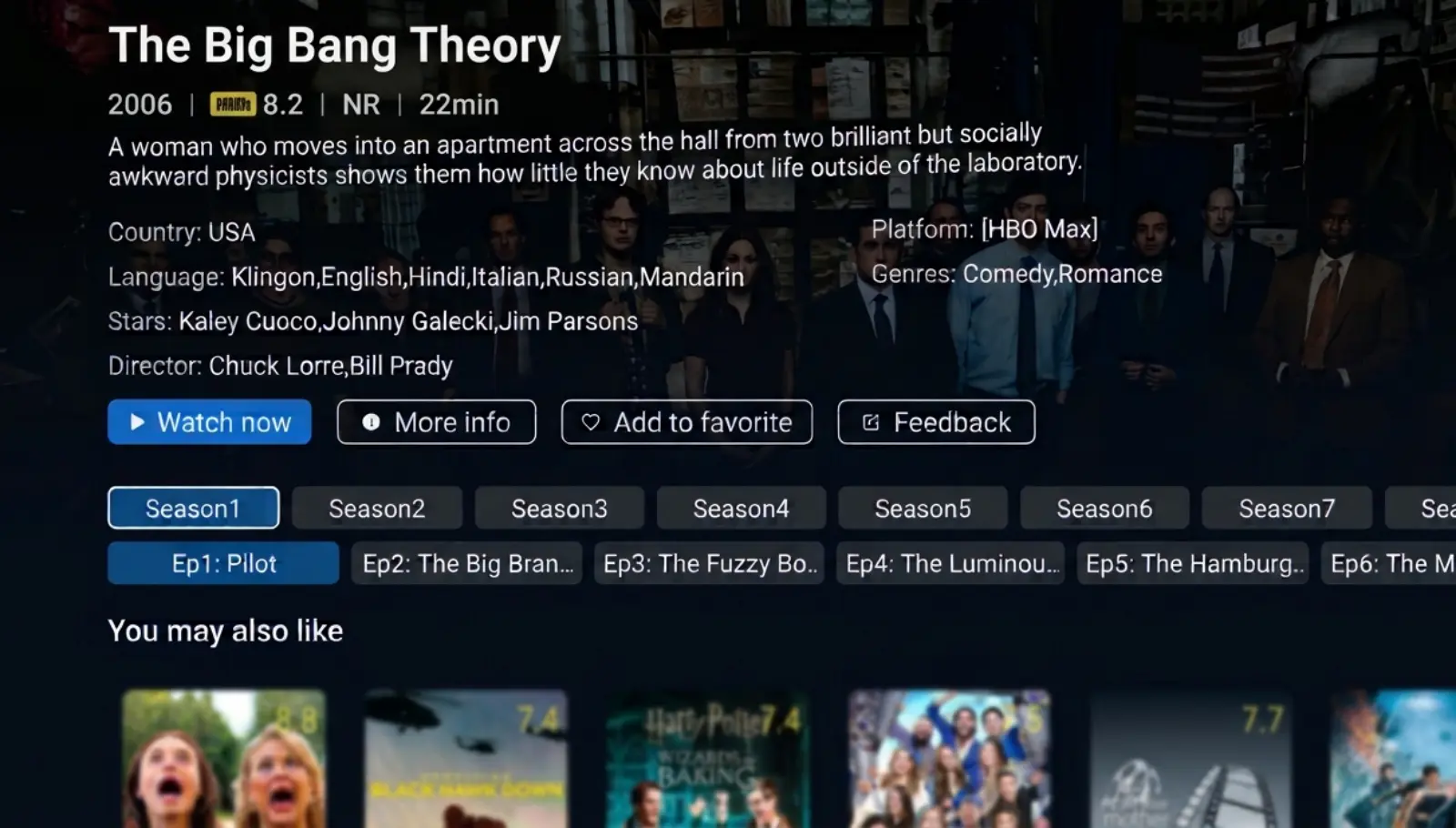
How to watch The Big Bang Theory free on SuperBox
These steps use the Blue VOD interface shown on SuperBox S8. An older compatible model or a different app build may arrange its menus differently, so follow the labels on your television.
- Open the VOD tile or installed Blue VOD shortcut.
- Choose Search and enter The Big Bang Theory.
- Where filters appear, choose TV Series and Name for a series-title search.
- Open the original series, checking its 2007 identity.
- Choose the desired season, then the episode you want to watch.
The expected result is an episode from the original sitcom, not a live channel or a related interview. If you land on a different title, return to the results before continuing.
If the app is missing, use the S8 app installation and Home-shortcut instructions. Installing Blue VOD and placing its shortcut on Home are separate tasks.
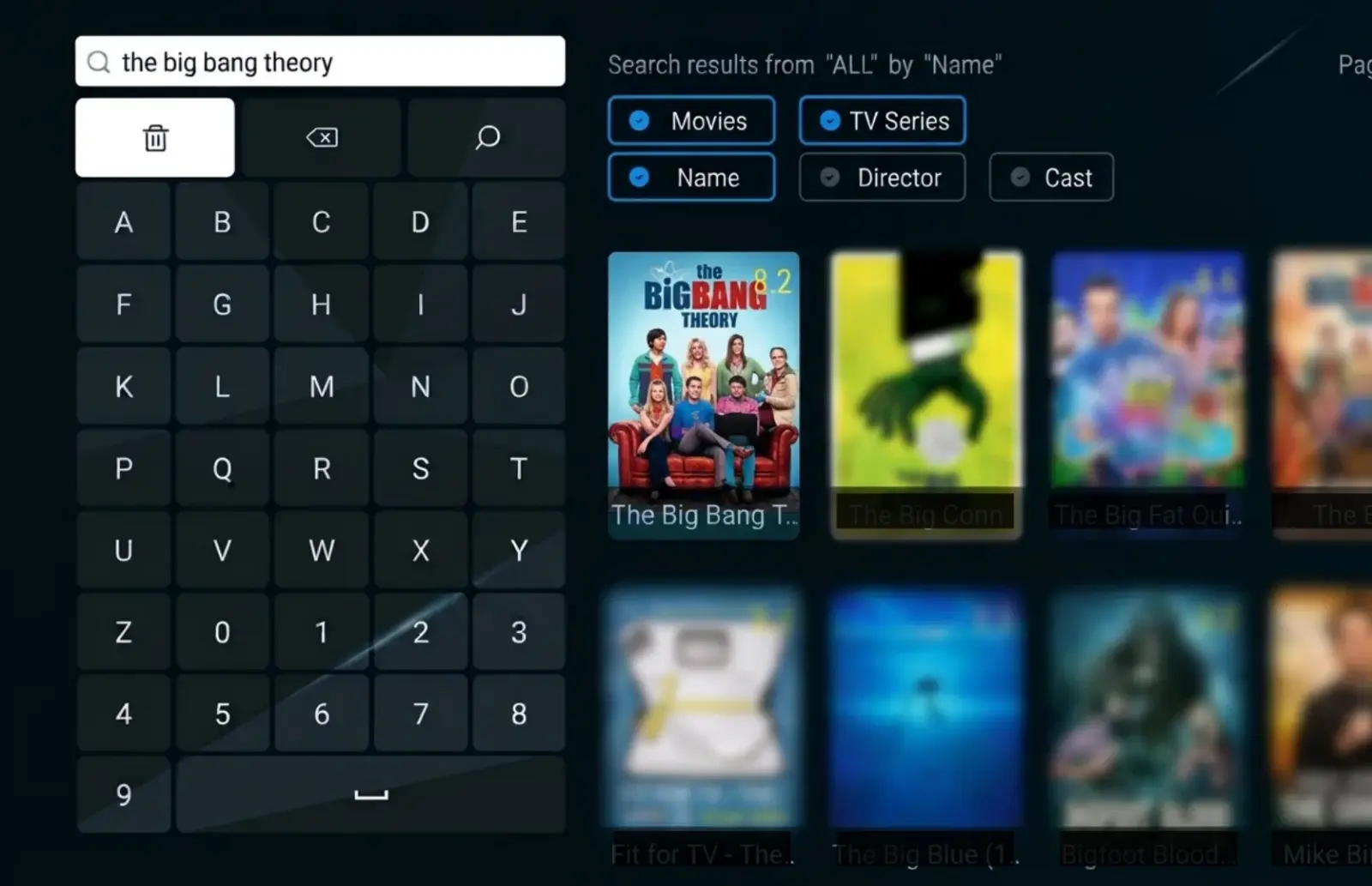
Search the title rather than a viewing question
Inside Blue VOD, enter the name of the show. Phrases such as “where can I watch The Big Bang Theory free” belong to a web search, not the app’s title field.
If the full name produces an empty result, check the spelling and try a shorter distinctive phrase such as Big Bang. Make sure the filters still describe a TV-series title. A search set to a cast member’s name serves a different purpose.
Read the result before choosing it. A familiar face in a poster can appear in an interview or another production, while the series title, year and season controls identify the program you intended.
Confirm the season before starting playback
Use both numbers when finding your place. S2E11 means Season 2, Episode 11. “Episode 11” on its own is incomplete when you are moving between 12 seasons.
If only some season choices fit on the screen, inspect the available navigation before assuming the rest are missing. Select the season explicitly, then the episode. If the opening scene is wrong, pause and return to that selection instead of skipping around inside an unintended installment.
Choose the sitcom starring Sheldon, Leonard and Penny
The Big Bang Theory began in 2007 and centers on physicists Leonard Hofstadter and Sheldon Cooper, their neighbor Penny, and the friendships around them. Johnny Galecki plays Leonard, Jim Parsons plays Sheldon, and Kaley Cuoco plays Penny. Howard, Raj, Amy and Bernadette are also familiar parts of the wider ensemble.
The title can lead you to several related productions. Before opening a result, distinguish the original sitcom from a childhood prequel or a discussion about the show.
| Title | How to recognize it | Is it the original 12-season sitcom? |
|---|---|---|
| The Big Bang Theory | The 2007 series with adult Sheldon, Leonard and Penny | Yes |
| Young Sheldon | Sheldon’s childhood, with Iain Armitage playing the young character | No; it is a separate prequel |
| The Official Big Bang Theory Podcast | Cast and crew discussions looking back at the sitcom | No; it is a separate companion production |
The Blue VOD confirmation here concerns The Big Bang Theory itself. It does not establish the app’s availability of every related production.
Do you need to watch Young Sheldon first?
No. You can start The Big Bang Theory with its own pilot. The original series introduces its characters and their relationships without requiring a separate prequel viewing beforehand.
If you came to the franchise through Young Sheldon, expect a different setting and ensemble. Search the full title rather than looking for the next season under Young Sheldon. The original show’s first season is the beginning of its own viewing order.
Pick a viewing path that suits tonight
You can follow the story in order or revisit individual episodes you already know. Decide which kind of evening you want before browsing descriptions from late in the series.
For a first watch: start with Pilot
Season 1, Episode 1 — Pilot introduces Leonard, Sheldon and their new neighbor Penny. It is the straightforward place to meet the group and learn the dynamics that later episodes build on.
Continue in release order if you want relationships and recurring jokes to develop naturally. Avoid beginning with the finale simply because you have heard people discuss it; later descriptions can reveal changes you would otherwise discover along the way.
For two people starting together, agree on the episode you will watch next. Someone watching ahead alone can make a shared rewatch harder to follow, even when both people have access to the same seasons.
For a Christmas rewatch: The Bath Item Gift Hypothesis
Season 2, Episode 11 — The Bath Item Gift Hypothesis is a holiday-season option for someone who already knows the characters. It is included in Warner Bros. Discovery’s published selection of The Big Bang Theory holiday episodes.
Find the episode by its season and number, then check the displayed title. You do not need to search for a separate Christmas movie or wait for a television channel to schedule the episode.
For guests, locate the entry before everyone sits down. Confirm that it starts, then pause at the beginning. That keeps the evening focused on the show rather than a long search through the season list.
For a costume-themed evening: The Justice League Recombination
Season 4, Episode 11 — The Justice League Recombination involves the group’s superhero costume plans for a New Year’s Eve gathering. It is another identifiable starting point for a returning viewer who remembers that part of the show.
Choose it as a familiar favorite rather than a substitute for the pilot. An individual comedy episode can be enjoyable on its own, but people watching in order may prefer to reach it naturally.
These are episode-finding suggestions. Select the matching entries in your current Blue VOD listing and check the title before playback.Make the series easy to return to
Select Favorite on the series detail page, then use the app’s Favorite menu to return. History provides another route to recent activity. The Blue VOD viewing-controls guide covers those features in detail.
A saved series and a remembered viewing position do different jobs. The saved entry gets you back to the show. Your season and episode identify where your rewatch should continue.
Before stopping, note the last completed installment. For example, “The Big Bang Theory — S2E11 finished” is clearer than “watched the Christmas one.” If you stopped halfway through, add the approximate time.
This is particularly helpful when more than one person uses the same television. Recent activity may reflect someone else’s viewing, so check the selected episode before continuing.
Check dialogue and captions without changing the whole setup
Play a short section at a comfortable volume. If captions would help, the S8 Blue VOD player’s gear icon → Subtitle Tracks menu shows the available choices for the current video.
Select a useful track if one is offered. A particular language on one episode does not establish the same choice on every other episode. Check the current entry rather than assuming the remote or a more expensive box can add an absent track.
Use the player’s pause and timeline controls for ordinary breaks and returning to a scene. If picture and sound are already comfortable, you can leave the advanced playback settings alone.
Choose a SuperBox around your everyday viewing
If you already own a compatible box, open Blue VOD there first. A 12-season catalog does not mean you need to download 12 seasons into the device’s internal storage before watching.
For someone buying a new setup, consider the full routine: familiar sitcoms, films, live television and the controls used most often. Buying for one show alone leaves too much of the decision unexplored.
The SuperBox S8 Max is an option for regular on-demand and live viewing, with 4GB RAM, 64GB internal storage, WiFi 6 and Gigabit Ethernet. The S8 Ultra offers 128GB internal storage and an included backlit voice remote, which can be helpful in a dim viewing room.
Choose between those features for their daily usefulness. More internal storage does not establish a larger The Big Bang Theory catalog or a higher-resolution version of every episode.
SuperBox Official Store is an authorized retailer serving the US and Canada. Use our website’s live chat before ordering if you want help matching a model to the people using the television. A clear recommendation should account for the room and budget as well as the features on the product page.
When a search, season or episode does not behave as expected
Identify the stage where things stop working before changing settings.
No series in search: Check the title, the TV Series selection and the Name filter. If the search page itself loads, an empty result needs a different description from an app that will not open.
The wrong Sheldon show opens: Return to the result and check the full title and 2007 identity. Young Sheldon and a companion podcast are different listings.
A season seems absent: Inspect the season navigation and note which choices are visible. A photograph of that screen is more useful than a general report that “the show is gone.”
One episode will not start: Test another episode and a different series, noting the results. This helps establish the scope without assuming that one failed entry proves the whole box is defective.
The wrong episode appears: Record the selected season, number and title, together with what the opening shows. Do not keep changing network settings to solve a mismatch between the label and the content.
For a direct purchase from superboxtvboxstore.com, email customer@superboxtvboxstore.com with your model, the exact season and episode, any on-screen message and the comparison results. Send order information privately. Our team can coordinate technical and order assistance for your store purchase.
Frequently asked questions
Can I watch all 12 seasons of The Big Bang Theory free on SuperBox?
Yes. All 12 seasons were confirmed in Blue VOD for this guide’s November 2026 check. On compatible SuperBox hardware, Blue VOD does not require a separate monthly subscription. Hardware and internet costs remain separate.
Can I start with a favorite episode instead of Season 1?
Yes. Select the season and episode you want. If you are new to the series, the pilot provides the introductions; returning viewers can revisit a familiar installment without restarting the entire show.
Is The Big Bang Theory the same show as Young Sheldon?
No. The Big Bang Theory is the original sitcom with the adult Sheldon, Leonard and Penny. Young Sheldon is a separate prequel about Sheldon’s childhood.
Do I use Blue TV, Playback or Blue VOD?
Use Blue VOD for the on-demand season and episode selection described here. You do not need to record a live broadcast or find the episode in a seven-day Playback schedule first.
Where can I stream The Big Bang Theory in the US and Canada?
HBO Max is a paid streaming option in the United States, and Crave lists all 12 seasons in Canada. Choose the service and offer for your country. Compatible SuperBox owners can instead follow the Blue VOD route described above.
Is a particular subtitle language or 4K version guaranteed?
Check the options on the current episode. A show appearing in the catalog does not confirm every language or video format, and the box’s hardware specifications do not determine the source format of every stream.
What is another sitcom to try afterward?
For another ensemble comedy, look at Friends on SuperBox, with its confirmed 10-season listing, or How I Met Your Mother, whose guide covers the nine-season series. Choose the next show for the kind of humor and viewing routine you enjoy.
For your next session, leave yourself one clear starting point: the series saved, the season selected, and the next episode identified. Then your evening can begin with the show rather than another search.
The article was updated on:
