
Knowledge SuperBox
SuperBox RC-200L Backlit Remote Tutorial





A television remote should become easier to use when the room gets darker—not harder. The SuperBox RC-200L backlit remote illuminates its buttons on demand, helping you identify controls without turning on a lamp or reaching for your phone.
The feature is especially practical for evening viewing, home theaters, and users who prefer stronger visual guidance. It is also designed with battery efficiency in mind: the keys illuminate after a button press, then switch off automatically after a short period of inactivity.
Best of all, there is no settings menu to find. The backlight mode is controlled directly from the remote with two buttons.
Quick answer: Press and hold OK + 0 together for approximately three seconds. When the remote’s red LED flashes three times, the backlight mode has been switched successfully. With backlight enabled, pressing any button illuminates the keys; after approximately five seconds without input, the light turns off automatically.
This tutorial explains that shortcut in detail, shows how to confirm whether backlight mode is active, distinguishes the RC-200L from the standard RC-200, and covers the most common problems reported by customers.
What Is the SuperBox RC-200L?
The RC-200L is the illuminated version of the familiar SuperBox voice remote. Its physical layout may resemble other RC-200-family remotes, but the “L” designation refers to the backlit function.
In the source demonstration, the backlit remote is associated with the SuperBox S7 Ultra and SuperBox Prime packages available when the video was published. Remote bundles can change by model, production batch, region, and retailer. Always verify the remote supplied with the specific product package rather than assuming every S7 or every RC-200-style remote includes illuminated keys.
The standard RC-200 and RC-200L should not be treated as identical:
| Feature | Standard RC-200 | RC-200L Backlit Remote |
|---|---|---|
| Standard navigation | Yes | Yes |
| Voice-control capability | Model and pairing dependent | Model and pairing dependent |
| Illuminated buttons | No | Yes |
| Manual backlight toggle | Not applicable | Hold OK + 0 |
| Automatic light timeout | Not applicable | Approximately five seconds |
If OK + 0 produces no lighting response after careful troubleshooting, first confirm that the label inside the battery compartment or on the product documentation identifies the remote as RC-200L.
Why the Backlight Is More Useful Than It Looks
Backlighting is not merely decorative. It improves the everyday experience in several practical ways:
- Buttons remain visible during nighttime viewing.
- Users can navigate without illuminating the entire room.
- The remote is easier to learn because labels and button groups are more recognizable.
- Accidental presses are less likely when changing volume or navigating playback.
- Older adults and users with reduced low-light visibility can identify controls more comfortably.
- The five-second automatic timeout limits unnecessary battery use.
The important phrase is automatic timeout. Enabled backlight mode does not mean the illumination should remain on continuously. The remote wakes the light when a button is pressed and turns it off after inactivity.
Before You Start
Prepare the remote before changing its lighting mode:
- Confirm that it is the RC-200L backlit version.
- Insert fresh batteries using the polarity markings inside the compartment.
- Make sure the OK and 0 buttons move freely and are not obstructed by a misaligned silicone cover.
- Hold the remote where you can clearly see its red status LED.
- Perform the shortcut away from other objects that might press neighboring buttons.
You do not need to open Android settings or point the remote toward the SuperBox just to change the lighting mode. The shortcut is processed by the remote itself.
Battery note: RC-200-family remotes commonly use two AAA batteries, but follow the markings inside your specific remote’s battery compartment. Never mix an old battery with a new one or combine different battery types.
How to Turn On the RC-200L Backlight
Step 1: Locate the OK and 0 Buttons
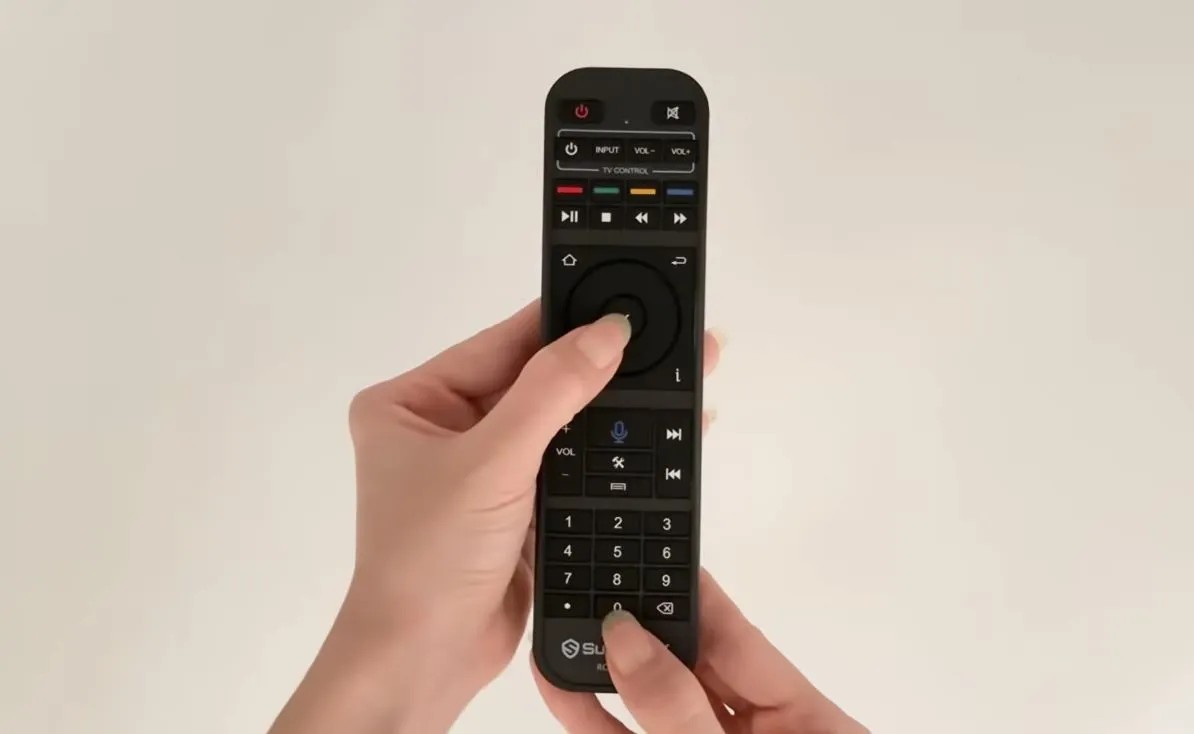
The OK button is in the center of the directional navigation ring. The 0 button is at the bottom of the numeric keypad.
Place one finger on each button before beginning. This makes it easier to press both controls at the same time.
Step 2: Press OK and 0 Together
Press OK + 0 simultaneously, then continue holding both buttons for approximately three seconds.
Do not tap the buttons separately. If OK is pressed first and released before 0 is registered, the remote may simply send a normal OK command. A steady, simultaneous hold is more reliable.
Step 3: Watch for Three Red Flashes
Observe the red LED at the top of the remote. When it flashes three times, the mode change has been accepted.
The same shortcut is a toggle, so three flashes confirm that the remote switched from its previous state. They do not, by themselves, tell you whether you have just enabled or disabled the light. Test the result with the next step.
Step 4: Press Any Button to Test the Light
Press any ordinary button once. When backlight mode is enabled, the remote’s keys should illuminate automatically.
For a clean test, use a harmless navigation button while the SuperBox home screen is open. Avoid testing with Power, Delete, or another control that could interrupt what you are doing.
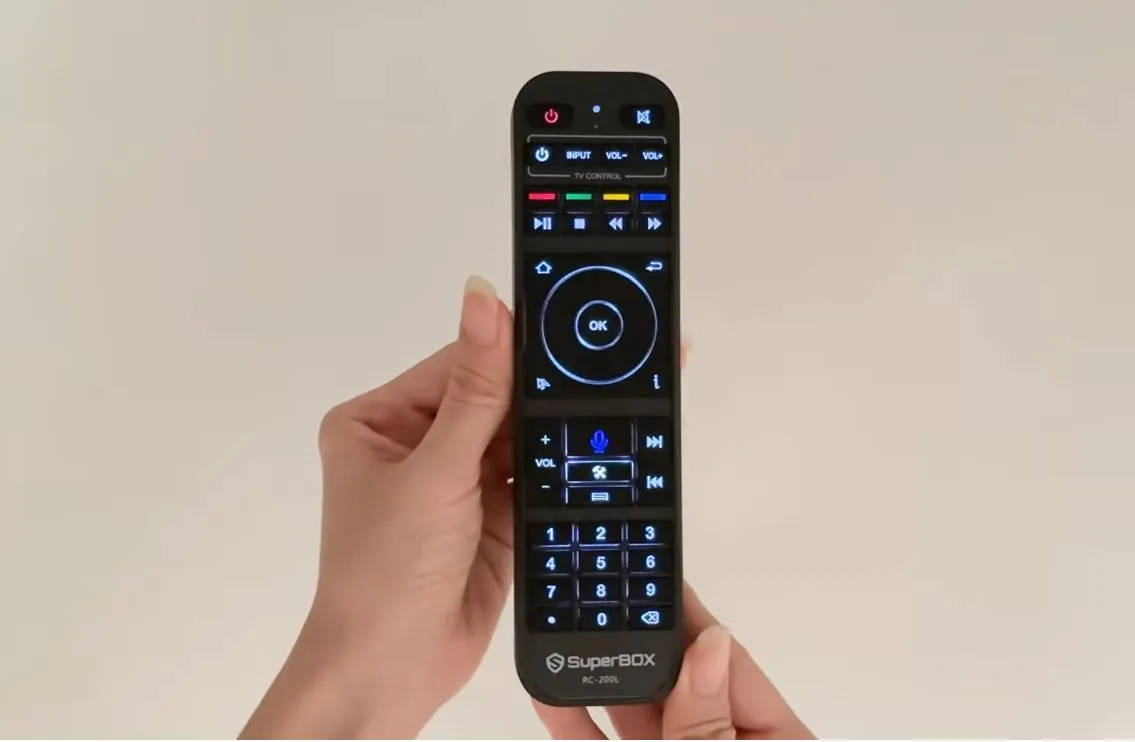
Step 5: Confirm the Automatic Timeout
Stop pressing buttons and wait. The source tutorial shows the backlight switching off after approximately five seconds of inactivity.
This is normal behavior, not a fault. The remote remains ready to use, and the illumination returns with the next button press.
Backlight, Bluetooth Pairing, and TV Programming Are Different
Customers often see a flashing LED and assume every remote procedure is the same. In fact, the RC-200L performs several independent functions.
| Function | Purpose | Key Point |
| Backlight toggle | Enables or disables illuminated keys | Hold OK + 0 for three seconds |
| Bluetooth pairing | Connects supported remote functions and voice input to the SuperBox | Separate pairing procedure; follow the device’s on-screen guide |
| IR learning / TV programming | Copies supported TV commands such as power or volume | Requires the original TV remote and a separate learning sequence |
| Automatic timeout | Conserves battery after lighting activates | Light turns off after about five seconds of inactivity |
A remote can illuminate correctly but still be disconnected from the SuperBox. It can also navigate the box while its backlight mode is disabled. Diagnose each function separately.
Does the RC-200L Need to Be Paired for the Backlight to Work?
The OK + 0 lighting shortcut is handled by the remote, so the backlight can provide a useful hardware test even when the SuperBox does not respond.
For example:
- Keys illuminate, but the box does not respond: investigate pairing, batteries, distance, or device state.
- Red LED flashes, but keys never illuminate: confirm the remote model and retry the backlight toggle.
- No LED and no backlight: check battery installation and replace the batteries.
- Only learned TV buttons work: the remote may be sending IR commands while its Bluetooth connection to the box needs attention.
If the SuperBox displays an on-screen remote-pairing guide, follow the combination shown on that specific device. Pairing shortcuts can differ by remote generation and firmware, so do not substitute OK + 0 – the backlight shortcut—for the pairing command.
Battery-Saving Tips for a Backlit Remote
The five-second timeout already limits unnecessary lighting, but a few habits can extend battery life further:
- Disable backlight mode when you do not need illuminated keys.
- Replace both batteries at the same time.
- Use batteries of the same brand, type, and age.
- Remove the batteries if the remote will be stored for an extended period.
- Do not leave objects resting on the keypad.
- Make sure a protective cover is not continuously pressing a button.
- Store the remote where the buttons cannot be compressed between sofa cushions.
Low battery power can create confusing symptoms: the LED may flash weakly, the backlight may flicker, voice control may fail, or the remote may respond intermittently. Replace the batteries before assuming the remote is defective.
Troubleshooting: The Backlight Will Not Turn On
Work through these checks in order:
1. Confirm the Remote Model
The standard RC-200 does not include backlit keys. Check for the RC-200L designation on the label, packaging, or product documentation.
2. Replace Both Batteries
Install a matching pair of fresh batteries and verify positive and negative polarity. A red LED can sometimes flash even when the remaining power is insufficient for stable illumination.
3. Repeat the Shortcut Carefully
Place one finger on OK and another on 0. Press both together and hold continuously for a full three seconds. Watch for exactly three confirmation flashes.
4. Test with a Normal Button
After the confirmation, press a directional button. The backlight is triggered by a button press; it may not remain illuminated immediately after the mode-switch sequence.
5. Remove a Tight Protective Cover
A misaligned cover may prevent one of the two buttons from being fully depressed. Test the shortcut with the cover removed.
6. Power-Cycle the Remote
Remove both batteries, wait about 10 seconds, then reinstall them and retry the procedure.
If the feature still does not work, photograph the front and battery-compartment label and contact the original seller. This helps support verify whether the remote is the correct RC-200L model.
Troubleshooting: The Backlight Stays On
The normal behavior demonstrated in the video is an automatic shutoff after about five seconds without input. If the lighting remains on:
- Check whether a button is physically stuck.
- Remove any tight silicone cover.
- Press OK + 0 for three seconds to toggle backlight mode off.
- Remove the batteries for 10 seconds.
- Reinstall a fresh, matching pair and test again.
Do not spray liquid cleaner into the keypad. If a spill occurred and a button remains stuck, remove the batteries and discontinue use until the remote is dry or professionally inspected.
Troubleshooting: The LED Flashes but the Box Does Not Respond
The three-flash backlight confirmation proves only that the lighting mode changed. It does not confirm Bluetooth pairing or communication with the SuperBox.
Try the following:
- Move closer to the SuperBox.
- Confirm the box is powered on and has completed startup.
- Replace the batteries.
- Use the model-specific remote-pairing guide shown on the television.
- Restart the SuperBox if the interface is frozen.
- Temporarily turn off or move away other nearby remotes when pairing.
If the remote lights correctly but cannot turn the SuperBox on, remember that power control can involve a different connection mode or learned IR command. Treat power, navigation, voice, and backlight as separate diagnostic areas.
Troubleshooting: The Light Turns Off Too Quickly
Approximately five seconds is the designed idle timeout shown in the tutorial. Pressing another button should illuminate the keys again.
The timeout is not an adjustable screen setting in the demonstrated procedure. If the light switches off while buttons are actively being pressed, replace the batteries and check for inconsistent button response.
Troubleshooting: OK + 0 Changes Something on the Screen
This usually means the buttons were not held simultaneously or not held long enough. Return to a neutral home-screen position, then try again:
- Rest both fingers on the buttons first.
- Press both at the same moment.
- Maintain steady pressure for three seconds.
- Release only after the three red flashes.
A normal OK selection or numeric 0 entry is not the confirmation. The red LED pattern is what matters.
Caring for the RC-200L
Good maintenance preserves the keypad, backlight, and internal electronics:
- Remove batteries before cleaning.
- Wipe the exterior with a soft, dry microfiber cloth.
- For stubborn dirt, lightly dampen the cloth rather than the remote.
- Keep liquid away from the microphone and button openings.
- Avoid harsh solvents, abrasive cleaners, and compressed air at close range.
- Allow the remote to dry completely before reinstalling batteries.
- Use a properly fitted protective cover if desired.
Never disassemble a remote that may still be covered by warranty unless the seller specifically authorizes it.
Frequently Asked Questions
What Buttons Turn the RC-200L Backlight On?
Press and hold OK + 0 together for approximately three seconds.
How Do I Know the Mode Changed?
The red LED flashes three times. Press a normal button afterward to see whether the keys illuminate.
Does OK + 0 Only Turn the Backlight On?
No. It is a toggle. Repeating the same combination switches the backlight mode off again.
Why Does the Backlight Turn Off After Five Seconds?
The automatic timeout conserves battery power. The keys illuminate again when you press a button, provided backlight mode remains enabled.
Does Every SuperBox Remote Have a Backlight?
No. The standard RC-200 is not backlit. Verify that your remote is the RC-200L and confirm what is included with the specific SuperBox package you purchase.
Which SuperBox Models Include the RC-200L?
The source video specifically references SuperBox S7 Ultra and Prime packages at the time of publication. Bundles can vary by retailer, region, model revision, and production batch, so check the current product listing or ask the seller to confirm.
Will Turning Off the Backlight Disable Voice Control?
No. The lighting toggle and Bluetooth/voice functions are separate. Voice control still depends on compatible hardware, software, and successful pairing.
Will Changing Batteries Reset the Backlight Mode?
Behavior can vary by remote revision. After replacing batteries, press a button to test the light. If needed, hold OK + 0 for three seconds and confirm the three red flashes.
Can I Adjust the Backlight Brightness or Timeout?
The source tutorial demonstrates only the on/off toggle and the automatic five-second timeout. It does not show user-adjustable brightness or duration settings.
The One Shortcut to Remember
The entire backlight workflow can be remembered in a single line:
OK + 0 for three seconds → three red flashes → press any key → light turns off after five seconds of inactivity.
This compact sequence is worth including in the product box, support email, quick-start guide, or customer-service macro because it resolves the most common RC-200L lighting question without opening any menus.
Final Thoughts
The RC-200L backlight is a small feature that makes the SuperBox experience more comfortable at night. It improves button visibility without leaving a distracting light on throughout the room, and its automatic timeout helps limit battery use.
Remember that OK + 0 controls only the backlight mode. If the remote illuminates but does not navigate, power the box, or accept voice commands, troubleshoot pairing and TV-control functions separately.
If the remote still will not illuminate after model verification, fresh batteries, and a careful reset attempt, contact SuperBox TV Box Store Technical Support on WhatsApp. Include your order number, SuperBox model, a photo of the remote’s label, and a short video showing the LED response.
For a visual demonstration:
Important: SuperBox TV Box Store sells open-platform Android media-player hardware and related accessories. Product bundles, remote revisions, supported commands, and software behavior can change by model, production batch, region, and time. Confirm current compatibility before purchasing a replacement remote.
Source
This guide was developed from the operating sequence demonstrated in: SuperBox RC-200L Backlit Remote Tutorial.
The article was updated on:
