
Knowledge SuperBox S8
How to Verify Your SuperBox Device: Official Authenticity & Warranty Guide





Verifying the authenticity of your SuperBox (S8 Pro, S8 Max, S8 Ultra, S7 Series) is essential to guarantee genuine hardware, lifetime zero-fee server access to 2,000+ live broadcast channels, and full coverage under the official 1-Year Manufacturer Replacement Warranty. You can completely authenticate both your seller and your console in under three minutes using the following verification checklist:
- 1. Authorized Dealer Verification: Confirm your seller is an authorized SuperBox distributor by verifying their official Authorization Code through the SuperBox verification portal.
- 2. 3-Point MAC Address Matching: Ensure the 12-character MAC address matches identically across the retail gift box label, the underside sticker on the metal chassis, and the on-screen display in Settings > About.
- 3. Online Serial & MAC Query: Enter the MAC address into the official SuperBox database to confirm genuine factory production and hardware validity.
- 4. Warranty & Activation Confirmation: Verify that your official 1-Year Replacement Warranty is active and associated with zero recurring monthly subscription fees ($0/month for life).
Why It Is Important to Buy From an Authorized SuperBox Dealer
Buying from an authorized SuperBox distributor provides greater confidence that you’re receiving an authentic product manufactured to official standards. SuperBox maintains an authorization program for approved distributors, and each authorized dealer is assigned an independent authorization code that customers can verify before completing a purchase.
Taking a few minutes to confirm a dealer’s authorization helps you purchase from a trusted source and ensures that the device information can be verified through the official SuperBox verification platform.
Review the official hardware line and authorized warranty details in our master superbox s8 review.
How to Verify a SuperBox Dealer
Request the Dealer’s Authorization Code
Before purchasing, ask the seller for their official authorization code or certification. Authorized dealers should be able to provide this information when requested.
Having the authorization code allows you to independently verify the dealer instead of relying solely on product listings or promotional materials.
Visit the Official Verification Page
Once you have the authorization code:
- Visit the official SuperBox website.
- Open the Verification section from the main navigation.
- Select Authorized Info Queries to access the dealer verification tool.
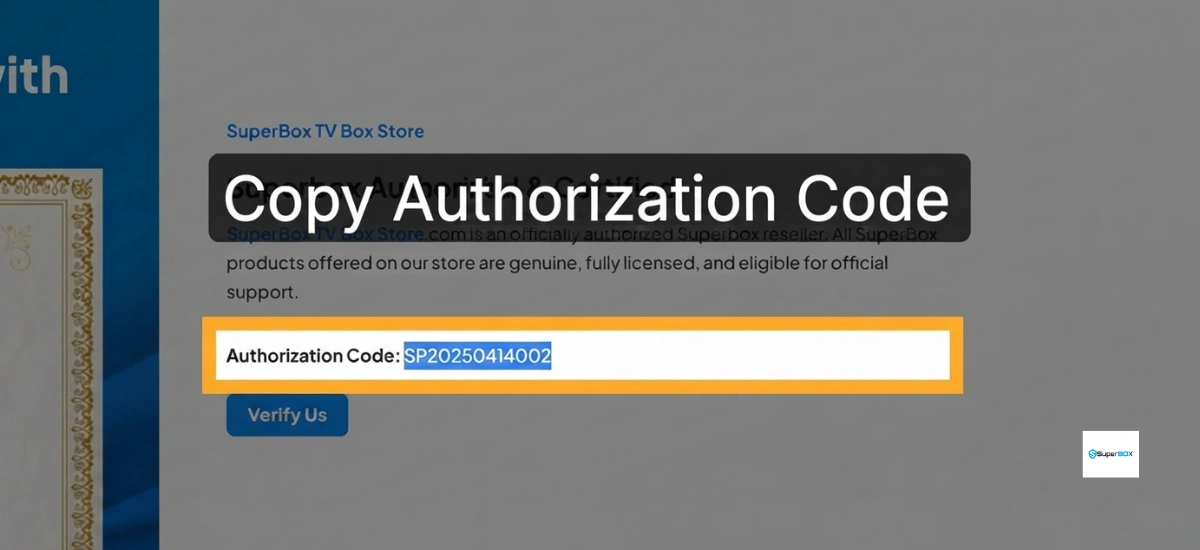
Using the official verification page ensures you’re checking the dealer information directly through SuperBox’s authorization database.
Verify the Dealer Information
On the verification page:
- Enter the authorization code provided by the seller.
- Complete the required verification code or CAPTCHA.
- Select Inquire Now or the search button.
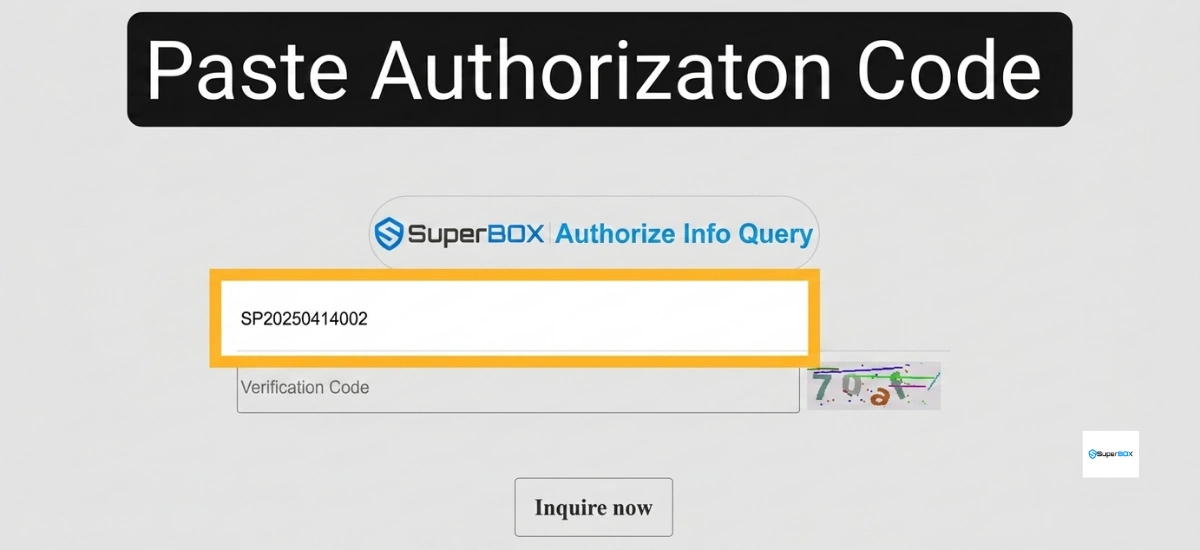
The system will search the authorization database and display the dealer’s registered information.
Review the Search Results
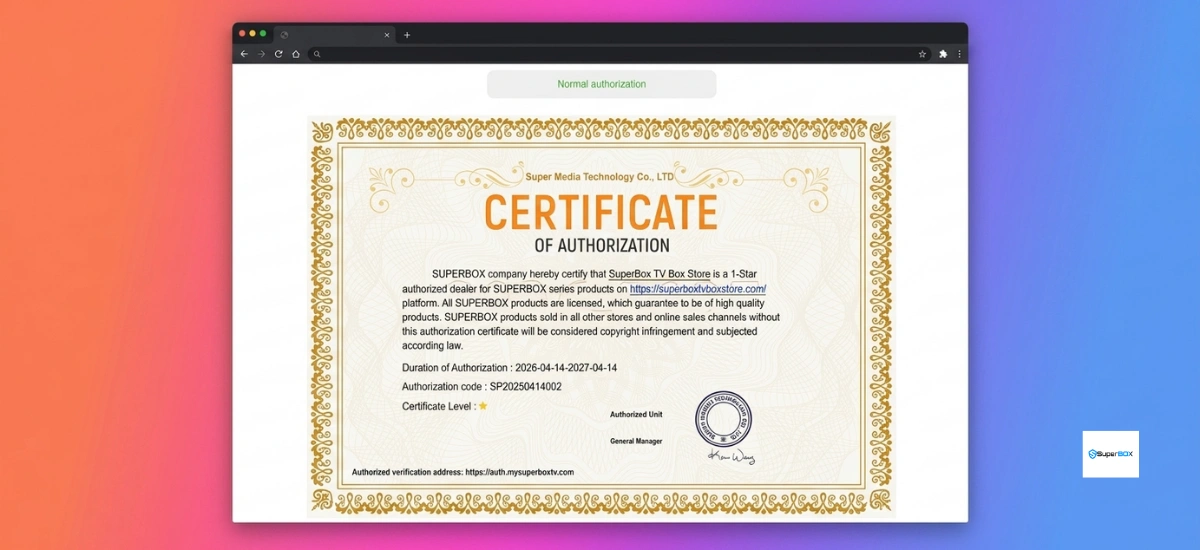
A successful verification should display the dealer’s Certificate of Authorization together with the registered store name.
Carefully compare the store name shown in the results with the name of the business you’re purchasing from. Matching information indicates that the authorization belongs to the seller you intend to buy from.
If the returned information does not match the seller or the authorization cannot be verified, contact the dealer for clarification before completing your purchase.
For detailed coverage terms and 1-to-1 hardware replacement procedures, consult our guide to the superbox warranty policy, or buy guaranteed authentic units directly from the SuperBox S8 Ultra Official Store.
How to Verify Your SuperBox Device
After receiving your SuperBox, you should also confirm that the device information is consistent across the packaging, hardware, and system software.
This additional verification helps ensure that all identifying information belongs to the same device.
Check the MAC Address
Every SuperBox has a unique MAC address that serves as its network identifier.
For the most reliable verification, compare the MAC address shown in these three locations:
- The product packaging
- The label on the bottom of the SuperBox device
- The MAC address displayed on-screen after the device has powered on
These three MAC addresses should be identical. Matching information indicates that the packaging, hardware, and system information correspond to the same unit.
If you notice any differences, contact your seller to confirm the device information before continuing with setup.
Verify the Device Online
After confirming the physical MAC address, you can perform an additional verification using the official SuperBox website.
The process is simple:
- Open the official verification page.
- Select your SuperBox model.
- Enter the device’s MAC address.
- Complete the required verification code.
- Start the search.
The system will display the available device information associated with the MAC address you entered.
Review the results carefully to ensure they correspond with your SuperBox model and device information. If the information appears incomplete or does not match your device, contact your seller for assistance.
Understanding Activation Information
The verification page also provides activation details for your device.
In some situations, the recorded activation date may be earlier than the day you first connected your SuperBox. This can occur when a dealer performs initial setup, inspection, or product testing before shipping the device.
A small difference between the recorded activation date and your first use is generally expected. If the activation information appears significantly different from what you anticipated, you can ask the seller to explain the recorded activation history.
Check Your Warranty Status
Another useful feature of the verification system is warranty tracking.
After your device information is retrieved, the verification results display the remaining warranty period. This provides a convenient way to monitor your warranty status and keep a record of your coverage.
Reviewing this information periodically helps you understand your current warranty timeline and provides a simple reference should you ever need product support.
Best Practices for Verifying Your SuperBox
For the best purchasing experience, complete each verification step in order:
- Verify the dealer before placing your order.
- Confirm the dealer’s authorization information using the official verification tool.
- Compare the MAC address on the packaging, device, and system screen.
- Verify the MAC address through the official website.
- Review the activation date and remaining warranty information after verification.
Completing these steps provides a thorough way to confirm your purchase and verify that your device information is consistent from packaging through activation.
Final Thoughts
Authenticating both the seller and the device is the most effective way to verify your SuperBox purchase. By checking the dealer’s authorization, confirming the MAC address across all locations, and reviewing the activation and warranty information through the official verification system, you can confidently verify your device information and enjoy your SuperBox with greater peace of mind.
These simple verification steps require only a few minutes but provide valuable confirmation that your SuperBox and its associated information are authentic and properly documented.
Our article is based on the following video:
The article was updated on:
