
Knowledge SuperBox
How to Pair a SuperBox S8 Remote: Step-by-Step Guide





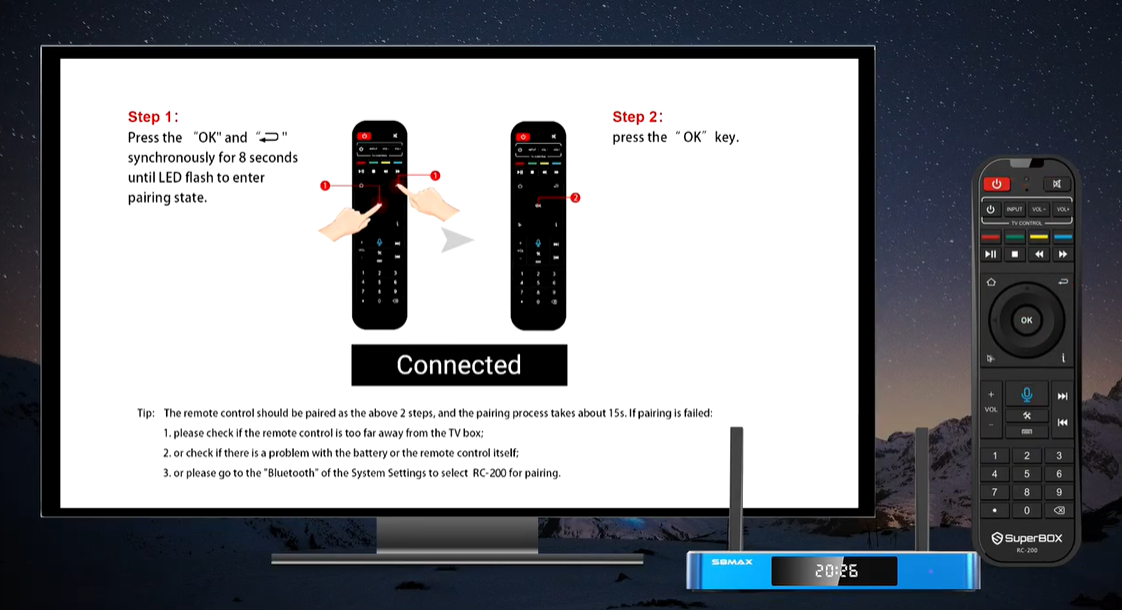
If the SuperBox S8 remote powers the box on but will not navigate the home screen, or the S8 displays a pairing prompt, the remote may need to be paired again. The pairing process for the RC-200 remote shown with the SuperBox S8 Series is short: hold two buttons together to enter pairing mode, then confirm with OK.
Quick pairing instructions
- Point the remote toward the SuperBox S8 and keep it close to the box.
- Press and hold OK + Return/Back together for about 8 seconds.
- Release when the remote’s LED flashes and the S8 enters pairing mode.
- Press OK once to confirm.
- Wait about 15 seconds for pairing to complete.
If the pairing screen remains or the remote still does not respond, check the troubleshooting section below. Avoid trying random button combinations: the steps here are specifically for the RC-200 pairing process demonstrated on the S8 interface.
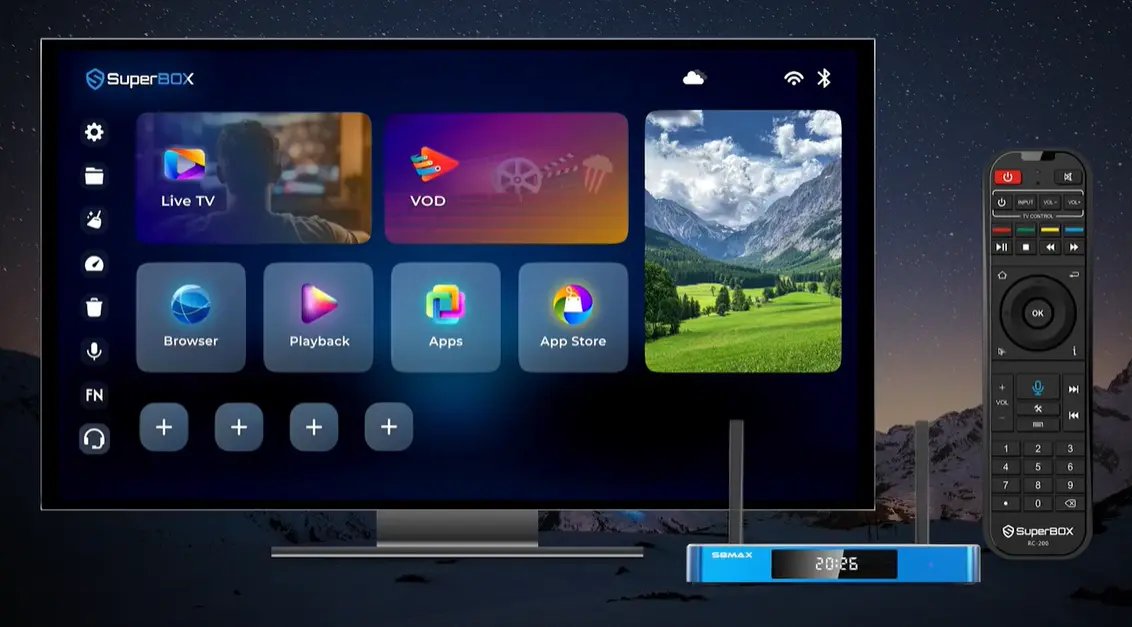
When should you pair the SuperBox S8 remote?
Pairing is useful when the S8 asks you to connect the remote, when the remote has stopped controlling the box, or after replacing or reconnecting a remote. If the remote is working normally, there is no need to repeat the pairing process.
The steps below pair the remote with the SuperBox itself. They are not instructions for programming the remote to control a television’s power or volume, and they are not a factory reset for the remote.
Choose the pairing route that matches your situation
Start with the button method when the S8 is waiting for a remote connection or when you need to reconnect the RC-200. It is the shortest route because it puts the remote into pairing mode and lets the S8 search for it directly.
Use the Bluetooth menu as the fallback when the button sequence does not complete. The instruction shown for this fallback is specific: open Bluetooth in System Settings, then select RC-200. You do not need to start in Bluetooth before trying the button method.
| Situation | Start here |
|---|---|
| S8 displays a remote pairing prompt | Hold OK + Return/Back, then confirm with OK |
| Remote was working but the S8 no longer responds | Try the RC-200 button-pairing sequence once |
| Button pairing does not complete | Check distance and batteries, then try System Settings → Bluetooth → RC-200 |
| You are trying to control TV power or volume | This guide does not program those TV-control buttons; use the separate TV remote-programming instructions |
This distinction keeps the troubleshooting focused. A pairing request concerns the link between the RC-200 and the SuperBox. TV-control programming concerns buttons that operate television functions. Completing one task does not automatically complete the other.
What you need before starting
- A SuperBox S8 Series device powered on and showing its home screen.
- The RC-200 remote used with the box.
- Working batteries in the remote.
- The remote close enough to the S8 for pairing.
The pairing prompt shown in the process reads “Searching…” and then “Pairing…”. Keep the remote near the box while these messages appear, and wait for the pairing process to finish before testing navigation.
Know the two buttons before you start
| Remote button | Where to find it | Role in pairing |
|---|---|---|
| OK | Center of the circular directional pad | Hold with Return/Back to enter pairing mode; press again when prompted to confirm |
| Return/Back | Curved-arrow key beside the directional pad | Hold with OK at the same time for about eight seconds |
The key point is that this is a two-stage sequence. Holding both buttons enters pairing mode; pressing OK afterward confirms the pairing request on the S8. Pressing OK only once at the beginning does not replace the hold step.
Pair the RC-200 remote with SuperBox S8
Step 1: Keep the remote close to the box
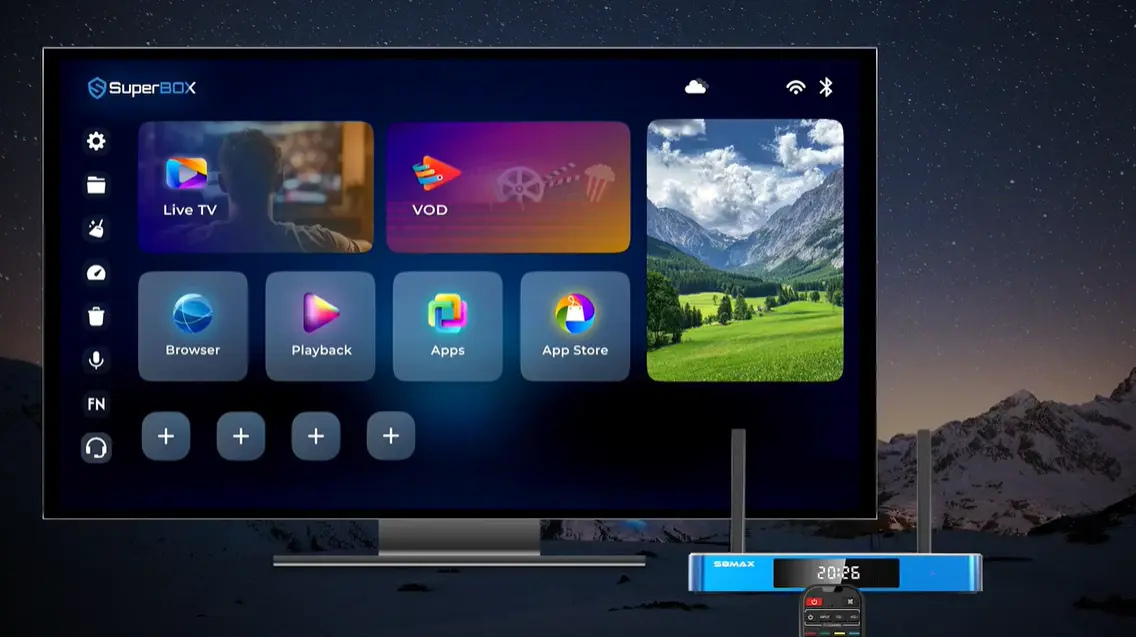
Start with the SuperBox S8 on its home screen. Hold the remote near the box while pairing. If the remote is too far away, the S8 may not detect it reliably.
Step 2: Press and hold OK + Return/Back together
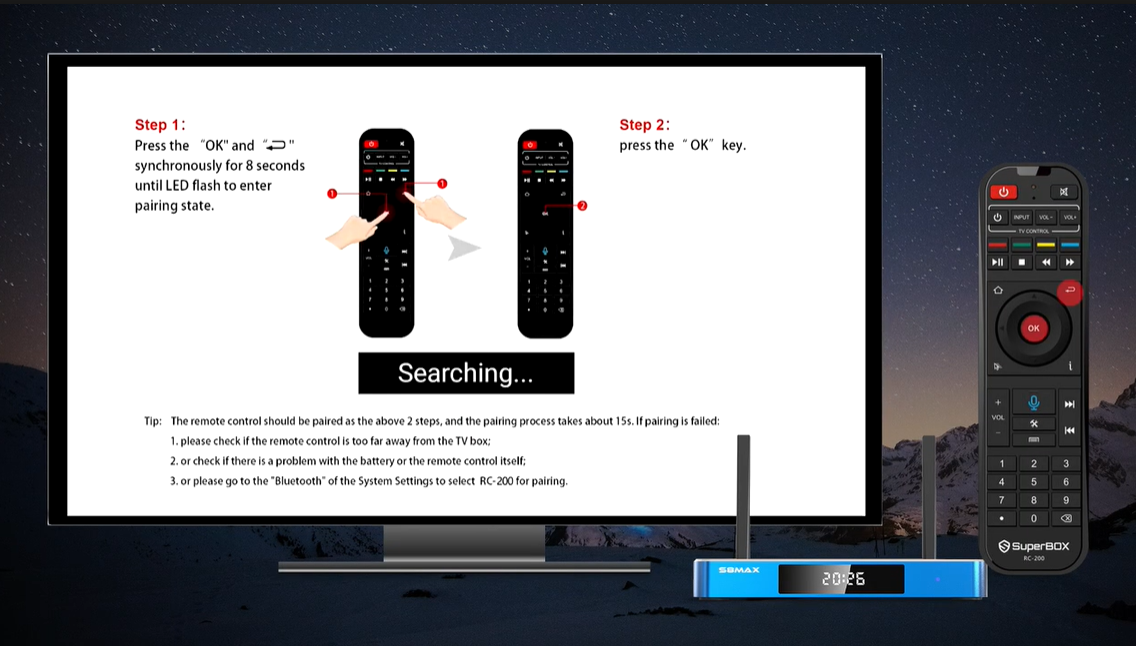
Locate OK in the center of the directional ring and Return/Back—the curved arrow key beside the ring. Press both buttons at the same time and hold them for about 8 seconds.
Do not press them one after the other. They need to be held simultaneously to place the remote into pairing mode.
Step 3: Watch for the LED flash and pairing prompt
After holding both buttons for about eight seconds, watch for the remote’s LED to flash. The S8 screen should show a pairing status such as “Searching…” or “Pairing…”.
The LED flash is the sign that the remote has entered pairing mode. If there is no flash or no pairing response, release the buttons and check the batteries before trying again.
Read the pairing status before pressing anything else
The status text tells you which part of the process is happening:
- Searching… means the S8 is looking for the remote after it enters pairing mode. Keep the remote close and wait for the prompt to change.
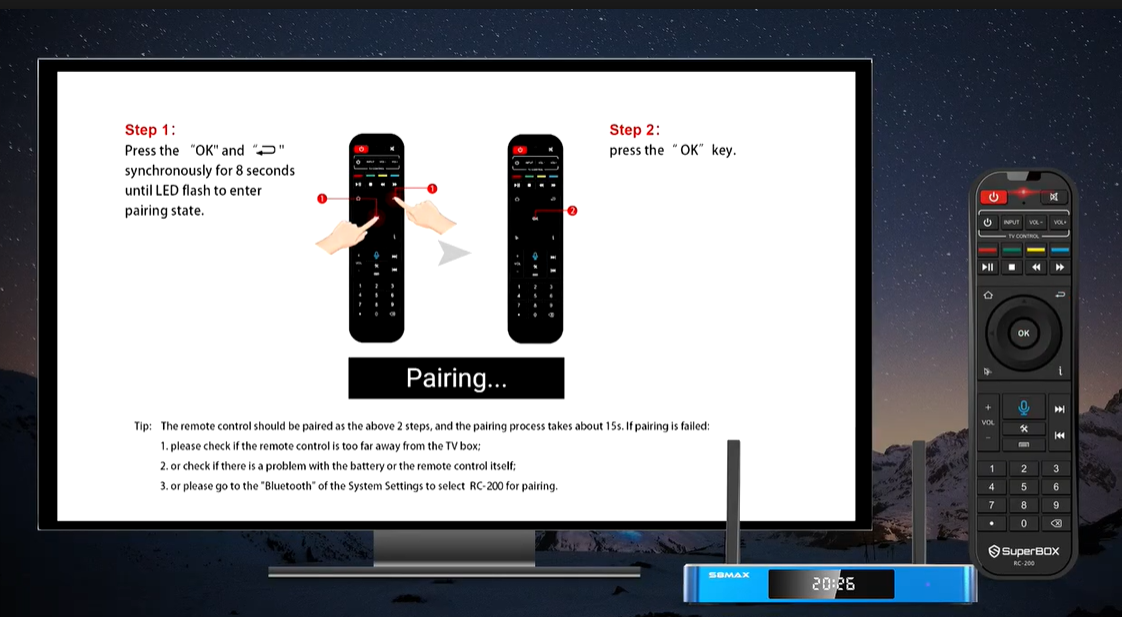
- Pairing… means the S8 has moved into the connection stage. Follow the on-screen instruction and press OK once.
- A finished prompt or responsive home-screen highlight means it is time to test navigation.
The button action depends on the stage. Do not press OK repeatedly while the screen is still searching; the clip shows OK as the confirmation step after the remote enters pairing mode. If the display never moves past Searching, use the troubleshooting checks instead of sending repeated inputs.
The LED and the TV message work together as checkpoints. The LED flash confirms that the remote accepted the button combination. The S8 message confirms that the box is processing the request. The final navigation test confirms that the connection is useful in practice.
Step 4: Press OK to confirm
When the pairing prompt appears, press OK once. This is the second step of the process. After confirming, allow roughly 15 seconds for the SuperBox S8 and remote to complete pairing.
Avoid pressing additional buttons while the screen is still searching or pairing. Wait until the prompt disappears or the remote begins navigating the S8 interface.
Step 5: Test the remote
When pairing finishes, use the directional ring to move between tiles on the S8 home screen and press OK to select one. If navigation responds, the remote is paired.
If the home screen still does not respond, continue with the checks below rather than repeatedly restarting the pairing sequence without checking the remote or Bluetooth settings.
Test the remote on a simple home-screen action first. Move the selection to a neighboring tile, move it back, and press OK on a tile that you can safely open. This confirms both directional navigation and selection. If the highlight moves but OK does not open the tile, note that precise behavior for support rather than assuming pairing fully succeeded.
When the test works, stop troubleshooting. There is no benefit to entering pairing mode again while the remote is responding normally.
What successful pairing looks like
Use three simple signs to decide whether the process worked:
- The S8 moves beyond its Searching… or Pairing… state.
- The remote has completed the roughly 15-second pairing period.
- The directional ring moves the highlight on the S8 home screen and OK opens the highlighted tile.
Do not judge success from the LED alone. The flash shows that the remote entered pairing mode; test navigation on the S8 after the pairing prompt finishes.
If the prompt is still visible, let the process finish before pressing more buttons. If the prompt disappears but navigation still does not respond, go to the troubleshooting table and follow the row that matches what happened on screen.
If the SuperBox S8 remote will not pair
Work through these checks in order:
1. Bring the remote closer
The pairing guide specifically recommends checking whether the remote is too far from the box. Move close to the SuperBox S8 and repeat the sequence: hold OK + Return/Back for about eight seconds, then press OK.
2. Check the batteries and remote
If the LED does not flash or the remote does not respond, check that the batteries are working and installed correctly. If the batteries are not the problem, the remote itself may need attention.
3. Pair from the S8 Bluetooth settings
If button pairing does not work, use the alternate path shown in the pairing instructions:
- Open System Settings on the SuperBox S8.
- Open Bluetooth.
- Look for RC-200 in the available device list.
- Select RC-200 to pair.
The exact appearance of System Settings can vary with the interface version, so follow the labels shown on your S8 screen. Do not select a different device simply because its name appears first.
Use this route as a deliberate fallback, not as a series of menu changes. Open Bluetooth, check the available-device names, and select RC-200 if it is listed. Then wait for the Bluetooth screen to show that the request has finished before returning to Home and testing the directional pad.
If you see several nearby device names, do not guess based on position in the list. The pairing instruction identifies the remote as RC-200. Selecting another device will not pair the SuperBox remote and can make it harder to tell which step failed.
4. Contact technical support if RC-200 is not listed
If RC-200 does not appear in Bluetooth, or if it appears but pairing repeatedly fails, contact the seller’s technical support team. Tell them your exact S8 model, that you are using an RC-200 remote, and which step failed. A photo of the S8 Bluetooth screen can help them understand what the box is detecting.
Troubleshoot by the symptom you see
Follow the row that best matches the failure. This keeps you from repeating the entire process when only one part needs attention.
| What happens | What it usually means in the pairing flow | Next action |
|---|---|---|
| The LED never flashes after holding the buttons | The remote may not have entered pairing mode | Confirm you are holding OK and Return/Back together, keep holding for about eight seconds, then check the batteries and remote |
| The S8 stays on “Searching…” | The box has not completed detection of the remote | Move the remote closer, check its batteries, and repeat the pairing sequence once |
| The screen changes to “Pairing…” | The S8 is at the confirmation stage | Press OK once, then wait about 15 seconds |
| The prompt finishes but navigation still fails | Pairing may not have completed successfully, or the remote needs another check | Try System Settings → Bluetooth → RC-200; if this also fails, contact technical support |
| RC-200 is not shown in the Bluetooth list | The S8 has not listed the remote as an available device | Keep the remote close, check battery/remote condition, retry pairing, and then ask support if it remains missing |
| The remote works after pairing | The remote-to-box connection is active | Return to normal use; do not repeat pairing unless the S8 asks or the remote stops responding |
The most useful diagnostic detail is the last state you reached. For example, “the LED flashed but the S8 stayed on Searching” tells support more than “the remote does not work.” If you contact the seller, include the exact message, whether the LED flashed, and whether RC-200 appeared in Bluetooth.
Quick recovery checklist
Before contacting support, run through this short checklist once:
- Is the remote the RC-200 model shown in this guide?
- Is the remote close to the SuperBox S8?
- Are the batteries working?
- Were OK and Return/Back held simultaneously for about eight seconds?
- Did the remote LED flash?
- Did you press OK once after the pairing prompt appeared?
- Did you wait for about 15 seconds before testing navigation?
- If button pairing failed, did you check System Settings → Bluetooth for RC-200?
Stop after these checks if pairing still fails. Repeating the same sequence over and over is unlikely to reveal whether the issue is the remote, its batteries, or Bluetooth detection. Send the checklist results to the seller’s technical support team so they can advise the next step.
Common pairing mistakes to avoid
| Mistake | What to do instead |
|---|---|
| Pressing OK and Return one at a time | Hold both buttons simultaneously for about eight seconds |
| Releasing the buttons immediately | Keep holding until the LED flashes and pairing mode begins |
| Pressing OK repeatedly during “Searching…” | Press OK once when instructed, then wait about 15 seconds |
| Pairing from too far away | Hold the remote close to the SuperBox S8 |
| Changing several settings at once | Try the button pairing first; use the Bluetooth menu only if needed |
| Using pairing steps from a different remote model | Confirm the remote is the RC-200 shown in this guide |
| Confusing remote pairing with TV programming | Pairing connects the remote to the SuperBox; TV power/volume programming is a separate task |
Frequently Asked Questions
How do I pair a SuperBox S8 remote?
For the RC-200, hold OK + Return/Back together for about eight seconds until the LED flashes, then press OK once and wait for pairing to complete.
How long does remote pairing take?
The pairing instructions indicate that the process takes about 15 seconds after confirmation. Wait for the status prompt to finish before testing the remote.
Why is my SuperBox remote still showing “Searching”?
The S8 may not have detected the remote yet. Keep the remote close, check its batteries, and repeat the button sequence. If necessary, try selecting RC-200 from System Settings → Bluetooth.
Can I pair the remote through Bluetooth settings?
Yes. The alternate method is to open Bluetooth in System Settings and select RC-200 from the available devices.
What should I do if RC-200 does not appear in Bluetooth?
Check that the remote has working batteries and is close to the S8, then retry pairing. If RC-200 still does not appear, contact technical support for help.
Is remote pairing the same as programming my TV’s volume buttons?
No. This guide pairs the RC-200 with the SuperBox S8. Programming TV power or volume buttons is a separate process.
Do I need to pair the remote if it already works?
No. Pairing is only needed when the S8 requests it or the remote is not communicating as expected.
Do I need to keep pointing the remote at the S8 while pairing?
Keep the remote close to the box during pairing. The troubleshooting instructions specifically recommend checking whether it is too far away if pairing fails.
What information should I give support if pairing fails?
Share that you have an RC-200, the S8 model, whether the LED flashed, the last status shown on screen, and whether RC-200 appeared in System Settings → Bluetooth.
Get Back to Using Your S8
For the RC-200 remote shown here, pairing comes down to a specific sequence: keep the remote near the S8, hold OK + Return/Back together for about eight seconds, wait for the LED flash, press OK, and allow about 15 seconds for pairing to finish.
If that does not work, check the remote’s batteries and distance from the box, then use System Settings → Bluetooth → RC-200 as the alternate method. These focused checks should help identify whether the issue is simply incomplete pairing or whether the remote needs further support.
Compatibility note: These instructions are for the RC-200 remote and pairing flow demonstrated with the SuperBox S8 Series. Remote layouts and button combinations can differ by model and software version. For assistance, contact the retailer from which the SuperBox was purchased.
The article was updated on:
