
Knowledge SuperBox
Streamer Box vs. Smart TV: Which Is Better in 2026?





If your television already has Netflix, YouTube, and other apps, buying a separate streamer box can seem unnecessary. Why add another device, cable, and remote when the TV is already “smart”?
The answer is that a smart TV and a streaming box solve different parts of the home-entertainment experience.
A smart TV combines the screen, speakers, inputs, and streaming platform inside one product. A streamer box connects through HDMI and provides a separate operating system, processor, storage system, network connection, and remote.
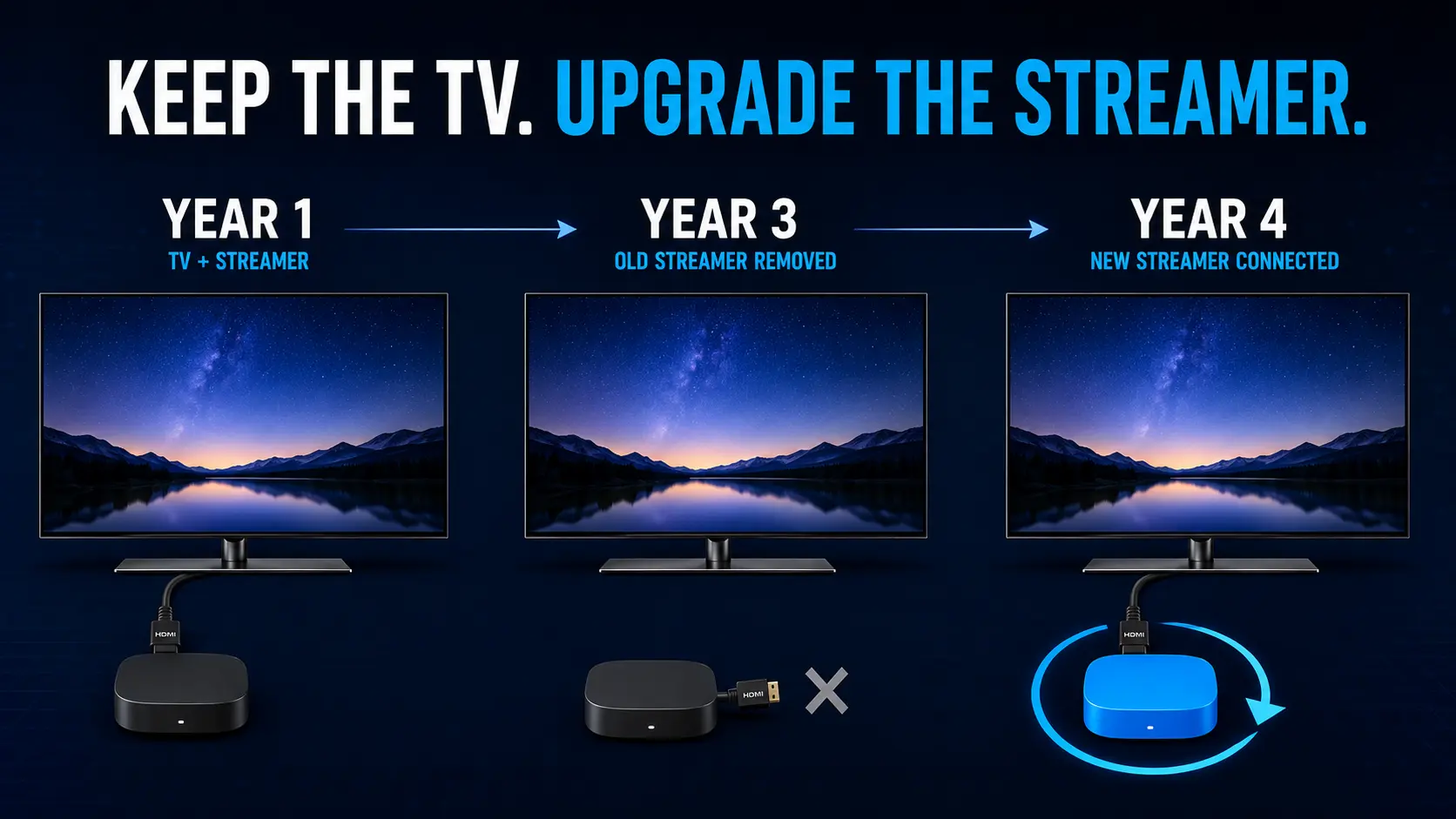
That separation can be valuable. The screen may remain excellent for years even after its built-in apps begin to feel slow, lose compatibility, or no longer fit the way you watch. Instead of replacing the whole television, you can upgrade the external media device.
In this streamer box vs. smart TV comparison, we will examine performance, app availability, software updates, storage, connectivity, advanced viewing tools, privacy, portability, and long-term cost. We will also explain the competitive advantages of SuperBox and help you decide whether a smart TV alone, an ordinary streaming player, or a smart TV paired with SuperBox is the right setup.
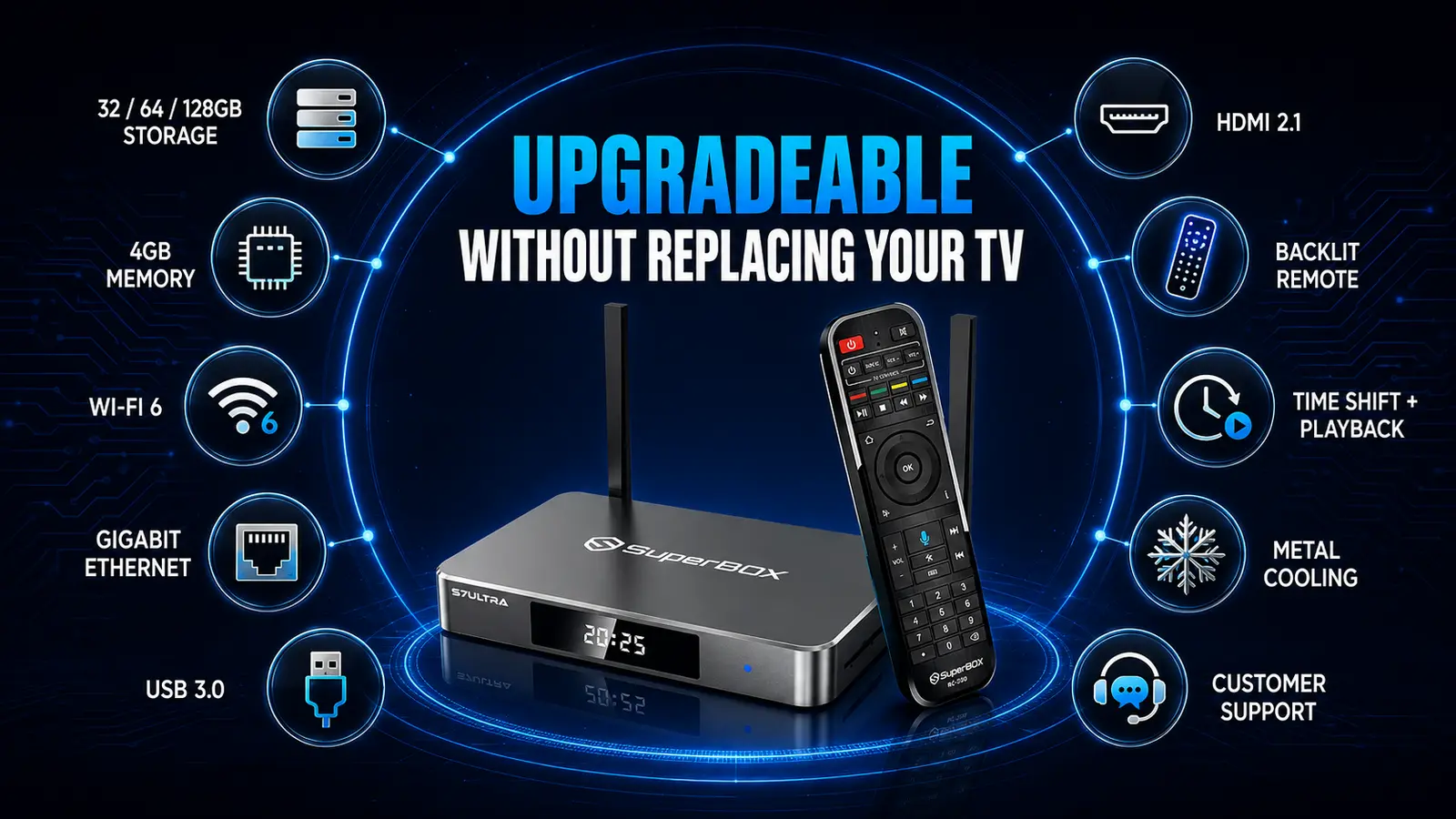
Quick answer: A modern smart TV is enough for viewers who use a few mainstream apps and value an all-in-one setup. A streamer box is usually better when you want a faster or more consistent interface, independent upgrades, more storage and ports, better networking, broader compatible-app flexibility, or portability. SuperBox is positioned above entry-level streaming sticks by offering 4GB memory, 32GB to 128GB storage across the current S7 range, Wi-Fi 6, Gigabit Ethernet, USB 3.0, HDMI 2.1, a backlit voice remote, diverse content library and supported playback and parental-control tools. For many buyers, the strongest solution is not smart TV or SuperBox – it is a good television with SuperBox.
Important: A streaming box cannot improve the physical panel, native refresh rate, black level, brightness, or viewing angle of a television. High-resolution output and HDR features require compatible hardware, content, applications, and network performance.
Streamer Box vs. Smart TV at a Glance
| Category | Smart TV only | Standard streamer box | SuperBox |
|---|---|---|---|
| Main purpose | Display plus built-in streaming apps | Adds a dedicated streaming platform through HDMI | Adds a dedicated Android-based entertainment platform through HDMI |
| Setup | Simplest: one device | Easy, but adds power and HDMI cables | Easy HDMI setup; Wi-Fi or Ethernet connection required for online features |
| Performance | Varies widely by TV tier and age | Usually consistent within each device model | 4GB memory across current S7 models; dedicated media hardware |
| Storage | Often not clearly advertised and may be limited | Commonly 16GB to 128GB depending on device | 32GB, 64GB, or 128GB across S7 Pro, Max, and Ultra |
| App flexibility | Controlled by the TV manufacturer’s store | Depends on Roku, Fire OS, tvOS, or Google TV ecosystem | Android 12 environment with compatible-app support |
| Software lifecycle | Platform tied to the television | Replace the small device when needed | Replace or upgrade the box without replacing the TV |
| Wired network | Available on some TVs | Varies; some use 100Mbps Ethernet or require an adapter | Gigabit Ethernet on current S7 models |
| External storage/local media | Varies by TV | Varies; some players provide USB | USB 3.0 and external-storage support on supported models |
| Advanced SuperBox tools | Not available | Platform- and app-dependent | Supported Time Shift/playback, parental controls, voice navigation, and local media tools |
| Portability | Television remains in place | Usually portable | Compact HDMI device suitable for moving between compatible displays |
| Best for | Casual streaming with minimum hardware | Mainstream apps or ecosystem-specific users | Buyers prioritizing storage, networking, flexible media use, and SuperBox features |
The comparison is not simply about which product is “smarter.” It is about whether you want the entertainment platform permanently tied to the display or independently replaceable.
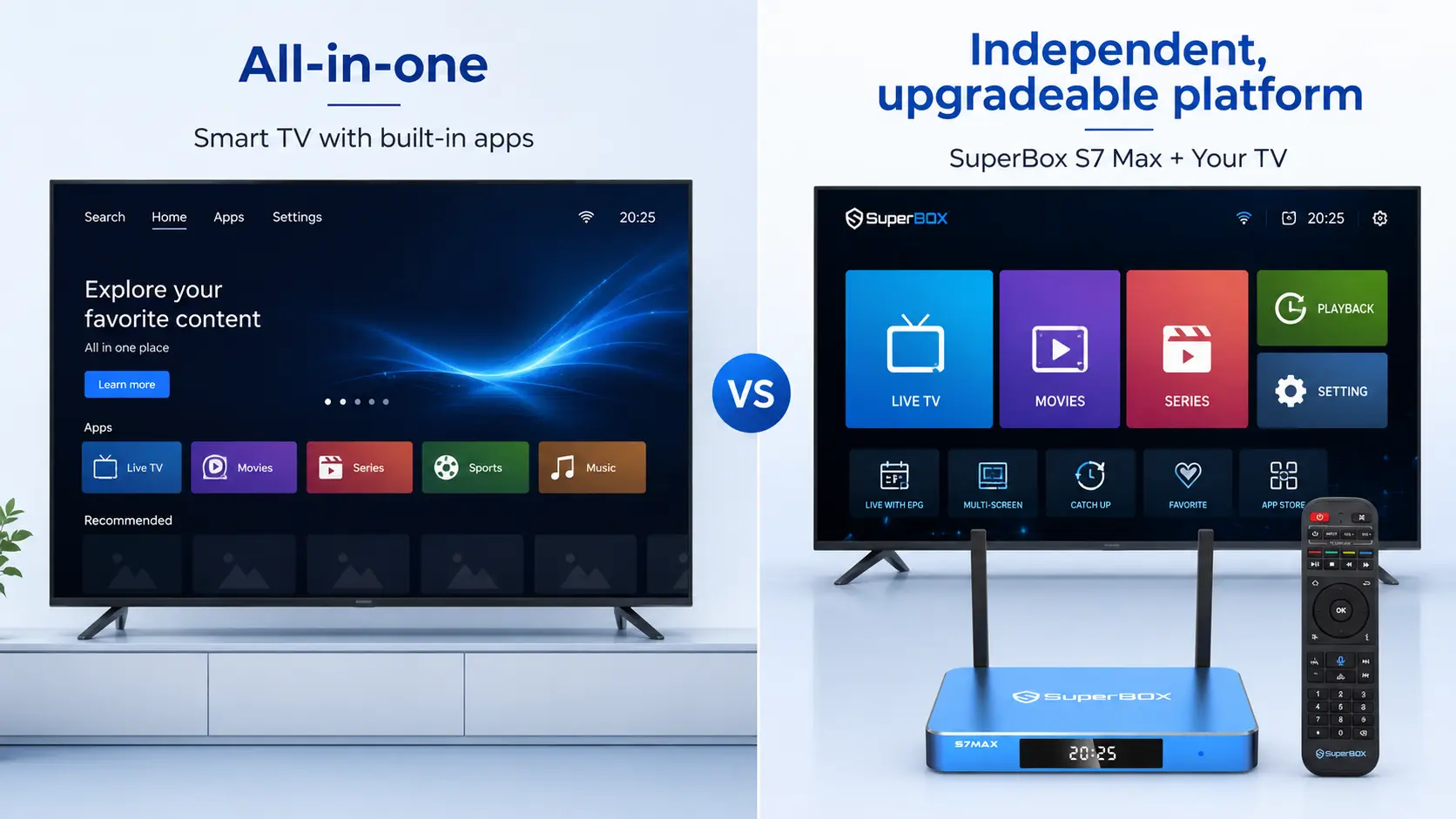
What Is a Smart TV?
A smart TV is a television with a built-in operating system, network connectivity, and an app store. Depending on the manufacturer, it may use Samsung Tizen, LG webOS, Google TV, Roku TV, Fire TV, or another platform.
The main benefit is convenience. After connecting the television to Wi-Fi or Ethernet, you can open compatible streaming apps without attaching another device.
Advantages of a Smart TV
- One product handles display, audio, inputs, and streaming.
- Fewer cables and power adapters.
- One factory remote controls the entire interface.
- Mainstream apps may be installed or available immediately.
- Picture and audio settings are integrated with playback.
- Voice assistants and smart-home features may be built in.
Limitations of a Smart TV
- Streaming performance varies significantly between entry-level and premium models.
- The operating system is tied to the television’s hardware.
- App availability depends on the manufacturer and region.
- Internal storage and RAM are not always clearly disclosed.
- Replacing an outdated built-in platform can mean adding an external device anyway.
- Manufacturer home screens may include recommendations, promotions, or services you do not use.
It would be inaccurate to say that all smart TVs receive poor software support. Some manufacturers have improved their policies. For example, LG’s webOS Re announcement described platform upgrades for eligible models over a five-year period. However, LG also notes that a software upgrade does not change the television’s original hardware performance or durability.
That is the central limitation: software may improve, but the processor, memory, storage, and ports remain the same for the life of the TV.
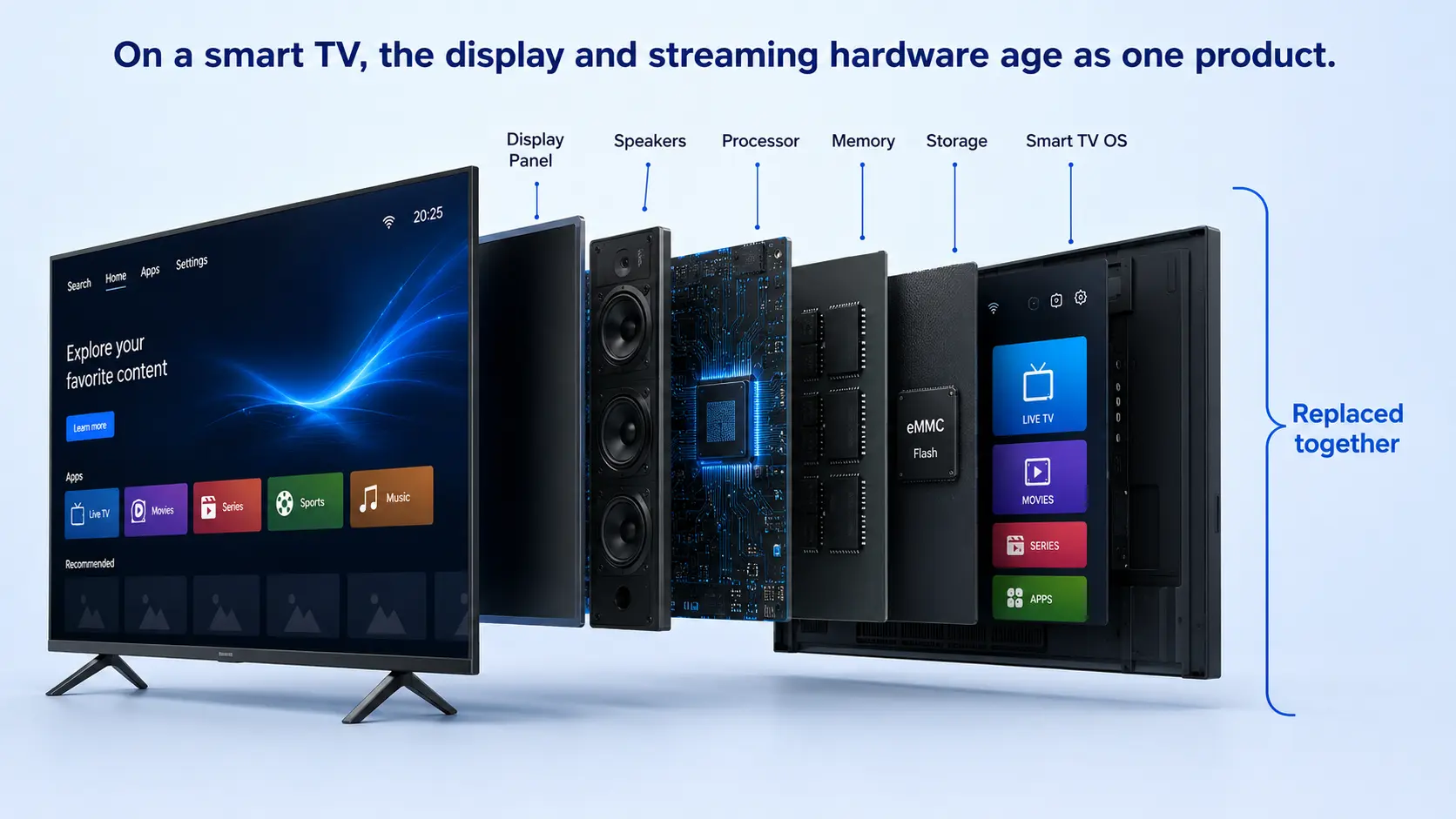
What Is a Streamer Box?
A streamer box is a compact media player that connects to a television or compatible display through HDMI. It has its own processor, operating system, memory, storage, networking hardware, and remote.
Popular categories include:
- Low-cost streaming sticks for mainstream apps.
- Ecosystem-focused players such as Roku, Fire TV, Google TV, and Apple TV.
- Premium media players with more powerful processors or local-media capabilities.
- Android-based entertainment boxes such as SuperBox.
Advantages of a Streamer Box
- Upgrades independently from the television.
- Creates a consistent interface across different TV brands.
- Often receives platform-specific app and feature updates.
- Can provide stronger performance than the built-in system of an older or budget TV.
- May add Ethernet, USB, Bluetooth, voice control, or additional storage.
- Can move between compatible HDMI displays.
Limitations of a Streamer Box
- Adds another device, power cable, and HDMI cable.
- May require a second remote if HDMI-CEC or IR control is not configured.
- The experience is still limited by the television’s panel and HDMI capabilities.
- Applications and services can vary by device, region, and licensing terms.
- A low-cost stick may have limited storage or networking ports.
Smart TV vs. Streaming Box: Detailed Comparison
1. Speed and Everyday Responsiveness
Smart-TV performance is difficult to generalize. A premium television may have a fast interface, while an entry-level model may use modest hardware because most of its price is allocated to the display panel.
A dedicated streaming device concentrates its hardware and software on media navigation. This can produce faster app launches and more consistent operation, especially when it replaces the built-in interface of an older television.
However, the phrase “streaming box” includes everything from inexpensive sticks to powerful premium players. A box is not automatically fast merely because it is separate. Compare its processor, memory, storage, cooling, and network connection.
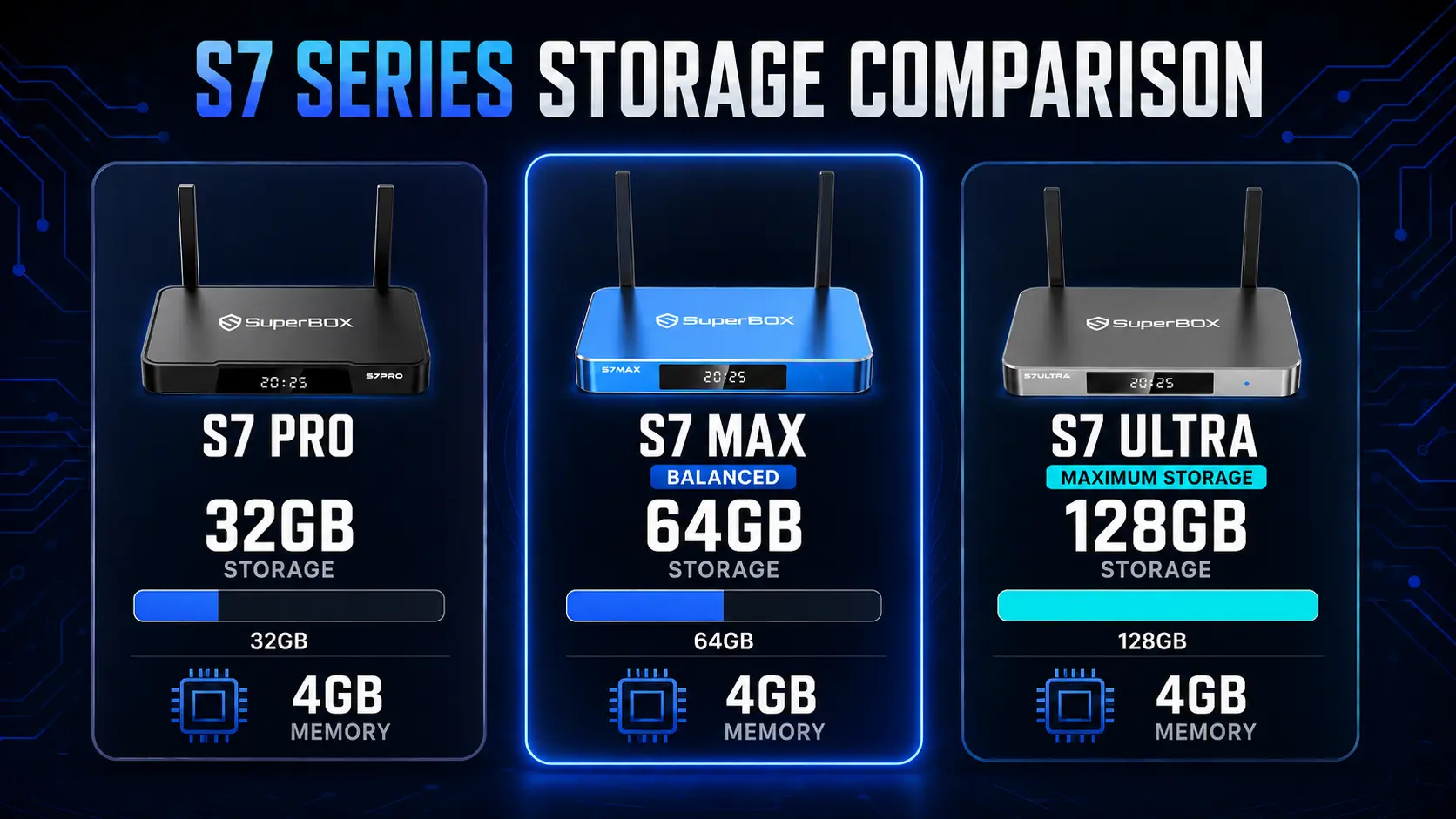
SuperBox’s current S7 specifications list 4GB of memory across the series, while storage scales from 32GB on Pro to 64GB on Max and 128GB on Ultra. This provides clearer hardware headroom than many devices whose memory or internal storage is small or not prominently disclosed.
2. App Availability and Ecosystem Control
Every platform controls its compatible applications differently:
- Samsung and LG use manufacturer-managed stores.
- Roku uses the Roku Channel Store.
- Fire TV uses Amazon’s ecosystem.
- Apple TV uses tvOS and the Apple App Store.
- Google TV uses a television-focused Google Play environment.
- SuperBox uses an Android 12 environment for compatible apps and SuperBox-supported tools.
A curated platform can be easier and more secure for casual users. A more flexible environment is better for users who want a broader range of compatible media players, utility apps, file managers, or local-media tools.
Only install applications from sources you trust. Broader installation flexibility is useful, but it also makes the user responsible for checking compatibility, permissions, security, and legal access to content.
3. Updates and Product Lifespan
A smart TV can remain physically useful long after its built-in platform stops meeting your needs. The display may still look excellent, but app support, navigation speed, or storage may become limiting.
An external box separates those lifecycles:
| Component | Smart TV only | TV plus streamer box |
| Display panel | Replaced with the television | Kept until the panel itself needs replacement |
| Streaming processor | Fixed inside TV | Replaced independently |
| Streaming storage | Fixed inside TV | Changes when the streamer is upgraded |
| App platform | Tied to manufacturer | Chosen by replacing the external device |
| Network hardware | Fixed inside TV | Can be upgraded with a newer box |
This does not guarantee that every streaming box will receive updates longer than every TV. The advantage is replaceability, not an unlimited software-support promise.
4. Storage and Local Media
Internal storage determines how much room is available for apps, cache, downloads where supported, and system updates. Some mainstream players provide 16GB or 32GB, while Apple currently offers 64GB and 128GB Apple TV 4K models. Apple’s technical specifications also show that Gigabit Ethernet is reserved for its 128GB Wi-Fi + Ethernet configuration.
SuperBox offers three storage tiers across the S7 family:
| SuperBox model | Memory | Internal storage | Best fit |
| S7 Pro | 4GB | 32GB | Essential streaming and a smaller app collection |
| S7 Max | 4GB | 64GB | Balanced everyday use and additional app/storage room |
| S7 Ultra | 4GB | 128GB | Larger app collection and heavier local-media use |
Supported SuperBox models also include USB 3.0 for compatible local media and external storage. Read our guide to adding a USB flash drive to SuperBox before formatting a drive or selecting internal versus removable storage.
5. Wi-Fi and Ethernet
Stable streaming depends on the entire network path: internet service, router, signal quality, device hardware, application servers, and content bitrate. No device can compensate for a failing internet connection.
The networking difference between media players can still be significant. The current Roku Ultra specifications list Wi-Fi 6 and 10/100 Ethernet. The third-generation Fire TV Cube lists Wi-Fi 6E but 10/100 Ethernet in Amazon’s device specifications. Apple TV 4K offers Wi-Fi 6, with Gigabit Ethernet on the 128GB Ethernet model.
Current SuperBox S7 models list dual-band Wi-Fi 6 and 1000Mbps Gigabit Ethernet across Pro, Max, and Ultra. This gives SuperBox a clear hardware advantage for users who prefer a full-speed wired connection or keep large local-network media files.
Gigabit hardware does not mean every online stream uses 1Gbps. Its benefit is network headroom, local-network performance, and a robust wired interface; actual internet speed cannot exceed the connection supplied by the router and service provider.
6. Picture and Audio Quality
A streamer box outputs a signal; the television produces the image. The final result depends on both devices, the HDMI connection, the app, and the content.
Modern premium players support different combinations of 4K, HDR10, HDR10+, Dolby Vision, HLG, and Dolby Atmos. Compatibility should be checked feature by feature rather than assuming the highest resolution number determines overall image quality.
SuperBox S7 specifications list H.265 decoding up to 6K at 60fps and HDMI 2.1. This gives the hardware support for high-resolution media, but many consumer televisions are 4K, and available content may also be 4K or lower. On a 4K TV, prioritize stable playback and good source quality rather than expecting the panel to display more pixels than its native resolution.
7. Remote Control and Ease of Use
A smart TV normally starts with one remote. Adding a streaming box can create a second-remote problem, but it does not have to.
Many streaming remotes can control television power and volume through HDMI-CEC, Bluetooth, or infrared learning, although compatibility varies. Apple states that its Siri Remote can control compatible TVs or receivers through IR or CEC. Roku Ultra includes a backlit rechargeable Voice Remote Pro.
SuperBox includes a backlit voice remote on current S7 models. The backlighting is especially useful in a dark room, while voice search can reduce long on-screen typing. Compatible television functions can also be programmed to the SuperBox remote using its IR-learning procedure.
For setup assistance, see our guide to programming an original TV remote to a SuperBox remote and the SuperBox RC-200L backlit remote tutorial.
8. Portability
A smart TV is not designed to travel. A streamer box can be disconnected, packed, and connected to another compatible HDMI display.
SuperBox’s combination of compact hardware, included remote, HDMI connection, Wi-Fi, and Ethernet makes it suitable for secondary homes, RVs, and other temporary setups. Before traveling, confirm that the destination allows personal HDMI devices and provides a network you are authorized to use.
Do not assume hotel or captive-portal Wi-Fi will connect as easily as a normal home network. Bring the required power supply, HDMI cable, and remote, and never leave personal accounts signed in on a shared display.
9. Total Cost and Upgrade Strategy
The cheapest setup is usually to use the smart platform already inside a TV you own. If it is fast, supports all required apps, and remains stable, there is no urgent need to add another device.
A streamer box becomes cost-effective when it prevents premature TV replacement. If the panel still looks good but the software feels dated, a small external platform is less disruptive than replacing a 55- or 65-inch television.
SuperBox has a higher upfront price than an entry-level stick because it competes on storage, wired networking, ports, memory, remote design, and additional supported viewing tools. It is sold as hardware without a mandatory monthly device fee. This does not mean every third-party app or streaming service is free; individual providers may require subscriptions, purchases, accounts, or regional access.
Current Streaming Devices Compared
| Device | Key hardware/platform strengths | Important limitations | Best for |
| Roku Ultra | Wi-Fi 6, USB 3.0, simple Roku platform, 4K/HDR formats, premium remote | 10/100 Ethernet; controlled Roku ecosystem | Straightforward mainstream streaming |
| Fire TV Cube (3rd Gen) | Wi-Fi 6E, hands-free Alexa, HDMI input and output, broad Fire TV support | 2GB memory, 16GB storage, 10/100 Ethernet | Alexa households and voice control |
| Apple TV 4K | A15 Bionic, polished tvOS, 64/128GB, strong Apple ecosystem integration | Gigabit Ethernet only on 128GB model; Apple Account required for purchases and rentals | Apple households and premium app streaming |
| Google TV Streamer | Google TV interface, Google Home integration, Ethernet, modern app ecosystem | Best experience is tied to Google services and supported apps | Google Home and mainstream Android TV users |
| SuperBox S7 Max | 4GB memory, 64GB storage, Wi-Fi 6, Gigabit Ethernet, USB 3.0, HDMI 2.1, backlit voice remote | Higher upfront cost than entry-level devices; online use requires internet | Balanced SuperBox experience and daily use |
| SuperBox S7 Ultra | Same core connectivity with 128GB storage and premium positioning | Highest price in current S7 range | Buyers wanting maximum SuperBox storage |
Specification numbers alone do not establish a universal winner. Apple’s processor, Roku’s simple interface, Fire TV’s Alexa integration, Google TV’s ecosystem, and SuperBox’s storage/networking/tools serve different priorities.
The Competitive Advantages of SuperBox
SuperBox is not trying to be the least expensive way to open Netflix. Its competitive position is a more complete media platform for buyers who want stronger hardware flexibility than a typical streaming stick and more independence than a TV’s built-in operating system.
1. Three Storage Tiers Instead of One Fixed Configuration
The S7 series allows buyers to choose 32GB, 64GB, or 128GB while retaining 4GB of memory. The S7 Max is the practical balance for most buyers; the S7 Ultra is more suitable when maximum internal storage is the priority.
2. Gigabit Ethernet Across the Current S7 Range
This is a meaningful differentiator from media players limited to 100Mbps Ethernet or adapters. It supports reliable wired operation and additional headroom for local-network media.
3. Wi-Fi 6 Plus Wired Flexibility
Users can choose wireless placement or a direct network cable without buying an additional Ethernet adapter.
4. USB 3.0 and External Storage
USB connectivity supports compatible local media and storage expansion workflows. This is more flexible than closed devices without a user-accessible USB data port.
5. Backlit Voice Remote
The remote is designed for living-room use, with visible buttons in low light, voice navigation, and programmable television functions.
6. Supported Time Shift, Playback, and Parental Controls
On supported applications and content, SuperBox provides Time Shift or playback tools for revisiting eligible programs. Parental-control functions can restrict selected areas with a password. Availability depends on model, application, region, and current software support.
7. A Consistent Interface on Almost Any HDMI Television
Moving from Samsung to LG or from an old TV to a new one does not require learning a completely different built-in platform. Connect SuperBox through HDMI and continue using the familiar SuperBox interface.
8. Independent Upgrade Path
When a display still performs well, you can replace the media box without discarding the panel. When you upgrade the TV, the SuperBox can move to the new HDMI display.
9. Metal Construction and Cooling on Current Models
Current S7 product specifications describe metal cases and ventilation designed to support heat dissipation during extended use. This is a practical difference from ultra-compact sticks that have less physical surface area for cooling.
10. Retailer Support and Authenticity Verification
Buying from an authorized retailer provides a clear order, warranty, return, and technical-support path. SuperBox TV Box Store offers a 30-day return period and a one-year replacement warranty for eligible defects, subject to the published policies.
11. Purpose-Built Apps, Curated for the Best Viewing Experience
SuperBox comes with a thoughtfully designed ecosystem of dedicated apps, created specifically to make entertainment easier to discover and enjoy. Each app is carefully structured around different viewing needs, bringing together a wide range of content in one seamless experience so users can spend less time searching and more time watching.
Smart TV Plus SuperBox: The Best of Both Worlds
The most useful conclusion is not that one device must replace the other.
A television should be chosen for:
- Panel quality.
- Screen size.
- Brightness and contrast.
- Refresh rate.
- Viewing angles.
- HDMI and audio compatibility.
SuperBox should be chosen for:
- Media interface.
- Storage capacity.
- App and local-media flexibility.
- Network hardware.
- Remote experience.
- Supported playback and family-control tools.
- Independent upgrades and portability.
This separation gives buyers more control. You can select the best screen for the room without being permanently committed to its built-in app platform.
When Is a Smart TV Alone Enough?
A smart TV is probably enough if:
- You use only a few mainstream applications.
- The interface is responsive and reliable.
- Every required app is available on the TV platform.
- You do not need external storage or local-media tools.
- You prefer the fewest possible components.
- You plan to replace the television before its smart platform becomes limiting.
Do not buy additional hardware merely to duplicate an experience that already works well.
When Is a Streamer Box the Better Choice?
Add a dedicated streaming device when:
- The TV panel is still good but its interface is slow.
- A required compatible app is missing from the TV’s store.
- You want the same interface on several televisions.
- You need a platform that can move between displays.
- You want Ethernet, USB, Bluetooth, or additional storage not available on the TV.
- You prefer replacing a small media device instead of the entire television.
Who Should Choose SuperBox?
SuperBox is especially suitable for buyers who:
- Want more storage than an entry-level streaming stick.
- Prefer Gigabit Ethernet without buying an adapter.
- Use USB drives or compatible local media.
- Value Time Shift/playback tools on supported content.
- Want a backlit voice remote.
- Need a consistent Android-based interface across old and new TVs.
- Want a compact box that can travel between compatible HDMI displays.
- Prefer an authorized-retailer support path.
Which SuperBox Model Should You Buy?
| Buyer profile | Recommended model | Reason |
| Essential use and smallest app collection | S7 Pro, when available | 4GB memory and 32GB storage |
| Best balance for most buyers | SuperBox S7 Max | 4GB memory and 64GB storage provide a practical middle tier |
| Maximum storage and premium S7 option | SuperBox S7 Ultra | 128GB internal storage for heavier usage |
| Buyers considering the next generation | Compare SuperBox S7 vs. S8 | Review availability, hardware differences, and current delivery information before ordering |
How to Add SuperBox to a Smart TV
- Connect the supplied HDMI cable between SuperBox and an available TV input.
- Connect the correct power supply to SuperBox and a stable outlet.
- Turn on the television and select the matching HDMI input.
- Connect SuperBox to Wi-Fi or Ethernet.
- Complete the device and compatible-app setup.
- Configure the remote’s television functions when desired.
- Check resolution, display mode, sound output, and network stability.
Do not place the box inside a sealed cabinet or cover its ventilation openings. If the television is wall-mounted, keep the device secure but accessible for cable checks and restarts.
Frequently Asked Questions
Do I need a streaming box if I have a smart TV?
Not necessarily. If the TV is fast, stable, and supports every app you use, its built-in platform may be enough. Add a box when you want an independent interface, stronger hardware, more storage, different apps, better networking, or easier upgrades.
Is a streamer box faster than a smart TV?
Sometimes, but not automatically. A premium smart TV can be faster than a low-cost stick. Compare the specific devices. Dedicated boxes often provide a more consistent media-focused experience, particularly on older or entry-level TVs.
Can SuperBox work with a smart TV?
Yes. SuperBox connects to an available HDMI input and operates as a separate media platform. The television continues to control picture, audio, and display settings.
Can SuperBox turn a non-smart TV into a smart TV?
It can add a connected media interface to an older television if the TV has a compatible HDMI input and can display the selected output resolution. Online features also require an internet connection.
Will SuperBox improve my TV’s picture quality?
It can provide a high-quality source signal and supported display modes, but it cannot change the television’s native panel resolution, brightness, contrast, or refresh rate. Final quality depends on the TV, content, app, HDMI connection, and selected settings.
Does SuperBox require a monthly subscription?
SuperBox is sold as hardware without a mandatory monthly device fee. Third-party apps and services may still require separate subscriptions, purchases, accounts, or other payments under their own terms.
Is SuperBox better than Roku?
They serve different priorities. Roku emphasizes a simple mainstream streaming ecosystem. SuperBox offers more clearly defined memory and storage tiers, Gigabit Ethernet, USB 3.0, compatible Android apps, and additional supported viewing tools. Choose based on the services and hardware features you actually need.
Is SuperBox better than Apple TV 4K?
Apple TV 4K is a strong choice for Apple integration and processor performance. SuperBox is better positioned for buyers who prioritize Android flexibility, USB storage, Gigabit networking across the range, and SuperBox-specific playback tools. Neither is the universal winner.
What is the best SuperBox model for most people?
The S7 Max is the balanced choice because it combines 4GB memory with 64GB storage. The S7 Ultra is more suitable when 128GB internal storage is important. Confirm current stock before ordering.
Can I use an Ethernet cable with SuperBox?
Yes. Current S7 models list a 1000Mbps Gigabit Ethernet port. Actual internet speed still depends on your internet plan, router, cabling, and network conditions.
Can I add external storage to SuperBox?
Supported models include USB 3.0 and can use compatible external storage. Back up the drive before formatting it, then choose internal or removable storage according to how you plan to use it.
Can I control the TV with the SuperBox remote?
Compatible television power, mute, and volume functions can be programmed using IR learning on supported remotes. Voice and Bluetooth functions are paired separately with SuperBox.
Can I travel with SuperBox?
Yes. Bring the box, correct power supply, HDMI cable, and remote. The destination needs a compatible HDMI display and an internet connection you are authorized to use for online features.
What happens if my smart TV stops supporting an app?
If the panel still works well, connecting a compatible external streaming device can restore access to apps available on that device’s platform without replacing the television.
Final Verdict: Streamer Box or Smart TV?
Choose a smart TV alone when you want the simplest setup and its built-in platform already does everything you need.
Choose a standard streaming player when you prefer a specific ecosystem such as Roku, Fire TV, Apple, or Google and mainly use mainstream apps.
Choose SuperBox when you want a more hardware-flexible media platform with 4GB memory, selectable storage, Wi-Fi 6, Gigabit Ethernet, USB 3.0, a backlit voice remote, and SuperBox-supported playback and family-control tools.
For many households, the best long-term answer is a combination: buy the television for its picture and buy SuperBox for the media experience. This approach keeps the display and streaming platform independently upgradeable, allows the same interface to move between compatible TVs, and avoids replacing a good panel simply because its built-in software no longer meets your needs.
Ready to compare models? Explore the SuperBox S7 collection, compare SuperBox S7 vs. S8, or contact SuperBox TV Box Store for help choosing a setup for your television and network.
The article was updated on:
