
Knowledge SuperBox
Blue TV Not Working on SuperBox? Fix Errors -14-104, -1004 500 & -11-203-203





Your SuperBox turns on, the Home screen looks normal, Blue VOD works and you can open Blue TV but the channel you want to watch will not play. Perhaps you see red numbers and 0kBps, the app keeps loading, or every channel opens to a black screen. Blue TV not working on SuperBox does not always mean the device itself is faulty. The next step depends on which error appears and how many channels are affected.
Quick answer: If one or a few channels show error -14-104 on SuperBox S7 or older models or error -1004 500 on S8, the affected channel’s server-side stream may be down or under maintenance. If all channels show error -11-203-203 with black screens, Blue TV may be undergoing maintenance or an ISP connection restriction may need investigation. In either case, note the error code and affected channels, then contact Technical Support; resetting the box will not repair a server-side outage. For freezing without these codes, start with basic app and network checks.
1. Blue TV Not Working on SuperBox? Identify the Problem First
The most useful question is not simply “Why is SuperBox not working?” It is “Does this happen on one channel, several channels, or every channel?” Try a few unrelated channels and note the exact message on the screen. Use this quick reference before changing any settings.
| What you see | What it may indicate | Best next action |
|---|---|---|
| Red numbers -14-104 and possibly 0kBps on S7 or an older SuperBox; only some channels fail | The affected channel source is down or undergoing maintenance | Note the channel names and report the issue to Technical Support |
| Red numbers -1004 500 on S8 and possibly 0kBps; only some channels fail | The same type of channel-side problem, displayed with an S8 error code | Report the affected channels to Technical Support |
| -11-203-203 and black screens on all channels | Often Blue TV maintenance or an upgrade; sometimes a connection restriction | Ask Technical Support for service status; investigate an ISP restriction if indicated |
| Blue TV freezes, crashes, or keeps loading without those codes | A possible app, network, or stream-specific issue | Compare channels then try safe basic checks |
A channel that plays normally is useful evidence: it helps distinguish an isolated stream problem from a wider Blue TV outage. Likewise, if other internet apps work but all Blue TV channels fail, do not automatically blame Wi-Fi.
2. Why Is Blue TV Not Working on SuperBox?
2.1. Individual Channel or Server-Side Problems
Live TV channels depend on streams delivered from upstream sources and servers. A particular source can become unavailable, go offline, or enter maintenance while other channels remain accessible. For SuperBox S7 and earlier models, this type of failure can appear as -14-104; on the S8 series, the corresponding code is -1004 500. Although the displayed codes differ, the reported underlying problem and recommended handling are the same.
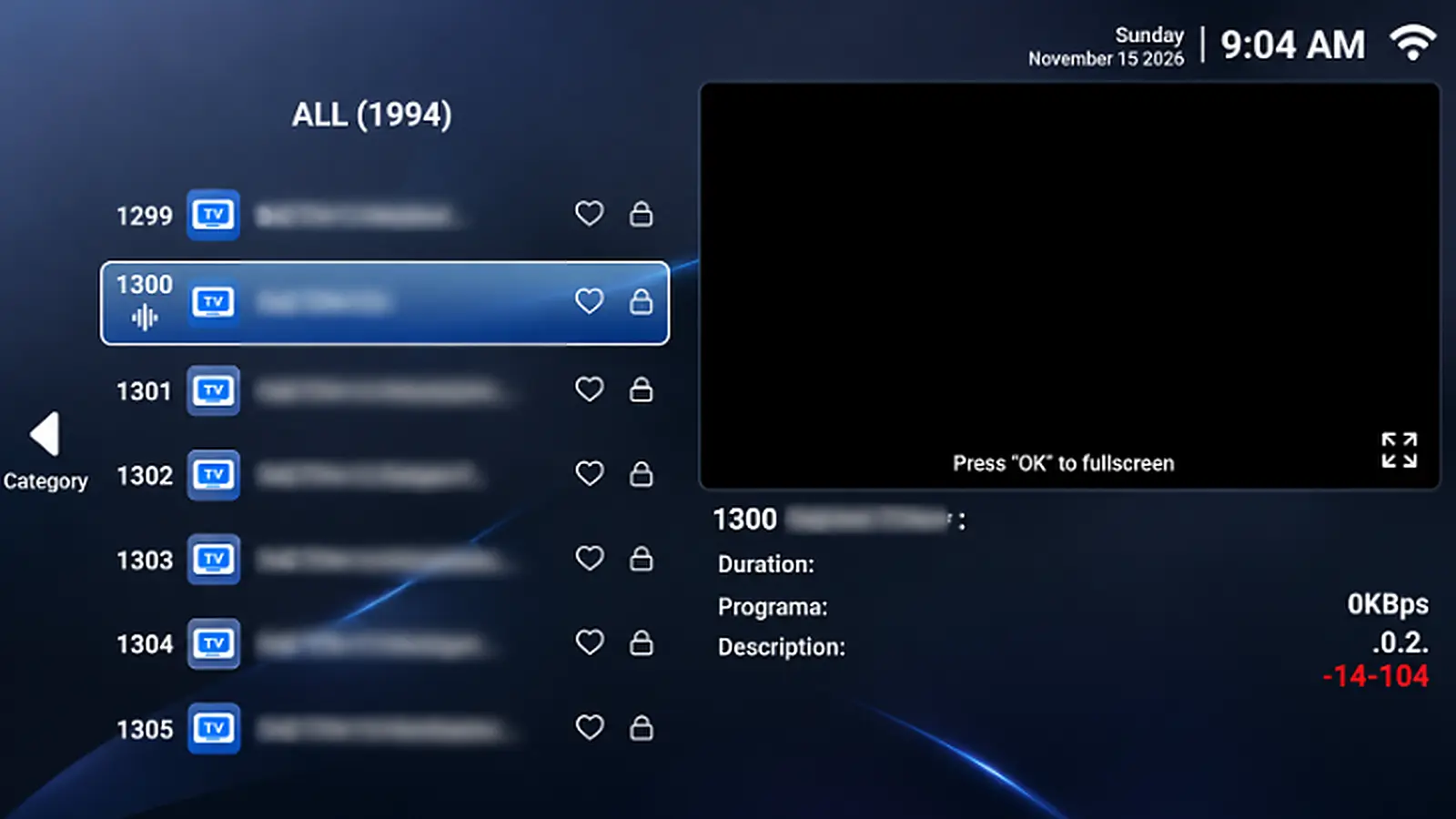
If the fault is with the channel source, replacing the HDMI cable, reinstalling Blue TV, or erasing the device does not restore that source. The stream needs attention on the service side, not repeated changes to your SuperBox.
2.2. Blue TV Server Maintenance or System Upgrades
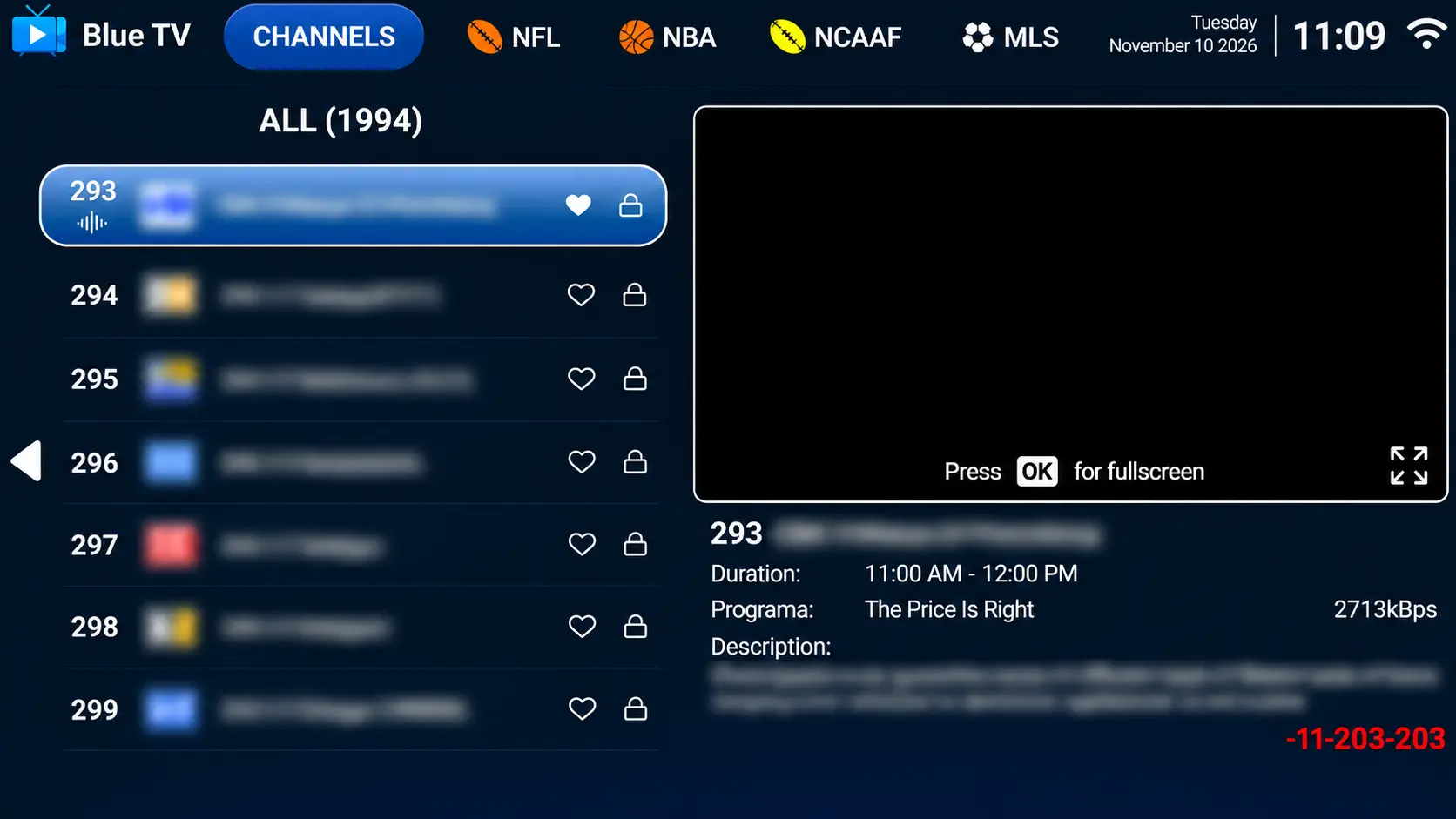
Service-wide maintenance is different from a single channel outage. During a Blue TV upgrade or maintenance period, multiple streams may be unavailable at once. Error -11-203-203 with black screens across all channels commonly points to this situation. The technical team can check whether maintenance is underway and share an estimated completion time if one has been confirmed. An error code by itself is not a live outage announcement or a guarantee of when service will return.
2.3. ISP Restrictions Affecting Blue TV Connections
Sometimes Blue TV may be unable to reach the service because an Internet Service Provider (ISP) has applied a connection or domain restriction. This is a possible explanation for all-channel failures such as error -11-203-203, but the code does not prove that the ISP is blocking anything. An ISP should verify the network conditions and whether any restriction actually applies before it is treated as the cause.
2.4. Network Instability or Blue TV App Issues
Freezing, spinning loading indicators, or unexpected app closures without a recognizable error code can require a different path. Weak Wi-Fi reception, a disconnected Ethernet cable, a router problem, or a temporary app issue can all affect playback. Compare Blue TV with another internet-dependent app, and check whether the behavior changes between channels. If the issue looks network-related, our SuperBox S8 Wi-Fi and Ethernet setup guide explains how to check the device’s connection. It is not a solution to a confirmed channel-server outage.
2.5. Device Activation or SuperBox Server Connection Issues
Device activation and server connectivity are useful diagnostic details, especially when several services cannot connect. They should not be presented as the automatic cause of -14-104, -1004 500, or -11-203-203. If activation or the server connection looks abnormal, take a photo of the on-screen status to share when requesting help instead of attempting an unofficial activation or software download.
3. How to Fix Blue TV Not Working on SuperBox: Start With These Checks
These checks help identify the correct repair path. You do not have to repeat them all when the screen already clearly indicates a known server-side channel error.
Step 1: Identify Whether One Channel or All Channels Are Affected
Open Blue TV and test two or three channels from different categories. Write down which ones play and which fail. If only a couple fail, focus on the affected channels. If none play, note whether they all show the same message. This simple comparison is more useful than repeatedly restarting the box without checking the symptom.
Step 2: Check the Error Code Displayed in Blue TV
If you see -14-104 (S7 and older) or -1004 500 (S8) on one or a few channels, go to Section 4 and report those channels. If you see -11-203-203 on every channel, follow Section 6 to check maintenance status and possible ISP restrictions. If you see no code, continue with the connection and app checks below.
Step 3: Check Your Wi-Fi or Ethernet Connection
Confirm that SuperBox shows an active network connection. Try another online function on the box, where available. If other apps also fail to connect, inspect your router and the Wi-Fi or Ethernet connection. When practical, a wired connection can help rule out unstable wireless reception. A working network does not guarantee that a particular Blue TV stream is available, so keep local connectivity and server availability separate in your diagnosis.
Step 4: Close and Reopen Blue TV if the App Is Frozen
If Blue TV is frozen on a menu, crashes, or endlessly loads without a known server error, exit the app and reopen it. A normal device restart may also help with a temporary app issue. Retest the same channel afterward. If the channel still shows a known server-side error, stop repeating local troubleshooting and report it. For broader performance problems, see our guide to SuperBox buffering and freezing; not every device-level suggestion in that guide is appropriate for a channel outage.
Step 5: Check SuperBox Activation and Server Connection
From the SuperBox Home screen, press and hold the number 6 key on the remote. Use the displayed status to check whether the device is activated and has connected to the SuperBox server. If either status is unclear or unsuccessful, take a clear photo to include when requesting help. This diagnostic screen is not proof that a particular Blue TV channel is healthy or unhealthy.
Step 6: Contact Technical Support Based on the Error
Send the model, exact code, affected channels, and a photo of the screen. Mention whether other channels and apps work. You can message SuperBox Technical Support on WhatsApp or consult the SuperBox support guide. Avoid a factory reset, firmware change, or unofficial APK installation unless a technician verifies that it is appropriate for your particular case.
4. Blue TV Errors -14-104 and -1004 500: Individual Channel Server Problems
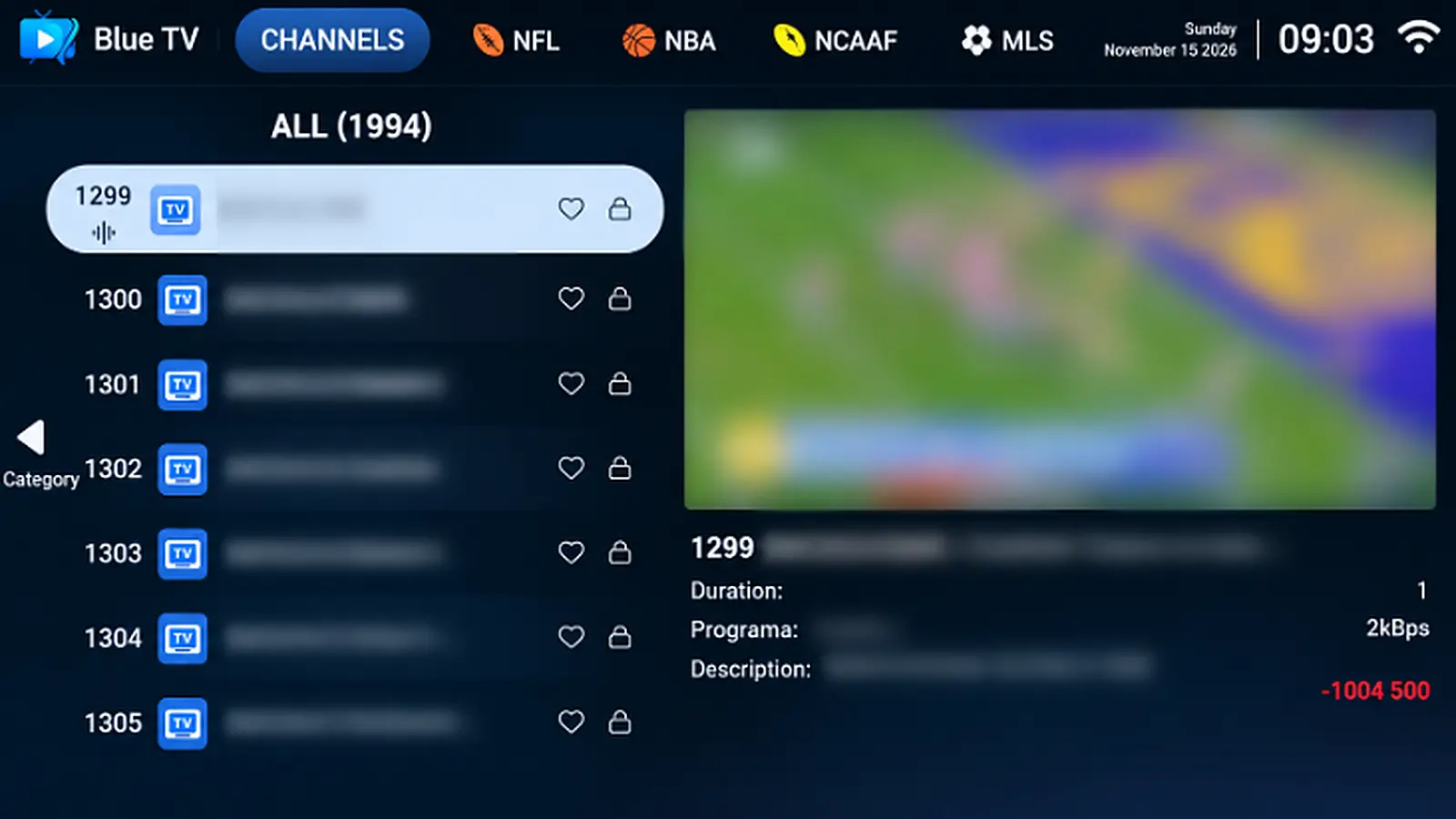
4.1. Error -14-104 on SuperBox S7 and Older Models
On an S7 or earlier generation, a channel that cannot receive its stream may display -14-104 inside Blue TV. Some viewers also notice red numbers or a 0kBps indicator. This often happens on one or a few channels while others continue playing. That pattern is a strong reason to have the affected channel source checked rather than resetting the entire SuperBox.
4.2. Error -1004 500 on SuperBox S8 Series
On the S8 series, the corresponding channel-side issue is displayed as -1004 500. The code looks different, but it refers to the same type of problem and follows the same support procedure as -14-104. When requesting help, mention the actual number shown on your model; do not replace it with the other generation’s code.
4.3. Why Do These Blue TV Error Codes Appear?
A channel’s upstream feed may have gone offline, a server may be servicing that feed, or the source may be temporarily unavailable for maintenance. Identifying the affected channel helps narrow down which stream needs attention. The 0kBps display, when present, reflects that the player is showing no incoming playback data at that moment; it does not by itself measure your home’s overall internet speed or prove an ISP restriction.
For example, if two sports channels show -1004 500 on an S8 but news and entertainment channels still play, that is a partial channel failure, not evidence that the entire Blue TV application has stopped working.
4.4. How to Resolve Errors -14-104 and -1004 500
Report the problem to Technical Support so the affected server-side channel source can be investigated and repaired. Include the exact channel names or numbers, the SuperBox model, the error code, and a screenshot or short video. If a few affected channels are temporarily unavailable, you may check whether the desired content is offered through a working alternative feed, but do not assume it will be available.
There is no reliable local button that repairs an offline source on a remote server. Repeated factory resets, firmware changes, and unverified APK downloads are not appropriate responses to this confirmed channel-side problem.
5. How to Fix Blue TV Freezing, Crashing, or Stuck on Loading 98%
5.1. Blue TV Freezes While Watching Live Channels
First determine whether freezing affects a specific channel or many unrelated channels. A single channel that consistently freezes while the others play should be reported as a channel-specific issue, including its name and the time you observed it. If several apps also freeze, check network stability and device performance. The SuperBox buffering and freezing guide provides additional general checks for widespread streaming problems.
5.2. Blue TV App Crashes or Closes Unexpectedly
A crash means the app itself closes or returns to the Home screen, which is different from a channel displaying a server error while Blue TV remains open. Reopen the app once and note whether the problem began after an update. If the crash repeats, record what you were doing immediately before the app closed.
5.3. Blue TV Gets Stuck on the Loading Screen (98%)
If Blue TV gets stuck on the loading screen at 98%, simply exit the app and reopen it a few times. If that does not work, uninstall the app by going to the home page, highlighting the app, pressing the menu button or navigating to the trash/delete option (or selecting the Trash icon on the homepage), and choosing Blue TV to remove it. Afterward, go to the App Store to redownload and reinstall it.
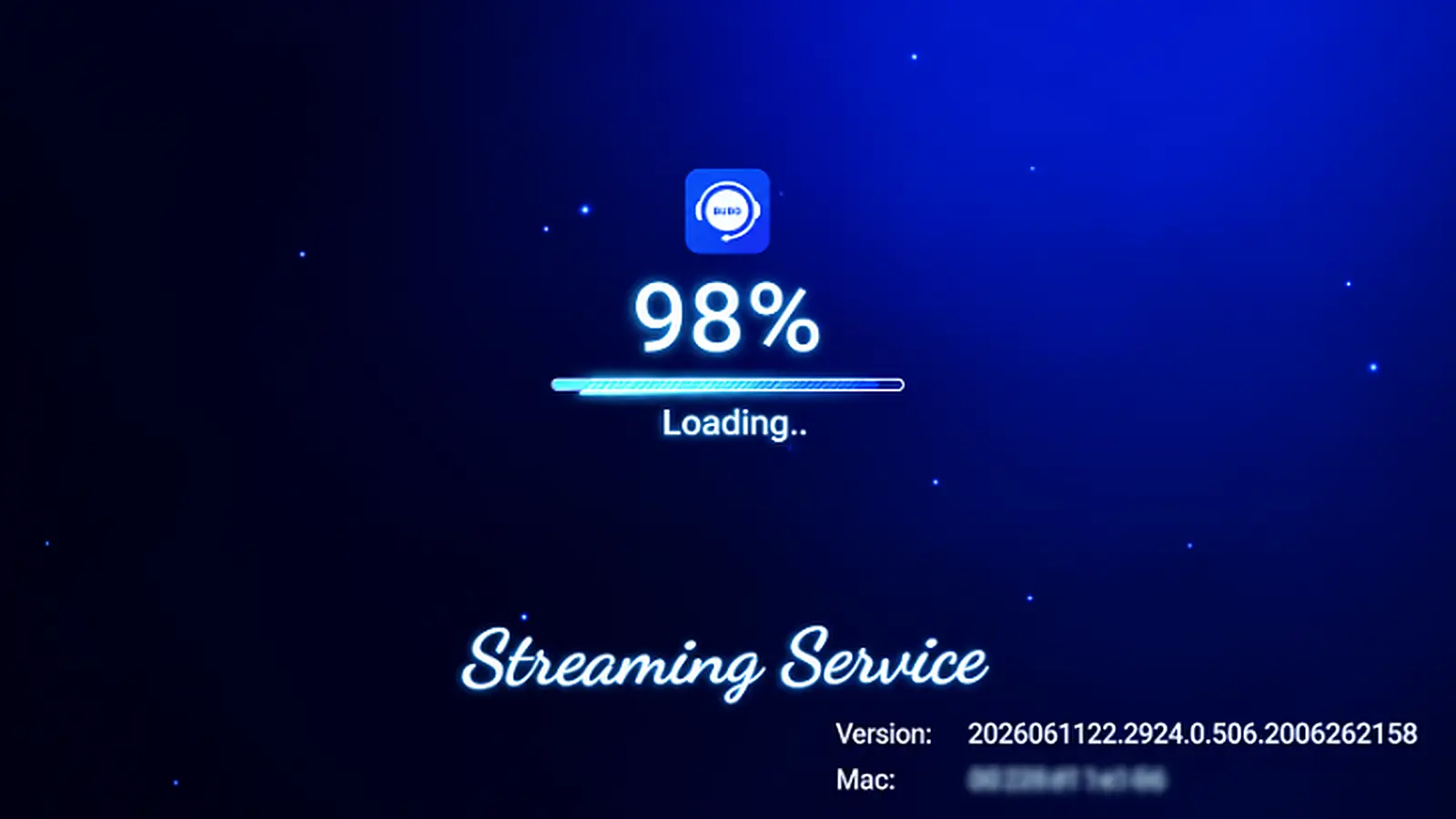
If the screen gets stuck at 98% and an error message or specific error code appears, please contact SuperBox Technical Support for direct guidance on how to fix it.
5.4. Blue TV Stops Working After an App or System Update
If the problem began immediately after an update, record the timing and describe the new behavior. A version-related app issue should not be confused with an unavailable streaming source. For focused instructions, read our Blue TV not working after update guide. Avoid reinstalling an otherwise working app simply because one channel is under maintenance.
6. Blue TV Error -11-203-203: All Channels Show a Black Screen
6.1. What Does Blue TV Error -11-203-203 Look Like?
Instead of one or two channels failing, every channel may open to a black screen and display -11-203-203. This pattern is important: it points toward a problem affecting Blue TV more broadly than a single channel. Note the code exactly as it appears, whether the channel guide still opens, and whether other apps have internet access.
6.2. Cause 1: Blue TV Server Maintenance or System Upgrades
One common explanation is that Blue TV is undergoing maintenance or an upgrade. Contact Technical Support first and ask whether there is a known service interruption and whether a confirmed estimated completion time is available. If the technical team confirms maintenance, follow its current guidance. Do not invent a return-to-service time or assume the box needs to be erased.
6.3. Cause 2: Your ISP May Be Restricting the Connection
A second possibility is an ISP connection restriction affecting access to the service. This can resemble a service-wide outage because the app cannot reach the necessary endpoints. However, error -11-203-203 does not prove ISP blocking. Confirm whether Blue TV is undergoing maintenance before asking your provider to investigate a possible restriction.
If your ISP reports that a domain was flagged for unusually high traffic, the appropriate response is to request the domain and reason for the flag, and ask for a review. Neither a high-traffic warning nor the error code alone establishes whether the domain is safe or unsafe.
6.4. How to Contact Your ISP About Blue TV Connection Restrictions
If support identifies a possible ISP restriction, contact your internet provider and ask it to check whether any network or domain restrictions have been placed on your connection. Request restoration of normal, unrestricted access if a restriction was applied in error. You can use this message:
Hello, I am having connection problems with a streaming app on my TV box. Could you please check whether any network or domain restrictions have been applied to my internet service? If a restriction was applied in error, please review it and restore normal access. If a domain was flagged for unusually high traffic, please tell me which domain was identified, what was detected, and whether the restriction can be removed. Thank you.
Give the ISP the information it requests through its official support channels. Do not share private network credentials, device IDs, or account details in public posts.
6.5. What to Do if Blue TV Still Shows Error -11-203-203
If the ISP confirms there are no relevant restrictions, or if the error continues after a restriction is reviewed, share the ISP’s findings with the technical team. Include the error screenshot, model, connection type, and whether other apps work. These details help distinguish an unresolved service problem from a connection-specific issue.
7. Can You Use Backup TV When Blue TV Is Not Working?
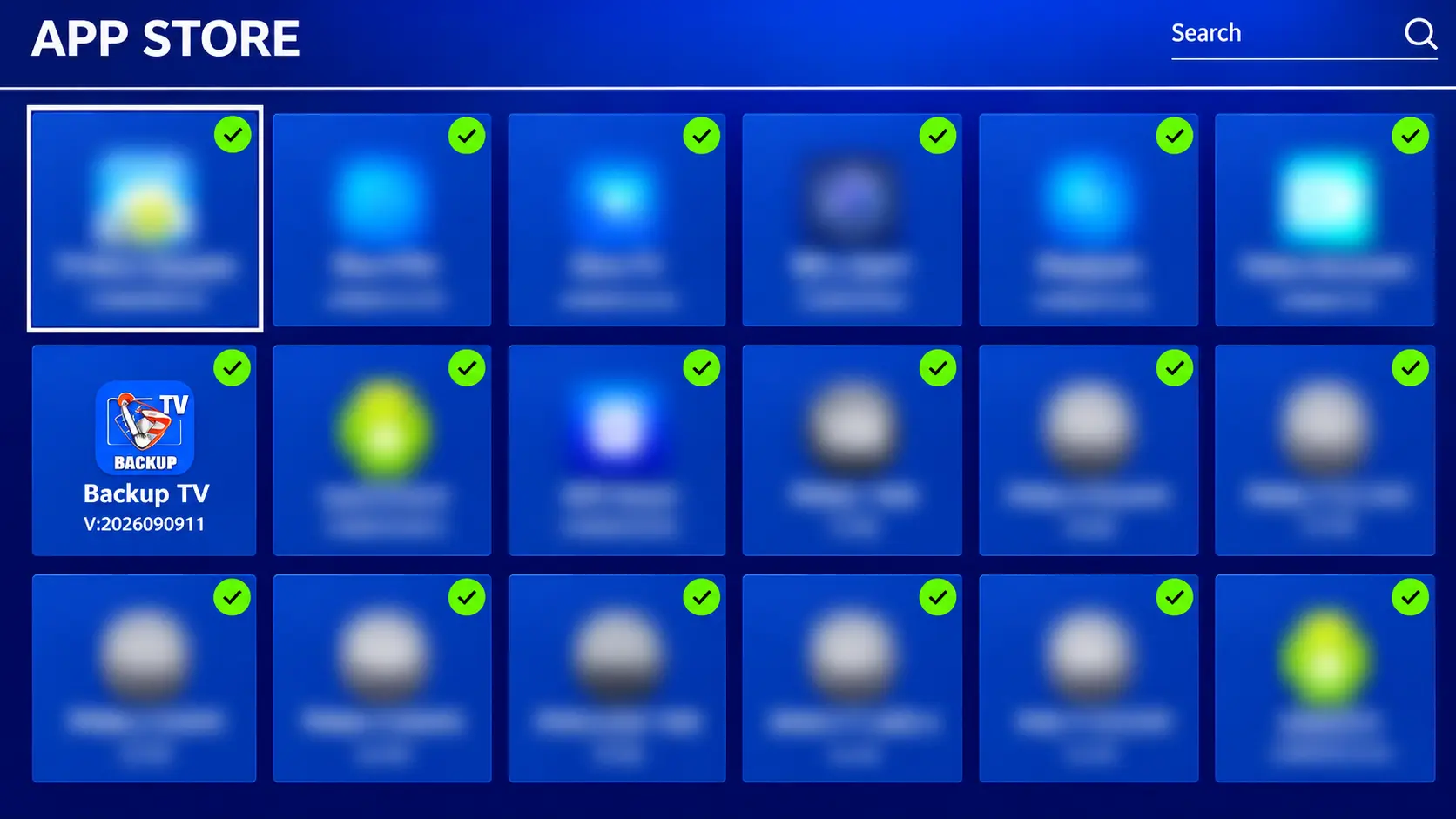
Backup TV may act as a backup option if a specific Blue TV channel (or all of them) is down, or if Blue TV is undergoing maintenance, as long as the backup app and content are working properly. It is reasonable to check an available alternate feed, especially during an isolated channel outage.
For an overview of its purpose and use, read What Is Backup TV on SuperBox?. Backup TV is an option to try, not a guaranteed fix for -14-104, -1004 500, or -11-203-203.
8. When Should You Contact SuperBox Technical Support?
Use this section when an individual channel source is unavailable, all Blue TV channels show a black screen, or the app keeps crashing after basic checks. One clear report with the exact symptoms, affected channels, and steps already tried is more useful than repeating device resets.
To help the team investigate efficiently, prepare:
- Your SuperBox model (for example, S7 Max or S8 Ultra).
- The exact error code, including any leading hyphen, plus a clear screenshot or video.
- The names or numbers of affected channels, and whether one, several, or all fail.
- Whether other Blue TV channels and other internet-dependent apps still work.
- Your connection type (Wi-Fi or Ethernet), the steps you tried, and any ISP findings.
For device technical assistance, message SuperBox Technical Support on WhatsApp. If you bought your box from our store, you can also reach SuperBox TV Box Store for help routing your request. Keep private order or device information in the support conversation rather than a public comment.
9. Frequently Asked Questions About Blue TV Not Working
Why is Blue TV not working on my SuperBox?
The answer depends on the symptom. An isolated channel can be unavailable at its source; widespread black screens may relate to service maintenance or a connection restriction; freezing without an error code may require network or app checks. Check the error and number of affected channels first.
What does error -14-104 mean on SuperBox S7?
On the S7 and older generations, -14-104 commonly appears when one or a few Blue TV channels have a server-side source issue or are under maintenance. Note the affected channel names and error code for your report.
What does error -1004 500 mean on SuperBox S8?
On the S8 series, -1004 500 is the corresponding code for the same type of channel-side problem. The same channel-reporting steps apply as for -14-104.
Are errors -14-104 and -1004 500 the same issue?
They are different codes on different SuperBox generations, but, as described here, they identify the same kind of channel-source issue and use the same support process.
Why does Blue TV show red numbers and 0kBps?
These are visible player indicators that may accompany a channel error. A 0kBps reading shows that the player is reporting no incoming playback data at that moment; it is not proof that your entire internet connection has stopped or that your ISP is blocking access.
What does Blue TV error -11-203-203 mean?
When -11-203-203 appears with black screens across all channels, Blue TV may be undergoing maintenance or an upgrade. Sometimes a restriction on the internet connection can produce similar symptoms. Check the current service status before concluding that the ISP is responsible.
Why are all my Blue TV channels showing a black screen?
Check whether error -11-203-203 appears and whether other internet apps work. Check the current maintenance status first; if a connection restriction is suspected, ask your ISP to review the connection.
Can my ISP restrict Blue TV connections?
An ISP may apply network or domain restrictions, and those restrictions can sometimes affect access to an app. Do not assume blocking from the error code alone. Ask the provider to check and review any restriction that may have been applied incorrectly.
Why does Blue TV keep freezing or crashing?
Freezing during one stream and the entire app crashing are different symptoms. Compare channels, check whether other apps work, and note whether the issue started after an update. Persistent crashes should be reported with a short video.
Can I use Backup TV if Blue TV stops working?
You may try Backup TV if the app and relevant backup streams are available. It is not guaranteed to carry the same channel or remain unaffected during a wider service or network issue.
Should I factory reset my SuperBox to fix Blue TV?
Not as a first step. A factory reset removes device data and cannot repair a channel source on a remote server. Only consider disruptive steps if Technical Support verifies that they are appropriate for your specific issue.
10. Final Thoughts: Getting Blue TV Working Again
When Blue TV is not working on SuperBox, the fastest way forward is to recognize the pattern. -14-104 on S7 and older models or -1004 500 on S8 usually points to an affected channel source. By contrast, -11-203-203 with black screens on every channel calls for a Blue TV maintenance-status check and, when appropriate, an ISP restriction review. Freezing or loading problems without these codes deserve basic connection and app checks.
Keep the exact error code, channel names, and a screenshot handy. A clear report helps the technical team investigate the right problem without unnecessary factory resets or repeated changes to a device that may be working normally.
The article was updated on:
