
Knowledge SuperBox
Where to Watch A Charlie Brown Thanksgiving in 2026





You can watch A Charlie Brown Thanksgiving free on a compatible SuperBox through Blue VOD. The original 1973 special has been confirmed in the app, with no separate monthly Blue VOD subscription or movie-rental charge. Apple TV is another viewing option through its US and Canadian listings.
For existing SuperBox owners, Blue VOD offers a straightforward way to enjoy the special without starting an Apple TV subscription. Apple’s public free weekend on November 14–15, 2026 has ended, but that event is separate from the confirmed Blue VOD viewing option.
Here is how to find the original 1973 program, choose an access option and get it playing on the screen your family wants to use.
Your viewing options for Thanksgiving 2026
Choose between the confirmed free Blue VOD listing on compatible SuperBox hardware and Apple TV’s subscription or eligible trial route. For Apple, use the US title page or Canadian title page, depending on your account’s region.
| Your situation | How to watch | What to check |
|---|---|---|
| You own a compatible SuperBox | Open the confirmed title in Blue VOD | No separate monthly Blue VOD fee or rental charge; hardware and internet required |
| You already subscribe to Apple TV | Open the special and play it through your subscription | Sign in to the account with access |
| You are an eligible new subscriber | Review the seven-day trial offer | Renewal price, eligibility and billing date |
| You wanted the public free weekend | Apple offered it November 14–15 | That 2026 event has already ended |
| You have Apple TV through an existing bundle or offer | Use the subscription included with that arrangement | Confirm that access is active before paying again |
You do not have to buy a new streaming device simply to watch this special. A compatible smart TV, supported streaming device or web browser may already give you everything you need.
Also distinguish the Apple TV streaming service, the Apple TV app and Apple TV 4K hardware. The similar names can make the process sound more complicated than it is: you need access to the program and a supported way to play it, not necessarily an Apple-branded box.
Can you still watch A Charlie Brown Thanksgiving free?
Watch free through Blue VOD on SuperBox
A Charlie Brown Thanksgiving is available free in Blue VOD on compatible SuperBox hardware. Open the app, find the original 1973 special and start watching without a separate rental payment or monthly Blue VOD fee.
This option is useful for families who already use SuperBox for movies and series. It does not require an Apple Account, an Apple TV subscription or eligibility for an Apple trial. The box and your internet connection are separate costs.
The 2026 free weekend has passed
Apple’s official holiday announcement scheduled the special’s free window for Saturday, November 14, through Sunday, November 15.
Those were advance holiday-viewing dates. They were not the weekend immediately before US Thanksgiving, and they were not a promise of free access on Thanksgiving Day.
For a family planning around Thursday, November 26, the confirmed Blue VOD listing is a free viewing option after a compatible SuperBox purchase. If you choose Apple TV instead, use an active subscription or an eligible offer rather than relying on its expired public event.
An eligible trial is a different option
Apple currently advertises a seven-day free trial for eligible new subscribers. Check the offer shown to your own account before accepting it. Trial eligibility is different from a public viewing weekend available without a paid subscription.
The trial can help someone try the service, but it becomes a subscription under the displayed terms. Review the renewal date and price, and follow the cancellation instructions if you do not want to continue.
If you are timing a seven-day trial around Thanksgiving, check its actual end date. Starting it well before the holiday does not automatically give you free viewing on November 26.

Compare Blue VOD and Apple TV viewing costs
The following comparison separates the Blue VOD app charge from Apple TV’s standard monthly subscription prices, checked on November 18, 2026:
| Viewing option | Separate monthly app or service charge |
|---|---|
| Blue VOD on compatible SuperBox hardware | $0; no separate rental charge for the confirmed title |
| Apple TV in the United States | US$14.99 after an eligible trial |
| Apple TV in Canada | CA$14.99 after an eligible trial |
Sources: Apple TV US and Apple TV Canada. Check your account’s final terms and applicable tax before subscribing.
These are local-currency prices. The matching number does not mean US dollars and Canadian dollars are interchangeable.
For an existing subscriber, playing this included special does not require starting another subscription. If you have Apple TV through a bundle, check that existing access first.
For an existing SuperBox owner, watching the confirmed Blue VOD title avoids adding a new subscription just for this special. For a new buyer, include the hardware purchase in your budget and consider the movies, series and live viewing you would use regularly. Apple’s monthly charge buys access to its service; it is not a rental price for a single 25-minute program.
How to watch A Charlie Brown Thanksgiving free in Blue VOD
Use your SuperBox remote to find the special. On the S8 interface:
- Open Blue VOD through the VOD tile or your installed app shortcut.
- Choose Search and enter A Charlie Brown Thanksgiving.
- Select Movies and Name where those filters appear. The special is a short film entry, so look in the movie results rather than searching for a season of a TV series.
- Open the original 1973 title. Check the complete name so you do not choose the Christmas or Great Pumpkin special.
- Select Watch now to begin the program.
If a full-title search is empty, try Charlie Brown Thanksgiving and check the search filters. You do not need to enter a web-search question or add the word “free.”
The S8 Blue VOD walkthrough explains the app’s search and playback controls. Older compatible models may arrange the controls differently.
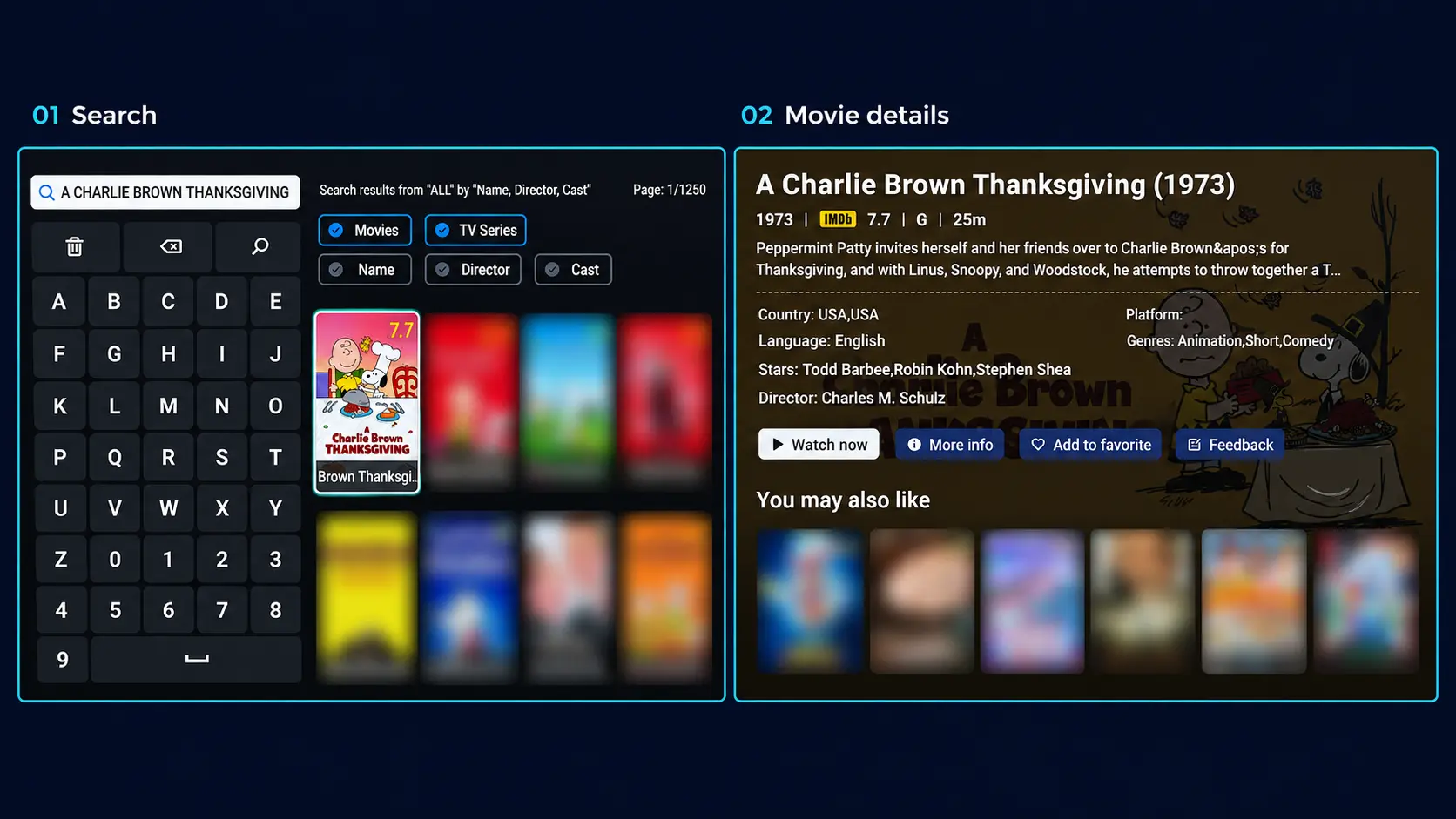
How to watch on your TV without buying an Apple TV box
First check whether the television or streaming device you already use supports the Apple TV app. Apple’s smart-TV and streaming-device setup instructions explain how to check compatibility.
- Find the Apple TV app on your supported device. If it is not installed, use that device’s app store to look for it.
- Open the app and sign in. Follow the on-screen instructions for your Apple Account. Some devices offer a phone-based sign-in option using a QR code.
- Search for A Charlie Brown Thanksgiving. Choose the original 1973 animated special.
- Check the access prompt. Use your active subscription or review the offer displayed to your account.
- Start the full program. Make sure you selected the special rather than its trailer.
You can also open the title page at tv.apple.com in a supported web browser. That is useful if you would rather watch on a computer or check your account before setting up the television.
If the app asks you to subscribe even though you already pay, check the signed-in account and how you originally obtained the subscription before purchasing again.
A device’s support for general streaming does not by itself establish Apple TV app compatibility. Use Apple’s supported-device information when choosing where to watch.
For bilingual households, Apple’s Canadian title page lists French (Canada) audio and subtitles. Choose your preferred available language before the group settles in, rather than assuming a translated menu also changes the spoken dialogue.
Make sure you found the original Thanksgiving special
The program you are looking for is A Charlie Brown Thanksgiving, released in 1973, with a running time of approximately 25 minutes. Apple’s US listing gives it a G rating.
It is a short animated television special, so a listing much shorter than a feature film is expected. You are not looking for a two-hour movie or a full season of The Snoopy Show.
The setup is familiar holiday chaos: Peppermint Patty invites the group to Charlie Brown’s house even though he already has plans to visit his grandmother. Snoopy helps put together an unusual meal.
The official Peanuts holiday-specials page highlights the toast-and-pretzel menu and the story’s emphasis on giving thanks. That makes the title easy to recognize even if you mainly remember Snoopy preparing food.
You do not need to watch other Peanuts specials first. This is a self-contained choice for a family gathering.
When searching a large holiday collection, keep these separate:
- A Charlie Brown Thanksgiving: the Thanksgiving meal and gathering.
- It’s the Great Pumpkin, Charlie Brown: the Halloween special.
- A Charlie Brown Christmas: the Christmas special.
A familiar character or similar poster is not enough to identify the right occasion. Check the complete title before pressing play.
Plan a short family viewing instead of a full movie night
The 25-minute length makes this special practical when guests are arriving, dinner is nearly ready or the group wants something brief after eating.
For a first viewing with children, choose a time when they can actually follow it. Starting while everyone is carrying food between rooms can turn a short story into background noise.
An easy plan is to set aside about half an hour, open the correct title beforehand and begin when the group is seated. You can leave the rest of the evening open rather than committing everyone to a second program.
The meal also gives families a simple conversation starter afterward: what makes someone feel welcome when plans do not go perfectly? Children can talk about the characters’ reactions without needing a detailed explanation of the whole Peanuts franchise.
If you remember watching it with your own parents, let younger viewers discover it for themselves. Explaining every familiar moment before it happens can take away some of the fun.
For the wider day’s arrangements, our Thanksgiving living-room setup checklist covers switching between entertainment, conversation and dinner.
Where SuperBox fits into a broader holiday TV plan
One short special may be only part of your household’s viewing. Families also want live television, movies and series throughout the season.
SuperBox offers that broader role through apps such as Blue TV for live-channel browsing and Blue VOD for on-demand entertainment. Its core apps are free to use after purchasing compatible hardware, which can help reduce recurring TV costs when they replace services you would otherwise keep paying for. Home internet and optional paid subscriptions remain separate expenses.
For a holiday tradition like A Charlie Brown Thanksgiving, the benefit is simple: return to the confirmed special in Blue VOD without adding another monthly app bill. The same box also serves the household’s other available movies, series and live-channel viewing.
For families considering a device for regular entertainment, the SuperBox S8 Max is one option to review with SuperBox TV Box Store, an authorized retailer serving the US and Canada. Our live chat can help match the hardware to your everyday viewing needs. Apple TV subscription access is a separate arrangement.
Frequently asked questions
Can I watch A Charlie Brown Thanksgiving free on SuperBox without Apple TV?
Yes. The 1973 special is confirmed in Blue VOD, where you can watch without a separate movie-rental payment, monthly Blue VOD fee or Apple TV subscription. You need compatible SuperBox hardware and an internet connection.
Where can I watch A Charlie Brown Thanksgiving on Thanksgiving Day 2026?
You can use the confirmed free Blue VOD listing on a compatible SuperBox, or watch through an active Apple TV subscription. Eligible Apple customers can also review a trial offer. Apple’s earlier public free weekend has ended; it is separate from the Blue VOD route.
Is it on Netflix, Hulu or Disney+?
Apple identifies its service as the exclusive streaming home of the classic Peanuts library. This guide also includes the confirmed Blue VOD option for compatible SuperBox owners. You do not need a Netflix, Hulu or Disney+ subscription to follow the Blue VOD steps above.
Do I need cable TV to watch it?
No. Both the Blue VOD route on compatible SuperBox hardware and Apple TV’s supported app or browser route use an internet connection. You do not need a traditional cable package or a scheduled channel airing to choose when the special starts.
Does “watch on Apple TV” mean I need Apple hardware?
No. Apple supports viewing through compatible smart TVs, streaming devices and browsers as well as its own products. Check the device you already have before buying additional hardware.
Is A Charlie Brown Thanksgiving a full-length movie?
It is a television special from 1973, running approximately 25 minutes. Some platforms group specials under Movies, so appearing in a movie search does not mean the listing should have feature-film length.
When is A Charlie Brown Christmas free in 2026?
You can watch free on SuperBox. Apple announced a separate free window for December 12–13, 2026. That is a different event for a different special. Subscribers can access the announced classic holiday programs outside those public free windows.
The article was updated on:
